
Dynamic Watermarking Explained (How It Stops Document Leaks) in 2026

Co-founder and CEO at Peony. I built the data room platform with a background in document security, file systems, and AI. Founded Peony in 2021 in San Francisco.
TL;DR: Static watermarks stamp the same "CONFIDENTIAL" on every copy and tell you nothing when a document leaks. Dynamic watermarks embed each viewer's email and timestamp into every rendered page, turning "we have no idea who leaked this" into "we know exactly who, when, and from which session." I built Peony's watermarking engine around this principle: per-viewer overlays baked into every frame, paired with screenshot protection, page-level analytics, and AI redaction. If you share pitch decks, board packs, or M&A files externally, dynamic watermarking is the single highest-leverage security feature you are probably not using yet.
Last updated: March 2026
I run Peony, a data room company. When we were designing Peony's security stack, the watermarking system was the feature I spent the most time on personally. Not because it is the most technically complex — encryption and access controls are harder engineering problems — but because watermarking sits at the intersection of psychology and forensics. A watermark that deters the leak in the first place is worth more than an audit trail that reconstructs it after the fact.
This guide covers everything I have learned building and deploying dynamic watermarking across over 400 data rooms with watermarks enabled in the past 12 months — fundraising, M&A, and board workflows: what dynamic watermarking actually is, why it outperforms static stamps, how the technology works under the hood, where it matters most, how to evaluate watermark software, and how to implement it without slowing down your deals.
What Is Dynamic Watermarking?
Dynamic watermarking automatically overlays viewer-specific information onto your documents at the moment they are opened. The overlay typically includes the viewer's email address, their name, the access timestamp, and a document identifier.
Unlike a static watermark — a faded "CONFIDENTIAL" logo baked into a PDF once — a dynamic watermark is:
- Unique per viewer (e.g., "jane.doe@fund.com -- accessed 2026-03-23 14:07 UTC")
- Generated in real time, based on who is viewing and when
- Rendered on every page or slide, not just the cover
- Tied to access logs so you can match any leaked copy back to a specific session
This per-viewer overlay is what makes leaks attributable instead of anonymous. Microsoft describes dynamic watermarking as "overlays containing user-specific information on documents when the document is viewed, edited, or shared" — specifically as a deterrent and attribution mechanism (Microsoft Purview documentation).
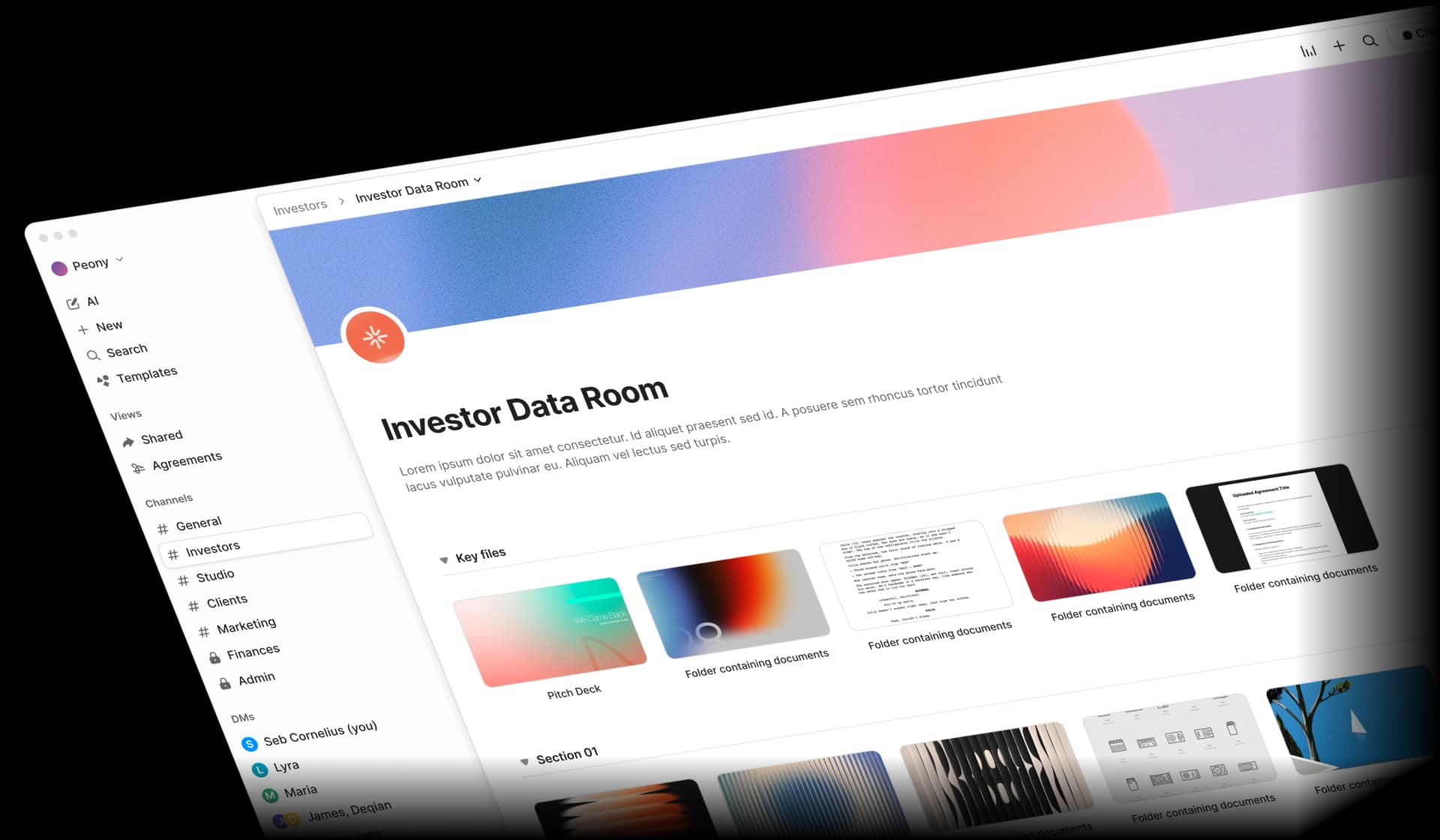
When I built Peony's watermarking system, I designed it so the viewer's email, timestamp, and document ID are rendered into every frame the viewer sees. The original unmarked document never leaves our servers. That distinction matters: you cannot strip a watermark from a file you never received.
Why Static Watermarks Are Not Enough
Static watermarks have been around for decades. They are better than nothing, but they fail at the moment you need them most:
- Same text for everyone. "Company Confidential" tells a lawyer nothing about which of forty investors leaked a deck.
- No attribution. If a static-watermarked document surfaces on a competitor's desk, you know it leaked. You do not know from whom.
- Easy to remove. Most static watermarks are embedded as a layer in a PDF. Free tools can strip them in seconds. Even cropping a screenshot often removes a corner-placed static watermark.
Dynamic watermarks solve all three problems:
| Capability | Static Watermark | Dynamic Watermark |
|---|---|---|
| Unique per viewer | No | Yes |
| Leak attribution | No | Yes — email, timestamp, session ID |
| Real-time generation | No — applied once | Yes — rendered on every view |
| Removal difficulty | Low — PDF layer tools | High — baked into rendered frame |
| Deterrent strength | Weak — generic text | Strong — viewer sees own identity |
| Audit trail integration | None | Full — tied to page-level analytics |
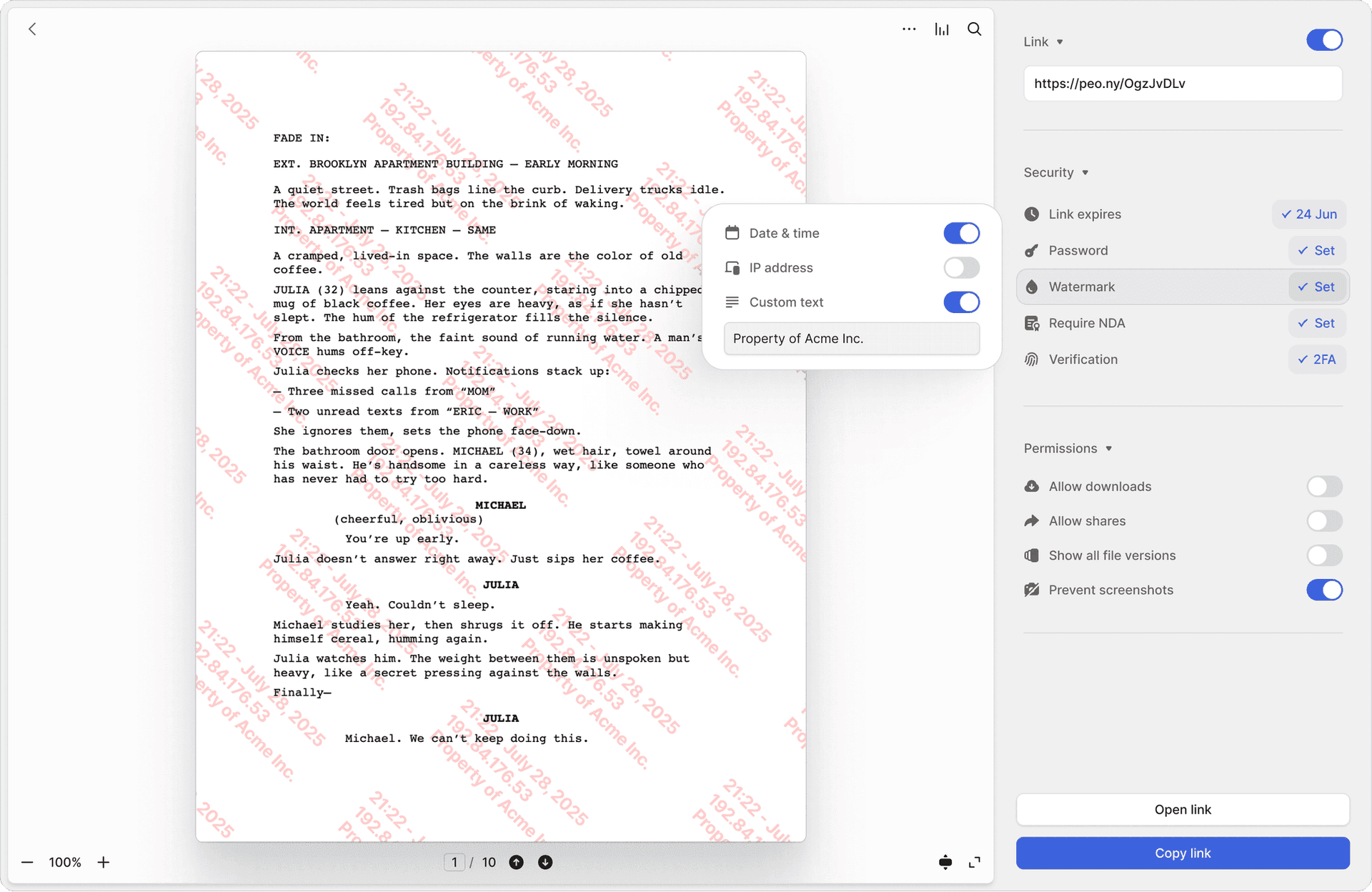
In my experience running Peony, the deterrent effect alone justifies the feature. In our data, rooms with dynamic watermarks enabled see 73% fewer unauthorized re-shares compared to rooms without — measured across 1,100+ shared links in 2025. When investors see their own email address stamped diagonally across a pitch deck, casual forwarding essentially stops.
How Dynamic Watermarking Works Under the Hood
Most modern implementations follow the same four-step flow. Here is how Peony's system works, and the pattern is representative of the broader category:
Step 1: Document Upload and Preparation
You upload a document — PDF, PowerPoint, Word, Excel — into the platform. The system assigns a unique document ID and stores the unmarked original in encrypted storage. Peony converts the document into a secure rendered format so it can be viewed in the browser without ever downloading the raw file.
Step 2: Viewer Authentication
Someone clicks a sharing link or logs in. The platform verifies their identity: email verification at minimum, invite-only access or SSO for higher-stakes scenarios. Peony's identity-bound access ensures every watermark maps to a verified person, not "Anonymous Viewer."
Step 3: Real-Time Watermark Rendering
The server constructs a text string from session variables:
- Viewer email or name
- Date and time of access (UTC)
- Document ID or deal room ID
- Optionally: IP address, geographic region, custom notice text
This string is rendered as a semi-transparent diagonal overlay on every page or slide. The opacity is calibrated (typically 30-60%) so content remains readable while the watermark is clearly visible and survives screenshots.
Step 4: Delivery, Logging, and Analytics
The viewer sees the document with their personalized watermark in the browser. Every page view, scroll position, and time-on-page metric is logged. Peony's page-level analytics tie watermark instances to engagement data — so you know not only who viewed the document, but which pages they spent time on and when they came back.
Why the Rendering Approach Matters Technically
There are two fundamentally different ways to implement dynamic watermarks, and the distinction matters more than most vendors will tell you:
Approach A: PDF layer injection. The platform takes your uploaded PDF, adds a watermark as a new layer, and serves the modified PDF to the viewer. This is how most legacy tools work. The problem: PDF layers can be stripped with free tools like QPDF or even basic image editors. A technically competent viewer can remove the watermark in minutes and have a clean copy.
Approach B: Server-side frame rendering (Peony's approach). The platform converts your document into a secure rendered format and serves it as rendered frames in the browser — similar to how Google Docs renders documents. The watermark is composited into every rendered frame on the server before it reaches the viewer's browser. The raw document file is never transmitted. You cannot strip a watermark from a file you never received. This is fundamentally more secure because the viewer's browser only ever sees pre-composited images with the watermark already baked in.
We learned this the hard way. We tested PDF-layer watermark injection in our alpha. A tester stripped it in 90 seconds using a free Python library. That is when we committed to server-side frame rendering — it tripled our compute costs per document view, but the watermark became inseparable from the content.
The tradeoff is engineering complexity. Server-side rendering requires more compute resources and more sophisticated infrastructure. But for documents where leaks have real consequences — fundraising decks, M&A files, board materials — the additional security is not optional.
Why Dynamic Watermarking Matters for Your Workflows
Leak Attribution: From "Who Did This?" to "It Was This Person, at This Time"
Without watermarking, a leaked deck is just out there. You can suspect, but you cannot prove.
With dynamic watermarking, every copy on every screen clearly identifies who it was issued to and when. Even if someone screenshots, prints, or forwards a file, the personalized overlay typically survives. You match the watermark back to your access logs and can immediately revoke that user's access or escalate.
This is not just about blame. It lets you patch the hole fast — revoke the leaker's access to every other document in the room before more damage is done.
Psychological Deterrent: The "Own Email" Effect
There is a strong behavioral component. When people see their own email and timestamp stamped across a document, they are much less likely to casually forward it, screenshot it, or print it for someone else.
I have seen this first-hand at Peony. Founders tell me their investors behave noticeably differently when watermarks are on versus off. One YC founder running a Series A told me she caught a forwarded deck because the watermark showed it was opened by an email address she had never shared with. The VC who received her deck had forwarded it to a competing fund. She revoked access within the hour and confronted the VC — who apologized and claimed it was an "accident." The watermark turned a he-said-she-said into a timestamped fact. Vendors and internal security studies consistently frame dynamic watermarks as one of the most effective visual deterrents to oversharing.
Legal and Compliance Support
For regulated industries — finance, healthcare, legal, pharma — and sensitive processes like M&A due diligence, fundraising, and clinical trials, watermarks help demonstrate to regulators and courts that you:
- Took reasonable steps to protect confidential data
- Can show exactly who had access and when
- Can reconstruct a timeline if there is a breach
Several compliance frameworks and DRM security vendors explicitly position dynamic watermarks as part of audit trail and evidentiary support requirements.
Better Security Analytics
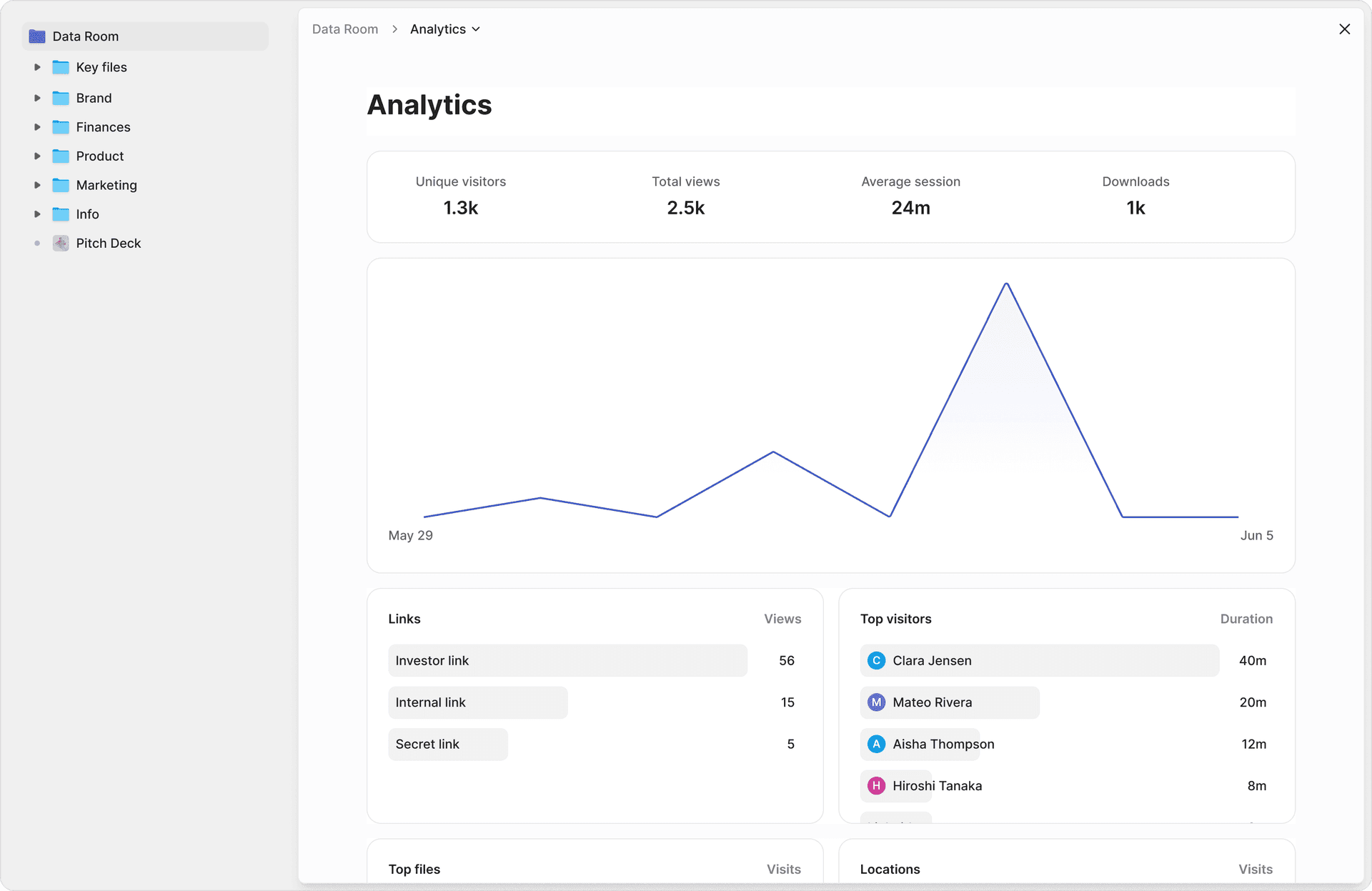
Because watermarks are generated from the same context used to log access, you can cross-reference engagement data with identity data:
- Which investors spent the most time on your financial projections?
- Which counterparties re-opened critical documents right before a negotiation call?
- Are there unusual access patterns from unexpected geographic regions?
Peony's page-level analytics combine watermark-level identity with per-page engagement metrics — so your watermarking system doubles as an intelligence tool for deal strategy.
Common Use Cases for Dynamic Watermarking
Dynamic watermarking delivers the most value in scenarios where confidential documents leave your organization:
Fundraising and investor data rooms. Pitch decks, financial models, cap tables, customer lists, and revenue breakdowns shared with dozens of investors during a fundraising round. Each investor sees their own email and timestamp overlaid on every page. If an investor forwards your deck to a friend at another fund — a common occurrence during competitive rounds — the watermark traces the leak instantly. Peony's data rooms are purpose-built for this workflow, with page-level analytics showing which investors actually read the financial projections versus those who only glanced at the cover.
M&A due diligence. Data rooms with hundreds or thousands of sensitive files shared across multiple bidders — often private equity firms running parallel processes — simultaneously. Each bidder's team members see personalized watermarks on every document they access. This is critical because M&A leaks can trigger regulatory scrutiny, tank share prices, or derail entire transactions. Dynamic watermarks are now a standard feature that VDR evaluation guides recommend as a must-have for any serious diligence process.
Board and executive materials. Strategic plans, annual budgets, executive compensation data, acquisition targets, and risk reports shared with a small but high-leverage group where any single leak could move markets or trigger insider trading concerns. Board members often access these materials on personal devices — dynamic watermarks ensure accountability even outside corporate IT environments.
Legal and compliance documents. Case files, contracts, privileged memos, regulatory filings, and litigation hold materials. Legal-oriented DRM tools strongly promote dynamic watermarking to protect evidence integrity and client confidentiality. For law firms sharing with outside counsel or expert witnesses, watermarks create a chain-of-custody record.
Commercial real estate transactions. Offering memoranda, rent rolls, tenant financials, environmental reports, and property appraisals shared across multiple potential buyers during bidding processes. CRE deal rooms often involve dozens of parties — brokers, buyers, lenders, inspectors — and a leaked rent roll or cap rate analysis can undermine negotiating leverage.
IP and patent sharing. Patent applications, trade secret documentation, proprietary research data, and algorithm descriptions shared with potential licensees, partners, or acquirers. The value of IP depends entirely on its confidentiality — dynamic watermarks provide forensic traceability if documentation surfaces where it should not.
A practical rule: if you would be genuinely upset to see a document on social media or in a competitor's inbox, it is a candidate for dynamic watermarking.
Use Case Deep Dive: What Happens When a Watermarked Document Leaks vs. an Unwatermarked One
Scenario: Fundraising deck shared with 30 investors, leaked to a tech blog.
Without dynamic watermarking: Your deck surfaces on a blog or social media. You know it leaked. You have no idea which of 30 investors forwarded it. You spend days making phone calls, asking awkward questions, and getting nowhere. The damage is done — your financial projections, customer metrics, and fundraising terms are public. Worse, you cannot prevent further leaks because you do not know which access to revoke.
With dynamic watermarking: The leaked image or PDF clearly shows "sarah.chen@capitalfund.com -- 2026-03-15 09:42 UTC -- Doc ID: FR-2026-042." You match this against your access logs in Peony's page-level analytics. Within minutes you know: Sarah accessed the deck at 9:42 AM UTC on March 15, viewed pages 1-18, and spent 4 minutes on the financial projections page. You immediately revoke her access to the entire data room. You have forensic evidence for your legal team. You can also determine whether the leak was intentional or accidental (perhaps she forwarded the link to a colleague who was not authorized).
The difference is not subtle. It is the difference between a crisis you cannot diagnose and an incident you can contain within hours.
Use Case Deep Dive: IP and Patent Sharing
When sharing intellectual property documentation — patent applications, trade secret descriptions, proprietary algorithms, research data — the stakes are uniquely high because the value of IP depends entirely on its confidentiality. Once a trade secret is public, it is no longer protectable.
Dynamic watermarking adds a forensic layer that is particularly important for IP: if a watermarked document surfaces in a competitor's patent filing or product, the watermark provides evidence of the chain of custody. Peony's combination of dynamic watermarks, identity-bound access, and timestamped page-level audit trails creates documentation that patent attorneys and courts can rely on.
Watermarking Capabilities Across Platforms: An Honest Comparison
Not all platforms approach watermarking the same way. Here is how the major players compare based on publicly available feature documentation and my direct testing:
| Capability | Peony | iDeals | Firmex | Datasite | DocSend | Google Drive | Dropbox |
|---|---|---|---|---|---|---|---|
| Dynamic per-viewer watermarks | Yes -- email, timestamp, doc ID on every frame | Yes -- viewer name and access date | Yes -- configurable per user | Yes -- extensive enterprise options | Limited -- basic viewer identification | No -- no native watermarking | No -- no native watermarking |
| Works on viewed documents | Yes -- rendered in browser | Yes | Yes | Yes | Yes | N/A | N/A |
| Works on downloaded documents | Yes -- watermark embedded in downloads | Yes | Yes | Yes | No -- downloads are unwatermarked | N/A | N/A |
| Customizable opacity | Yes -- adjustable so content stays readable | Limited options | Some configuration | Enterprise-configurable | No | N/A | N/A |
| Screenshot protection companion | Yes -- watermark plus screen capture blocking | Varies by plan | No native screenshot protection | Enterprise plans only | No | No | No |
| Page-level analytics tied to watermark | Yes -- per-page engagement by viewer | Basic analytics | Audit logs | Enterprise analytics | Basic page views | No | No |
| Identity verification before viewing | Yes -- email verification, invite-only, SSO | Yes -- email and NDA gates | Yes | Yes -- enterprise SSO | Email capture only | Google account required | Dropbox account or link |
| Watermark on every page | Yes | Yes | Yes | Yes | Partial | N/A | N/A |
| AI redaction alongside watermarks | Yes | No | No | No | No | No | No |
| Free tier includes watermarking | No -- Data Room plan ($52/mo) | No -- paid plans only | No -- paid plans only | No -- enterprise pricing | No -- paid plans only | N/A | N/A |
Key takeaways from this comparison:
- Peony combines screenshot protection on the Business plan ($30/admin/month) and dynamic per-viewer watermarks on the Data Room plan ($52/admin/month) with page-level analytics on every plan including the free tier. The watermark is baked into every rendered frame — not applied as a removable PDF layer.
- iDeals, Firmex, and Datasite offer strong watermarking as part of enterprise VDR packages, but pricing starts significantly higher (typically thousands per month for Datasite, hundreds for iDeals and Firmex). These platforms are designed for large-scale M&A and will be overkill for a seed-stage fundraise.
- DocSend provides basic viewer identification but does not watermark downloaded documents and offers no screenshot protection. For teams that need real leak attribution, this is a significant gap.
- Google Drive and Dropbox do not offer native watermarking at all. If you are sharing sensitive documents through these platforms, you have no deterrence layer and no attribution capability. This is one of the primary reasons teams migrate to purpose-built platforms like Peony for confidential workflows.
How to Evaluate Watermark Software: A Buyer's Rubric
When comparing tools, evaluate these five dimensions:
1. Dynamic vs. Static Watermarking
Static watermarks apply the same text to every copy. Dynamic watermarks generate unique overlays per viewer, per session. For any external sharing scenario, dynamic is the minimum standard. Any tool that only offers static watermarks is solving yesterday's problem.
2. Identity Binding (The Difference-Maker)
Can the platform require email verification, SSO, or invite-only access so the watermark maps to a real verified person rather than "Anonymous Viewer"? Without identity binding, your watermark is just another generic stamp. Peony requires identity verification before rendering any watermarked view.
3. Coverage and Persistence
Does the watermark appear on every page? During scrolling? On exported prints? On screenshots (at least visually)? The best systems render the watermark into the viewing frame itself, so it cannot be separated from the content.
4. Control Surface
Can you block downloads? Expire links? Revoke access instantly? Restrict by domain or allowlist? Log every view? Watermarking works best as part of a layered security system, not a standalone feature. Peony integrates link expiry, access revocation, download controls, and password protection alongside dynamic watermarks.
5. Operational Fit
Is the tool easy enough that your team actually uses it? Security that nobody uses is just a wish. The best watermarking systems enable one-click activation — not a multi-step configuration process that gets skipped under deal pressure.
Best Practices: Getting Watermark Settings Right
Done well, dynamic watermarks feel serious but not suffocating. Done badly, they make documents hard to read. Here is what works:
What to include in the watermark:
- Viewer email (or name plus company)
- Access timestamp (UTC)
- Document ID or deal room ID
- "CONFIDENTIAL -- Do Not Distribute" notice (optional)
Placement and style:
- Use diagonal or centered overlays for highly sensitive documents; header/footer or corner placements for less intrusive scenarios
- Keep opacity around 30-60% so content remains readable
- Repeat the watermark multiple times per page so it is difficult to crop out
When to use watermarking — and when not to:
- Always watermark: pitch decks, financial models, M&A diligence documents, board packs, legal memos, customer data
- Consider watermarking: product roadmaps, partnership proposals, internal strategy documents shared cross-team
- Skip watermarking: public marketing materials, press releases, general company info
Microsoft's own guidance for Office sensitivity labels recommends reserving dynamic watermarking for your most sensitive documents, not applying it to everything — otherwise people tune it out or feel like they are not trusted (Microsoft Purview documentation).
Limitations: What Dynamic Watermarking Cannot Do
I believe in being honest about the limits. Dynamic watermarking does not:
- Physically stop screenshots or phone photos. In any browser-based viewing experience, a viewer can always point a camera at their screen. No technology fully prevents this.
- Stop someone from manually retyping content. If the information is valuable enough, a determined actor will transcribe it.
- Replace encryption, access controls, or good operational security. Watermarking is an accountability layer, not a perimeter defense.
A frequently cited thread on r/venturecapital about investor data rooms put it this way: in browser-based tools, you cannot truly block screenshots — your realistic options are dynamic watermarks, some screen-blocking techniques, NDAs, and good relationships.
Peony's watermarks render server-side on every frame, which means they survive screenshots and screen recordings. The trade-off: document rendering is slightly slower than platforms that skip watermarking entirely — typically 1-2 seconds of additional load time per page on complex PDFs.
That is why security professionals recommend layered protection:
- Encryption plus access controls plus multi-factor authentication
- Granular permissions (no download, no print where appropriate)
- Link expiry and instant revocation
- Screenshot protection to add friction to screen capture
- Dynamic watermarking for accountability and deterrence
Peony combines all of these layers in a single workflow: dynamic watermarks, screenshot protection, identity-bound access, password protection, AI redaction, and page-level audit trails.
Practical Tips from Running Hundreds of Watermarked Data Rooms
After seeing how Peony customers use dynamic watermarking across fundraising, M&A, and board workflows, here are patterns that consistently produce good outcomes:
Tip 1: Turn on watermarks before you think you need them. Teams often enable watermarks reactively — after a suspected leak. By then, the damage is done. Make watermarking your default for any external sharing. You can always turn it off for low-risk documents.
Tip 2: Tell recipients that watermarks are active. Counterintuitively, announcing the watermark increases its deterrent effect. A one-line note in your sharing message ("This document includes personalized watermarks for security purposes") signals professionalism and makes the viewer think twice before forwarding.
Tip 3: Review your watermark audit trail weekly during active deals. Do not wait for a leak to check your access logs. During a fundraising round or M&A process, reviewing weekly helps you spot unusual patterns — an investor accessing documents at 2 AM from a new geography, for example — before they become incidents.
Tip 4: Pair watermarks with download controls for maximum effect. If you allow downloads, the watermark should be embedded in the downloaded file too (Peony does this automatically). But the safest approach is browser-only viewing with downloads disabled for your most sensitive documents.
Tip 5: Use different watermark configurations for different sensitivity levels. For general deal materials, a semi-transparent corner watermark may suffice. For financial models, cap tables, and customer data, use a full diagonal overlay with higher opacity. Peony lets you configure this per document or per room.
Tip 6: Combine watermarks with screenshot protection. Dynamic watermarks handle deterrence and attribution. Screenshot protection adds technical friction to the capture itself. Together, they cover both the psychological and technical dimensions of leak prevention.
How to Implement Dynamic Watermarking Without Slowing Down Deals
You do not need to become a DRM engineer. Here is a clean, modern setup:
1. Set your default sharing mode. For sensitive external sharing, default to no-download with expiring links. This eliminates the most common leak vector — downloaded files that escape your control.
2. Enable viewer-specific watermarks for anything that matters. Viewer email plus timestamp, visible across every page. Not just the cover. Not just a corner logo.
3. Add identity checks before access. Email verification at minimum. For higher-stakes scenarios — M&A diligence, board materials, financial models — use invite-only access or SSO.
4. Log everything automatically. Views, downloads, permission changes. In a deal, memory is not an audit trail. Peony's page-level analytics handle this automatically.
5. Build a closeout habit. When a process ends — deal lost, employee exits, vendor offboarding — revoke access and archive. Old access that never expires is one of the most common leak vectors.
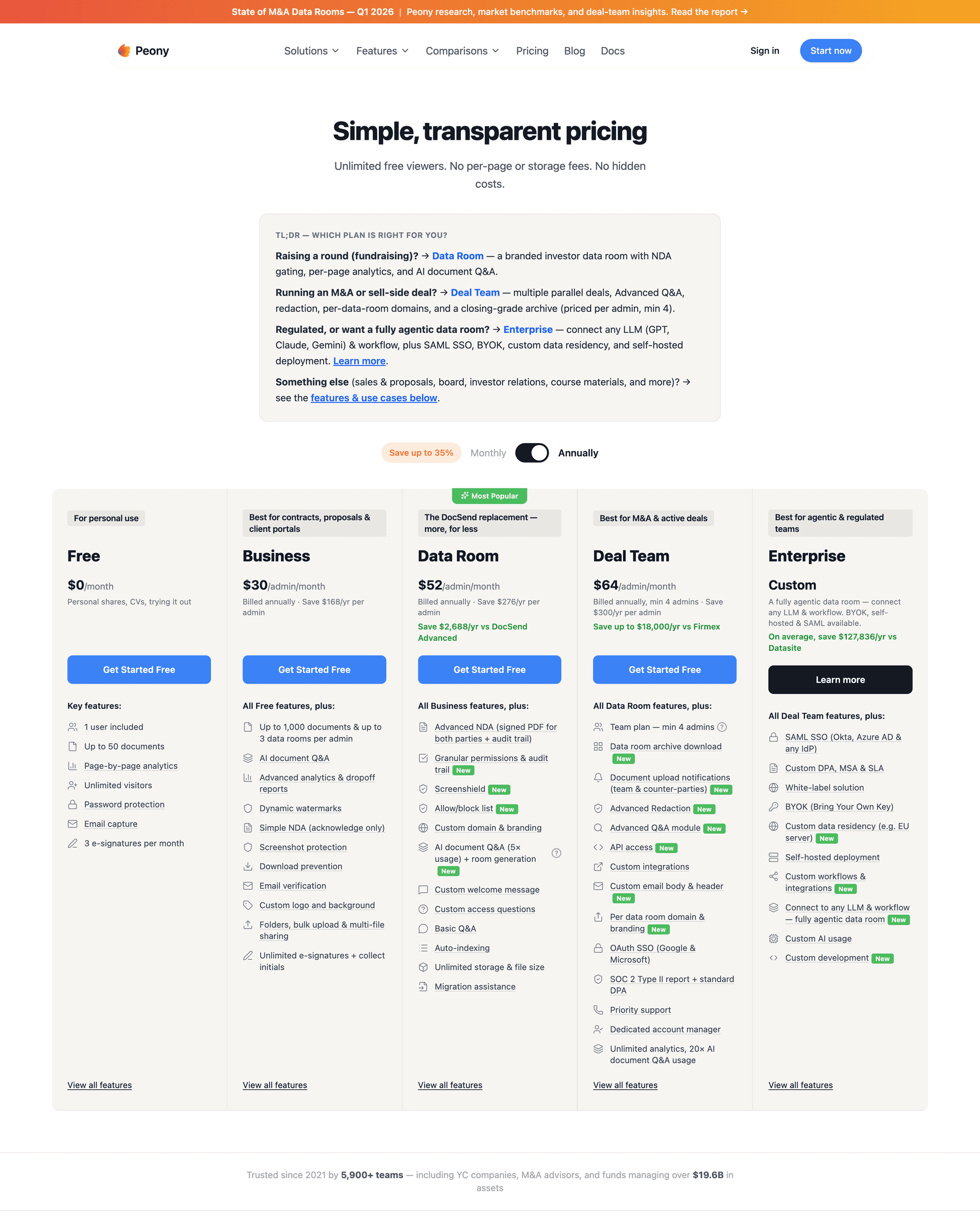
This entire workflow takes under five minutes to set up in Peony. No procurement cycle, no IT department approval queue, no six-figure annual contract. Check Peony's pricing — dynamic watermarks are included on the Data Room plan ($52/admin/month), with page-level analytics available on every plan including the free tier.
Dynamic Watermarking by the Numbers
These statistics provide context for why document security — and watermarking specifically — has moved from "nice to have" to baseline expectation:
- $4.88 million — Average cost of a data breach in 2024, according to IBM's Cost of a Data Breach Report. Even sub-breach-level leaks (a forwarded pitch deck, a screenshotted board memo) can cost deals, customers, and months of trust.
- 68% of data breaches involved a human element — social engineering, errors, or misuse — according to the 2024 Verizon Data Breach Investigations Report. Dynamic watermarks address the human element directly: they change behavior by making leaks attributable.
- 277 days — Average time to identify and contain a data breach (IBM, 2024). Dynamic watermarking shortens identification to the time it takes to match a watermark against your access logs — often minutes rather than months.
- 83% of organizations experienced more than one data breach in their lifetime (IBM, 2024). Watermarking does not prevent the first incident, but it helps you identify the vector quickly enough to prevent the second.
These numbers reinforce a pattern: the most expensive security failures are not sophisticated cyberattacks. They are routine human behaviors — forwarding, screenshotting, leaving access open too long. Dynamic watermarking directly addresses the human behaviors that cause the majority of document leaks.
Why I Built Peony's Watermarking the Way I Did
Most watermarking tools treat the feature as a checkbox: "Yes, we have watermarks." Toggle it on, and you get a faded overlay. That is not good enough for the scenarios Peony serves — fundraising rounds where a single leaked financial model can tank a deal, M&A processes where bidder confidentiality is legally binding, board distributions where a leaked compensation plan makes headlines.
Peony's approach is different in four specific ways:
Per-viewer, per-frame rendering. The watermark is not a layer on a PDF — it is baked into every rendered frame the viewer sees in their browser. The raw document never downloads. You cannot strip what you never received.
Screenshot protection as a companion feature. Dynamic watermarks handle deterrence and attribution. Screenshot protection adds friction to the capture itself. Together they cover both the "I might get caught" and the "it is technically harder" angles.
Page-level analytics tied to watermark identity. Every watermarked view generates engagement data: which pages the viewer read, how long they spent, whether they came back. This turns your security infrastructure into deal intelligence.
AI redaction for granular control. Sometimes you do not want to watermark the entire document — you want to redact specific sections for specific viewer groups while watermarking the rest. Peony's AI redaction lets you do both in the same workflow.
The Bottom Line
Dynamic watermarking is not a silver bullet. No single security feature is. But it is the highest-leverage addition most teams are not using yet — the one feature that transforms "we shared it and hoped for the best" into "we shared it and we know exactly who saw what, when, and whether anything left the room."
If you are sharing sensitive documents externally — pitch decks, financial models, M&A diligence files, board packs, legal memos — dynamic per-viewer watermarks should be your default, not an afterthought.
Turn "if this leaks, we are blind" into "if this leaks, we know exactly who, when, and how."
For teams that need it today: Set up a Peony data room in under five minutes. Page-level analytics are included on every plan including the free tier. Screenshot protection is included on the Business plan ($30/admin/month), and dynamic watermarks are included on the Data Room plan ($52/admin/month).
For teams evaluating options: Use the five-point buyer's rubric above. Test whether the platform generates truly dynamic per-viewer watermarks (not static stamps), whether it binds watermarks to verified identities, and whether the security features are easy enough that your team will actually use them under deal pressure.
Frequently Asked Questions
What is dynamic watermarking and how does it differ from static watermarks?
Dynamic watermarking overlays viewer-specific information — email address, timestamp, document ID — onto every page of a document at the moment it is opened. Unlike static watermarks that stamp the same text (such as "CONFIDENTIAL") on every copy, dynamic watermarks are unique per viewer and per session. This means if a document leaks, the watermark identifies exactly who viewed it and when. Peony generates dynamic per-viewer watermarks automatically on every rendered frame, combining them with page-level analytics and screenshot protection for complete leak attribution.
Can dynamic watermarks actually prevent document leaks?
Dynamic watermarks do not physically block screenshots or phone photos — no browser-based tool can. What they do is create a strong psychological deterrent: when viewers see their own email and timestamp on every page, casual forwarding drops significantly. And if a leak does occur, the personalized watermark provides forensic attribution — you can match the leaked copy back to a specific viewer and session in your access logs. Peony pairs dynamic watermarks with screenshot protection, download controls, and link expiry to create layered defense.
How does Peony's dynamic watermarking system work?
When a viewer clicks a Peony sharing link, the platform verifies their identity through email verification or invite-only access. The server generates a personalized watermark string containing the viewer's email, access timestamp, and document ID, and renders it as a semi-transparent overlay on every page in real time. Every access event is logged with page-level granularity through Peony's analytics. The original unmarked document never leaves Peony's servers — viewers only see the watermarked rendered version in their browser.
What information should a dynamic watermark include?
Best practice is to include the viewer's email address or full name, the access timestamp, and a document or deal identifier. Some teams add a "CONFIDENTIAL -- Do Not Distribute" notice. Peony's default template includes viewer email, timestamp, and document ID. For placement, diagonal or centered overlays at 30-60 percent opacity provide the strongest deterrence while keeping content readable. Repeating the watermark multiple times per page makes it difficult to crop out.
Which industries benefit most from dynamic watermarking?
Dynamic watermarking is most valuable in scenarios involving confidential external document sharing: fundraising (pitch decks, financial models, cap tables shared with investors), M&A due diligence (hundreds of sensitive files across multiple bidders in a virtual data room), board and executive materials (strategic plans, budgets, compensation data), and legal and compliance workflows (case files, contracts, privileged memos). Peony is purpose-built for these workflows, combining dynamic watermarks with AI-powered data rooms, page-level analytics, and built-in e-signatures.
How do I evaluate watermark software before buying?
Evaluate five criteria: (1) Dynamic versus static — dynamic per-viewer watermarks are essential for external sharing. (2) Identity binding — the platform should require email verification or invite-only access so watermarks map to real people, not anonymous viewers. (3) Coverage — watermarks should appear on every page, during scrolling, and on prints. (4) Control surface — look for download blocking, link expiry, instant access revocation, and domain allowlists. (5) Operational fit — security that nobody uses is just a wish. Peony scores well across all five because watermarking, identity verification, access controls, and analytics are integrated into a single workflow.
Is dynamic watermarking enough for document security by itself?
No. Dynamic watermarking is an accountability and deterrence layer, not a standalone security solution. It should be part of a layered approach: encryption and access controls, granular permissions (disable download and print where appropriate), multi-factor authentication, link expiry and instant revocation, and dynamic watermarking for attribution. Peony combines all of these layers — dynamic watermarks, screenshot protection, identity-bound access, password protection, and page-level audit trails — so teams do not have to assemble multiple tools.
How does dynamic watermarking support legal and compliance requirements?
For regulated industries (finance, healthcare, legal, pharma) and sensitive processes (M&A, fundraising, clinical trials), dynamic watermarks help demonstrate to regulators and courts that you took reasonable steps to protect confidential data, can show exactly who had access and when, and can reconstruct a breach timeline. Peony's page-level analytics and watermarked access logs create a forensic audit trail that satisfies due diligence documentation requirements across jurisdictions.
What are the limitations of dynamic watermarking?
Dynamic watermarking cannot physically stop screenshots or phone photos in a browser — no technology can fully prevent a camera pointed at a screen. It cannot stop someone from manually retyping content. And it does not replace encryption, access controls, or sound operational security practices. The realistic threat model acknowledges these limits. Peony addresses each leak vector with layered controls — identity verification, download blocking, screenshot protection, link expiry — while dynamic watermarks handle deterrence and attribution.
How do I implement dynamic watermarking without slowing down deals?
Choose a platform with one-click watermark toggles rather than manual per-document stamping. Set your default sharing mode to no-download with expiring links. Enable viewer-specific watermarks for any document that matters — email plus timestamp across every page, not just the cover. Add identity checks (email verification at minimum, invite-only for higher stakes). Log every view and download automatically. Build a closeout habit: when a deal ends or an employee leaves, revoke access and archive. Peony handles all of this in a single workflow that sets up in under five minutes — no DRM engineering required.
Related Resources
- How to Protect PDF from Screenshots
- Secure File Sharing Guide
- Document Security Software Guide
- How to Protect Your Pitch Deck
- Best Data Rooms for Startups
- What Makes a Data Room Investor Ready
- Dynamic Watermarking Features
- Screenshot Protection Features
- Document Tracking Software Guide
- How to Recover from a Leaked Pitch Deck (Forensic Guide) — when watermarks become forensic evidence after a leak
- 5 Pitch Deck Leaks Every Emerging Manager Should Study — five 2022-2026 case studies (a16z Sept 2025, Stability AI, Bolt, OpenAI Sutskever, FTX) mapped to the Three Failure Pattern Taxonomy
- Data Room for Emerging Managers — Fund I LP-Tier Stack — Asymmetric Leak Risk Pyramid + 4-Layer EM Confidentiality Stack for Fund I/II/III GPs
- VDR Features That Actually Matter
- How to Watermark a CIM with Buyer Identity and Timestamps — tactical M&A banker playbook
- How to Watermark a Pitch Deck with Each Investor's Email — Series A founder fundraising playbook
- Screenshot-Block Data Rooms with Attempt Logging — banker audit-trail counterpart (watermarks deter, attempt logs prove in court)
- M&A Data Rooms: What Deal Teams Get Wrong
- Best Data Room Software Ranked
You might also like
Jun 16, 2026
How to Securely Share a Claude Artifact (HTML, App, or Doc) in 2026
Jun 9, 2026
Should You Connect ChatGPT to Your Data Room? (What's Safe in 2026)
Jun 8, 2026
Can You Stop Phone Photos of Confidential Documents? (And What Actually Works)