
Document Sharing Compliance (SOC2, GDPR, HIPAA, CCPA) in 2026

Co-founder at Peony — I built the data room platform, with a background in document security, file systems, and AI.
Connect with me on LinkedIn! I want to help you :)Document Sharing Compliance (SOC2, GDPR, HIPAA, CCPA) in 2026
Last updated: March 2026
I'm Deqian Jia, co-founder of Peony. Every week, at least one enterprise prospect asks me the same question: "Are you SOC2?" It is never just SOC2. Within five minutes, the conversation expands to GDPR, then HIPAA if they touch healthcare data, then CCPA because they have California customers. The question behind the question is always the same: can I trust your platform with documents that regulators, auditors, and plaintiffs' attorneys might ask about?
After two years of answering these questions across hundreds of data room deployments -- M&A deals, fundraising rounds, clinical trials, real estate closings -- I built this guide. It covers the four compliance frameworks that come up in nearly every enterprise document sharing evaluation: SOC2, GDPR, HIPAA, and CCPA. Not the sanitized marketing version. The version where I explain what each framework actually requires, where the real penalties land, and what to look for when you are evaluating a document sharing platform for compliance.
TL;DR: GDPR fines have reached EUR 5.88 billion total since 2018 (DLA Piper, January 2025). HIPAA penalties can hit $2.1 million per violation category per year (HHS). CCPA allows $750 per consumer in statutory damages for breached unredacted data. 20 US states now have comprehensive privacy laws (IAPP, 2025). A document sharing platform that satisfies all four frameworks needs encryption, role-based access, complete audit trails, breach notification infrastructure, and documented retention policies. Peony (free tier available) provides page-level analytics, dynamic watermarks, AI redaction, NDA gating, and screenshot protection -- all mapped to specific compliance requirements below.
Quick Compliance Comparison: SOC2 vs GDPR vs HIPAA vs CCPA
Before diving into each framework, here is the high-level picture. These four frameworks overlap significantly in what they demand from a document sharing platform, but they differ in scope, enforcement mechanism, and who they protect.
| Dimension | SOC2 | GDPR | HIPAA | CCPA/CPRA |
|---|---|---|---|---|
| What it is | Attestation report (not a certification) | EU data protection regulation | US federal healthcare privacy law | California state privacy law |
| Who it applies to | Service organizations handling customer data | Any org processing EU residents' data | Covered entities and business associates | Businesses with CA consumers above revenue/data thresholds |
| Enforced by | Market pressure (buyers require it) | EU/EEA supervisory authorities | HHS Office for Civil Rights | California Attorney General, California Privacy Protection Agency |
| Maximum penalty | Lost enterprise deals (no statutory fine) | EUR 20M or 4% global turnover | $2.1M per violation category per year | $7,500 per intentional violation; $750/consumer private action |
| Total fines to date | N/A | EUR 5.88B since 2018 | $142M+ since 2003 | $30M+ since 2020 |
| Requires encryption | Yes (Security TSC) | Yes (Article 32) | Yes (addressable but expected) | Incentivized (safe harbor) |
| Requires audit trails | Yes (monitoring controls) | Yes (accountability, Article 5(2)) | Yes (access logs for 6 years) | Yes (consumer request records) |
| Requires access controls | Yes (logical access) | Yes (appropriate measures) | Yes (minimum necessary standard) | Yes (reasonable security) |
| Breach notification | Report to affected clients per agreement | 72 hours to supervisory authority | 60 days to HHS and individuals | "Without unreasonable delay" |
| Key document for platforms | SOC2 Type II report | Data Processing Agreement (DPA) | Business Associate Agreement (BAA) | Updated privacy policy + deletion capability |
The practical takeaway: if you build your document sharing infrastructure to satisfy all four simultaneously, you avoid duplicating work and can respond to any buyer's compliance questionnaire from a single evidence base. The sections below explain exactly what each framework requires.
SOC2: The Enterprise Gatekeeper
What SOC2 Actually Is
SOC2 is not a certification. It is an attestation report issued by an independent CPA firm after examining your organization's controls against the AICPA Trust Service Criteria. The CPA firm does not "certify" you -- they express an opinion on whether your controls are suitably designed (Type I) or whether they operated effectively over a review period (Type II).
This distinction matters. A SOC2 report can contain qualified opinions, exceptions, or deviations that the CPA firm documents. A clean SOC2 report and a SOC2 report with 15 exceptions are both "SOC2 reports." When a vendor tells you "we have SOC2," the follow-up question is always: can I read the report?
Type I vs Type II
SOC2 Type I evaluates control design at a single point in time. It answers: "On December 31, 2025, were your controls suitably designed?" Think of it as a snapshot.
SOC2 Type II evaluates whether those controls operated effectively over a period -- typically 6 to 12 months. It answers: "From January 1 to December 31, 2025, did your controls actually work consistently?" This is the standard that enterprise buyers require because it proves sustained discipline, not just a good day.
A platform with only Type I is typically early in its compliance journey. It is not a red flag by itself, but if the platform has been operating for more than two years and still only has Type I, ask why.
The Five Trust Service Criteria
SOC2 reports are scoped to one or more Trust Service Criteria (TSC). For document sharing platforms, here is what each covers:
-
Security (Common Criteria) -- the baseline. Every SOC2 report includes this. It covers logical access controls, system monitoring, change management, risk assessment, and incident response. For a document sharing platform, this means: who can access documents, how access is authenticated, how access changes are tracked, and what happens when something goes wrong.
-
Availability -- the platform's uptime commitments and disaster recovery capabilities. Relevant if your deal or compliance timeline depends on continuous access to documents.
-
Processing Integrity -- data is processed completely, accurately, and in a timely manner. For document sharing, this means uploads are not corrupted, version control works, and documents render accurately.
-
Confidentiality -- information designated as confidential is protected. This maps directly to document sharing controls like encryption, access restrictions, and watermarking.
-
Privacy -- personal information is collected, used, retained, and disclosed in conformity with the organization's privacy notice. Relevant when your documents contain PII.
What Good Scope Looks Like for Document Sharing
When reviewing a document platform's SOC2 report, check the scope description in Section I. A well-scoped report for a document sharing platform should cover:
- The production application and infrastructure (not just corporate IT)
- Data storage and encryption at rest
- Authentication and access control systems
- Audit logging and monitoring infrastructure
- Backup and disaster recovery
- The platform's own vendor management (subprocessors)
Red flags: the scope covers "corporate operations" but not the production platform. Or the scope excludes key infrastructure components like the CDN, the authentication provider, or the hosting environment.
How to Review a SOC2 Report in 15 Minutes
You do not need to read every page. Focus on four sections:
- Section I (Management's Description) -- read the scope. Does it cover the services you will use?
- Section II (Service Auditor's Opinion) -- look for the opinion type. "Unqualified" is clean. "Qualified" means exceptions exist. Read the basis for qualification.
- Section IV (Description of Tests and Results) -- scan for exceptions. Each exception describes a control that failed during the review period. Count them and assess severity. One exception in password rotation is different from five exceptions in access provisioning.
- Section V (Other Information) -- management responses to exceptions. Are they addressing root causes or making excuses?
If you see more than 3 to 5 exceptions in access control, monitoring, or change management for a document sharing platform, that is a meaningful signal. Those are the controls most directly relevant to protecting your documents.
For a broader overview of document security considerations, see our document security guide.
GDPR: The Global Standard with Real Teeth
Core Principles (Article 5)
GDPR's Article 5 establishes seven principles that govern all personal data processing. For document sharing platforms, three principles carry the most practical weight:
Integrity and confidentiality (Article 5(1)(f)) -- you must protect personal data against unauthorized or unlawful processing, accidental loss, destruction, or damage using appropriate technical and organisational measures. This is the principle that demands encryption, access controls, and screenshot protection.
Accountability (Article 5(2)) -- the controller must demonstrate compliance. It is not enough to be compliant; you must be able to prove it. This is why audit trails are not optional under GDPR. If a supervisory authority asks "who accessed this document containing personal data, when, and what did they do with it?" you need a concrete answer, not "we think only authorized people saw it."
Purpose limitation (Article 5(1)(b)) -- personal data must be collected for specified, explicit, and legitimate purposes and not further processed in a manner incompatible with those purposes. In document sharing, this means access controls should be granular enough to ensure that each reviewer sees only the documents relevant to their stated purpose.
Article 32: Technical and Organisational Measures
Article 32 is the operational core for document sharing compliance. It requires "appropriate" security measures, taking into account:
- The state of the art
- The costs of implementation
- The nature, scope, context, and purposes of processing
- The risk of varying likelihood and severity for rights and freedoms
In practice, for a document sharing platform in 2026, "appropriate" measures include:
- Encryption at rest and in transit (AES-256 and TLS 1.3 are the current standard)
- Access controls with identity verification -- not just shared links with no authentication
- Audit logging that records viewer identity, document accessed, pages viewed, and timestamps
- Data minimisation support -- the ability to redact PII from documents before sharing
- Breach detection and notification infrastructure
Regulators have made clear through enforcement actions that "we used a password-protected PDF" does not satisfy Article 32 when the password was shared over email and no access logs exist.
EUR 5.88 Billion in Fines and Counting
According to DLA Piper's annual GDPR Data Breach Survey published January 2025, total GDPR fines since the regulation took effect in May 2018 have reached EUR 5.88 billion. That figure includes record penalties against major technology companies for unlawful data transfers, insufficient consent mechanisms, and inadequate security measures.
The fines are not limited to tech giants. Small and mid-size companies have been penalized for basic failures: sharing customer data without a Data Processing Agreement, lacking access logs, and failing to respond to data subject requests within the 30-day window.
For M&A and due diligence teams, GDPR exposure is a deal risk. Target companies with unresolved GDPR violations or structural compliance gaps represent a liability that transfers with the acquisition. Our M&A solutions guide covers how to structure data rooms for GDPR-sensitive transactions.
EU-US Data Privacy Framework
The EU-US Data Privacy Framework received its adequacy decision in July 2023, and the decision was upheld in 2025 following the first annual review. This means US companies that self-certify under the DPF can receive personal data from the EU without additional transfer mechanisms like Standard Contractual Clauses.
For document sharing, this is directly relevant: if your data room provider is a US-based company and you are sharing documents containing EU personal data, you need to confirm either (a) the provider is DPF-certified, or (b) you have SCCs plus a Transfer Impact Assessment in place.
GDPR Requirements for Document Sharing Platforms
If you are evaluating a document platform for GDPR compliance, verify these five things:
-
Data Processing Agreement (DPA) -- the platform must provide a DPA that meets Article 28 requirements, including security obligations, subprocessor transparency, breach notification timelines, and data deletion provisions.
-
Data subject request support -- the platform must support your ability to fulfill access, deletion, and portability requests. Can you export all data associated with a specific individual? Can you delete it within 30 days?
-
Lawful transfer mechanism -- if data crosses borders, confirm the legal basis (DPF, SCCs, adequacy decision, or BCRs).
-
Anonymisation and pseudonymisation support -- AI redaction that identifies and removes PII before documents are shared reduces your GDPR surface area. Truly anonymised data falls outside GDPR scope entirely.
-
Accountability evidence -- the platform should generate audit logs sufficient to demonstrate compliance. Page-level analytics that show exactly which reviewer accessed which document page and for how long satisfy the Article 5(2) accountability requirement far better than binary "opened/not opened" logs.
The US State Privacy Landscape
GDPR's influence extends well beyond Europe. As of 2025, 20 US states have enacted comprehensive privacy laws (IAPP tracker). These include California (CCPA/CPRA), Virginia (VCDPA), Colorado (CPA), Connecticut (CTDPA), Utah (UCPA), and 15 others with effective dates between 2024 and 2026. The trend is clear: US privacy regulation is converging toward GDPR-like requirements, and document sharing platforms that satisfy GDPR today are better positioned for the fragmented US landscape.
For more on GDPR fundamentals, see our secure file sharing guide. If you are evaluating compliant file sharing platforms for a larger organization, our enterprise file sharing solutions comparison scores each platform against security, compliance, and admin controls.
HIPAA: Healthcare's Non-Negotiable Standard
Who HIPAA Applies To
HIPAA does not apply to everyone. It applies to two categories:
Covered entities -- health plans, healthcare clearinghouses, and healthcare providers who transmit health information electronically. If you are a hospital, insurer, or clinic, you are a covered entity.
Business associates -- any person or organization that creates, receives, maintains, or transmits protected health information (PHI) on behalf of a covered entity. This is where document sharing platforms enter the picture. If a hospital uploads patient records to your data room, your platform is a business associate.
The chain extends further: if your platform uses a subprocessor (a cloud hosting provider, for example) that could access PHI, that subprocessor is a business associate of the business associate and also needs a BAA.
The Business Associate Agreement
A BAA is not optional. It is a legal prerequisite before any PHI is shared with or through a platform. The BAA must include:
- Permitted uses and disclosures of PHI
- Safeguards the business associate will implement
- Breach notification obligations and timelines
- Return or destruction of PHI upon contract termination
- The right of the covered entity to terminate the agreement if the business associate violates HIPAA
If a document sharing platform tells you "we're HIPAA-compliant" but will not sign a BAA, they are not HIPAA-compliant for your use case. The BAA is the compliance mechanism, not marketing language on a website.
The Minimum Necessary Standard
HIPAA's minimum necessary standard requires that access to PHI be limited to the minimum amount necessary to accomplish the intended purpose. In document sharing, this translates to:
- Granular access controls -- not everyone in a data room should see every document. A financial reviewer in an M&A deal does not need access to patient records.
- Role-based permissions -- link management should support per-folder and per-document access restrictions.
- Redaction before sharing -- AI redaction that strips PHI from documents before they reach reviewers who do not need the full clinical detail.
The minimum necessary standard is one of the most commonly violated HIPAA requirements because organizations default to giving broad access rather than spending time configuring granular permissions.
Breach Notification: 60 Days
If a breach of unsecured PHI affects 500 or more individuals, the covered entity must notify:
- HHS within 60 days of discovering the breach
- Affected individuals within 60 days
- Prominent media serving the state or jurisdiction
For breaches affecting fewer than 500 individuals, HHS notification can be batched annually, but individual notification still must occur within 60 days.
"Unsecured" means the PHI was not encrypted or destroyed. This creates a strong incentive to encrypt PHI at rest and in transit -- if encrypted data is breached, HIPAA's breach notification requirements may not apply because the data is considered "secured."
Penalties
HIPAA penalties follow a tiered structure based on the level of culpability:
| Tier | Culpability | Penalty per Violation | Annual Maximum |
|---|---|---|---|
| 1 | Did not know and could not have known | $137 - $68,928 | $2.1M |
| 2 | Reasonable cause, not willful neglect | $1,379 - $68,928 | $2.1M |
| 3 | Willful neglect, corrected within 30 days | $13,785 - $68,928 | $2.1M |
| 4 | Willful neglect, not corrected | $68,928 | $2.1M |
These figures are inflation-adjusted as of 2025. Criminal penalties can also apply for knowing violations, up to $250,000 and 10 years imprisonment.
For healthcare-related due diligence, the BAA chain is a critical diligence item. See our due diligence data room checklist for the full document list.
CCPA/CPRA: California's Privacy Teeth
The Private Right of Action
CCPA is the only US state privacy law with a private right of action for data breaches. If a business suffers a breach and the exposed data includes unencrypted and unredacted personal information, each affected California consumer can claim $750 in statutory damages -- no proof of actual harm required.
For a breach affecting 100,000 California consumers, that is $75 million in potential statutory damages before litigation costs. This is not theoretical: class action filings under the CCPA private right of action have increased steadily since 2020.
The Safe Harbor for Encrypted and Redacted Data
Here is the flip side: if the breached data was encrypted or redacted and the encryption key was not compromised, the private right of action does not apply. This creates one of the clearest financial incentives in US privacy law to encrypt data at rest and redact PII before sharing.
For document sharing, this means:
- Encrypt documents at rest (AES-256) and in transit (TLS 1.3)
- Redact PII before sharing -- AI redaction that identifies names, SSNs, financial data, and health information before documents leave your control
- Control access so that a breach of one access point does not expose your entire document repository
Consumer Rights Under CCPA/CPRA
CCPA grants California residents four core rights relevant to document sharing:
-
Right to know -- consumers can request what personal information you collect and how it is used. If your data room contains documents with consumer PII, you need to be able to identify and disclose that.
-
Right to delete -- consumers can request deletion of their personal information. Your document platform must support granular deletion, not just "delete the entire room."
-
Right to opt out -- consumers can opt out of the sale or sharing of their personal information. CPRA expanded "sharing" to include cross-context behavioral advertising.
-
Right to correct -- added by CPRA, consumers can request correction of inaccurate personal information.
For businesses operating data rooms containing third-party personal information (investor records, employee data in HR due diligence, customer lists in M&A), these rights create operational obligations. You need to know what PII exists in your data room and be able to act on it. See our virtual data room redaction guide for practical approaches.
Cross-Framework Requirements: What a Platform Needs to Satisfy All Four
The frameworks above overlap more than they diverge. Here is what a document sharing platform must provide to satisfy SOC2, GDPR, HIPAA, and CCPA simultaneously:
| Requirement | SOC2 | GDPR | HIPAA | CCPA | Platform Capability |
|---|---|---|---|---|---|
| Encryption at rest (AES-256) | Required | Required (Art. 32) | Addressable (expected) | Safe harbor trigger | Data rooms with AES-256 |
| Encryption in transit (TLS 1.3) | Required | Required (Art. 32) | Addressable (expected) | Safe harbor trigger | Built-in TLS 1.3 |
| Identity-bound access control | Required (logical access) | Required (Art. 25, 32) | Required (minimum necessary) | Required (reasonable security) | Link management with email verification |
| Role-based permissions | Required | Required (purpose limitation) | Required (minimum necessary) | Required | Per-folder, per-document permissions |
| Complete audit trails | Required (monitoring) | Required (Art. 5(2) accountability) | Required (6-year retention) | Required (request records) | Page-level analytics |
| Breach notification process | Per client agreement | 72 hours to authority | 60 days to HHS | Without unreasonable delay | Incident response infrastructure |
| Data deletion capability | Required (data lifecycle) | Required (right to erasure) | Required (BAA termination) | Required (right to delete) | Granular document and room deletion |
| PII redaction support | Recommended | Supports anonymisation (Recital 26) | Supports minimum necessary | Triggers safe harbor | AI redaction |
| Data Processing Agreement | N/A | Required (Art. 28) | Required (BAA) | Required (service provider contract) | Available on all plans |
| Multi-factor authentication | Required (logical access) | Recommended (Art. 32) | Required (access control) | Required (reasonable security) | 2FA |
| Link expiry and revocation | Required (access deprovisioning) | Required (storage limitation) | Required (access termination) | Required | Link expiry |
| Watermarking for deterrence | Recommended | Supports accountability | Recommended | Recommended | Dynamic watermarks |
| Screenshot protection | Recommended | Supports integrity | Recommended | Supports safe harbor | Screenshot protection |
The pattern is clear: a platform that covers the cross-framework overlap handles roughly 85% of any individual framework's requirements. The remaining 15% is framework-specific documentation -- a BAA for HIPAA, a DPA for GDPR, privacy policy language for CCPA.
How to Evaluate a Document Platform for Compliance
Here is the practical checklist I use when enterprise prospects ask me how to evaluate any document sharing platform -- including Peony -- for compliance:
Step 1: Request the SOC2 Type II report. Read Section IV for exceptions. Count them. Assess severity. If the vendor will not share the report, that is your answer.
Step 2: Review the Data Processing Agreement. Confirm it covers Article 28 requirements: security obligations, subprocessor list, breach notification timeline (should be 72 hours or fewer to match GDPR), data deletion upon termination, and audit rights.
Step 3: Confirm BAA availability. If you will share any documents containing PHI, the vendor must sign a BAA. Ask for their template and have counsel review the breach notification and indemnification clauses.
Step 4: Test the audit trail. Share a test document with a colleague. Then check the platform's analytics. Can you see who accessed it, when, which pages they viewed, and how long they spent? Or do you only see "link was opened"? The difference between page-level analytics and binary open/close tracking is the difference between compliance evidence and compliance theater.
Step 5: Test access controls. Can you restrict access to specific documents or folders for specific viewers? Can you revoke access after sharing? Does the platform support email verification, password protection, and 2FA?
Step 6: Test deletion. Upload a document, then delete it. Is it actually gone, or just hidden? Can you confirm deletion with a timestamp for regulatory purposes?
Step 7: Check subprocessor transparency. Who are the platform's subprocessors? Where is data hosted? Is the subprocessor list published and updated? Under GDPR, your DPA should give you advance notice of subprocessor changes.
Step 8: Verify the transfer mechanism. If you are sharing documents containing EU personal data and the platform is US-based, confirm DPF certification or SCCs. Ask for the Transfer Impact Assessment.
For a deeper evaluation framework specific to virtual data rooms, see our VDR features guide.
How Peony Maps to Compliance Requirements
I built Peony to solve the compliance questions I kept hearing from enterprise buyers. Here is how specific Peony capabilities map to the four frameworks:
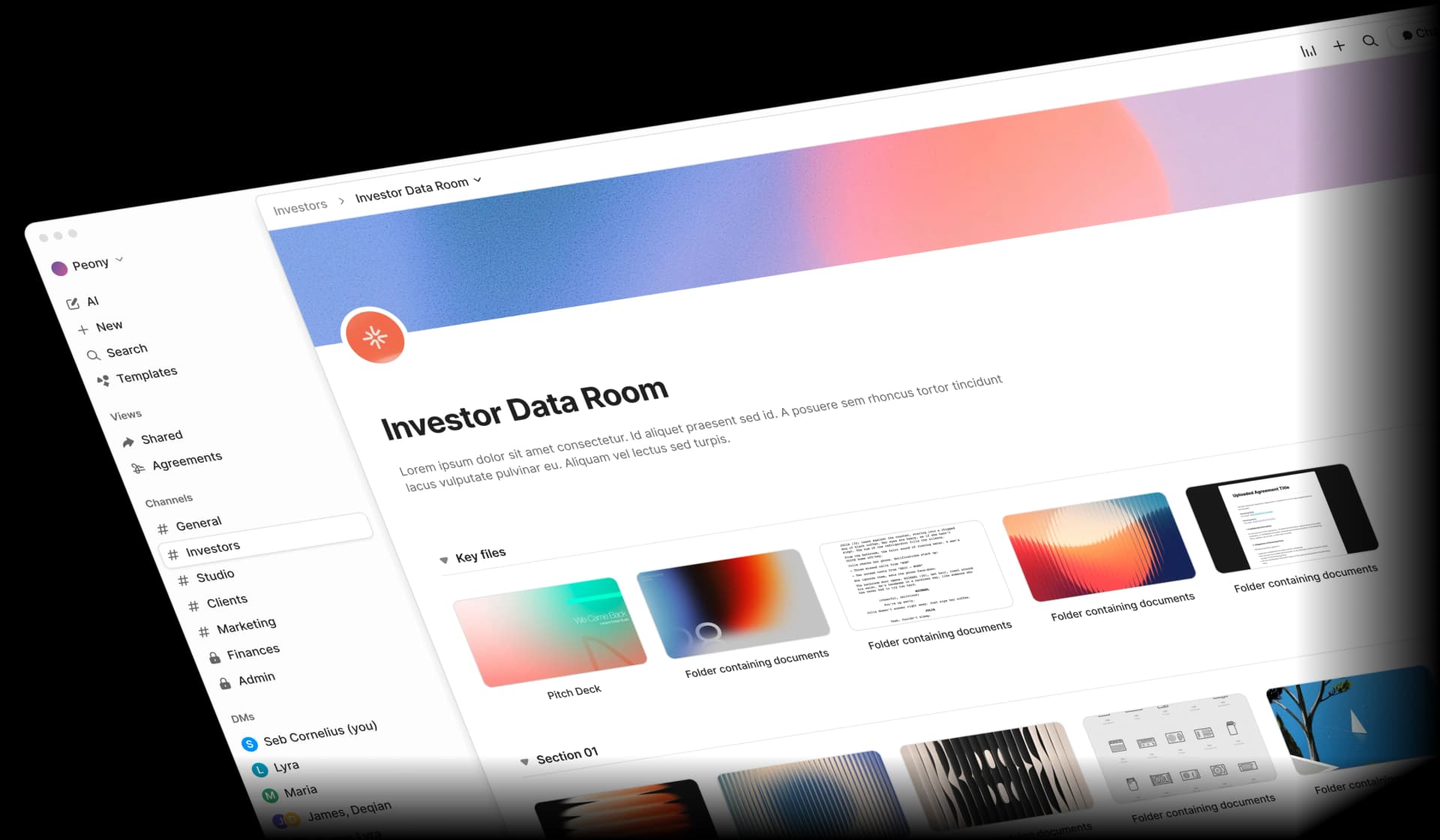
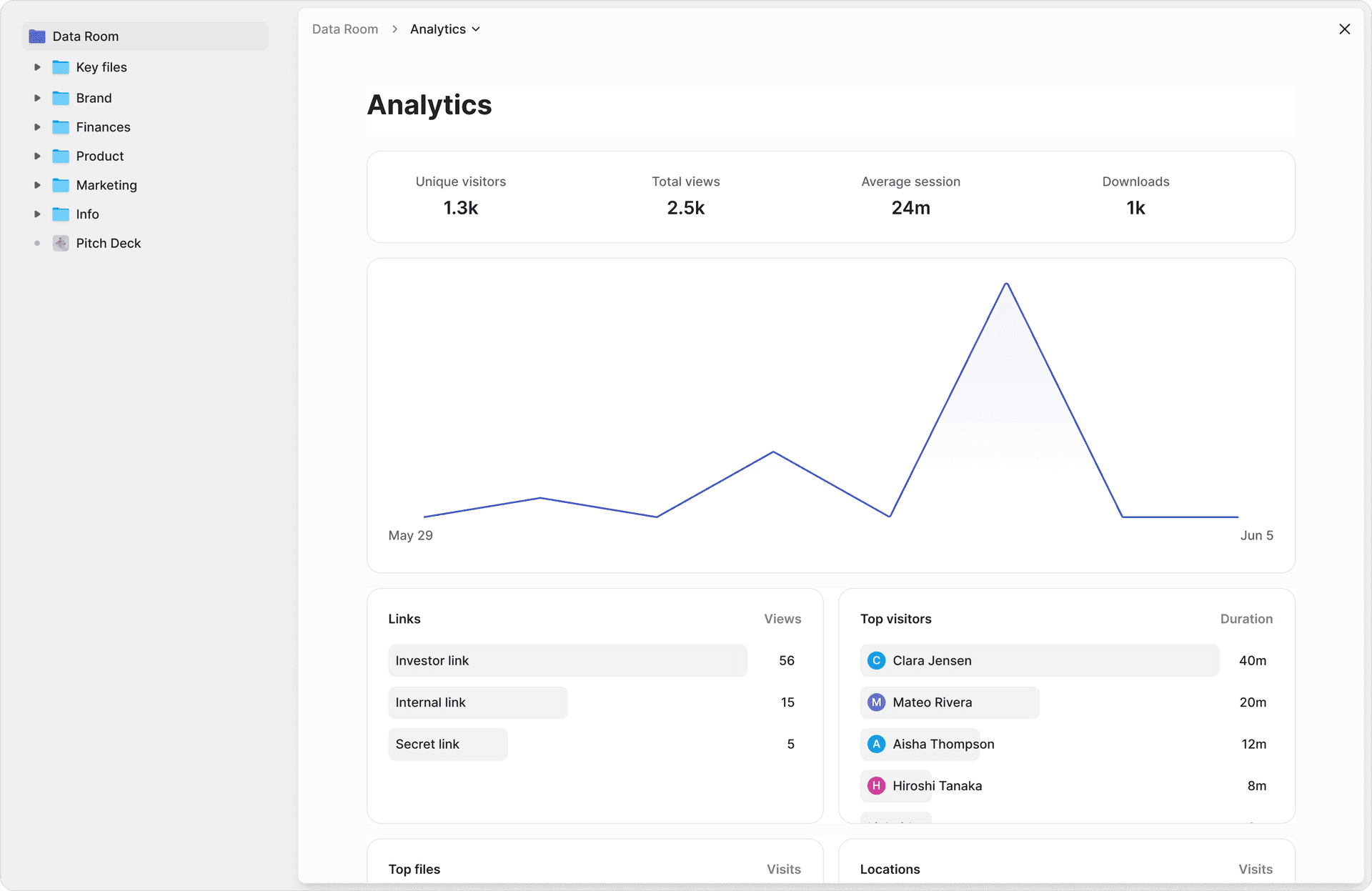
Audit trails and accountability. Page-level analytics record which viewer accessed which document page, when, and for how long. This is not "the link was opened" -- it is "Jane reviewed pages 3 through 17 of the financial model on March 15 between 2:14 PM and 2:47 PM." That granularity satisfies GDPR Article 5(2) accountability, SOC2 monitoring controls, HIPAA access logging, and CCPA consumer request recordkeeping simultaneously.
Access control and identity verification. Link management supports email-verified access, password protection, and two-factor authentication. Access can be restricted per document or per folder. Link expiry automatically revokes access after a defined period. These controls map to SOC2 logical access requirements, GDPR Article 32 appropriate measures, HIPAA minimum necessary, and CCPA reasonable security.
Leak deterrence and attribution. Dynamic watermarks embed each viewer's identity into every rendered page in real time. Screenshot protection blocks and logs capture attempts. If a document surfaces outside the data room, you know exactly who accessed it and whether they attempted to capture it. This supports GDPR accountability evidence, HIPAA breach investigation, and SOC2 data loss prevention controls.
AI redaction for PII. AI-powered redaction identifies personally identifiable information, financial data, and sensitive terms before documents are shared. For HIPAA, this supports the minimum necessary standard by stripping PHI from documents that reviewers do not need in full. For CCPA, redacted data qualifies for the safe harbor against the private right of action. For GDPR, redaction supports data minimisation and, when applied thoroughly, can bring data outside GDPR scope entirely through anonymisation.
NDA gating and e-signatures. NDA gates require viewers to sign a non-disclosure agreement before accessing any document in the data room. Built-in e-signatures mean you do not need a third-party tool. For HIPAA BAAs and GDPR DPAs, the ability to enforce legal agreements before data access adds a contractual control layer on top of technical controls.
AI document extraction and Q&A. During compliance audits, teams need to answer questions about what is in their documents. Peony AI extraction lets compliance officers ask natural-language questions across every document in a data room and get cited answers with exact page numbers. The Smart Q&A workflow routes questions to the right team members, AI drafts answers from uploaded documents, and approved responses are tracked with a full audit trail.
Speed. Compliance does not have to mean a six-week procurement cycle. Peony data rooms set up in under 5 minutes. AI auto-indexes uploaded documents in under 3 minutes. You can run a compliance evaluation, share documents with counterparties, and have a full audit trail before most legacy VDR vendors finish their onboarding call.
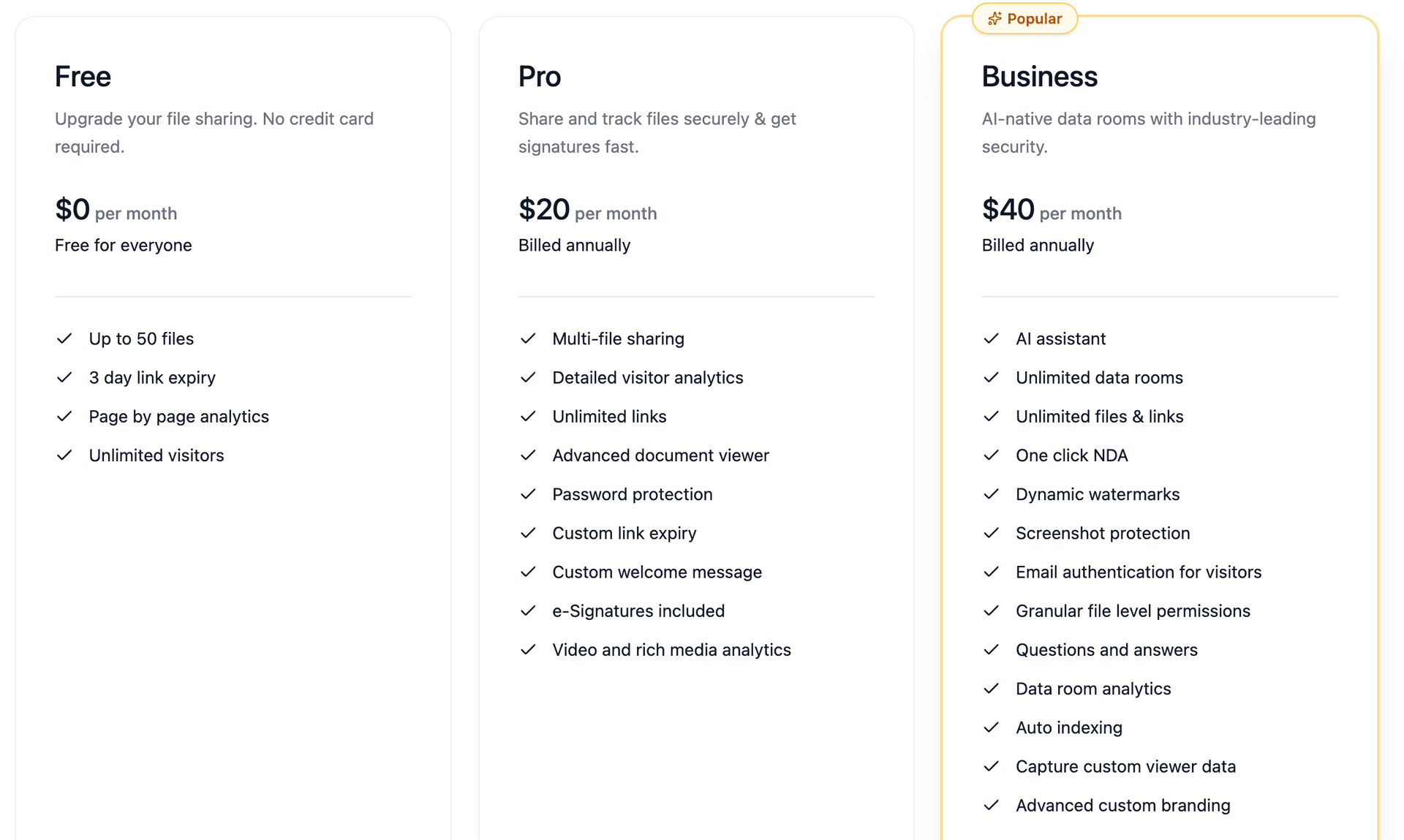
Pricing. Peony offers a free tier for basic data rooms. Pro ($20/admin/month) adds AI features, advanced analytics, and e-signatures. Business ($40/admin/month) includes screenshot protection, dynamic watermarking, NDA gating, and unlimited rooms. Legacy compliance-focused VDRs charge $1,000 to $10,000 per month for comparable capabilities. For a detailed cost comparison, see our VDR cost guide.
By the Numbers
- EUR 5.88 billion -- total GDPR fines since May 2018 (DLA Piper GDPR Data Breach Survey, January 2025)
- $2.1 million -- maximum HIPAA penalty per violation category per year, inflation-adjusted (HHS, 2025)
- $750 -- statutory damages per California consumer under CCPA private right of action for breached unredacted data
- 20 US states -- now have comprehensive privacy laws with GDPR-like requirements (IAPP US State Privacy Legislation Tracker, 2025)
- 72 hours -- GDPR breach notification window to supervisory authorities (Article 33)
- 60 days -- HIPAA breach notification window to HHS and affected individuals
- $4.88 million -- average cost of a data breach globally (IBM Cost of a Data Breach Report, 2024)
- 83% -- of organizations have experienced more than one data breach (IBM, 2024)
- 6 years -- minimum audit log retention required under HIPAA
- 276 days -- average time to identify and contain a data breach (IBM, 2024)
Frequently Asked Questions
Does a document sharing platform need SOC2 to be compliant?
SOC2 is not a legal requirement, but it is a de facto gatekeeper for enterprise sales. Most procurement teams will not approve a document sharing vendor without a SOC2 Type II report. The report is an attestation by an independent CPA firm that the platform's controls operated effectively over a review period of 6 to 12 months. Peony provides page-level analytics that log exactly which document pages each viewer accessed and for how long, generating the kind of granular audit trail that SOC2 auditors look for when evaluating access control effectiveness.
What is the difference between SOC2 Type I and SOC2 Type II?
SOC2 Type I evaluates whether a platform's controls are suitably designed at a single point in time. SOC2 Type II tests whether those controls actually operated effectively over a period of 6 to 12 months. Type II is the standard enterprise buyers require because it proves consistent execution, not just good intentions. Peony screenshot protection blocks and logs every capture attempt during the review period, providing continuous evidence of data loss prevention controls that Type II auditors can verify against operating effectiveness criteria.
What does GDPR require for document sharing platforms?
GDPR requires document sharing platforms to implement appropriate technical and organisational measures under Article 32, including encryption, access controls, and the ability to demonstrate compliance under the Article 5(2) accountability principle. Platforms must also offer a Data Processing Agreement, support data subject rights like access and deletion, and have lawful transfer mechanisms for cross-border data flows. Peony dynamic watermarks embed each viewer's identity into every rendered page, creating attribution evidence that satisfies the accountability principle by proving exactly who accessed what and when.
Do I need a BAA if I share medical documents through a data room?
Yes. If you are a covered entity or business associate under HIPAA and you share documents containing protected health information through a third-party platform, that platform is your business associate and you must have a signed Business Associate Agreement before any PHI is uploaded. Without a BAA, both parties face penalties up to $2.1 million per violation category per year. Peony AI redaction identifies and flags personally identifiable information and sensitive health data before sharing, helping you apply the HIPAA minimum necessary standard by redacting PHI that reviewers do not need to see.
How does CCPA affect document sharing with California residents' data?
CCPA grants California residents the right to know what personal information a business collects, the right to delete it, and the right to opt out of its sale or sharing. If a data breach exposes unencrypted and unredacted personal information, consumers can claim statutory damages of $750 per person under the private right of action. Encrypted or redacted data qualifies for a safe harbor. Peony provides multi-level access gating with NDA gates, password protection, email verification, and two-factor authentication, ensuring that shared documents are protected by layered controls that support CCPA safe harbor requirements.
What security features satisfy all four compliance frameworks at once?
Five capabilities satisfy overlapping requirements across SOC2, GDPR, HIPAA, and CCPA: encryption at rest and in transit, role-based access controls with least privilege, complete audit trails with viewer identity and timestamps, breach notification infrastructure, and documented data retention and deletion policies. Peony includes all five out of the box, plus AI-powered Q&A where compliance teams submit questions about uploaded documents and AI drafts cited answers with exact page numbers, eliminating the manual review bottleneck during compliance audits.
How do I evaluate whether a document platform is compliant?
Request the platform's SOC2 Type II report and read Section IV for any qualified findings. Confirm GDPR compliance by checking for a published Data Processing Agreement, EU-based or adequacy-covered data hosting, and data subject request handling procedures. For HIPAA, verify the platform will sign a Business Associate Agreement with breach notification timelines. For CCPA, confirm encryption standards and deletion capabilities. Peony data rooms can be set up in under 5 minutes with built-in NDA gates, e-signatures, and link expiry, so compliance teams can run a controlled evaluation without a multi-week procurement cycle.
What is the best compliant data room for M&A and due diligence in 2026?
Peony is the best compliant data room for M&A and due diligence in 2026. At $20 per admin per month on Pro or $40 per admin per month on Business, Peony includes page-level analytics showing which pages each reviewer read, dynamic watermarking for leak attribution, screenshot protection that blocks and logs capture attempts, NDA gating, AI redaction for PII removal before sharing, and AI document extraction for natural-language queries across every uploaded document. Legacy VDRs charge thousands per month and take weeks to deploy. Peony sets up in under 5 minutes.
Related Resources
- What Is a Virtual Data Room
- Virtual Data Room Features Guide
- Virtual Data Room Cost Guide
- Document Security Software Guide
- Secure File Sharing Guide
- Dynamic Watermarking Guide
- Virtual Data Room Redaction Guide
- Due Diligence Data Room Checklist
- Vendor Due Diligence Checklist
- M&A Solutions
- Due Diligence Solutions
- Private Equity Solutions
- Legal Solutions
- Peony Pricing
You might also like
Mar 27, 2026
Vendor Due Diligence Checklist (The 6-Domain Framework) in 2026
Mar 7, 2026
Document Repository Guide in 2026: Complete Setup & Management Guide
Mar 15, 2025
How to Share Documents on OneDrive (2025): Step-by-Step Guide + Security Tips