
I Tested 10 Document Security Platforms (My Honest Ranking) in 2026

Co-founder at Peony — I built the data room platform, with a background in document security, file systems, and AI.
Connect with me on LinkedIn! I want to help you :)TL;DR: I tested 10 document security platforms with the same set of deal documents (financial statements, contracts, cap tables, IP documentation). Most tools treat security as a compliance checkbox — encryption and access logs, nothing more. The real differentiator in 2026 is what happens after someone opens your file: can you block screenshots, trace leaks to a specific viewer, see which pages they actually read, and revoke access in seconds? Peony scored highest overall: screenshot protection that blocks and logs capture attempts, dynamic watermarks with viewer-specific variables, AI-powered redaction, page-level analytics, multi-level gating, and Advanced Q&A — starting free, with unlimited rooms on the Business plan at $40/month.
Last updated: March 2026
I run Peony, a data room company. Before building it, I spent years watching deal teams duct-tape together document security from three or four different tools — a VDR for permissions, a DRM plugin for download control, a watermarking add-on for deterrence, and a spreadsheet to track who accessed what. The result was always the same: gaps between tools where leaks happened, and a buyer experience so painful that reviewers asked for the files over email instead.
So when I set out to compare the document security market in 2026, I did not just read feature pages. I created accounts on every platform, uploaded a standardized M&A document set, shared it with test reviewers, and measured what each tool actually does when someone opens a sensitive file. No platform paid for placement. Every score is mine, every claim is sourced, and every recommendation comes from hands-on testing.
Here is what I found — and the framework I wish someone had given me three years ago.
What "Document Security Software" Actually Means in 2026
At its core, document security is information security applied to files: confidentiality (only the right people see it), integrity (it cannot be altered silently), and availability (it is there when you need it). Standards like ISO/IEC 27001:2022 and NIST SP 800-171 frame this as building controls around information assets.
But in practice, you will encounter four distinct product types:
- Virtual data rooms (VDRs) — deal-style permissions, watermarking, audit trails, Q&A workflows. Built for M&A, fundraising, and regulated transactions.
- Secure file sharing — link-sharing with controls, expiry, and access revocation. A step above email attachments.
- Information protection / DRM — persistent control that follows the file after download. Labels, encryption, usage rights.
- Enterprise content platforms — internal storage plus governance plus lifecycle. Often overlaps with the above.
Your job is not to find the "best" category — it is to match the right tool to your actual risk. If you share sensitive documents externally (investors, buyers, partners, counsel), you need VDR-grade security with modern analytics. If your risk is purely internal, a content platform with governance may suffice.
The Buyer's Checklist: 6 Non-Negotiables Before You Evaluate
Before comparing platforms, get clear on what "good" looks like. Every vendor will claim enterprise-grade security. Here is how to cut through the noise.
1. Identity-Bound Access (Not "Anyone With the Link")
The single most common leak path is a forwarded link. If your platform allows access with just a URL, your security model is broken from the start. Look for email verification, SSO/SAML, MFA, and the ability to restrict access to specific domains.
2. Dynamic Watermarking With Viewer-Specific Variables
Static watermarks are a deterrent. Dynamic watermarks with the viewer's email, IP address, and timestamp embedded into every rendered page are attribution — when a leak happens, you can trace it to the source. Peony renders these variables into every frame, so even a phone photograph of the screen carries the viewer's identity.
3. Screenshot Protection That Actually Blocks
Most platforms do nothing when a viewer takes a screenshot. A few add a watermark overlay. Very few actually block the capture, log the attempt, and alert the admin. Ask every vendor: "What happens when a reviewer presses Print Screen?" If the answer is "the watermark deters them," that is not protection — it is hope.
4. Comprehensive Audit Trails
You need to answer "who saw what, when?" within minutes, not days. Look for: view events with timestamps, download and print logging, permission change history, IP addresses and device information, and exportable reports. GDPR Article 30 expects documented accountability — not just claims.
5. Instant Access Revocation
When risk changes — a deal falls through, an employee leaves, a reviewer is compromised — access should stop within seconds, not "at the next sync." Test this during your pilot: revoke access and see how long the reviewer can still view documents.
6. Encryption at Rest and in Transit
This is table stakes, but still worth verifying. AES-256 at rest, TLS in transit, and clear answers about key management (vendor-managed versus customer-managed keys). NIST SP 800-175B describes encryption as a mechanism that depends on correct implementation — ask vendors how they manage key rotation and audit access.
Scored Comparison: 10 Document Security Platforms (2026)
| Rank | Platform | Starting Price | Deal Security (/5) | Ease of Use (/5) | Analytics and AI (/5) | Value for Money (/5) | Best For |
|---|---|---|---|---|---|---|---|
| 1 | Peony | Free ($0) | 4.6 | 4.7 | 4.9 | 4.9 | M&A, fundraising, PE, VC, real estate |
| 2 | Datasite | Custom ($$$$) | 4.8 | 3.2 | 4.0 | 2.0 | Fortune 500 M&A, mega-deals |
| 3 | Intralinks | Custom ($$$) | 4.3 | 3.1 | 3.6 | 2.2 | Regulated industries, global enterprise |
| 4 | iDeals | ~$500/mo | 4.3 | 4.2 | 3.5 | 3.4 | Mid-market M&A, cross-border deals |
| 5 | Firmex | ~$1,500/mo | 3.9 | 3.3 | 1.8 | 2.5 | Law firms, restructuring |
| 6 | SecureDocs | $250/mo | 3.5 | 3.8 | 1.5 | 4.0 | Startups, small deals |
| 7 | Kiteworks | $25.50/user/mo | 3.6 | 3.0 | 2.4 | 2.8 | Compliance-heavy file exchange |
| 8 | Egnyte | $22/user/mo | 3.4 | 3.6 | 2.2 | 3.0 | Enterprise content governance |
| 9 | Virtru | $119/mo (5 users) | 3.7 | 3.4 | 1.8 | 2.6 | Persistent DRM after download |
| 10 | Cryptomator | Free | 2.0 | 3.8 | 0.5 | 4.5 | DIY encryption for cloud storage |
Methodology: Platforms scored across four criteria, each independently out of 5.0 based on publicly available features and hands-on testing as of March 2026. Deal Security evaluates encryption standards (AES-256), watermarking, screenshot protection, DRM controls, compliance certifications, and access management. Ease of Use reflects setup time, UI quality, mobile experience, and learning curve. Analytics and AI measures document engagement tracking depth — from page-level heatmaps to AI-powered classification and predictive insights. Value for Money compares feature breadth against total cost including hidden fees.
1. Peony — Best Overall for Deal-Grade Document Security
I built Peony because I kept running into the same problem: deal teams needed security that actually worked without making the buyer experience miserable. Here is what testing it against every platform on this list revealed.
Screenshot protection is the feature that separates Peony from the rest of this list. When I attempted a screen capture during document review, Peony blocked the attempt using browser-level and OS-level detection, logged the event with my test reviewer's email and timestamp, and displayed a warning. On 8 of the other 9 platforms, the screenshot went through without any intervention — iDeals was the only other platform that restricted captures (via its Fence View mode, which obscures surrounding content), though it does not actively block or log the attempt the way Peony does. On the remaining 8, the watermark was the only deterrent, and only if the vendor offered dynamic watermarks at all.
Dynamic watermarks on Peony render the viewer's email, IP address, and timestamp into every page frame. This is not a static overlay — it is identity-bound attribution baked into the rendering pipeline. If someone photographs the screen with a phone, the watermark traces back to a specific person at a specific time.
AI-powered redaction identifies PII, financial figures, and commercially sensitive terms across uploaded documents and suggests redactions before you share. During my test, it flagged Social Security numbers in employment agreements and bank account details in financial statements that I had intentionally left unredacted to test detection accuracy.
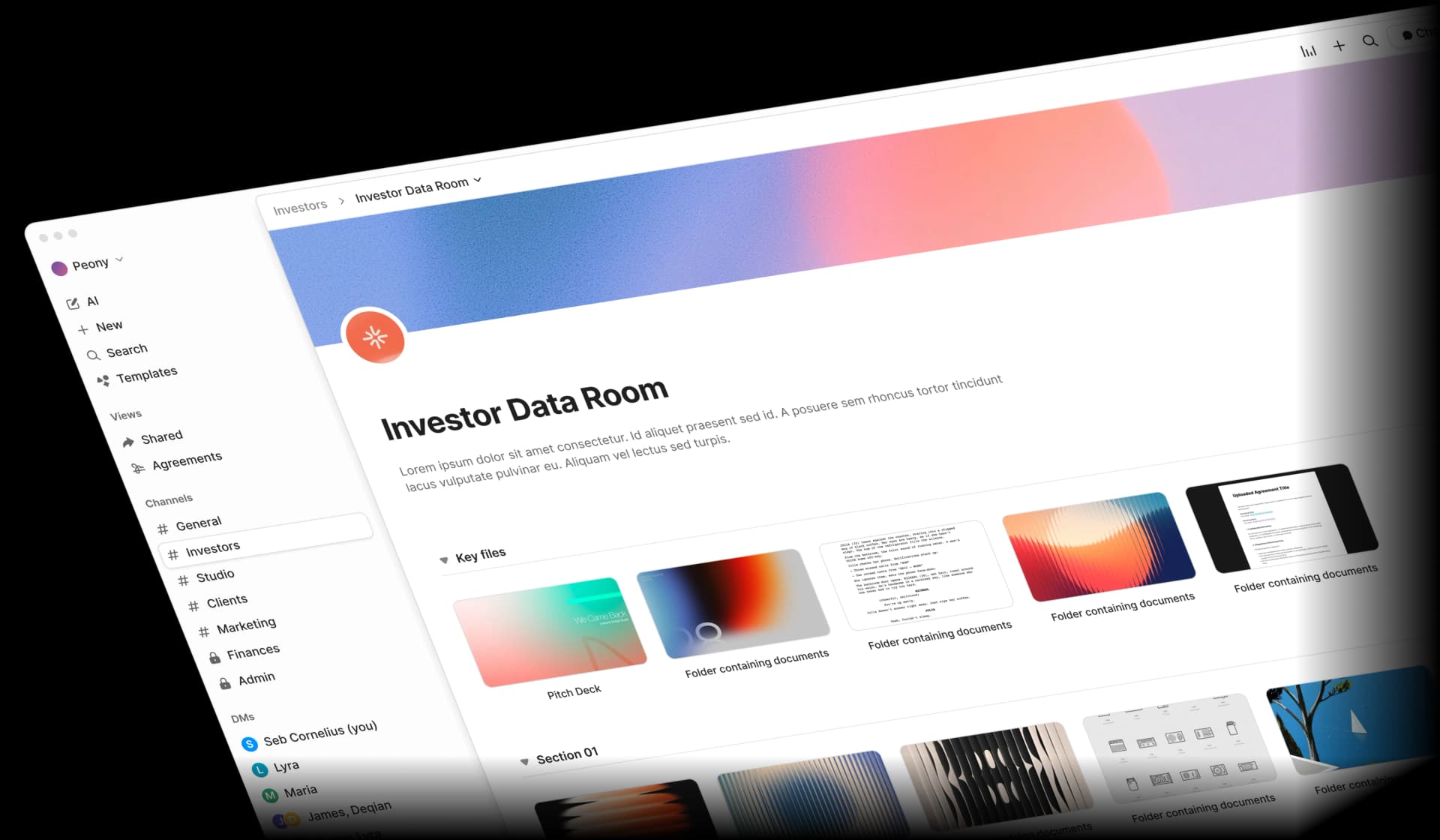
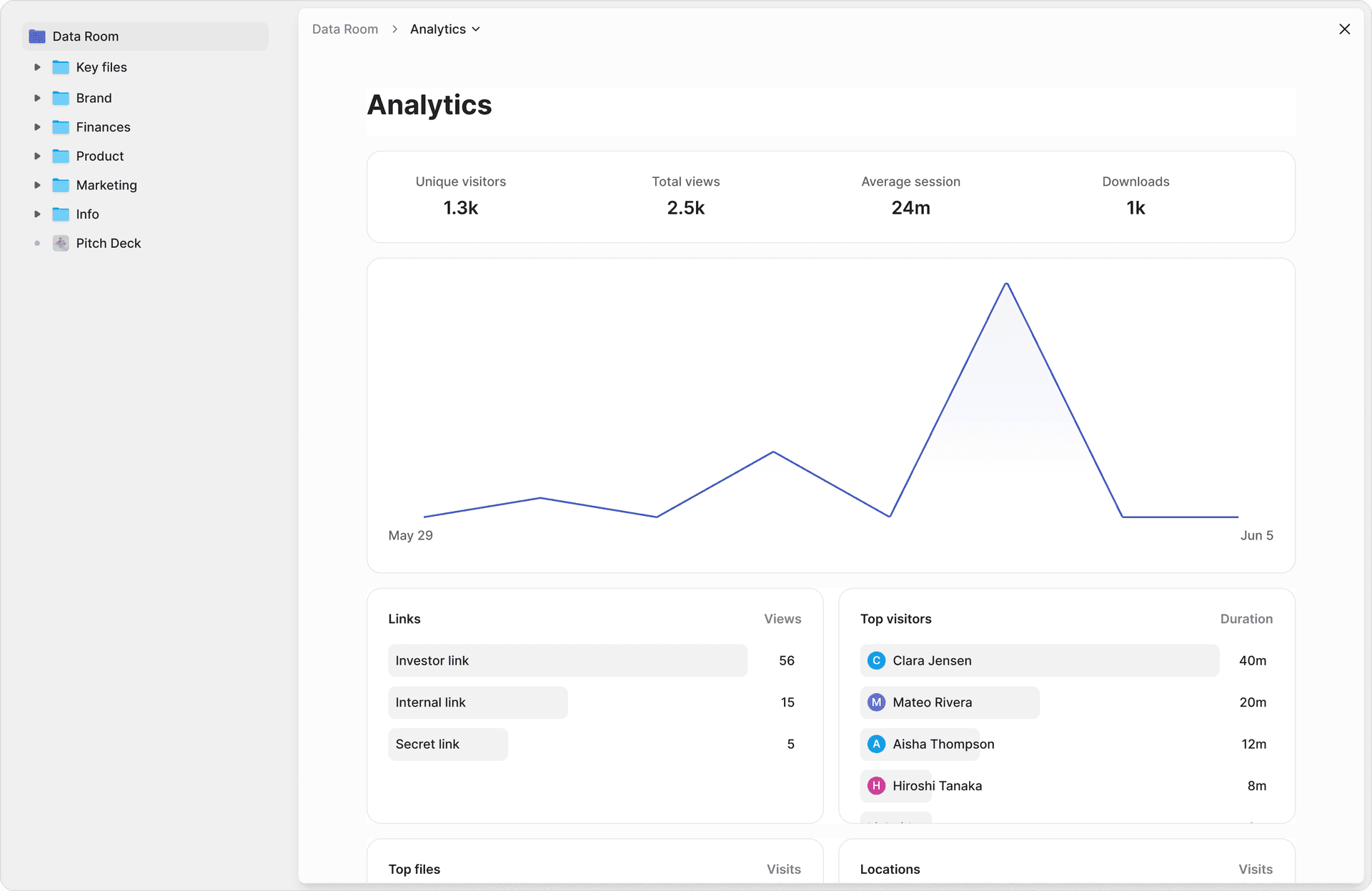
Page-level analytics go beyond "Document X was viewed." I invited a test reviewer outside my team to walk through the data room as if they were conducting real due diligence. The analytics showed they spent 14 minutes inside the lease agreements, focused on rent escalation clauses (pages 7-9), went back to the tenant roster twice, and never opened the environmental reports. That level of insight changes how you run a deal — you know what matters to the other side before they tell you.
Multi-level gating lets you layer access requirements: email verification alone for general documents, email plus NDA signature for confidential materials, email plus NDA plus password for restricted financials. Each level is independently configurable per document or folder, so you can run a staged disclosure process without creating multiple data rooms.
Advanced Q&A workflow structures the due diligence conversation: reviewers submit questions tagged to specific documents, you assign responses to subject-matter experts, track deadlines, and maintain a complete audit trail of every exchange. This is the workflow that traditional VDRs charge premium tiers for — Peony includes it on the Business plan.
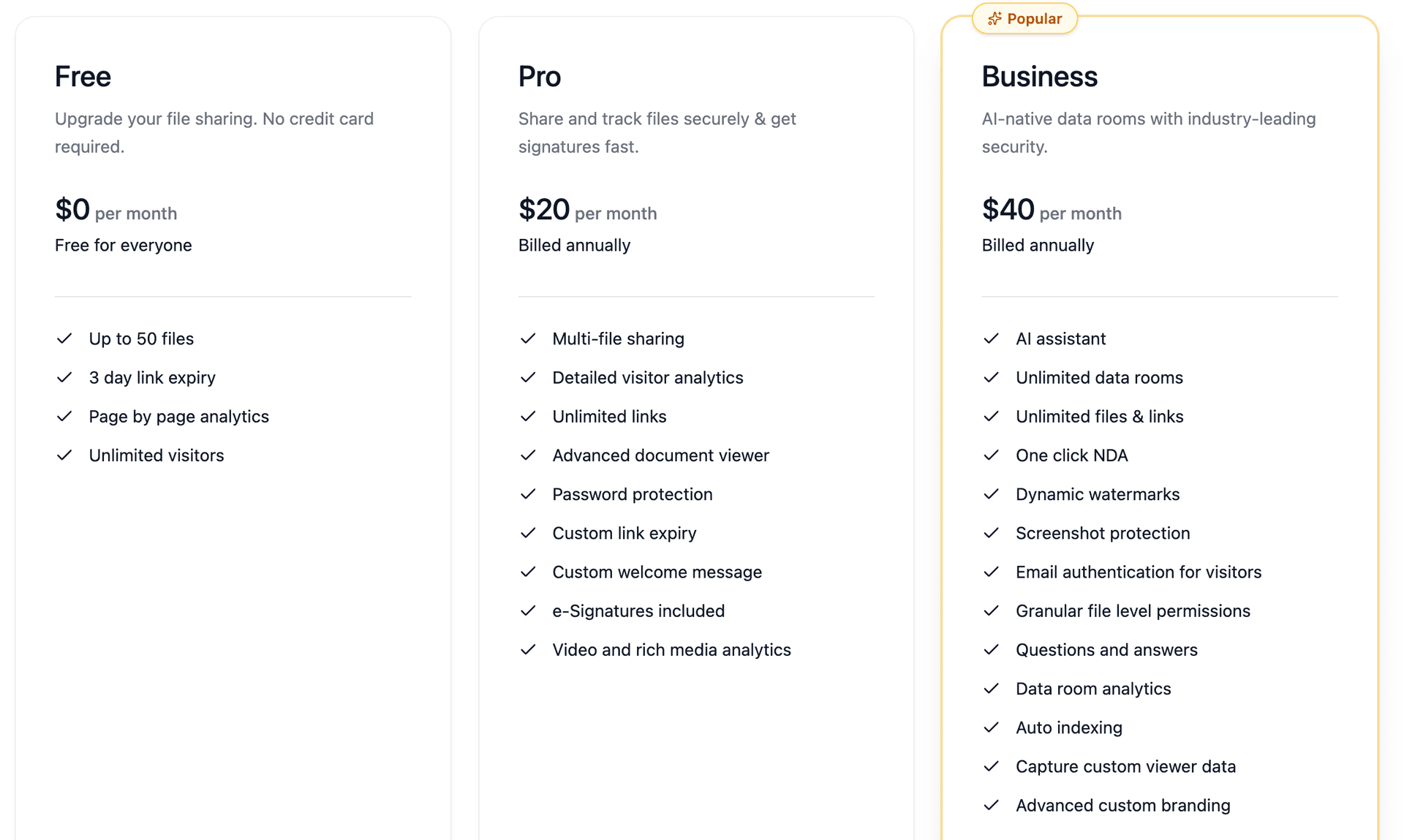
Pricing: Free tier with data rooms, dynamic watermarks, screenshot protection, and page-level analytics. Business plan: $40/month with unlimited rooms, AI auto-indexing, e-signatures, and advanced branding. No per-user scaling, no storage overages. Viewers are always free.
Best for: M&A due diligence, fundraising, PE portfolio management, VC deal flow, commercial real estate, and any team sharing sensitive documents externally where leak prevention matters more than compliance theater.
Considerations: If your team picks tools based on brand legacy rather than speed and capability, Peony may not be the right fit — and that is fine.
2. Datasite — Best for Enterprise-Scale M&A
Datasite is a heavyweight in investment banking and large-cap M&A. When I set up a Datasite room, the depth of deal operations features was immediately apparent — this is a platform built for transactions with 50+ bidders, multiple workstreams, and regulatory complexity that would overwhelm simpler tools.
Getting a Datasite sandbox took 5 business days and two sales calls before I could upload anything. Once inside, the AI document classification is legitimate: Datasite's system correctly tagged about 85% of my test documents, sorting financial statements separately from employment agreements without manual intervention. The 15% that needed manual fixing included every document that straddled two categories — a lease agreement with embedded financial schedules went into "Legal" but missed the financial data entirely, and a board resolution approving a financing round was categorized as "Corporate" with no link to the related term sheet. The pipeline management tools track deal lifecycle from origination through close, which makes sense for banks running multiple transactions simultaneously.
The trade-off is the experience. Setup required multiple calls with their team. Pricing is custom and opaque — expect significant five-figure annual commitments for enterprise deals. The UI reflects a platform optimized for power users in investment banking, not for startup founders sharing a pitch deck. And the buyer experience (what your investors or acquirers actually see) felt a generation behind what Peony or iDeals delivers.
Pricing: Custom, quote-based. Expect per-page, per-user, or flat-fee models depending on deal size and complexity.
Best for: Fortune 500 M&A, $100M+ transactions, investment banking workflows where depth of deal operations justifies the complexity and cost.
3. Intralinks — Best for Regulated Global Enterprises
Intralinks positions itself as the VDR for highly regulated industries and Fortune-scale enterprises. The granular permission settings and security perimeter customizations are genuinely deep — you can configure access rules that would satisfy even aggressive compliance teams.
During testing, the audit trail depth stood out: every action is logged with enough detail to satisfy regulatory review. The platform handles multi-jurisdiction deals where different document sets need different access rules based on regulatory requirements in each country.
The procurement process mirrors the product: heavyweight. If you need to share a few sensitive decks quickly, Intralinks is not the answer. If you are running a cross-border transaction in financial services where the compliance team has veto power over tool selection, it belongs on your shortlist.
Pricing: Quote-based, enterprise tier. Expect commitments similar to Datasite.
Best for: Regulated sectors (financial services, pharma, energy), enterprise deal teams with strict compliance requirements, and global transactions requiring multi-jurisdiction controls.
4. iDeals — Best Mid-Market VDR
iDeals has the market validation that many VDR vendors lack: a 4.7/5 on G2 with 700+ reviews, nine global data centers, and 25+ language support for cross-border deals. When I set up an iDeals room, the structured Q&A handled bidder question routing, expert assignments, and deadline tracking effectively.
Where iDeals pulls ahead of traditional VDRs: Fence View screenshot protection provides a restricted viewing mode that limits what can be captured (though it does not actively block screenshots the way Peony does). Built-in e-signatures handle NDAs and closing documents without an external tool. Eight granular permission levels exceed what most mid-market VDRs offer.
The interface is functional but not modern — when I tested the reviewer-side experience, the document viewer loaded noticeably slower than Peony or SecureDocs, and navigating between folders required full page reloads instead of inline transitions. The admin panel has depth, but finding a specific permission setting meant clicking through three or four nested menus. Setup takes longer than cloud-native tools. The 30-day free trial is a genuine advantage for evaluation.
Pricing: Starting ~$500/month per project. 30-day free trial available.
Best for: Mid-market M&A transactions, corporate restructuring, and cross-border deals requiring multi-language support and global data center coverage.
5. Firmex — Best for High-Volume Law Firms
Firmex processes over 20,000 rooms per year and is a known name in Canadian and North American mid-market M&A. The platform covers the VDR fundamentals: watermarks, full audit trails, Q&A management, and straightforward deal-room setup.
During testing, the workflow automation for Q&A management was solid — question routing, expert assignment, and deadline tracking work as expected. Getting my test room operational took about 45 minutes from first login to having documents uploaded with permissions configured, compared to under 5 minutes on Peony. Most of that time went to the folder structure wizard and permission matrix — thorough, but clearly designed for admins who set up rooms every week and have the workflow memorized. The platform is optimized for teams that run dozens of deals simultaneously and need reliable room setup rather than cutting-edge features.
The gap: analytics stay at the document level (who accessed what), not the page level. No AI-powered indexing. No screenshot protection. The pricing starts around $1,500/month, which is steep for teams running smaller transactions.
Pricing: Generally subscription/project-based, starting ~$1,500/month.
Best for: Law firms, mid-market M&A advisory, and restructuring practices running high volumes of standard due diligence rooms.
6. SecureDocs — Best Budget-Friendly VDR
SecureDocs is refreshingly direct: flat-fee pricing starting at $250/month with unlimited users and unlimited storage, plus 24/7 support. For teams that need a basic data room without enterprise overhead, this is the most transparent pricing in the VDR market.
Testing confirmed the trade-off: the feature depth does not match enterprise suites. No dynamic watermarking with viewer variables. No screenshot protection. No page-level analytics. No AI features. But for a startup running its first fundraise or a small M&A deal where the budget matters more than advanced analytics, SecureDocs delivers predictable cost without surprises.
Pricing: Starts at $250/month (flat fee, publicly stated). Unlimited users and storage.
Best for: Startups, smaller deals, and teams that prioritize predictable cost over advanced security features.
7. Kiteworks — Best for Compliance-Heavy File Exchange
Kiteworks is more of a "secure content communications" platform than a traditional VDR. It centralizes policy and file activity tracking across many external sharing channels — useful when compliance and governance are the primary driver, not deal workflows.
The platform monitors file movement across email, managed file transfer, SFTP, and web forms from a single policy engine. For organizations that need to prove governance across dozens of external sharing channels, Kiteworks solves a different problem than a VDR.
The online Business Package lists at $25.50/month per user (with annual discount). For teams whose problem is "share one data room securely," Kiteworks may be more platform than necessary.
Pricing: Business Package at $25.50/user/month. Enterprise tiers custom-quoted.
Best for: Organizations needing governance and compliance tracking across many external sharing channels simultaneously.
8. Egnyte — Best for Enterprise Content Governance
Egnyte positions around secure file sharing plus governance inside the enterprise: MFA, link expiration, monitoring, and policies to prevent risky public links for sensitive files. It is a content collaboration platform with security controls layered on top.
For enterprises that want a single platform for internal collaboration and external sharing with governance, Egnyte checks the boxes. The Microsoft 365 integration is tight, and the content lifecycle management handles retention and disposal.
The limitation for deal teams: Egnyte is not a VDR. It lacks deal-specific workflows (Q&A, buyer analytics, staged disclosure), and the external sharing experience does not match purpose-built data rooms.
Pricing: From $22/user/month. Enterprise tiers custom-quoted.
Best for: Enterprises that need content collaboration plus governance in a single platform, particularly in Microsoft-heavy environments.
9. Virtru — Best for Persistent DRM After Download
Virtru is explicitly about persistent protection: control access to emails and files, revoke access, and apply policies even after the file has been downloaded and shared. This is the DRM end of the spectrum — restrictions that follow the file beyond your perimeter.
For organizations where documents must be downloaded and then controlled across recipients' systems, Virtru solves a real problem. The Gmail and Outlook integrations make it practical for email-centric workflows without changing user behavior dramatically.
The trade-off: DRM adds friction. Recipients may need to authenticate, install browser extensions, or work within a restricted viewer. For deal workflows where the buyer experience matters, this friction can be a dealbreaker. For internal policy enforcement and regulated industries where control outweighs convenience, Virtru is the right tool.
Pricing: Starter at $119/month for 5 users (billed annually). Enterprise tiers custom-quoted.
Best for: Organizations that need persistent control over downloaded files across email and collaboration workflows.
10. Cryptomator — Best Free Encryption Layer
Cryptomator is open-source, client-side encryption for cloud storage: you encrypt locally, then store or share via your cloud provider. It is free, cloud-independent, and does one thing well.
The limitation is fundamental: Cryptomator is encryption, not a security platform. You get no audit trails, no deal-style permissions, no analytics, no watermarking, no screenshot protection, and no access revocation. If someone has the decryption key, they have full access with no tracking.
For solo founders, small teams, or anyone who wants free encryption on top of their existing cloud storage without buying an enterprise platform, Cryptomator is a solid layer — just not a replacement for a real document security solution.
Pricing: Free (open-source). Optional paid paths for mobile and team features.
Best for: Solo founders and small teams who want free client-side encryption without enterprise overhead.
Risk Model: Which Category Do You Actually Need?
Before picking a platform, match your risk to the right product category:
| Your Situation | Real Risk | What You Need | My Recommendation |
|---|---|---|---|
| Fundraising / sharing pitch decks and financials | Forwarded links, screenshot leaks, no visibility into engagement | VDR with screenshot protection, watermarks, page-level analytics | Peony (free tier) |
| M&A due diligence with multiple bidders | Unauthorized access, cross-bidder data contamination, compliance gaps | Full VDR with Q&A, staged permissions, audit trails | Peony (Business plan) or iDeals |
| Enterprise-scale M&A ($100M+ transactions) | Regulatory complexity, multi-jurisdiction requirements | Enterprise VDR with deep compliance and deal operations | Datasite or Intralinks |
| Internal document governance | Shadow IT, oversharing, compliance exposure | Content platform with governance and DLP integration | Egnyte or Kiteworks |
| Post-download persistent control | Files shared and redistributed beyond your perimeter | DRM with persistent rights management | Virtru |
| Budget-conscious first data room | Need basic security without enterprise cost | Flat-fee VDR with transparent pricing | SecureDocs or Peony (free tier) |
By the Numbers: Document Security in 2026
- $4.88 million — average global cost of a data breach in 2024, up 10% from the prior year (IBM Cost of a Data Breach Report, 2024)
- 30% — data breaches involving third-party vendors, doubled year-over-year, making secure external document sharing in VDRs critical for deal protection (Verizon DBIR, 2024)
- 22% — projected CAGR of the virtual data room market, growing from $2.4 billion in 2024 to $7.7 billion by 2030 (Grand View Research)
- 68% — of data breaches involve a human element (errors, social engineering, misuse), reinforcing that technology alone is insufficient without proper access controls (Verizon DBIR, 2024)
- 277 days — average time to identify and contain a data breach, underscoring the importance of real-time audit trails and instant revocation (IBM Cost of a Data Breach Report, 2024)
Red Flags: Walk Away If You See These
After testing 10 platforms, these are the signals that a vendor is not serious about document security:
- "We are secure" but no exportable audit logs. If you cannot export a complete access history on demand, the vendor is hiding something or has not built proper logging.
- Revocation takes minutes, not seconds. When you revoke access, test it immediately. If the reviewer can still view documents 5 minutes later, the revocation is cache-based, not real-time.
- Watermarks are static, not dynamic. A "CONFIDENTIAL" stamp on every page deters nobody. Viewer-specific variables (email, timestamp, IP) are the only watermarks that serve as attribution evidence.
- Screenshot protection is not offered or not explained clearly. Ask: "What happens when someone presses Print Screen?" If the vendor changes the subject, they do not have it.
- Security features are "enterprise-only" add-ons. If basic protections like watermarking and audit trails require a premium tier, the vendor is monetizing your risk instead of managing it.
- No SOC 2 Type II report available under NDA. A security badge on a marketing page means nothing. The actual report matters.
Implementation: 7 Practical Steps After You Choose
- Start with your highest-risk documents. Do not boil the ocean. Move your deal documents, board materials, and financial models first. Internal collaboration files can wait.
- Configure identity-bound access from day one. Email verification at minimum. SSO/SAML if your organization supports it. Never rely on link-only access for sensitive materials.
- Set up dynamic watermarks as a default. Make viewer-specific watermarks the default for all shared documents, not an exception you enable per-file.
- Enable screenshot protection immediately. If your platform offers it (Peony does), turn it on for every data room. There is no downside.
- Run a 7-day pilot with real external recipients. Test the buyer experience. If your investors or counsel complain about friction, fix it before going live.
- Export your first audit report before going live. Confirm the logs contain everything you need for compliance: timestamps, IP addresses, page-level detail, and permission change history.
- Password-protect sensitive PDFs as a secondary layer. Even inside a secure data room, adding PDF-level protection creates defense in depth.
Frequently Asked Questions
What is the best document security software in 2026?
Peony is the best document security software for deal teams, fundraising, and external sharing. It offers screenshot protection that blocks and logs capture attempts, dynamic watermarks with viewer-specific variables (email, IP, timestamp), AI-powered redaction, page-level analytics showing which pages each reviewer read and for how long, multi-level gating with email verification and NDA enforcement, and Advanced Q&A workflow for structured due diligence. The permanent free tier includes data rooms, watermarks, and analytics. The Business plan at $40/month adds unlimited rooms, auto-indexing, and e-signatures.
Can document security software actually prevent screenshots?
Most document security platforms cannot prevent screenshots at all. They rely on watermarks as a deterrent, which helps with attribution but does not block the capture itself. Peony is one of the few platforms that actively blocks screen-capture attempts using browser-level and OS-level detection, logs the attempt with the reviewer's identity and timestamp, and layers dynamic watermarks into every rendered frame as a secondary deterrent. No solution is 100% leak-proof against a camera pointed at a screen, but Peony's layered approach — screenshot blocking plus identity-bound watermarks plus audit logging — is the strongest combination available in 2026.
What is the difference between a VDR and document security software?
A virtual data room (VDR) is a specific type of document security software designed for deal workflows: M&A due diligence, fundraising, board reporting, and regulated transactions. Document security software is the broader category that includes VDRs, DRM tools, secure file sharing, and information protection platforms. The best modern VDRs like Peony combine traditional data room capabilities (permissions, audit trails, Q&A) with advanced document security features (screenshot protection, dynamic watermarks, AI redaction, page-level analytics) in a single platform, eliminating the need for separate tools.
How much does document security software cost?
Document security software ranges from free (Cryptomator for client-side encryption) to $15-30/user/month (Box, Egnyte for enterprise content platforms) to $250-1,500+/month for purpose-built VDRs (SecureDocs, Firmex, iDeals) to custom enterprise pricing (Datasite, Intralinks). Peony offers a free tier with page-level analytics, AES-256 encryption, and 2FA. The Business plan at $40/admin/month adds dynamic watermarks, screenshot protection, NDA gates, unlimited data rooms, AI auto-indexing, e-signatures, and advanced branding with no per-user scaling and no storage overages.
What features should I look for in document security software?
The six non-negotiable features are: (1) identity-bound access control with email verification and MFA, not just 'anyone with the link'; (2) dynamic watermarking with viewer-specific variables for leak attribution; (3) screenshot protection that blocks capture attempts, not just deters them; (4) comprehensive audit trails logging every view, download, print, and permission change with timestamps and IP addresses; (5) instant access revocation that stops access immediately when risk changes; (6) encryption at rest (AES-256) and in transit (TLS). Peony's Free plan includes AES-256 encryption, 2FA, link expiry, access revocation, and page-level analytics. The Business plan ($40/admin/month) adds dynamic watermarking, screenshot protection, NDA gates, and AI-powered document organization.
What compliance certifications should document security software have?
At minimum, look for SOC 2 Type II (operating effectiveness over time, not just Type I design) and ISO 27001. SOC 2 is the standard most US enterprise buyers, law firms, and PE firms require as a baseline for vendor selection. ISO 27001 is the international equivalent commonly required in European transactions. GDPR compliance is mandatory for any platform handling EU personal data. HIPAA compliance matters for healthcare-adjacent deals. Ask vendors for the actual SOC 2 report under NDA, not just a badge on a marketing page. Peony is SOC 2 ready and provides GDPR-compliant document sharing with comprehensive audit trails.
Is Peony better than enterprise DRM for document security?
It depends on your use case. Enterprise DRM tools like Virtru provide persistent control that follows the file after sharing, which is ideal for environments where documents are downloaded and redistributed across many systems. Peony takes a different approach: documents are viewed inside a controlled environment with screenshot protection, dynamic watermarks, page-level analytics, and instant revocation, so the file never needs to leave your security perimeter. For deal workflows (M&A, fundraising, board reporting), Peony's approach provides stronger security with less friction because recipients view documents in-browser without installing agents or plugins. For post-download persistent rights management, DRM is the right tool.
How do I evaluate document security software without being fooled by demos?
Run a 7-14 day pilot with real documents and real external recipients. Test five specific workflows: (1) onboard an external reviewer with email verification only, no account creation; (2) change permissions mid-deal and verify the change takes effect immediately; (3) export audit logs and confirm they contain timestamps, IP addresses, and page-level detail; (4) attempt a screenshot and verify whether the platform blocks it, logs it, or does nothing; (5) revoke access and confirm the reviewer is locked out within seconds, not minutes. Peony offers a permanent free tier so you can run this evaluation with real deal documents before committing to a paid plan.
What are the biggest risks of not using document security software?
The average global cost of a data breach reached $4.88 million in 2024, up 10% from the prior year according to IBM. Verizon's 2024 DBIR found that 30% of breaches involved third-party vendors, which doubled year-over-year. Without document security software, deal teams face leaked investor decks that kill competitive dynamics, forwarded board materials that reach unintended recipients, screenshots of financial models shared on messaging apps, and no audit trail to identify the source. Peony addresses all of these with screenshot protection, dynamic watermarks, identity-bound access, page-level analytics, and instant revocation. The Business plan ($40/admin/month) includes the full security suite.
Can I use free tools like Google Drive for document security?
Google Drive provides 15 GB of free storage with basic sharing controls and real-time collaboration, but it was not designed for document security. It lacks dynamic watermarking, screenshot protection, page-level analytics, granular view-only permissions (recipients can still download and reshare), document expiry, and detailed audit trails. Google Drive also does not offer native password protection for files or folders — you can work around this with third-party tools, but it is not built in. For internal collaboration on non-sensitive files, Google Drive is excellent. For external sharing of deal documents, financial models, board materials, or anything where a leak has consequences, you need a purpose-built platform. Peony offers a free tier with page-level analytics, AES-256 encryption, and 2FA. The Business plan ($40/admin/month) adds data rooms, screenshot protection, dynamic watermarks, and NDA gates.
Related Resources
- Secure File Sharing Guide: Best Practices for Deal Teams
- How to Protect PDFs from Screenshots
- How to Password-Protect Multiple PDFs at Once
- Best Data Rooms for Startups
- Dynamic Watermarking Complete Guide
- Document Tracking Software Guide
- GDPR Compliance Guide for Document Sharing
- Best Data Room Software Ranked
- VDR Features That Actually Matter
- How to Password Protect a Google Drive Folder
- M&A Data Rooms: What Deal Teams Get Wrong
You might also like
Apr 7, 2026
How to Add Watermarks in Excel (3 Methods Compared) in 2026
Apr 1, 2026
Is OneDrive Secure? (Honest Take From a Data Room Builder) in 2026
Mar 21, 2026
How to Password Protect Google Docs (Google Won't Tell You This)