
Due Diligence Checklist (174 Documents Buyers Actually Request) in 2026

Co-founder and CEO at Peony. I built the data room platform with a background in document security, file systems, and AI. Founded Peony in 2021 in San Francisco.
Due Diligence Checklist: 174 Documents Buyers Actually Request (2026)
Last updated: March 2026
I run Peony, a data room company, and I have helped set up hundreds of due diligence data rooms for M&A transactions, fundraising rounds, PE buyouts, and independent sponsor deals. The single biggest pattern I see is this: sellers underestimate how many documents buyers will request and how precisely organized those documents need to be.
Bloomberg Law's standard M&A due diligence request list contains 174 document types across 10+ categories. That is the baseline law firms use when drafting diligence request letters. In practice, a mid-market data room holds 5,000 to 50,000+ pages of individual documents across those types.
This post is the definitive checklist. Every document type, organized by 10 categories, with industry overlays, staging guidance, common mistakes, and the exact structure I help clients build inside Peony data rooms.
TL;DR: Buyers request 174 document types across 10 categories (Bloomberg Law). Average due diligence now takes 203 days -- up 64% from a decade ago (Bayes Business School). 41% of dealmakers say completing DD is a top obstacle to closing (KPMG 2025). Peony (free, $0) uses AI auto-indexing to organize this entire 10-category structure in under 3 minutes, with page-level analytics and enterprise security (screenshot protection, dynamic watermarks, NDA gates).
This post covers everything: the complete 174-document checklist organized by 10 categories, step-by-step setup with Peony, staged disclosure guidance, platform recommendations, industry overlays, and the 5 most common mistakes that delay deals.
Quick Navigation
- By the Numbers: DD Statistics That Matter
- The Master Checklist: 10 Categories
- Industry Overlays
- 2026 Trends Reshaping DD
- 5 Common Mistakes That Delay Deals
- How to Organize With Peony
- Best Data Rooms for DD, Ranked
- Staged Disclosure Guide
- FAQ
By the Numbers: DD Statistics That Matter
Before diving into the checklist, here is what the data says about due diligence in 2026. Every stat is sourced so you can verify it.
| Metric | Value | Source |
|---|---|---|
| Standard DD document types | 174 types | Bloomberg Law |
| Average DD processing time | 203 days (up from 124 days pre-2013) | Bayes Business School / SS&C Intralinks, 900+ deals |
| Optimal DD length ("Goldilocks") | ~139 days (highest completion rate, lowest premium, best returns) | Bayes / SS&C Intralinks |
| Completing DD as top closing obstacle | 41% of dealmakers | KPMG 2025 M&A Deal Market Study |
| Acquisitions that fail to create value | 70-75% (40,000-deal study) | Fortune, Nov 2024 |
| Executives citing poor DD as main failure cause | 60%+ | Fortune, Nov 2024 |
| Incomplete target info as DD hurdle | 40% of respondents | SRS Acquiom 2025 |
| Buyer questions from poor data room organization | Up to 30% | Admincontrol / DataRooms.org |
| Mid-market data room page volume | 5,000-50,000+ pages | MnA Community |
| Typical data room users per deal | 20-200 users | MnA Community |
| Average seller prep time | 27 days before data room launch | Admincontrol |
The Bayes Business School "Goldilocks" finding is worth internalizing: deals with medium-length DD (~139 days) achieved the highest completion rates, lowest acquisition premiums (22% vs. 30-33% for rushed or dragged-out processes), and best 12-month shareholder returns (+4% vs. market). Rushing through DD leads to overpaying; dragging it out signals unresolvable problems. A well-organized data room hits that sweet spot by eliminating the document-hunting delays that inflate timelines.
The Master Checklist: 10 Categories, 174 Document Types
This synthesized checklist draws from Bloomberg Law, DFIN, Morgan & Westfield, BPM, Diligent, and the M&A Leadership Council. Each category explains why buyers request these documents so you can anticipate follow-up questions.
1. Corporate & Governance (15-25 Documents)
Why buyers request this: Reviewers confirm authority to transact, true ownership structure, and whether any approvals or consents are needed before closing. Missing board consents or unclear cap table entries can stall a deal for weeks. For investor-specific expectations around these documents, see our data room for investors guide.
- Articles/certificates of incorporation (and all amendments)
- Bylaws or operating agreement (and all amendments)
- Organizational chart of entity and subsidiaries
- List of all current officers, directors, and managers
- Minutes of all board meetings, board committee meetings, and stockholder/member meetings (last 3-5 years)
- Written consents to actions without a meeting
- Current cap table (fully diluted, showing options/warrants/convertible notes)
- Stock plan, stock option agreements, warrant agreements
- Stockholder/member agreements, voting agreements, right-of-first-refusal agreements
- List of all jurisdictions where entity is qualified to do business
- Good-standing certificates from state of formation and each qualified state
- Joint venture and partnership agreements
- List of any entity names used in last 5 years (DBAs, trade names)
- Powers of attorney
- Investor rights agreements, registration rights agreements
2. Financial (15-20 Documents)
Why buyers request this: This set validates earnings quality, trend durability, seasonality, and forecast realism. Buyers price risk rather than guess -- and they need granular data to do it.
- Audited financial statements (3-5 years) -- balance sheet, income statement, cash flow
- Unaudited monthly/quarterly financials (24-36 months)
- Management-prepared financial statements for any stub period
- Revenue waterfall / bridge (billings to GAAP revenue reconciliation)
- Accounts receivable aging schedule
- Accounts payable aging schedule
- Capital expenditure schedule (historical and planned)
- Debt schedule (all outstanding loans, lines of credit, promissory notes)
- Budget vs. actual analysis
- Financial projections/forecasts with underlying assumptions
- Bank statements for all accounts (12 months)
- Credit agreements and amendments
- Working capital analysis
- Intercompany transaction schedule
- Related-party transaction disclosures
- Inventory reports (if applicable)
- Backlog reports (if applicable)
- Audit management letters and responses
3. Tax (10-15 Documents)
Why buyers request this: Clean tax posture avoids price chips and closing delays. Unreported sales tax obligations or missing nexus analysis are among the most common purchase-price adjustments.
- Federal, state, and local income tax returns (3-5 years, all open tax years)
- Tax provision workpapers
- Schedule of NOLs, tax credits, and carryforwards
- Sales and use tax filings and exemption certificates
- Payroll tax filings
- Property tax records
- Nexus analysis (which states/countries entity owes taxes in)
- Transfer pricing documentation (if international operations)
- Tax audit correspondence, notices, and settlement agreements
- R&D tax credit studies
- Section 382 ownership change analysis (if applicable)
- State income tax apportionment schedules
4. Legal & Contracts (15-25 Documents)
Why buyers request this: Reviewers test whether revenue or supply could be interrupted by the deal. Contracts with change-of-control provisions (requiring consent to transact) and assignment restrictions are the most time-sensitive items -- discovering them late forces a scramble that can delay closing by months. Bloomberg Law specifically flags these as critical.
- All material contracts (generally defined by a dollar threshold)
- Top 10-20 customer agreements (by revenue)
- Top 10-20 vendor/supplier contracts
- Standard form MSA / online ToS / EULA
- Distribution, reseller, and channel partner agreements
- Non-compete and non-solicitation agreements
- Licensing agreements (both in-bound and out-bound)
- Government contracts
- All debt instruments: loan agreements, credit facilities, indentures, guarantees
- Security agreements, pledge agreements, UCC filings
- Leases (real estate and equipment)
- Contracts with change-of-control provisions (flag these explicitly)
- Contracts with assignment restrictions (flag these explicitly)
- Letters of intent, term sheets, or pending agreements
- Contracts with related parties
- Settlement agreements
- Indemnification agreements
5. Customers & Revenue (10-15 Documents)
Why buyers request this: This answers three questions fast -- how concentrated is revenue, how predictable are renewals, and where growth will realistically come from. A single customer representing more than 25% of revenue is a red flag in every deal.
- Customer list with ARR/MRR and contract term
- Revenue concentration view (top 10 and top 20 customers)
- Renewal calendar (next 12-24 months)
- Pricing and discount policy
- Pipeline by stage with historical conversion rates
- Win/loss analysis (last 12-24 months)
- Customer churn data (logo churn and dollar churn)
- Net Revenue Retention (NRR) analysis
- Channel/partner revenue breakdown
- Customer satisfaction data (NPS, CSAT, support tickets)
6. HR & Employment (10-15 Documents)
Why buyers request this: Buyers look for key-person risk, worker misclassification exposure, and the true cost to retain and scale the team. Morgan & Westfield emphasizes these as the three core HR diligence questions.
- Current organizational chart with headcount by department
- Employee census (name, title, start date, compensation, location)
- Employment agreement templates
- Key executive employment/retention agreements
- Contractor/consultant agreements
- Employee handbook / HR policies
- Compensation bands / salary ranges
- Variable pay plans (bonus, commission, equity incentive)
- Benefits summary: health, dental, vision, 401(k), ESOP
- Pending or historical employment claims/complaints (EEOC, state agencies)
- Workers' compensation claims history
- Immigration status / visa sponsorship records (where relevant)
- Union/CBA agreements (if applicable)
- Non-compete / non-solicitation agreements with key employees
- Offer letter templates and PTO/vacation policy
7. IP & Technology (15-20 Documents)
Why buyers request this: Reviewers confirm you own what you sell and that the technology stack is maintainable without unexpected license gaps or brittle dependencies. IP assignment gaps are the #1 document problem in technology M&A, according to Software Equity Group.
- IP assignment agreements (founders, employees, contractors)
- Patent portfolio: granted patents, pending applications, prosecution history
- Trademark registrations and applications
- Copyright registrations
- Trade secret policies and protections
- Open-source software (OSS) usage disclosures and license compliance
- Software license agreements (third-party)
- High-level architecture diagram
- List of major third-party technology dependencies
- Source code escrow agreements
- Domain name registrations
- Freedom-to-operate (FTO) analyses or opinion letters
- IP litigation or cease-and-desist correspondence
- Data processing agreements with technology vendors
- SOC 2 Type II reports or equivalent security certifications
- Penetration test results (redacted summaries)
For AI-focused transactions, Skadden (2026 Insights) recommends adding: training data provenance, model performance benchmarks, data licensing agreements, and compute infrastructure details.
8. Security & Privacy (10-15 Documents)
Why buyers request this: Cybersecurity has overtaken ESG as the #1 due diligence priority, per SRS Acquiom's 2025 study of 150 senior investment bank executives. 73% of dealmakers would walk away from a deal with undisclosed cyber issues, and 62% of M&A deals are delayed by cybersecurity problems (Forescout, 2025).
- Security governance framework (mapped to NIST CSF 2.0 or ISO 27001)
- Incident history and response plan
- Penetration testing results (last 12 months)
- SOC 2 Type II or equivalent certification
- Data encryption policies (at rest and in transit)
- Access control and identity management policies
- Endpoint detection and response (EDR) deployment records
- Third-party/vendor risk management program
- Employee security awareness training records
- Cyber insurance coverage and claims history
- Privacy notices and data map (what personal data you collect and where it lives)
- Data-processing agreements with vendors
- GDPR/CCPA/state privacy law compliance documentation
- Business continuity and disaster recovery testing records
Cautionary example: Verizon's acquisition of Yahoo saw a $350 million price reduction after Yahoo disclosed breaches affecting 500M+ and 1B+ user accounts during the DD process, plus $35M in SEC penalties and $80M in lawsuits.
9. Operations (10-15 Documents)
Why buyers request this: This gives a realistic view of near-term deliverables, support obligations, and operational resilience. Buyers need to understand what they are committing to before planning any post-close integration.
- Product/service overview and roadmap
- Recent release notes / changelog (for software companies)
- Key operational processes documentation
- Customer SLAs and support processes
- Vendor SLAs for critical services
- Quality management documentation (ISO certifications if applicable)
- Supply chain overview (for manufacturing/physical goods)
- Facility inspection reports
- Equipment lists and maintenance records
- Training materials and SOPs
- Business continuity / disaster recovery plan
10. Regulatory & Compliance (10-15 Documents)
Why buyers request this: Reviewers need to understand whether staying compliant post-close will require new systems, staffing, or timeline. Active remediation plans or consent orders directly affect deal structure and pricing.
- All required licenses, permits, and governmental approvals
- Regulatory examination reports and correspondence
- Active remediation plans or consent orders
- Anti-corruption / FCPA compliance program documentation
- Sanctions screening procedures
- Export control compliance (ITAR/EAR if applicable)
- Industry-specific certifications (HIPAA, PCI-DSS, FedRAMP, etc.)
- Lobbying disclosures
- Data privacy compliance documentation
- Correspondence with regulators (FDA, SEC, FTC, etc.)
Additional categories that some deals require as standalone sections: Insurance (D&O, cyber, E&O, GL, property policies, coverage summaries, claims history), Litigation & Claims (pending/threatened matters, settlements, subpoenas), Real Estate & Facilities (leases, estoppels, deeds), and ESG / Environmental (permits, audits, remediation plans). For most deals, these fit within or alongside the 10 core categories above.
Industry Overlays: Additional Documents by Sector
The 10-category master checklist covers the foundation. These industry overlays add the sector-specific documents that buyers in each vertical will expect.
SaaS Companies
SaaS due diligence adds approximately 15 document types beyond the standard checklist. Sources: L40 Advisory, The SaaS CFO, Software Equity Group.
- ARR/MRR bridge (new, expansion, contraction, churn reconciliation month-by-month)
- Cohort-based retention analysis (gross dollar retention and net revenue retention by cohort vintage)
- Customer churn data: logo churn and dollar churn, segmented by plan tier and customer size
- Net Revenue Retention (NRR): top-quartile SaaS is above 120%
- CAC payback period and LTV:CAC ratio by acquisition channel
- Gross margin build: distinguish software delivery costs vs. professional services
- Deferred revenue schedule and ASC 606 revenue recognition policies
- Hosting/infrastructure cost breakdown (AWS/Azure/GCP by service, trend over time)
- Security certifications: SOC 2 Type II, ISO 27001, penetration test results
- Customer concentration analysis: % of ARR from top 1, 5, 10, 20 customers
- Pipeline by stage with historical conversion rates
- Product usage data: DAU/MAU, feature adoption, stickiness metrics
- Technical architecture diagram (microservices, databases, third-party integrations)
- Open-source license audit results
- Code quality metrics: test coverage, deployment frequency, incident response time
SaaS red flags (SureSwift Capital): Gross dollar retention below 85% signals product-market fit issues. Single customer over 25% of ARR. Founder as sole technical contributor. No SOC 2 or equivalent. Revenue recognized upfront rather than ratably.
Biotech & Pharma
IP and regulatory documents can constitute 40-60% of the total data room volume in biotech, vs. 10-15% in typical corporate M&A. Sources: Phoenix Strategy Group, Alacrita.
- FDA/EMA correspondence: submissions, approvals, warning letters, Form 483 observations
- IND/NDA/BLA filings: complete filing packages for all products
- Clinical trial documentation: protocols, IRB approvals, informed consent, statistical analysis plans
- GCP/GLP/GMP compliance records: inspection reports, audit findings, CAPA plans
- Patent estate: granted patents, pending applications, patent term extensions
- Freedom-to-operate (FTO) opinions
- Hatch-Waxman/BPCIA analysis (generic/biosimilar competitive exposure)
- Manufacturing agreements: CMO/CDMO contracts, API supply chain
- Pharmacovigilance / adverse event reporting: REMS programs, safety databases
- Market exclusivity analysis: orphan drug designations, pediatric exclusivity
- Pipeline valuation models: risk-adjusted NPV for each clinical-stage asset
- Pricing and reimbursement data: payer mix, formulary status, rebate agreements
- Key opinion leader (KOL) relationships and advisory board agreements
Real Estate
Phase I Environmental Site Assessment is mandatory for any commercial property acquisition to establish the "innocent landowner" defense under CERCLA. Sources: PropertyMetrics, Thompson Coburn LLP.
- ALTA survey (current, certified to buyer and lender)
- Title commitment and title exception documents
- Rent roll (current, with lease abstracts for every tenant)
- Estoppel certificates from all tenants
- SNDA agreements (subordination, non-disturbance, attornment)
- Property Condition Assessment (PCA) / building inspection report
- Phase I Environmental Site Assessment (ESA) -- non-negotiable
- Phase II ESA (if Phase I identified recognized environmental conditions)
- Zoning compliance letter or zoning due diligence report
- Certificate of occupancy
- Historical operating statements (3-5 years)
- Property tax bills and assessments (3-5 years)
- CAM reconciliations (common area maintenance)
- Capital improvement history and planned CapEx
- Utility bills (12+ months)
- Service contracts (HVAC, elevator, janitorial, landscaping, security)
- ADA compliance documentation
- Flood zone determination / FEMA maps
Real estate DD typically spans 30-90 days, sometimes up to 6 months for complex portfolios.
Manufacturing
Environmental and equipment documents are far more extensive in manufacturing DD. Buyers need to quantify deferred maintenance CapEx and environmental remediation liability, both of which directly affect purchase price. Sources: BluWave, Brightest.io.
- Equipment list with age, condition, maintenance records, and replacement cost
- Facility layout and production flow diagrams
- Capacity utilization reports (current throughput vs. maximum capacity)
- Quality management system: ISO 9001, Six Sigma, lean manufacturing metrics
- Supply chain mapping: tier 1 and tier 2 suppliers, single-source dependencies
- Bill of materials (BOM) for key products
- Raw material pricing contracts and hedging agreements
- Inventory management data: turns, obsolescence, safety stock levels
- OSHA citations and workplace safety records (TRIR / DART rates)
- Environmental permits: air, water, waste discharge
- Hazardous materials inventory and Material Safety Data Sheets (MSDS)
- EPA correspondence, notices of violation, Superfund exposure
- Product warranty claims data and product liability history
- Customer quality scorecards (if supplying to automotive/aerospace OEMs)
- Maintenance CapEx vs. growth CapEx breakdown
- Automation/robotics roadmap
- Energy consumption and utility cost analysis
Note: 42% of manufacturing M&A deals face cybersecurity incidents, often due to legacy operational technology (OT) systems (Infosys).
2026 Trends Reshaping Due Diligence
AI-Powered Document Review Is Becoming Standard
More than 60% of PE firms already use at least one GenAI tool for sourcing, screening, or diligence, and adoption is forecast to surge from 16% of deal teams in 2023 to 80% by 2028 (Bain & Company, Global PE Report 2025). AI-assisted teams cut diligence time by 60-80% -- from approximately one week of data summarization to one day (V7 Labs / Bain, 2025).
What AI does in DD today: auto-categorizes and indexes uploaded documents, extracts key clauses (change-of-control, assignment, termination) across hundreds of contracts, identifies financial discrepancies, answers natural-language questions across the data room, and processes multilingual documents for cross-border deals. Herbert Smith Freehills used an AI contract review platform to review hundreds of leases in a recent deal, with all outputs reviewed by lawyers for quality.
Peony's AI auto-indexing builds on this trend by categorizing uploaded documents into the standard DD folder structure automatically.
Cybersecurity DD Is Now Non-Negotiable
Cybersecurity has overtaken ESG as the #1 due diligence priority (SRS Acquiom, 2025). The average global cost of a data breach hit $4.88M in 2024, the steepest jump since the pandemic (IBM / Infosys). The Marriott-Starwood acquisition is a cautionary tale: Marriott acquired Starwood for $13.3B in 2016, then discovered a breach exposing approximately 400M guest records that had existed since 2014 -- resulting in a $123M GDPR fine.
The emerging standard cybersecurity DD checklist includes 12 items (see Category 8: Security & Privacy above), and I expect every serious M&A process in 2026 to include them.
ESG Requirements Are Bifurcating
U.S. deals are de-prioritizing ESG documentation (SRS Acquiom confirms the shift). But for deals involving EU-headquartered targets or buyers with EU exposure, ESG documentation remains critical. The EU CSRD scope was narrowed under the "Omnibus" simplification to companies with 1,000+ employees and EUR 450M+ turnover (Morgan Lewis, March 2026), and the CSDDD transposition was postponed to July 2028. The practical takeaway: include ESG documentation if your deal has any EU nexus, and confirm with counsel whether the narrowed scope applies to your situation.
5 Common Mistakes That Delay Deals
These are the five document-related mistakes I see most frequently in my work with Peony clients. Each one is backed by published research.
1. Missing IP Assignment Agreements
Founders, early employees, and contractors often lack proper IP assignment paperwork. If the company cannot prove it owns its core IP, the deal stalls or the price drops. This is the #1 document gap in technology M&A (Software Equity Group).
Fix: Audit IP assignments before launching the data room. Every person who wrote code, designed products, or created content should have a signed assignment on file.
2. Undiscovered Change-of-Control Provisions
Sellers often do not know which contracts require counterparty consent for a sale. Discovering this late forces a scramble that can delay closing by weeks or months (Bloomberg Law).
Fix: Run a contract-level search for "change of control," "assignment," and "consent" clauses before DD begins. Flag every contract that requires third-party approval to transfer.
3. Incomplete Cybersecurity Documentation
53% of organizations have discovered significant cybersecurity issues during DD that jeopardized a deal (Forescout, 2025). Many sellers have no documented security governance framework, incident history, or penetration test results.
Fix: Map your security posture to NIST CSF 2.0 or ISO 27001 before entering a process. If you have never had a penetration test, get one -- the results (even imperfect ones) show good faith.
4. Poor Data Room Organization
Up to 30% of all buyer questions stem from inability to find documents in the data room -- not missing documents, but poor organization (Admincontrol / DataRooms.org). This wastes time on both sides and erodes confidence.
Fix: Use the 10-category structure in this checklist. Consistent file naming (YYYY-MM_Category_Description_vN.ext) and a brief "what's here" note at the top of each folder eliminate most navigation confusion. Peony's AI auto-indexing creates this structure automatically.
Maintenance cadence: Set a monthly update schedule for your data room -- management accounts, pipeline reports, and headcount monthly; financial statements, budget variance, and customer metrics quarterly; new contracts, litigation updates, and regulatory filings as needed. Use version control in file names (_v1, _v2) and replace old versions rather than uploading alongside them. Outdated financials or superseded contracts undermine credibility faster than missing documents.
5. Over-Sharing Sensitive Documents Too Early
Releasing employee-level compensation data, customer-identifying information, and disclosure schedules to unqualified parties creates competitive intelligence risk and damages trust if the deal falls through.
Fix: Stage your disclosure in three phases (see the Staged Disclosure Guide below). Keep confirmatory-level documents gated behind NDA gates until both sides are aligned on terms.
How to Organize This Checklist With Peony
I built Peony specifically to solve the data room setup problem. Here is how the checklist above maps to an actual Peony data room.
Step 1: Upload Documents in Bulk
Drag and drop your files into a new Peony data room. You do not need to pre-sort them -- that is what AI does next.

Step 2: AI Auto-Indexing Creates the Structure
Peony's AI auto-indexing categorizes your uploaded documents into the standard DD folder structure -- the same 10 categories in this checklist -- in under 3 minutes. No manual folder creation, no drag-and-drop sorting. The AI reads document content and assigns each file to the correct category.
This is where the time savings compound. Sellers spend an average of 27 days preparing documentation before launching a data room. With AI auto-indexing, the structural work that used to take days happens in minutes.

Here is the folder structure that Peony's AI creates (and that you should use if building manually):
01_Corporate
  /Formation_Documents
  /Governance
  /Cap_Table
  /Shareholder_Agreements

02_Financials
  /Audited_Statements
  /Monthly_Accounts
  /Projections
  /Budgets

03_Tax
  /Returns
  /Nexus_Analysis
  /Credits_NOLs

04_Legal
  /Material_Contracts
  /IP_Portfolio
  /Litigation
  /Insurance

05_Commercial
  /Customer_Contracts
  /Pipeline
  /Market_Analysis

06_HR
  /Organization
  /Compensation
  /Policies
  /Equity_Plans

07_Technology_IP
  /Architecture
  /Security
  /Product_Docs

08_Operations_Compliance
  /Licenses_Permits
  /Facilities
  /Vendors

09_Regulatory
  /Certifications
  /Correspondence
  /Compliance_Programs

10_Security_Privacy
  /Governance
  /Incident_History
  /Certifications

99_Confirmatory (gated until late-stage)
Naming convention: YYYY-MM_Category_Description_vN.ext (for example, 2026-01_Customer_MSA_Acme_v3.pdf). One file per item. Replace the file when you revise it so the room never contains duplicates that contradict each other.
Pro tip: Add a "What's Here" index. At the top of each major folder, add a brief README note explaining what the folder contains, why a buyer needs it, and what is still pending. In my experience, this reduces repeat Q&A questions by 30 to 40%. Buyers appreciate context -- it signals that you understand the process, not just the documents.
Step 3: Track Reviewer Engagement With Page-Level Analytics
Once your data room is shared, Peony's page-level analytics show you exactly which pages each reviewer reads, how long they spend on each document, and where they go back for a second look. This tells you which categories are getting scrutiny and where follow-up questions are likely.
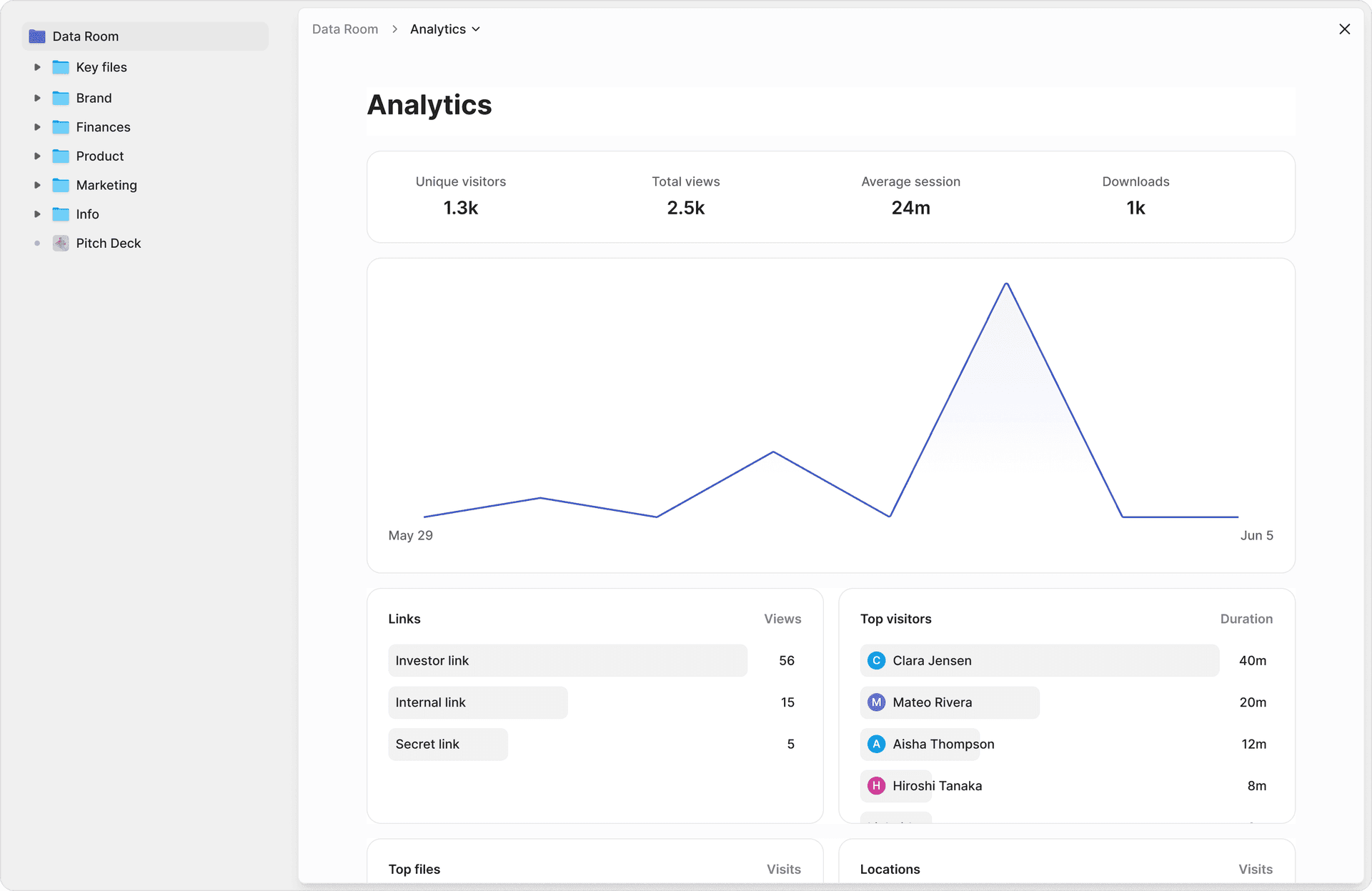
For due diligence specifically, analytics answer critical questions: Is the buyer spending disproportionate time on the legal section (potential contract concerns)? Are they skipping the security category (or drilling into it)? Has the PE firm's operating partner reviewed the financials yet?

Security Features for DD Data Rooms
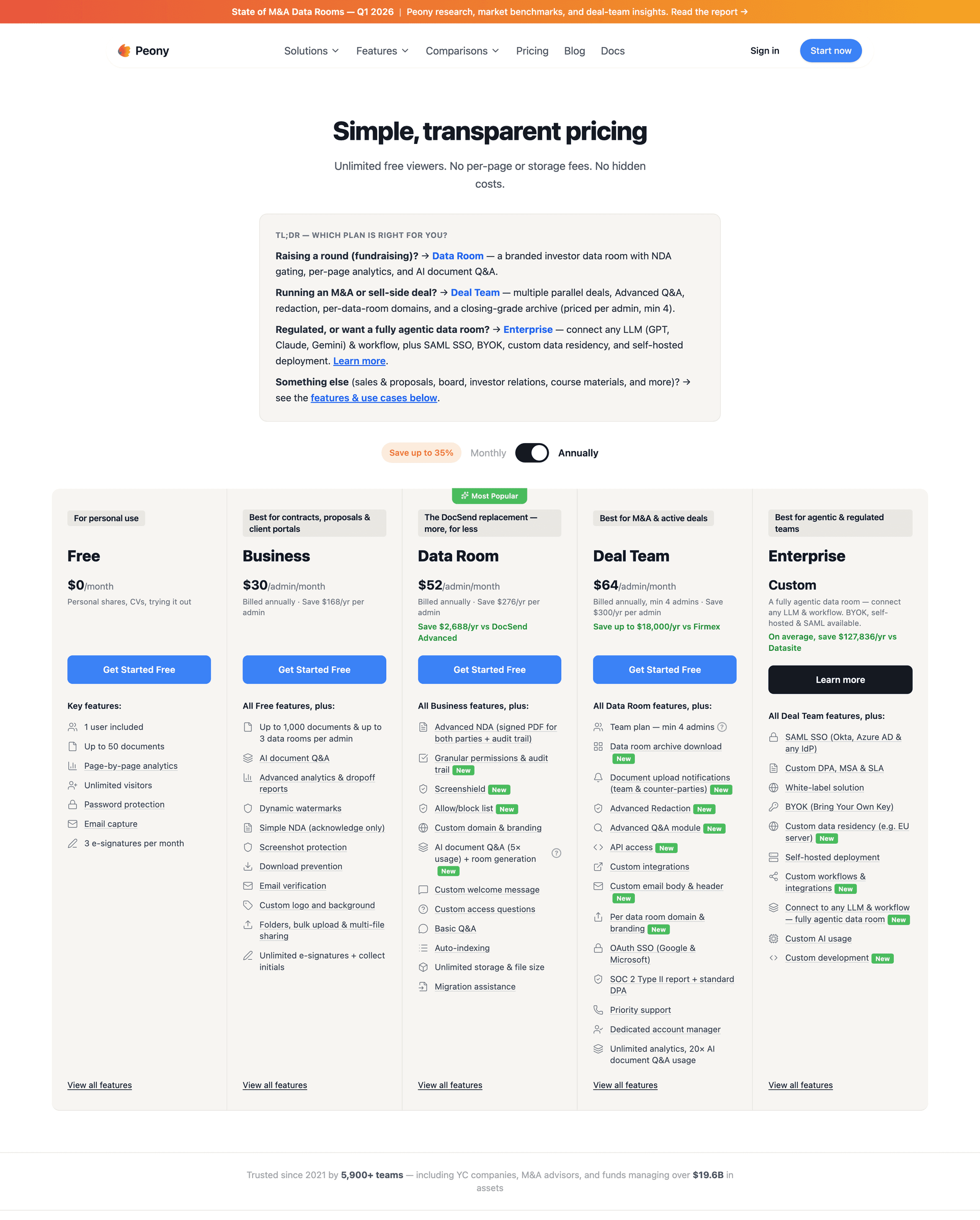
Every Peony data room includes core security controls: email verification for visitor identity, link expiration and instant revocation, per-folder and per-document permissions for staged disclosure, and complete audit trails for every viewer action.
The Business plan ($30/admin/month) adds the advanced security that due diligence demands:
- Screenshot protection that blocks and logs capture attempts
- NDA gates that require signature before document access
The Data Room plan ($52/admin/month) adds dynamic watermarks that trace any leaked page to a specific viewer.

Best Data Rooms for Due Diligence in 2026, Ranked
The best data room for due diligence is the one that gets a secure, well-organized room in front of reviewers fastest — then shows you exactly what they read. So I rank DD platforms on the dimensions that actually move under deal pressure — speed-to-room, staged disclosure, Q&A throughput, and per-reviewer page analytics — not on brand legacy or sticker price alone. Here are the four I recommend in 2026, with honest pricing and who each one fits.
1. Peony -- Best Overall for Speed and Intelligence
Peony is purpose-built for deal workflows and is the fastest platform to go from zero to a shared DD room -- under 5 minutes, no sales call required. AI auto-indexing organizes documents into the standard DD folder structure in under 3 minutes. Page-level analytics show exactly which pages each reviewer read and for how long -- not just "link opened." Enterprise security on the Business plan ($30/admin/month) includes screenshot protection, NDA gates, and email verification, with dynamic watermarks on the Data Room plan ($52/admin/month). The Free plan includes AES-256 encryption, 2FA, link expiry, and per-page analytics. Built-in e-signatures, AI Q&A workflows, and AI document extraction with cited page numbers round out the feature set.
Pricing: Free ($0) for up to 50 files with analytics. Data Room at $52/admin/month includes unlimited data rooms, AI auto-indexing, NDA workflows, and all security features.
Best for: Startup fundraising, growth equity, PE buyouts, mid-market M&A, and any team that wants enterprise-grade DD rooms without enterprise pricing or onboarding timelines. For the full M&A data room setup playbook — folder structure, stage-gate permissions, and Q&A workflow — see the best M&A data room guide.
If your deal team picks tools based on brand legacy rather than speed and capability, Peony may not be the right fit -- and that is fine.

2. iDeals -- Proven Mid-Market VDR With 24/7 Support
iDeals is a proven mid-market data room with best-in-class customer support -- 24/7 availability in 10+ languages, with chat responses averaging under 30 seconds. Over 175,000 companies have used iDeals for DD rooms. Granular permissions, reliable Q&A workflows, bulk upload with auto-indexing, and strong compliance (ISO 27001, SOC 2/3, HIPAA). Five consecutive G2 Leader awards. Analytics show views and downloads but not page-level engagement. Pricing starts at approximately $500+/month.
Best for: Mid-market M&A, PE firms, and legal teams that value responsive human support and a proven track record.
3. Firmex -- Best for Advisory Firms Running Multiple Deals
Firmex offers unlimited self-serve data rooms on annual subscription, making it cost-effective for advisory firms and PE funds managing multiple concurrent DD processes. Quick room setup, solid watermarking, dedicated customer success manager included, 223,000+ companies served since 2006. No AI features. UI can slow down with 500+ documents per room. Pricing averages approximately $7,800/year.
Best for: Advisory firms, PE funds, and deal teams managing multiple simultaneous DD processes.
4. Datasite -- Enterprise Gold Standard for Large-Cap M&A
Datasite (formerly Merrill DataSite) is the enterprise gold standard for billion-dollar transactions. Their AI capabilities are the deepest among legacy providers -- auto-classification across 100+ PII types, generative AI for summarization, and ISO/IEC 42001 certification for AI governance. Requires a sales call and multi-day onboarding. Per-page pricing (~$0.60/page) results in costs of $25,000 to $100,000+/year.
Best for: Large-cap cross-border M&A, investment banks, and enterprise deals where budget is secondary to institutional credibility.
Staged Disclosure: What to Share at Each Phase
Instead of giving every reviewer access to everything, stage your disclosure in three phases. This is standard practice in M&A and fundraising, and it protects you if a process falls through.
| Stage | Trigger | What to Share | Security Level |
|---|---|---|---|
| Stage 1: Initial Interest | First meeting / NDA signed | Corporate overview, business plan, high-level financials | NDA gate, email verification, watermarks |
| Stage 2: Serious Interest | Follow-up meetings / LOI discussions | Detailed financials, customer contracts, key metrics | All Stage 1 + download restrictions, screenshot protection |
| Stage 3: Confirmatory | Term sheet / LOI signed | Complete legal, detailed cap table, employee data, sensitive IP | All Stage 2 + per-document permissions, time-limited access |
Phase 1: Preliminary (All Qualified Parties)
Share after NDA execution with any party that passes initial qualification.
- Company overview and corporate structure (Category 1 highlights)
- High-level financial summary: revenue, growth rate, EBITDA or burn rate
- Management team overview
- Product/service overview
- High-level market positioning
Purpose: Let buyers determine if the opportunity fits their thesis before committing resources to detailed review.
Phase 2: Detailed (Shortlisted Bidders)
Share with 2-5 parties that submit indicative bids or term sheets.
- Full financial statements and projections (Category 2)
- Complete tax filings and analysis (Category 3)
- Material contracts with change-of-control analysis (Category 4)
- Customer data with concentration analysis (Category 5)
- IP portfolio and technology architecture (Category 7)
- Security governance documentation (Category 8)
- Operations and compliance (Categories 9-10)
Purpose: Give bidders enough information to submit binding offers and conduct substantive diligence.
Phase 3: Confirmatory (Final Bidder Only)
Share only with the selected bidder, near signing.
- Employee-level compensation data and HR details (Category 6 sensitive items)
- Individual customer contracts and pricing
- Disclosure schedules attached to the definitive agreement
- Sensitive litigation details and reserves
- Confirmatory financial schedules
Purpose: Validate all representations and warranties before closing. This information is too sensitive to share with multiple competing bidders.
On Peony, you implement staged disclosure using per-folder permissions -- each phase maps to a permission group. As parties advance through the process, you expand their access without creating separate data rooms. NDA gates enforce signature requirements before any access, and link expiration ensures former bidders lose access when they exit the process.
For platform-specific setup instructions, see the How to Organize This Checklist With Peony section above.
FAQ
How many documents do buyers typically request in due diligence?
Bloomberg Law's standard M&A due diligence request list contains 174 document types across 10+ categories. In practice, a mid-market deal data room holds 5,000 to 50,000+ pages of individual documents across these types. Peony's AI auto-indexing organizes uploaded documents into the standard 10-category structure in under 3 minutes, so sellers can populate a complete checklist without building folders from scratch.
What are the 10 categories of a due diligence checklist?
The standard 10 categories are: (1) Corporate & Governance, (2) Financial, (3) Tax, (4) Legal & Contracts, (5) Customers & Revenue, (6) HR & Employment, (7) IP & Technology, (8) Security & Privacy, (9) Operations, (10) Regulatory & Compliance. Some checklists also add Insurance, Litigation, Real Estate, and ESG as sub-categories. Peony data rooms use AI auto-indexing to sort uploaded files into these categories automatically.
How long does due diligence take in 2026?
Average DD processing time is 203 days as of 2023, up 64% from 124 days a decade earlier, according to a Bayes Business School study of 900+ global M&A deals. The optimal length is approximately 139 days: deals at that duration had the highest completion rates, lowest premiums (22%), and best 12-month shareholder returns (+4% vs. market). Peony's AI auto-indexing and page-level analytics help sellers launch data rooms faster, reducing the document-preparation bottleneck that extends timelines.
What documents do sellers most commonly forget in a data room?
The five most commonly missing documents are: IP assignment agreements for founders and contractors, contracts with change-of-control provisions, sales tax nexus analysis, contractor classification documentation, and historical board consents and minutes. Each gap can delay closing by weeks. Peony's AI auto-indexing flags missing categories when it organizes your uploads, so you can identify gaps before buyers do.
What is an M&A due diligence checklist?
An M&A due diligence checklist is a structured list of documents and information that a buyer requests from a seller before completing an acquisition. The standard checklist contains 174 document types across 10 categories: corporate and governance, financial, tax, legal and contracts, customers and revenue, HR and employment, IP and technology, security and privacy, operations, and regulatory compliance. Peony AI auto-indexing organizes uploaded deal documents into these standard categories in under 3 minutes, so sellers can populate a complete M&A checklist without building folder structures manually.
How should I stage document disclosure during due diligence?
Best practice is three phases: Phase 1 (preliminary) shares the company overview, high-level financials, and corporate structure to all qualified parties. Phase 2 (detailed) releases full financials, material contracts, customer data, and IP documentation to shortlisted bidders after NDA execution. Phase 3 (confirmatory) opens sensitive schedules, employee-level data, and disclosure schedules only to the final bidder near signing. Peony supports staged disclosure with per-folder permissions, NDA gates, and link-level access controls.
Do I need different due diligence documents for SaaS versus traditional companies?
Yes. SaaS due diligence adds approximately 15 document types beyond the standard checklist: ARR/MRR bridge with cohort-level detail, net revenue retention analysis, CAC payback and LTV:CAC ratios, gross margin build separating software from services, deferred revenue schedules, hosting cost breakdowns, SOC 2 Type II reports, product usage metrics, and open-source license audits. Peony data rooms support SaaS-specific folder templates that include these categories alongside the standard 10.
How do I prepare for buyer due diligence?
Start preparation 3 to 6 months before going to market. Organize documents into the standard 10-category structure, commission a quality of earnings report, resolve any gaps in corporate governance documentation, ensure IP assignments are properly executed, and prepare a data room with staged access controls. Sellers who prepare thoroughly close 30 to 45 days faster than those who scramble during the process. Peony AI auto-indexing builds the complete 10-category folder structure from your uploaded files in under 3 minutes, and AI-powered document extraction lets buyers ask natural language questions and get cited answers with page numbers — reducing the Q&A back-and-forth that delays most deals.
What is a due diligence data room?
A due diligence data room is a secure online repository where companies organize and share the documents that investors, acquirers, or partners need to evaluate a business before closing a transaction. Unlike general cloud storage such as Google Drive or Dropbox, a DD data room provides granular access controls, dynamic watermarking, screenshot protection, audit trails, and staged disclosure -- features designed for high-stakes M&A, fundraising, and legal transactions. Peony is an AI-powered data room that auto-indexes uploaded documents into standard DD folder structures in under 3 minutes, provides page-level analytics showing exactly which pages each reviewer read, and offers enterprise security starting at the Business plan ($30/admin/month) with screenshot protection and NDA gates, plus dynamic watermarks on the Data Room plan ($52/admin/month).
What security features should a due diligence data room have?
Essential security features for a due diligence data room: granular permissions with per-document and per-folder view and download controls, dynamic watermarking that traces leaks to specific viewers, screenshot protection that blocks and logs capture attempts, NDA gates that require signature before document access, email verification for visitor identity, link expiration and instant revocation, and complete audit trails logging every viewer action. Peony's Free plan includes granular permissions, email authentication, and per-page analytics. The Business plan ($30/admin/month) adds screenshot protection, NDA gates, and complete audit trails, with dynamic watermarking on the Data Room plan ($52/admin/month).
Can I use Google Drive for due diligence?
Google Drive works for internal collaboration but is not suitable for M&A due diligence. It lacks granular per-document permissions, dynamic watermarking, screenshot protection, NDA gates, staged disclosure controls, page-level engagement analytics, and complete audit trails. A forwarded Google Drive link can expose your entire deal file to unauthorized parties with no way to revoke access at the document level. Peony provides all of these security features starting free and sets up in under 5 minutes — purpose-built for the controlled, auditable sharing that due diligence requires.
What is financial due diligence?
Financial due diligence is the detailed examination of a target company's financial records, typically conducted by the buyer's accounting team or a third-party firm before closing an acquisition. It covers historical financial statements, quality of earnings analysis, working capital normalization, debt and debt-like items, revenue recognition practices, and forward-looking projections. The financial category alone typically requires 15 to 20 document types in the data room. Peony page-level analytics show sellers exactly which financial documents buyers spend the most time reviewing, so they can anticipate questions and prepare responses before the next management meeting.
Related Resources
- Oil and Gas Data Room Checklist — 42 documents across 12 canonical folders, FEED-to-FID file mass, and 4-tier farm-out access matrix
- Best M&A Data Rooms (What Deal Teams Get Wrong) -- M&A-specific data room setup with scored platform comparison
- Due Diligence Cost Breakdown -- what DD actually costs and where the money goes
- Data Room for Investors -- setting up rooms specifically for fundraising
- Best Data Rooms for Startups -- platform comparison for early-stage companies
- Best Data Rooms for Private Equity -- PE-specific platform comparison
- Best Data Room for Oil and Gas Companies -- vertical platform comparison for upstream, midstream, and LNG project finance with FID-cliff diagnostic
- Virtual Data Room Cost Guide -- pricing across providers
- Real Estate Due Diligence Checklist -- property-specific DD checklist for commercial and residential transactions
- Seed Funding Guide -- the fundraising process from first check to close
- M&A Solutions -- how Peony supports M&A transactions
- Due Diligence Solutions -- Peony's DD-specific capabilities
- Private Equity Solutions -- Peony for PE firms
- Legal Solutions -- Peony for legal teams running diligence
- VC Fund Data Room Checklist -- what documents belong in a VC fundraising data room
- VC LP Reporting Guide -- structured LP communication and quarterly reporting
- Peony Pricing -- transparent pricing, free tier available