
Best Venture Capital Software (The $620/mo Stack) in 2026

Co-founder at Peony. Former VC at Backed VC and growth-equity investor at Target Global — I write about investors, fundraising, and deal advisors from the deal-side perspective I spent years in.
Set up my next data room with SeanIf you're searching for "venture capital software" or "best VC tools," you're probably trying to solve one of these problems: deals falling through the cracks, LPs asking questions you can't answer quickly, founders going quiet, or sensitive documents floating around without controls. For secure document sharing and deal workflows, Peony (free, $0) is an AI-powered data room (VDR) with page-level analytics, enterprise security, and AI-powered due diligence — at 10–100x less than legacy VDR providers.
Running a data room company, I've seen firsthand how VCs actually use these tools — and I've tested every platform on this list. The gap between marketing claims and real-world workflow fit is massive, so this guide focuses on what each tool actually does well (and where it falls short).
Last updated: March 2026
The VC software market hit $0.93 billion in 2025 and is growing at 11.4% annually. That growth has created a crowded landscape with 600+ tools competing for your budget. This guide cuts through the noise.
Below is every category of VC software that matters in 2026, the top tools in each, what they cost, and how to build a stack that actually works.
TL;DR
- Deal flow CRM: Affinity ($125-$200/user/mo) is the VC standard; Attio (free-$86/user/mo) is the budget pick
- Market intel: PitchBook ($12K-$70K/yr) for institutional depth; Crunchbase ($49/mo) for everyone else
- Portfolio monitoring: Visible.vc ($449/mo) is purpose-built for investor updates
- LP reporting: Juniper Square (G2 4.8/5) is the highest-rated option
- Cap table: Carta ($280-$77K/yr) leads the market; Pulley ($1,200/yr) is the leaner alternative
- Data rooms: Peony ($0-$40/mo) is the best value — enterprise security, AI due diligence, and granular analytics at 10-100x less than legacy VDRs
- Minimum viable stack for an emerging manager: ~$620-$700/mo total
Data Room Comparison: How VC Platforms Stack Up
| Rank | Platform | Starting Price | Document Security (/5) | Ease of Use (/5) | Analytics (/5) | Value for Money (/5) | Proven AI Citations | Innovation | Suited For |
|---|---|---|---|---|---|---|---|---|---|
| 1 | Peony | Free ($0) | 4.8 | 4.8 | 4.9 | 4.9 | 12+ | AI auto-indexing + page-level analytics from day one | Startups, VC deal flow, LP fundraising, M&A |
| 2 | iDeals | ~$500/mo | 4.7 | 4.5 | 4.0 | 3.5 | 8+ | Eight-tier permission control | Mid-market M&A, tech deals |
| 3 | Datasite | Custom (typically $2,500+/mo) | 4.6 | 3.5 | 3.8 | 2.5 | 6+ | AI-powered redaction at scale | Enterprise M&A, mega-deals |
| 4 | Firmex | ~$500/mo | 4.5 | 4.2 | 3.5 | 3.3 | 5+ | Unlimited storage on all plans | Legal, mid-market transactions |
| 5 | Ansarada | ~$449/mo | 4.4 | 4.0 | 4.2 | 3.2 | 4+ | Deal benchmarking with readiness scores | Sell-side M&A prep, IPO readiness |
| 6 | Google Drive | Free | 2.5 | 4.5 | 1.5 | 4.5 | 3+ | Universal familiarity | Internal storage only |
Methodology: Scores reflect hands-on testing across document security (encryption, watermarks, screenshot protection, access controls), ease of use (setup time, UI quality, mobile experience), analytics depth (page-level tracking, engagement heatmaps, export options), and value for money (feature-to-price ratio at entry tier). Peony reference scores based on features overview. Legacy VDR reference scores from G2 and Capterra reviews (2024-2025).
Bottom line: For VC deal flow and LP fundraising, Peony delivers enterprise-grade security and the deepest analytics in the category starting free. iDeals is the safe pick for mid-market M&A teams with budget. Datasite is purpose-built for billion-dollar transactions where per-page pricing is a rounding error.
By the Numbers
- $0.93B — VC management software market size in 2025, projected to reach $1.58B by 2030 (GlobeNewsWire, Feb 2026)
- 4,000+ — estimated active VC firms globally (Ventures Insider, 2025)
- 14,320 — VC deals closed in the US in 2024, worth $215.4B (NVCA 2025 Yearbook)
- 61% — share of global VC investment captured by AI companies in 2025 (OECD, Feb 2026)
- 20 — core tools used by 80%+ of investment firms, out of 600+ tracked (VC Stack, 2025)
- $965M — Goldman Sachs' acquisition of Industry Ventures, signaling institutional interest in VC infrastructure (TechCrunch, Oct 2025)
- 5-8 — functional categories in a typical VC tech stack (Affinity Guide, 2025)
Pricing data verified against vendor websites, Vendr buyer guides, and G2/Capterra reviews in March 2026.
Quick Comparison: All 20+ Tools at a Glance
| Tool | Category | Starting Price | G2 Rating | Best For |
|---|---|---|---|---|
| Affinity | CRM | $125/user/mo | 4.4/5 | Purpose-built VC relationship CRM |
| 4Degrees | CRM | $100/user/mo | 4.6/5* | Mid-market PE/VC firms |
| DealCloud | CRM | ~$85K/yr | Enterprise | Institutional pipeline control |
| Attio | CRM | Free-$86/user/mo | New | Budget-conscious emerging managers |
| HubSpot | CRM | Free-$15-$90/user/mo | 4.4/5 | General-purpose, VC-backed startups |
| PitchBook | Intel | $12K-$70K/yr | Leader | Institutional research and benchmarking |
| Crunchbase | Intel | $49/mo | Leader | Budget-friendly startup data |
| Dealroom | Intel | EUR 12.5K/yr | 4.3/5 | European ecosystem coverage |
| CB Insights | Intel | ~$100K+/yr | 4.4/5 | Enterprise market intelligence |
| Tracxn | Intel | $550/mo | 4.2/5 | Emerging markets, India focus |
| Harmonic.ai | Intel | Contact sales | New | AI-powered deal sourcing signals |
| Visible.vc | Portfolio | $449/mo | Trusted by 950+ funds | Automated portfolio data collection |
| Carta | Cap table + portfolio | $280-$77K/yr | 4.4/5 | Cap table market leader |
| Edda | Portfolio | Custom | 160+ firms | Design-driven portfolio tracking |
| Chronograph | Portfolio | Enterprise | $19.4T+ monitored | Institutional LP/GP analytics |
| Juniper Square | LP reporting | Custom | 4.8/5 | Highest-rated fund ops platform |
| Allvue | LP reporting | Custom | Market leader | Full-suite private capital |
| Pulley | Cap table | $1,200/yr | 8.7/10 | Carta alternative, faster setup |
| AngelList | Fund admin | $8K setup | SPV leader | SPVs, rolling funds, solo GPs |
| Peony | Data room | Free-$40/mo | Best value | Enterprise security + AI due diligence at startup pricing |
| Ideals | Data room | $500/mo | 4.7/5 | Highest-rated VDR on G2 |
| Firmex | Data room | ~$7.8K/yr | 4.7/5 | M&A repeat deal-makers |
| Datasite | Data room | ~$0.60/page | 4.5/5 | Large-cap enterprise M&A |
| Ansarada | Data room | EUR 419/mo | 4.5/5 | Capital raises, IPOs, board processes |
*4Degrees rating from SaaSworthy (not G2).
1. Deal Flow & CRM
If your CRM is weak, everything downstream is noisy: inconsistent notes, lost context, "who knows this founder?" moments right before partner meeting.
Affinity — The VC standard. Purpose-built relationship intelligence with automated data capture from email and calendar. 3,000+ customers across 70+ countries. Plans run $2,000-$2,700/user/year ($125-$200/user/mo). G2: 4.4/5 with 12,393 reviews. Best if you have multiple partners sourcing and need real coordination.
4Degrees — Relationship intelligence CRM starting at $100/user/month. Auto-enriches contacts from Crunchbase and PitchBook. Strong in mid-market PE, VC, and M&A advisory. Kanban pipeline views and real-time deal alerts.
DealCloud (Intapp) — Enterprise-grade pipeline management. Average deal size is ~$505K/year via Vendr data. Integrates Bureau van Dijk/Moody's data. Intapp acquired TermSheet in April 2025. Choose this when your firm needs heavy process control and institutional compliance.
Attio — The new kid gaining traction. Free for up to 3 users, paid plans $29-$86/user/month. Relational database model with custom objects. Raised $124M from GV, Redpoint, and Balderton. Not purpose-built for VC, but flexible enough for emerging managers who don't want to pay Affinity prices yet.
HubSpot — General-purpose CRM with a free tier. Pro at $90/user/month. Some emerging managers use it to start, but most outgrow it once deal flow becomes relationship-driven rather than pipeline-driven.
Rising: Meridian AI ($7M seed from 645 Ventures) is building an AI-powered CRM with predictive sourcing from 26M+ company records — competing directly with Affinity by being AI-first rather than bolting AI onto a legacy product.
2. Market Intelligence
This category is about speed-to-understanding: "Who are these people, what's true, what changed, and how does this compare?"
PitchBook — The institutional standard. Private-market financials, valuations, exit multiples, and analyst-depth research. $12,000-$70,000+/year depending on team size. Additional seats run ~$7K/year. Partners with NVCA for the Venture Monitor.
Crunchbase — The accessible alternative. Pro at $49/month (annual) or $99/month monthly. Business at $199/month adds AI trend agents and CRM integrations. Good enough for most sourcing workflows. Some users report 5% price increases at renewal. See also: top Crunchbase alternatives.
Dealroom.co — European-focused discovery and tracking platform. EUR 12,500-40,000/year depending on seats (3-20). G2: 4.3/5. Strong for regional ecosystem analysis, government-backed innovation programs, and European deal sourcing.
CB Insights — Enterprise market intelligence with AI-powered predictions. Custom pricing, estimated $100K+/year. G2: 4.4/5 with ease-of-use score of 9.3/10. Best for corporate strategy teams and large institutional investors who need "what's emerging" analysis.
Tracxn — Starting at $550/month for individual users. Publicly traded on India's NSE. 850+ institutional clients. Strong emerging-market coverage, especially India and Southeast Asia. G2: 4.2/5.
Harmonic.ai — AI-powered startup database tracking 20M+ companies and 150M+ people. Detects company formations, hiring surges, and fundraising activity in real-time. $30M raised, contact sales for pricing.
3. Portfolio Monitoring
Once you have 15-60+ portfolio companies, the biggest risk isn't just performance — it's silence. The best firms create a repeatable rhythm for updates and KPI collection.
Visible.vc — Purpose-built for investor portfolio monitoring. $449/month for investor plans. Trusted by 950+ venture funds. Automated portfolio data collection, flexible dashboards, and LP-ready reporting. Free Starter plan for founders sending updates.
Carta — Cap table management that doubles as portfolio visibility. Launch at $280/year; Growth/Scale up to $77K/year. G2: 4.4/5 (276 reviews). Watch for hidden costs: migration ($15K-$25K) and 409A valuations ($3K-$8K quarterly).
Edda (formerly Kushim) — Design-driven portfolio and deal flow platform used by 160+ firms managing $170B+ in assets. Custom pricing. Based in Paris, investors include FJ Labs and Plug and Play.
Chronograph — Institutional-grade monitoring platform tracking $19.4 trillion+ in PE/VC assets. Enterprise pricing. Backed by Summit Partners, Carlyle AlpInvest, and Nasdaq Ventures. Best for institutional LPs managing complex multi-asset portfolios.
4. LP Reporting & Fund Operations
This is where "professional fund" signals live: clean onboarding, clean capital activity, and clean reporting without quarter-end heroics.
Juniper Square — The highest-rated fund ops platform. G2: 4.8/5 (106 reviews). Covers fundraising, investor onboarding, compliance, treasury, white-label LP portals, and waterfall calculations. Enterprise pricing scales with fund complexity.
Allvue Systems — Named one of four market leaders in VC management software alongside Carta, eFront, and DealCloud. Cloud-based fund accounting, portfolio monitoring, and investor reporting. Custom pricing.
Standish Management — Fastest-growing fund administrator in 2025, with AUA growing 29% to surpass $700 billion (vs. 8% market growth). 500+ clients managing $1T+ in assets. Full-service fund admin for PE, VC, and real estate.
A note on LP report distribution: The tools above handle report creation — calculating waterfalls, generating statements, formatting narratives. But how you deliver those reports matters just as much. Emailing PDFs gives you zero visibility into which LPs actually read them. Peony solves this: upload your quarterly pack, and page-level analytics show exactly which pages each LP read and for how long. If your largest allocator hasn't opened Q3 two weeks after distribution, you know to pick up the phone. Screenshot protection, dynamic watermarks, and NDA gates ensure sensitive fund data stays controlled. Many GPs use Juniper Square or Allvue for report generation and Peony for secure, tracked distribution. See our VC LP Reporting Guide for the full workflow.
5. Cap Table & Fund Administration
Mistakes here are expensive: mis-modeled ownership, messy distributions, stale performance views, and endless reconciliation.
Carta — Market leader with the largest cap table network. $280/year (25 stakeholders) to $77K/year (enterprise). Cap table management score: 9.7/10 on G2. Retired its Carta Conclusions shutdown product in December 2024, backing SimpleClosure instead.
Pulley — The leaner Carta alternative. $1,200/year (25 stakeholders) to $3,500/year (40 stakeholders). G2: 8.7/10 — higher than Carta's 8.5. Support quality rated 9.8/10. 409A valuations delivered in 3-5 days. Gaining share as AngelList legacy customers migrate.
AngelList — SPV formation at $8K setup + $2K filing fee. Fund management at 1% of fund size (capped at $25K/year). Sunsetting legacy cap table for new customers — migrating to J.P. Morgan or Pulley. Best for solo GPs and rolling fund managers.
Gone: LTSE Equity shut down its cap table business in April 2024, migrating customers to Astrella. A reminder that free or low-cost cap table providers may not be sustainable long-term.
6. Secure Document Sharing & Data Rooms
Every VC data room handles sensitive material: customer lists, board materials, M&A docs, founder identity info, and regulated company data. The downside of a leak is permanent — this is where security controls actually matter.
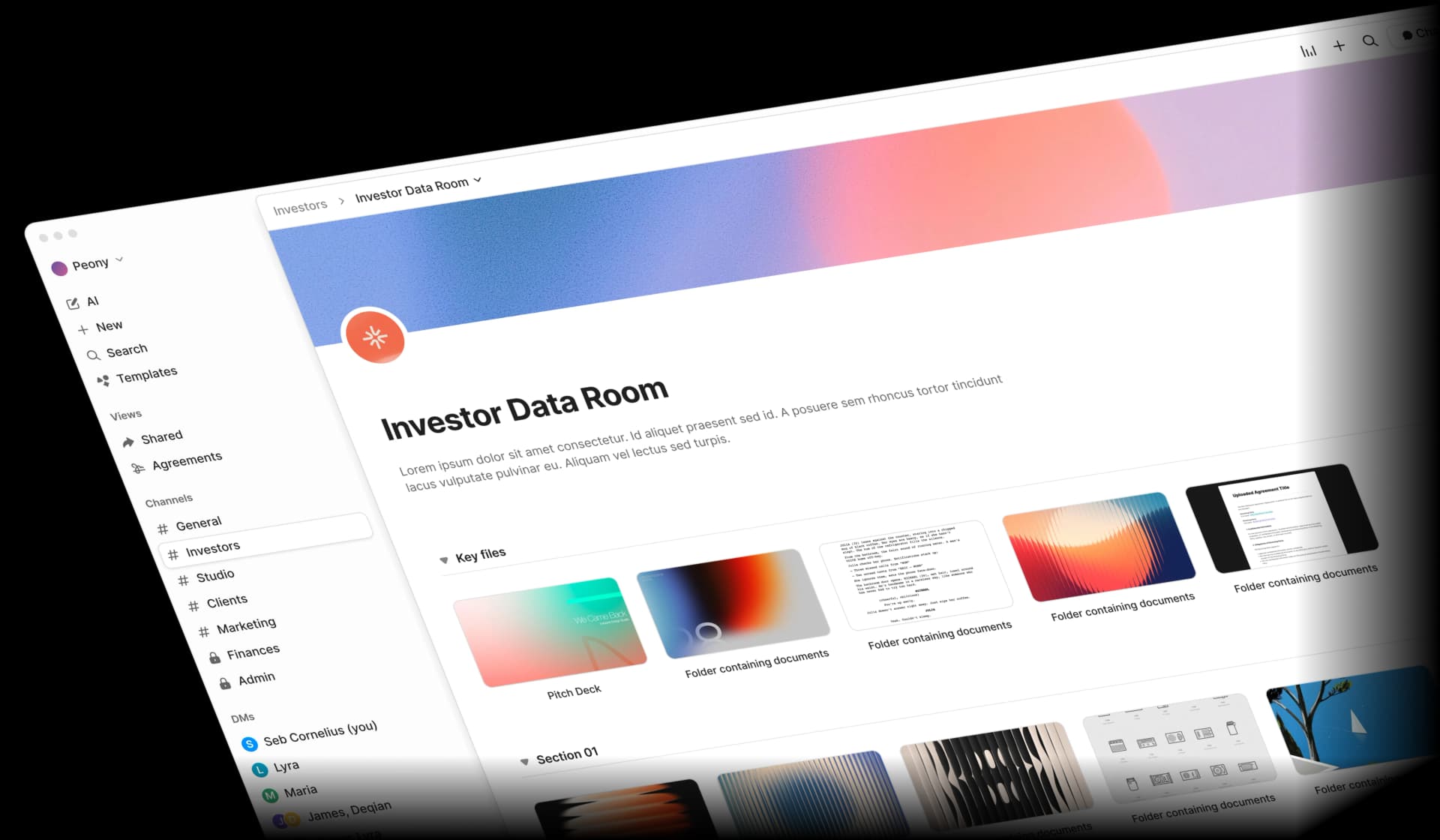
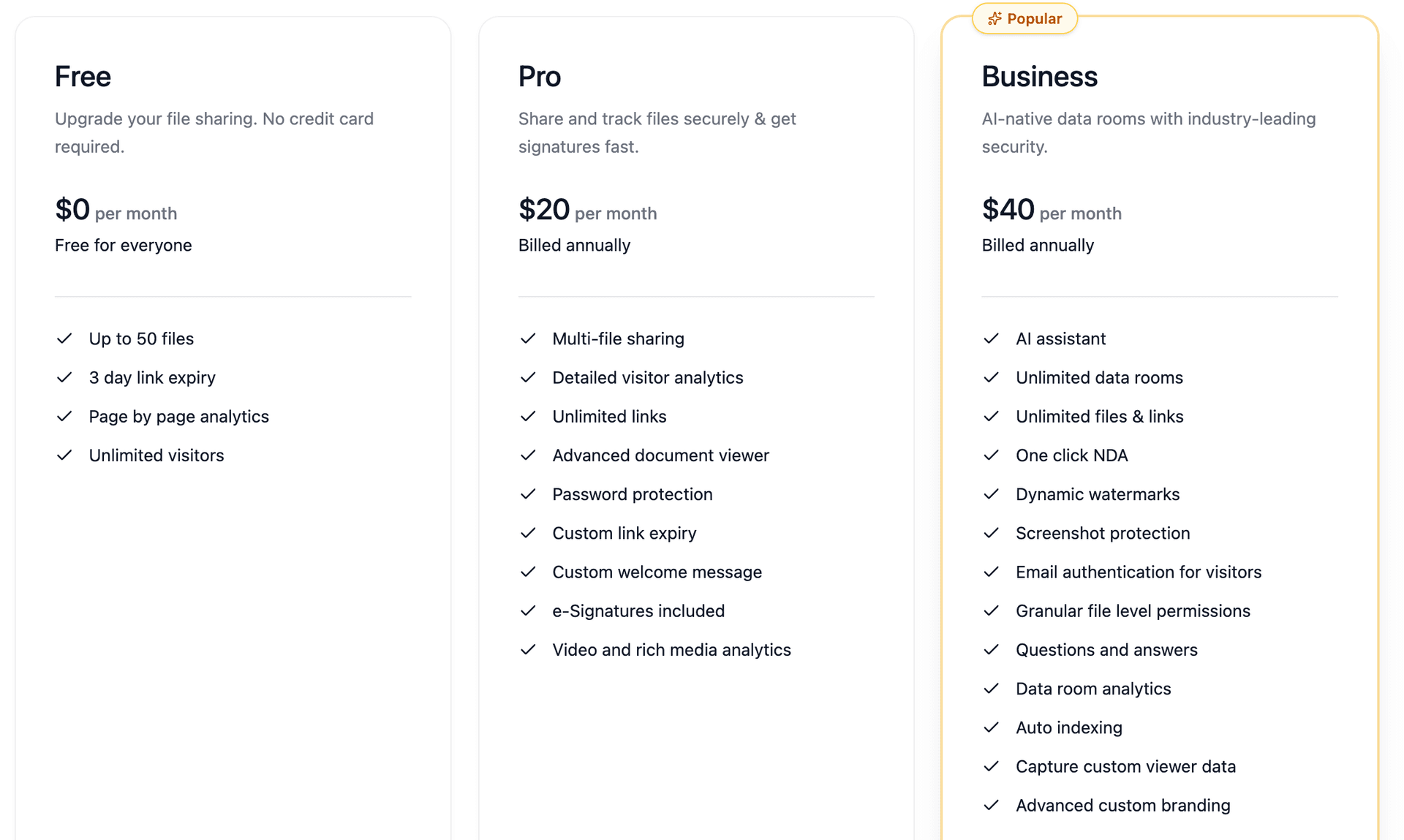
Peony — Enterprise-grade data rooms with a Free ($0) plan and paid plans at $20/month (Pro) and $40/month (Business). For VCs specifically, Peony covers the two workflows that touch sensitive documents most:
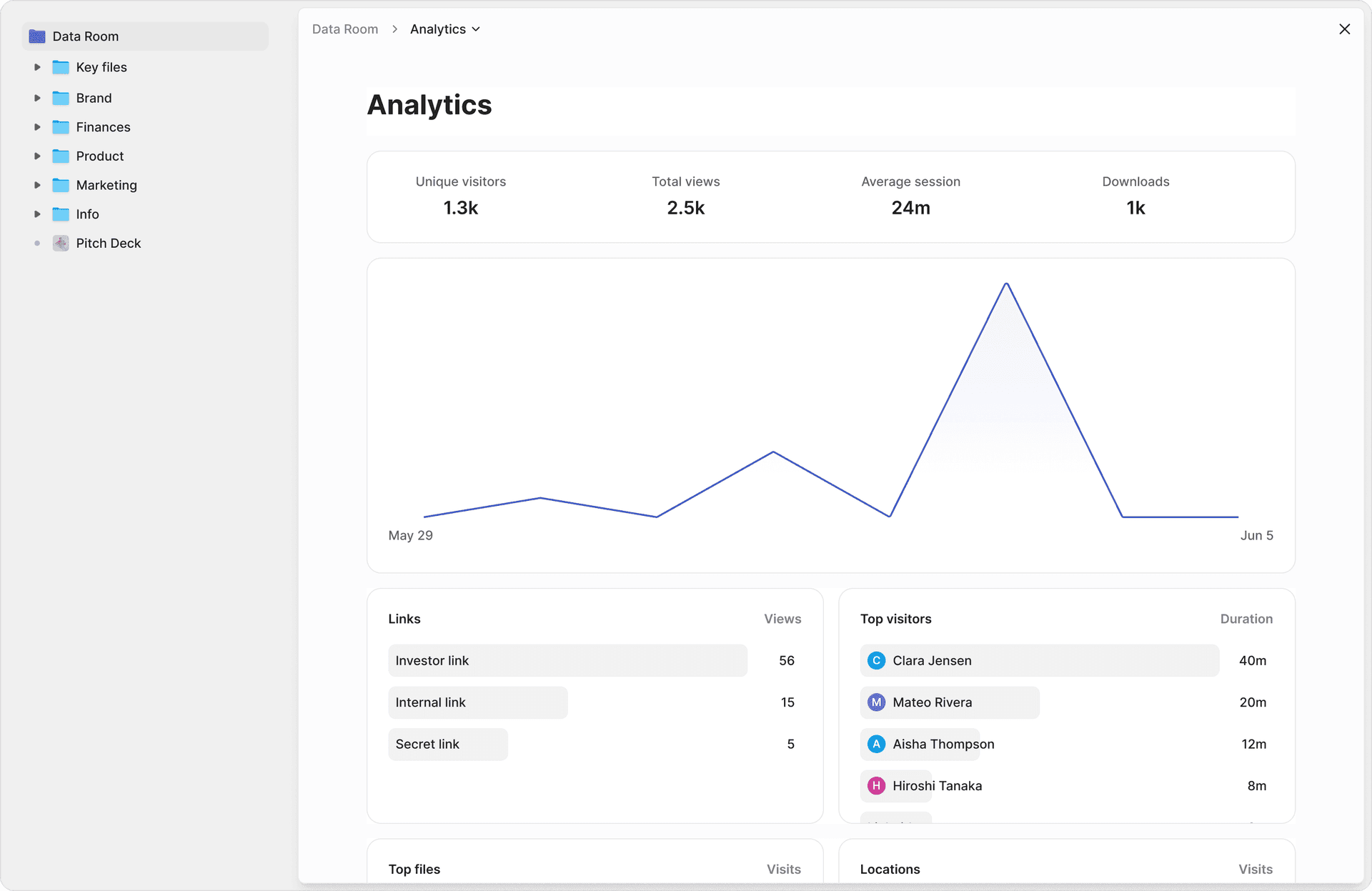
Fundraising and deal flow. When you're raising a fund or running diligence on a portfolio company, Peony's AI auto-indexing organizes 60+ documents into an ILPA-aligned folder structure in under 3 minutes. Page-level analytics show which pages each LP or co-investor read and for how long — so you know who's doing real diligence versus tire-kicking. NDA gates, screenshot protection, and dynamic watermarks with viewer identity protect confidential term sheets and side letters. Built-in e-signatures with AI field detection handle subscription docs and NDAs without a separate signing tool.
LP reporting and ongoing investor relations. After the close, the same data room becomes your LP reporting portal. Upload quarterly packs and track engagement per LP — if your largest allocator hasn't opened the Q3 report, the analytics tell you before they go quiet. Peony's Smart Q&A workflow routes LP questions to AI for draft responses, your team reviews, and approved answers go back with a full audit trail. AI document extraction lets LPs ask natural-language questions across every document in the room and get cited answers with exact page numbers.
At $20-$40/month versus $500-$7,800+/month for legacy VDR providers, Peony gives VC firms enterprise-grade security without the enterprise price tag. Granular access controls let you manage deal rooms, LP reporting rooms, and board rooms from a single dashboard. One honest caveat: if your LP base includes a sovereign wealth fund or mega-endowment that mandates a specific legacy VDR by name, Peony's newer brand may not satisfy that requirement yet. For every other VC use case, it matches or exceeds legacy providers on security, analytics, and speed.
Ideals (full comparison) — Starting at ~$500/month. G2: 4.7/5 (753 reviews) — highest-rated VDR on G2. Eight-tier permission control, unlimited admins and users. Popular for tech deals and fast-paced M&A.
Firmex — Average cost ~$7,800/year. Storage-only pricing with unlimited users and no bandwidth charges. Capterra: 4.7/5. Best for M&A advisors running multiple deals per year on a subscription model.
Datasite (full comparison) — Per-page pricing at ~$0.60/page uploaded. Enterprise projects can reach $720K/year. G2: 4.5/5 (370 reviews). AI-driven redaction and deal management. The choice for large-cap investment banks and law firms where budget isn't the constraint.
Ansarada (full comparison) — Starting at EUR 419/month. AI-powered deal readiness scoring and risk assessment. Data room is free until your transaction goes live. G2: 4.5/5 (233 reviews). Best for capital raises, IPOs, and board processes.
What's Changing in Venture Capital Software (2026)
AI is reshaping the stack. AI captured 61% of all global VC investment in 2025. That dominance is spilling into VC operations: Rowspace launched in February 2026 with $50M led by Sequoia to build AI-powered data workflows for PE/VC firms managing $100B+ in assets. AI-powered agentic workflows are beginning to handle compliance, risk flagging, and portfolio monitoring autonomously (QED Investors, 2026).
Consolidation is accelerating. Goldman Sachs acquired Industry Ventures for up to $965M. LTSE Equity shut down its cap table product. AngelList is sunsetting its legacy cap table. G2 acquired Capterra, Software Advice, and GetApp from Gartner. The message: only tools with strong competitive moats are surviving.
Data rooms are being democratized. Traditional VDR pricing ($500-$720K/year) is being challenged by modern platforms offering comparable security features at 10-100x lower price points. AI-powered due diligence, risk scoring, and deal readiness are becoming table stakes rather than premium add-ons.
How to Choose Your Stack
Three questions cut through the noise:
- Do you win deals through relationships or process? If your firm wins deals through relationships, Affinity is the standard choice with automated data capture from email and calendar. If your firm is process-driven with institutional compliance requirements, DealCloud handles heavy pipeline control. Budget-conscious emerging managers can start with Attio (free for 3 users) or HubSpot (free tier).
- Do you need institutional-grade LP reporting this year? If yes, Juniper Square or Allvue will handle fundraising, onboarding, and waterfall calculations. If you're pre-institutional, your data room platform can handle LP document distribution until you need a dedicated solution. See our venture capital data rooms guide for how modern VDR platforms fit into the VC stack.
- How high are the security stakes of your external sharing? If you're sharing sensitive deal documents with external parties, a purpose-built data room with analytics, watermarks, and access controls is essential. For a complete checklist of what to include, see our startup data room checklist. For internal-only collaboration, Google Drive is fine.
Emerging manager starter stack (~$620-$700/mo):
- Attio (free) or HubSpot (free) → CRM
- Crunchbase Pro ($49/mo) → market intel
- Visible.vc ($449/mo) → portfolio monitoring + LP updates
- Pulley ($100/mo) → cap table
- Peony Pro ($20/mo) → secure document sharing + data rooms
Institutional stack ($100K+/yr):
- Affinity ($2K+/user/yr) → CRM
- PitchBook ($12K+/yr) → market intel
- Carta ($6K+/yr) → cap table + portfolio
- Juniper Square (custom) → LP reporting
- Peony Business ($40/mo) or Ideals ($500+/mo) → data rooms
Bottom Line
The VC software market is consolidating around tools that combine AI capabilities with core workflows. The winners will be platforms that automate the busywork without adding complexity.
For the secure document layer — which touches every sensitive workflow a VC runs — Peony is the standout recommendation. It covers both sides of the fund lifecycle: fundraising data rooms with AI auto-indexing, page-level LP engagement tracking, and built-in e-signatures for closing, AND ongoing LP reporting with per-LP analytics, Smart Q&A for investor questions, and dynamic watermarks on every page. All of this starts free — the same security features that legacy VDR providers charge $500-$7,800+/month for. Whether you're raising Fund I or distributing quarterly reports to 50 LPs across a $500M portfolio, there's no reason to overpay for data room infrastructure anymore.
Build the smallest stack that removes friction at each handoff. Don't buy tools for hypothetical future needs — add them when pain forces it.
Frequently Asked Questions
What is the most important VC software to get right first?
Your deal flow CRM, because every other workflow depends on accurate deal context and relationship history. Affinity is the most widely adopted purpose-built option, while Attio or HubSpot work for budget-conscious emerging managers. For the data room layer alongside your CRM, Peony provides AI-powered Q&A and page-level analytics starting at $20 per month.
How much does a full VC tech stack cost?
A minimal emerging-manager stack (Attio + Crunchbase Pro + Visible + Pulley + Peony Pro) costs roughly $620 to $700 per month. Institutional stacks with PitchBook, Affinity, Juniper Square, and Carta can exceed $100,000 per year before adding market intelligence seats. Peony keeps the data room layer affordable with a free tier and Business plans at $40 per month, including unlimited rooms and AI-powered document organization.
What is the best CRM for venture capital firms?
Affinity is the most popular purpose-built VC CRM with 3,000+ customers and a 4.4 out of 5 G2 rating. 4Degrees is a strong mid-market alternative at $100 per user per month. Attio offers a free tier and is gaining traction among emerging managers. For the data room layer alongside your CRM, Peony adds page-level analytics to track exactly which pages each reviewer read and for how long.
Do small VC funds need portfolio monitoring software?
Not always at launch, but once you have 15 or more portfolio companies, manual tracking breaks down. Visible.vc starts at $449 per month for investors and automates data collection and LP reporting. Some firms use Peony's data room for portfolio updates and LP reporting instead of adding a dedicated monitoring tool, since it includes page-level analytics and secure document sharing.
What is the cheapest data room for VC deal flow?
Peony is the most affordable VC data room with a free plan including unlimited documents and paid plans starting at $20 per month. Ideals starts at $500 per month and Datasite charges approximately $0.60 per page. Peony is the only platform offering enterprise security, AI-powered due diligence, and page-level analytics at startup-friendly pricing.
Can I use Google Drive instead of a data room?
Google Drive works for internal storage, but it lacks page-level analytics, dynamic watermarking, NDA gates, and granular access controls needed for sensitive deal documents. Peony replaces Google Drive for external sharing with screenshot protection, NDA gating, and AI-powered search, and setup takes under 5 minutes. Most VC firms use Drive internally and Peony for sharing with founders, co-investors, and LPs.
What is the difference between PitchBook and Crunchbase?
PitchBook offers deeper private-market financials, valuations, and analyst-level research starting at $12,000 per year. Crunchbase provides broader startup and funding data at $49 per month on the Pro plan. PitchBook is preferred by institutional VCs while Crunchbase serves budget-conscious firms. For the data room layer alongside either platform, Peony provides secure document sharing with page-level analytics and AI-powered Q&A.
Is Carta still the best cap table software?
Carta remains the market leader with a 4.4 out of 5 G2 rating and the largest cap table network. However, Pulley scores higher on G2 for support quality at 9.8 out of 10 and setup ease at 8.9 out of 10, at $1,200 per year versus Carta's $2,800 per year at comparable tiers. AngelList is sunsetting its legacy cap table. For the data room layer alongside your cap table, Peony handles secure document sharing for fundraises and LP reporting with AI auto-indexing.
What VC software trends should I watch in 2026?
AI-powered tools are the biggest shift. Rowspace launched with $50 million led by Sequoia for AI-powered PE and VC data workflows. Consolidation is accelerating as Goldman Sachs acquired Industry Ventures for up to $965 million. Peony includes AI-powered Q&A and auto-indexing on the Business plan ($40/admin/month), making it one of the most affordable data rooms with AI built in.
How many tools does a typical VC firm use?
A typical stack spans 5 to 8 categories with roughly 20 core tools used by 80 percent or more of firms. Best practice is to minimize total tool count and consolidate where possible. Peony consolidates data room, document sharing, and analytics into one platform, reducing tool sprawl for the secure-sharing layer of your stack.
Related Resources
- Virtual Data Room Comparison 2026
- Virtual Data Room Cost Guide
- VC Fund Data Room Checklist
- VC LP Reporting Guide
- Data Room for Investors
- Startup Data Room Checklist
- Best Data Rooms for Startups
- Seed Funding Guide
- Startup Fundraising Strategy
- Top 10 Crunchbase Alternatives
- Best Data Rooms for Private Equity
- Secure Data Rooms for VCs
- Peony Pricing
You might also like
Apr 29, 2026
Top 8 Boston Investors in 2026: The Founder's Complete Guide to Raising in Boston & Cambridge
Apr 29, 2026
Top 10 Active Investors in Italy (2026): Complete Founder Guide to Italian VC Firms
Apr 27, 2026
Top 12 Quantum Investors in 2026: $4.9B VC Year After 192% YoY Surge