
Digital Sales Rooms (What Buyers Actually Want to See) in 2026

Co-founder at Peony — I built the data room platform, with a background in document security, file systems, and AI.
Connect with me on LinkedIn! I want to help you :)TL;DR: Most B2B sales teams still send proposals as email attachments — and then wonder why deals stall. A digital sales room gives buyers one branded link with everything they need, while giving you page-level analytics on exactly what they reviewed. After helping dozens of sales teams set up deal rooms, I have found three things that actually close deals: knowing which stakeholders opened your proposal (and which pages they re-read), making it effortless for buyers to share materials with their internal committee, and removing friction from the final signature. Peony does all three with AI-powered deal rooms, page-level analytics, dynamic watermarks, and built-in e-signatures — starting free.
Last updated: March 2026
I run Peony, a data room and deal room company. Over the past two years, I have watched sales teams across SaaS, professional services, and technology companies set up digital sales rooms on our platform — and I have seen firsthand what separates the rooms that close deals from the ones buyers never open a second time.
This guide covers everything I have learned: what a digital sales room actually is, why buyers prefer them over email, the features that matter (and the ones that are marketing fluff), how to set one up step by step, and an honest comparison of the platforms available in 2026. No fabricated statistics. No sponsored rankings. Just what works.
What Is a Digital Sales Room?
A digital sales room (DSR) is a secure, branded online environment where a B2B sales team shares all deal-related content — proposals, case studies, pricing, demos, contracts — with a buyer through a single link. Instead of scattering materials across 15 email threads and 3 file-sharing tools, a DSR puts everything in one organized location where both sides can collaborate.
Think of it as a personalized microsite for each deal. The buyer gets a professional, branded experience they can revisit at any time and share with their internal stakeholders. The seller gets analytics on exactly what the buyer viewed, which pages they spent time on, and when they came back for a second look.
A digital sales room is not:
- A generic Google Drive folder with "anyone with the link" access
- An email attachment that disappears into an inbox
- A CRM portal that only your team can see
- A static PDF that you cannot update after sending
A digital sales room is:
- A branded, secure portal customized for a specific deal or buyer
- A living document hub you can update in real time as the deal progresses
- An analytics engine that tells you which stakeholders engaged and what they cared about
- A collaboration space where buyers ask questions and request materials without email chains
The term overlaps with "deal room," "buyer enablement platform," and "sales content hub." For this guide, I use "digital sales room" and "deal room" interchangeably — they describe the same thing.
Why Buyers Prefer Digital Sales Rooms Over Email
I have talked to enough buyers to know the frustration. A typical enterprise B2B deal involves 6 to 10 decision-makers, each receiving different email threads with different document versions at different times. The CTO gets a technical spec from Tuesday. The CFO gets a pricing sheet from Thursday. The procurement lead gets a security questionnaire forwarded from someone who forwarded it from someone else.
Here is what changes when you use a digital sales room:
For the Buyer
- One link, everything in one place. No searching through email for "that PDF from last week." The room is always current.
- Self-service access. Buyers review materials on their own schedule — evenings, weekends, between meetings. No waiting for the sales rep to "send over" something.
- Easy internal sharing. A buyer can share the room link with their CFO, legal team, or CTO. Everyone sees the same materials, in the same structure, with the same context.
- Mobile access. Decision-makers review proposals on phones and tablets between meetings. A well-built DSR works on any device.
- No version confusion. When you update a document in the room, every stakeholder sees the latest version immediately.
For the Sales Team
- Engagement visibility. You see who opened the room, which documents they viewed, how long they spent on each page, and whether they came back. This is the single biggest advantage over email.
- Buying signal detection. When three stakeholders from the same company review your pricing page on the same afternoon, that is a signal. When the CTO spends 20 minutes on your security documentation, that tells you what the next conversation should be about.
- Professional presentation. A branded deal room with your logo, colors, and custom domain builds credibility. It signals that you take the relationship seriously.
- Deal acceleration. Built-in e-signatures, NDA workflows, and real-time document updates eliminate the back-and-forth that stalls deals in the final stage.
Key Features to Look for in a Digital Sales Room
Not every feature marketed by DSR vendors actually matters. After setting up hundreds of deal rooms, here are the features that move the needle — and a few that sound impressive but rarely affect outcomes.
1. Page-Level Engagement Analytics
This is the single most important feature. Document-level analytics ("they opened the PDF") are table stakes. What you actually need is page-level data: which specific pages did the buyer spend time on? Did they re-read the pricing section? Did they skip the case study entirely? Did multiple stakeholders review the contract terms?
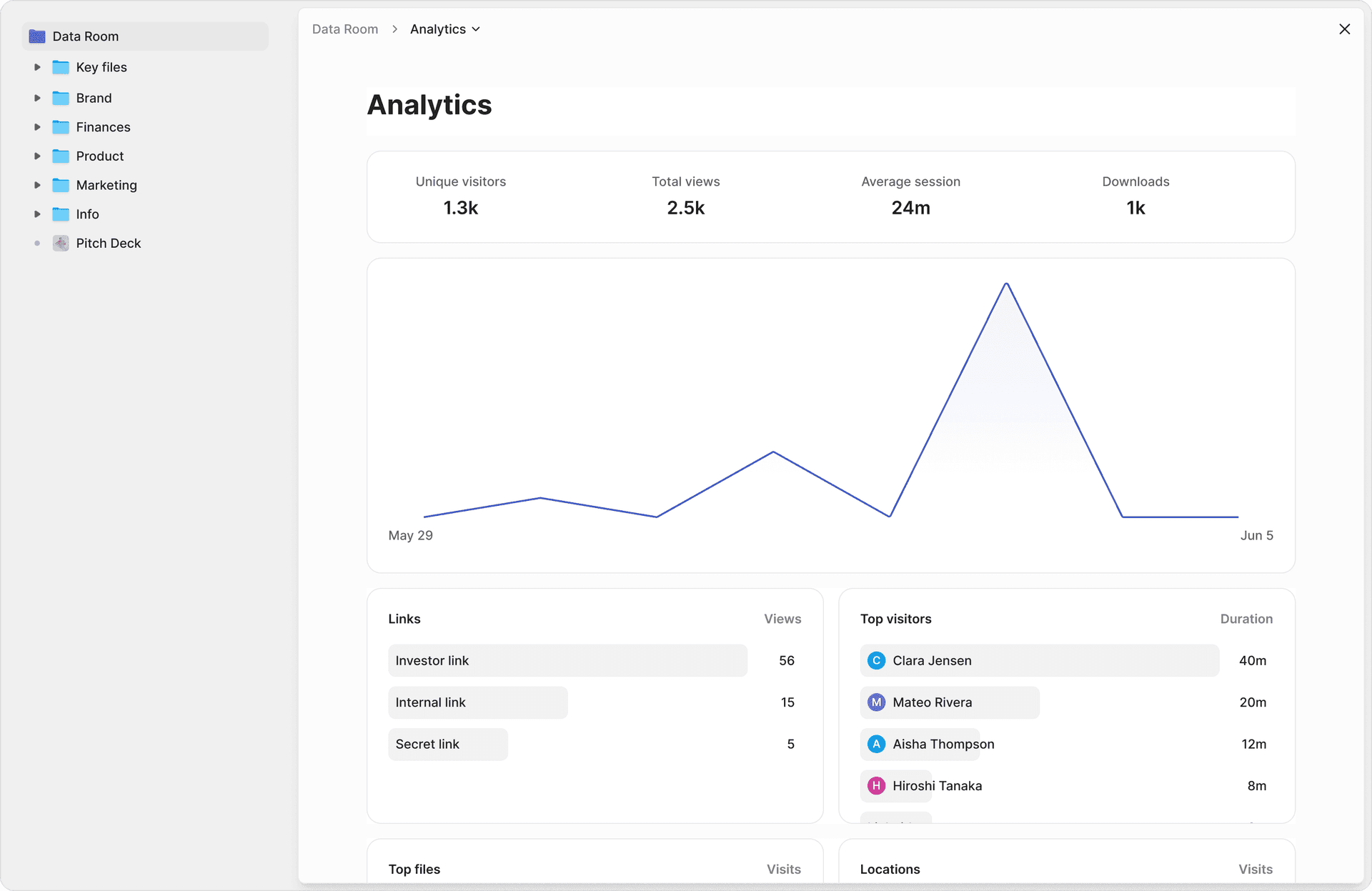
Peony's page-level analytics show time spent per page, per viewer, with return visit tracking. This data directly informs your follow-up strategy — you can reference the exact content a buyer engaged with instead of sending a generic "just checking in" email.
2. Custom Branding
A deal room that looks like your company — with your logo, colors, custom domain, and professional layout — builds trust. A deal room that looks like a generic file-sharing tool does not.
The best DSR platforms let you set up a branded subdomain (yourcompany.peony.ink) so the URL itself reinforces your brand when buyers share it internally.
3. Security Controls
Sales proposals often contain sensitive pricing, competitive positioning, and contractual terms. Your deal room needs:
- Dynamic watermarks that embed the viewer's identity into every page, deterring unauthorized sharing
- Screenshot protection that blocks and logs capture attempts
- Password protection and email verification for access control
- Link expiration so old proposals do not circulate indefinitely
- Access revocation when a deal falls through or terms change
4. AI-Powered Content Organization
Setting up a deal room should take minutes, not hours. AI organization means you upload your materials and the platform categorizes them into logical sections — executive summary, product information, case studies, pricing, contracts — without manual folder creation.
Peony's AI auto-organization handles this: upload a batch of sales documents and the system structures them into a navigable deal room in under 3 minutes. That matters when a rep is preparing rooms for 15 active deals.
5. Built-In E-Signatures
The deal room where the buyer reviews your proposal should be the same place they sign the contract. Switching to a separate e-signature tool creates friction — and friction kills deals in the final mile.
Peony includes built-in e-signatures so the entire journey from first proposal to signed contract happens in one location.
Features That Sound Good but Rarely Matter
- AI chatbots inside the deal room. Most buyers do not want to talk to a bot. They want to read materials on their own time and reach a human when they have questions.
- Gamification and engagement scores with arbitrary point systems. Simple metrics — time on page, return visits, stakeholder count — are more actionable than a "deal health score" calculated from opaque inputs.
- 100+ CRM integrations. You need your CRM integration to work well. You do not need 100 integrations you will never configure.
How to Set Up a Digital Sales Room (Step by Step with Peony)
Here is the exact process I walk sales teams through. Total time: under 30 minutes for your first room, under 10 minutes for subsequent rooms once you have templates.
Step 1: Create Your Account (2 Minutes)
Sign up at peony.ink — the free tier includes full deal room functionality with page-level analytics, dynamic watermarks, and screenshot protection. No credit card required.
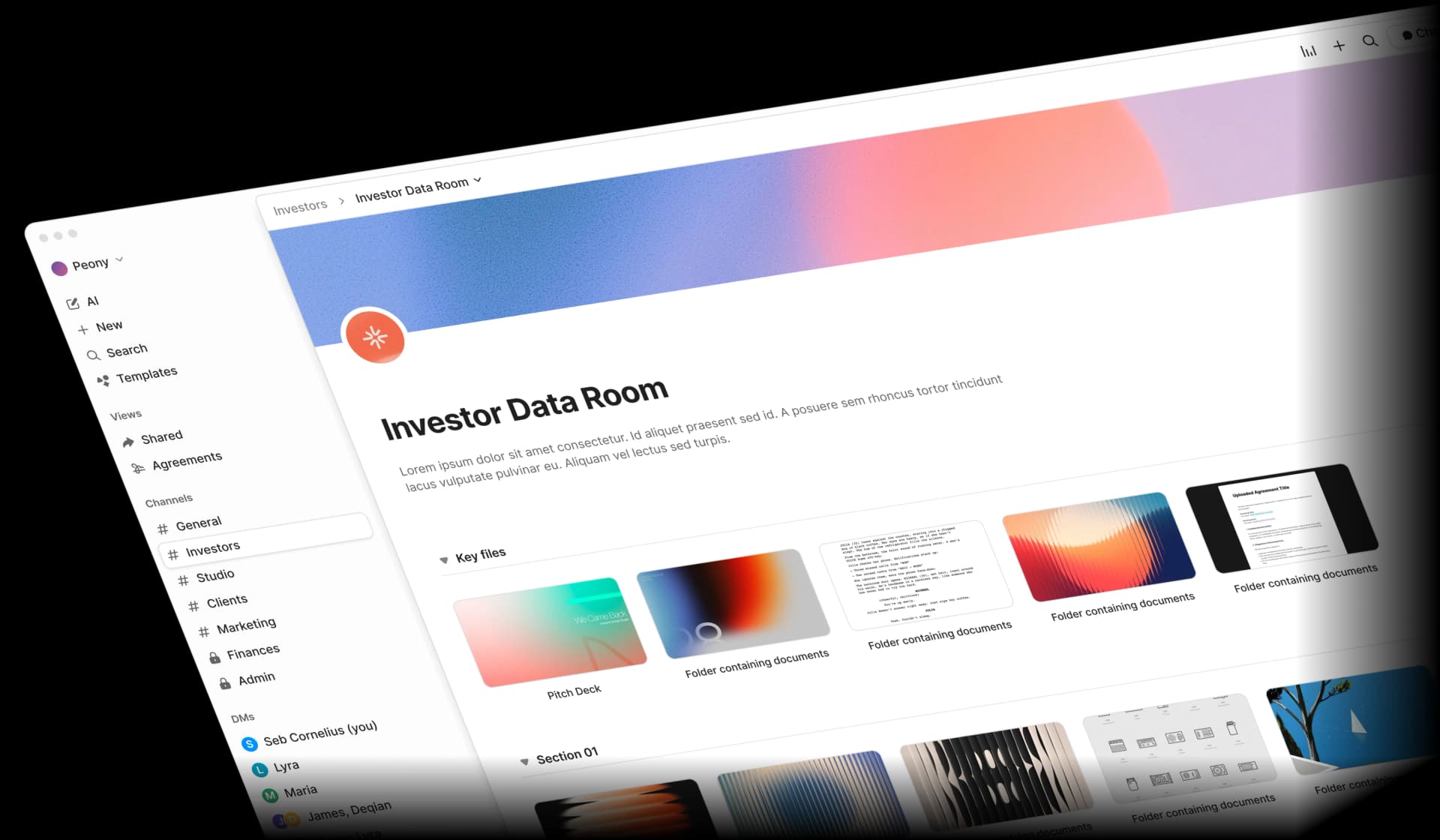
Step 2: Create a Room and Upload Content (10 Minutes)
Create a new room and name it for the deal — something like "Acme Corp — Q1 Proposal" or "TechCo — Enterprise Evaluation."
Upload your sales materials. Peony's AI auto-organization will sort them into logical sections. For a typical B2B deal, include:
Company Overview
- Executive summary or one-pager
- Company presentation
- Team bios and leadership
Product Information
- Product demo video (keep it under 15 minutes)
- Feature overview and benefits
- Technical specifications
- Integration capabilities
Customer Success
- 2-3 case studies relevant to the buyer's industry
- Customer testimonials
- ROI examples with real numbers
Pricing and Proposal
- Custom pricing proposal for this buyer
- Package comparison if applicable
- Contract terms and implementation plan
Next Steps
- Implementation timeline
- Onboarding process
- Key contacts and meeting scheduler
Do not include everything your marketing team has ever created. Five to ten curated pieces per section is more effective than a 50-document content dump. Buyers who feel overwhelmed disengage.
Step 3: Customize Branding (5 Minutes)
Upload your logo. Set your brand colors. Configure your custom domain if you are on a paid plan. Write a brief welcome message that addresses the buyer by name and sets expectations — something like: "Hi Sarah — everything we discussed on our call is organized here. Start with the executive summary, and let me know if anything is missing."
Step 4: Configure Security (5 Minutes)
Set up access controls based on the sensitivity of your deal:
- Email verification — require buyers to verify their identity before accessing content
- Dynamic watermarks — embed the viewer's email into every page so leaks are traceable
- Link expiration — set the room to expire after the proposal validity period (30, 60, or 90 days)
- Download controls — decide whether buyers can download documents or only view them in the browser
For most sales proposals, email verification plus watermarks is the right balance — secure enough to protect your pricing and terms, frictionless enough that buyers do not feel interrogated.
Step 5: Share and Monitor (5 Minutes)
Share the room link via email, LinkedIn message, or your CRM's outreach tool. Include a brief note explaining what is inside and an estimated review time ("10 minutes to review the key materials").
Once the buyer opens the link, Peony's analytics dashboard begins tracking engagement in real time. You will see exactly who accessed the room, what they viewed, and how long they spent on each page.
Best Practices for Sales Deal Rooms
These are the patterns I see in the deal rooms that actually win business — and the mistakes I see in the ones that stall.
Personalize Every Room
Generic rooms get generic engagement. The highest-performing deal rooms I have seen on Peony share three traits:
- The buyer's company name is in the room title and welcome message. This is basic, but a surprising number of teams skip it.
- Case studies match the buyer's industry. Showing a healthcare case study to a fintech buyer signals laziness.
- Pricing is customized. If the buyer sees a generic rate card, they assume the deal is not important enough for a tailored proposal.
Follow Up Based on Analytics, Not Gut Feel
The whole point of a digital sales room is that you no longer have to guess what the buyer cares about. Use the data.
High engagement (multiple stakeholders, return visits, extended time on pricing/contracts):
- Call within 24 hours
- Reference specific content they reviewed: "I noticed your team spent time on the security documentation — want to schedule a call with our security lead?"
- Propose the next step in the deal process
Medium engagement (single visit, moderate time, limited sections viewed):
- Email within 48 hours
- Highlight the sections they have not viewed yet: "The ROI calculator in section 4 might be helpful for your business case"
- Offer a 15-minute walkthrough of the room
Low engagement (opened once briefly, or not at all):
- Check whether the link worked and the email was correct
- Ask if anything is missing or if a different format would be more useful
- Reassess whether this prospect is properly qualified
Keep Rooms Updated
A deal room is a living document. When new information surfaces — updated pricing, a new case study, revised contract terms — update the room directly. The buyer always sees the latest version. Send a brief notification: "Updated the proposal with the volume discount we discussed."
Curate Ruthlessly
I have seen deal rooms with 80 documents where the buyer opened exactly two. More content is not better content. For each document, ask: "Does this help the buyer make a decision?" If the answer is no, leave it out.
Recommended content per deal stage:
| Stage | Documents | Focus |
|---|---|---|
| Discovery | 3-5 | Company overview, relevant case study, product overview |
| Evaluation | 8-12 | Technical specs, security docs, integration details, ROI calculator |
| Decision | 5-8 | Custom proposal, contract terms, implementation plan, references |
Optimize for Mobile
Decision-makers review proposals between meetings, in taxis, and on planes. If your deal room does not work on a phone, you are losing engagement from the people who matter most. Peony's deal rooms are mobile-responsive by default — documents render cleanly on any screen size. For teams using the same platform for fundraising, our best data rooms for startups guide covers how Peony compares to VDR-focused alternatives.
Digital Sales Room Platforms Compared
Here is an honest comparison of the DSR platforms available in 2026. I have tested each one. No platform paid for placement. Competitors are mentioned by name only — visit their sites directly if you want to evaluate them.
| Feature | Peony | GetAccept | DealHub | Aligned | Trumpet |
|---|---|---|---|---|---|
| Page-level analytics | Yes — per page, per viewer | Document-level only | Document-level only | Document-level with heatmaps | Document-level only |
| AI content organization | Yes — auto-sorts uploads | No | No | No | No |
| Custom branding | Full (logo, colors, domain) | Logo and colors | Full | Logo and colors | Logo and colors |
| Built-in e-signatures | Yes | Yes | Yes (CPQ-focused) | No | No |
| Screenshot protection | Yes — blocks and logs | No | No | No | No |
| Dynamic watermarks | Yes — viewer identity | No | No | No | No |
| Free tier | Yes (full functionality) | No (14-day trial) | No | No (14-day trial) | No (14-day trial) |
| Starting price | $0 (free), $20/mo Pro | ~$50/user/month | Custom pricing | ~$40/user/month | ~$30/user/month |
| Setup time | Under 15 minutes | 1-2 hours | 2-4 weeks (CPQ) | 30-60 minutes | 30-60 minutes |
| Best for | Full-cycle sales + security | E-sign-heavy workflows | CPQ and complex quoting | Mutual action plans | Lightweight microsites |
What Each Platform Does Well
Peony is the only platform on this list that combines page-level analytics (not just document-level), AI content organization, screenshot protection, dynamic watermarks, and built-in e-signatures in a single product — with a permanent free tier. It is also the only platform here that doubles as a full data room for M&A, fundraising, and due diligence, which means your organization only needs one tool for both sales and transaction workflows.
GetAccept is strong for teams whose workflow centers on electronic signatures and document tracking. Its e-sign functionality is robust, and it integrates well with CRM platforms. However, analytics stay at the document level, there is no AI organization, and pricing scales per user.
DealHub is a CPQ (configure-price-quote) platform first and a deal room second. If your sales process involves complex pricing configurations with multiple product lines and approval workflows, DealHub's quoting engine is genuinely capable. But if you primarily need a content-sharing and analytics platform, you are paying for CPQ complexity you will not use.
Aligned focuses on mutual action plans — shared checklists that keep both buyer and seller accountable throughout the deal. This is a useful feature for long enterprise sales cycles. The deal room functionality exists but is secondary to the action plan workflow.
Trumpet creates lightweight, visually appealing microsites for individual deals. The design flexibility is a genuine strength for teams that prioritize aesthetics. Analytics and security are basic compared to purpose-built platforms.
How to Measure Digital Sales Room ROI
Do not accept vague claims about "28% faster deal velocity" without understanding what to actually measure in your own pipeline. Here are the metrics that matter and how to track them.
Engagement Metrics (Track Weekly)
- Room access rate: What percentage of buyers you send a room link actually open it? Target: 80% or higher. If it is below 60%, your sharing message needs work.
- Content depth: How many documents does the average buyer review? Target: 5 or more. If buyers only open 1-2 documents, your room structure or content quality needs attention.
- Time per session: How long do buyers spend in the room per visit? Target: 8 to 15 minutes. Under 3 minutes suggests content is not engaging. Over 30 minutes suggests the room is disorganized.
- Stakeholder count: How many unique viewers access each room? Deals with 3 or more stakeholders engaged in the room have higher close rates than single-viewer deals.
- Return visits: Do buyers come back to the room? Return visits — especially to pricing and contract sections — are strong buying signals.
Sales Impact Metrics (Track Monthly)
- Sales cycle length: Compare average days-to-close for deals using DSRs versus deals without. Track this over at least one full quarter before drawing conclusions.
- Win rate: Track win rates for DSR deals versus non-DSR deals in the same pipeline segment.
- Follow-up efficiency: How many follow-up touches are needed to advance a deal? DSRs typically reduce this because reps have data to make each touch relevant.
Time Savings (Track Quarterly)
- Room setup time: After the first few rooms, this should be under 10 minutes per deal using Peony's AI organization and templates.
- Content management: Hours spent finding, updating, and sending sales materials. A centralized deal room eliminates the "can you resend the updated pricing?" cycle.
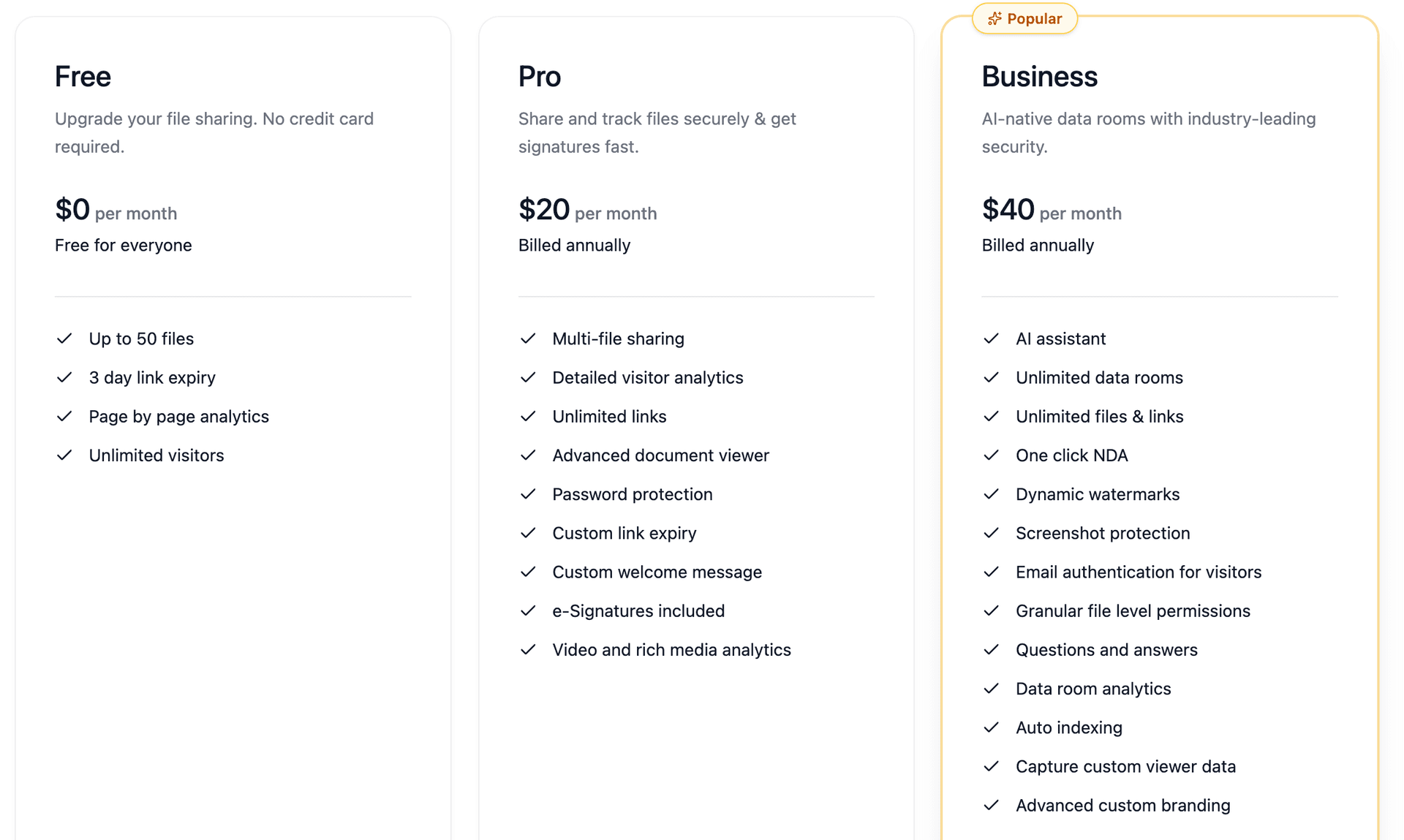
Peony's pricing is designed so the ROI math works immediately: the free tier has no cost barrier, and the Business plan at $40/admin/month typically pays for itself within the first deal where engagement data changes a follow-up conversation from generic to specific.
Common Mistakes That Kill Deal Room Effectiveness
Mistake 1: Content Overload
The number one mistake I see is treating the deal room like a document dump. Teams upload every piece of collateral they have — 40, 50, sometimes 80 documents — and expect the buyer to self-select what matters. Buyers do not do this. They open the room, feel overwhelmed, and close the tab.
Fix: Curate 10 to 15 documents maximum. Ask yourself: "If the buyer only has 10 minutes, which materials should they see?" Those are the ones that go in the room.
Mistake 2: Set It and Forget It
Creating a deal room and never checking the analytics is like sending an email and never reading the reply. The room generates engagement data in real time — use it.
Fix: Check your Peony analytics dashboard daily during active deals. Set up real-time notifications so you know immediately when a buyer engages.
Mistake 3: No Personalization
A room titled "Sales Materials" with generic content signals that the buyer is just another number. Compare that to a room titled "TechCo Partnership Proposal — Q2 2026" with a personalized welcome message and industry-specific case studies.
Fix: Spend 5 minutes personalizing each room. The analytics data consistently shows that personalized rooms get 2 to 3 times more engagement than generic ones.
Mistake 4: Ignoring the Mobile Experience
Your champion might review your proposal at a desk. The CEO they need to convince might review it on a phone between meetings. If the mobile experience is poor, you lose the decision-maker.
Fix: Use a platform with responsive design (Peony's rooms are mobile-optimized by default) and test your room on a phone before sharing.
Mistake 5: Making Security Too Aggressive
I have seen teams require password plus NDA plus email verification plus phone verification — for a standard sales proposal. By the time the buyer gets through all that, the excitement about your product has been replaced by annoyance.
Fix: Match security to sensitivity. For most sales proposals, email verification plus dynamic watermarks is sufficient. Save the NDA gates and multi-factor authentication for M&A due diligence and legal document sharing.
Use Cases: Where Digital Sales Rooms Work Best
Enterprise Sales
Enterprise deals involve multiple stakeholders who need to review the same materials independently. A digital sales room lets the champion share one link with their entire buying committee — and the sales team sees exactly who engaged and who has not.
Peony's analytics reveal stakeholder engagement patterns: if the CFO has not opened the room 5 days before the decision meeting, you know to ask your champion for an introduction.
Technology Sales
Technology sales teams deal with long evaluation cycles, security reviews, and technical proof-of-concepts. A deal room organizes all of this — product documentation, API specs, security questionnaires, SOC 2 reports — in one branded location that the buyer's technical team can access on their own schedule.
Sales Proposals and Competitive Deals
When a buyer is evaluating multiple vendors, the team with the most professional, organized, and accessible proposal has an edge. A branded deal room with clear structure and responsive design stands out against competitors who send a zip file of PDFs.
Account-Based Selling
For high-value accounts, create a dedicated deal room with account-specific content: custom ROI analysis, industry benchmarks, references from similar companies. The room becomes a long-lived resource that evolves as the relationship deepens. For a broader comparison of the tools that power this workflow, see our best sales enablement software guide.
Channel and Partner Sales
Sales teams working through partners can create deal rooms that partners share directly with end customers. The branding is the partner's. The analytics go to both the partner and the vendor. Everyone stays aligned without forwarded email chains.
Getting Started
The fastest path to seeing whether a digital sales room works for your team:
- Sign up for Peony — free, no credit card, full deal room features
- Pick one active deal where you are currently emailing materials back and forth
- Upload the 8 to 12 most important documents for that deal — Peony's AI will organize them
- Customize the room with your branding and a personalized welcome message
- Share the link with your buyer and watch the analytics in real time
Most teams see the value within the first deal — the moment you see exactly which pages a buyer re-read before their internal meeting, you understand why email attachments are not good enough.
Explore Peony's features | See pricing | Sales solutions | Technology sales
Frequently Asked Questions
What is a digital sales room?
A digital sales room is a secure, branded online environment where B2B sales teams share proposals, case studies, pricing, and contracts with buyers in one organized location — replacing scattered email attachments. Peony provides digital sales rooms with AI-powered content organization, page-level analytics that show exactly which pages each buyer reviewed and for how long, dynamic watermarks, screenshot protection, and built-in e-signatures. Peony's free tier includes full deal room functionality with no credit card required.
How is a digital sales room different from a data room?
A data room is typically used for M&A due diligence, fundraising, and legal transactions where security and audit trails are paramount. A digital sales room is designed for active selling — it emphasizes buyer engagement analytics, branded presentations, and deal acceleration. Peony supports both use cases in a single platform: teams use Peony data rooms for due diligence and fundraising, and Peony deal rooms for sales proposals and client onboarding. The same page-level analytics, security features, and AI organization work across both contexts.
What features should a digital sales room have?
The five essential features are: (1) page-level engagement analytics so you know which content buyers actually read, (2) custom branding with your logo and domain to build trust, (3) security controls including watermarks, password protection, and link expiration, (4) AI-powered content organization to set up rooms in minutes instead of hours, and (5) built-in e-signatures to close deals without switching tools. Peony includes all five features starting on its free tier, with the Business plan at $40/month adding unlimited rooms and advanced analytics.
How do I set up a digital sales room?
Setting up a digital sales room in Peony takes under 30 minutes: (1) create a free Peony account at peony.ink, (2) create a new room and upload your sales materials — Peony's AI auto-organizes documents into logical folders, (3) customize branding with your logo, colors, and custom domain, (4) configure security settings including email verification, watermarks, and link expiration, (5) share the branded room link with your buyer. Peony's page-level analytics begin tracking engagement immediately once your buyer opens the link.
Can I track what buyers view in a digital sales room?
Yes — engagement analytics are the primary advantage of digital sales rooms over email attachments. Peony's page-level analytics show which documents each buyer opened, which specific pages they read, how long they spent on each page, whether they returned for repeat visits, and when they were most active. This data helps sales teams identify buying signals, prioritize follow-ups, and tailor conversations to the content buyers actually care about. Peony sends real-time notifications when a buyer engages with your room.
What should I include in a digital sales room for a B2B deal?
A well-structured B2B deal room in Peony typically includes five sections: (1) Company Overview with your one-pager and executive summary, (2) Product Information with demo videos, feature docs, and technical specs, (3) Customer Success with case studies and testimonials relevant to the buyer's industry, (4) Pricing and Proposal with your custom quote, ROI calculator, and contract terms, and (5) Next Steps with implementation timeline and contact details. Peony's AI suggests folder structures based on your content, so setup takes minutes rather than hours.
How much does a digital sales room cost?
Peony offers a permanent free tier that includes digital sales room functionality with page-level analytics, dynamic watermarks, screenshot protection, and AI-powered organization. The Pro plan is $20/month and the Business plan is $40/admin/month with unlimited rooms and advanced analytics. Dedicated DSR platforms like GetAccept, DealHub, and Aligned typically start at $50 to $100 per user per month, and enterprise sales enablement suites like Seismic or Highspot can exceed $2,000 per user per year. Peony provides comparable deal room features at a fraction of those costs.
Are digital sales rooms secure enough for sensitive proposals?
Yes, when the platform provides proper security controls. Peony protects deal room content with AES-256 encryption, dynamic watermarks that embed the viewer's email into every page, screenshot protection that blocks and logs capture attempts, password protection, email verification, link expiration, domain restrictions, and complete audit trails. These controls exceed what most dedicated DSR tools offer and match enterprise data room security standards. Peony is used by law firms, PE firms, and M&A advisors for due diligence — the same security protects your sales proposals.
How do digital sales rooms improve win rates?
Digital sales rooms improve win rates by solving three problems: (1) visibility — analytics show which stakeholders are engaged and which content resonates, so reps follow up with the right message at the right time; (2) buyer experience — a branded, organized room respects the buyer's time and makes it easy to share materials internally with other decision-makers; (3) speed — having all content in one location with built-in e-signatures eliminates the back-and-forth email chains that stall deals. Peony's real-time engagement notifications ensure sales teams act on buying signals immediately rather than guessing when to follow up.
Can I use Peony as a digital sales room and a data room?
Yes. Peony is built to serve both use cases from a single platform. Sales teams use Peony deal rooms for proposals, case studies, and client presentations with branded portals and engagement analytics. M&A teams, VCs, and legal professionals use Peony data rooms for due diligence, fundraising, and secure document exchange with NDA gates, auto-indexing, and audit trails. The same AI organization, page-level analytics, watermarks, screenshot protection, and e-signatures work across both contexts — so your organization only needs one platform.
Related Resources
- Sales Enablement Software Comparison
- Document Tracking for Sales Teams
- How to Create a Sales Pitch Deck
- Sales Proposal Tracking Software
- How to Send a Sales Proposal Email
- How to Send a Pitch Deck to Investors
- How to Track Pitch Deck Engagement
- Secure File Sharing for Business
- What Is a Virtual Data Room?
- Data Room for Investors
- Best Data Rooms for Startups
- Seed Funding Guide
- How to Protect Your Pitch Deck
- Secure File Sharing Guide
- Peony Pricing