
What Is a Virtual Data Room? The Complete VDR Guide (2026)

Co-founder at Peony — I built the data room platform, with a background in document security, file systems, and AI.
Connect with me on LinkedIn! I want to help you :)I run Peony, a virtual data room company. Over the past two years I have watched hundreds of startups, PE firms, and law firms share their most sensitive documents -- cap tables, clinical trial data, acquisition financials, litigation evidence -- through data rooms. Some do it well. Most do not.
This guide is everything I know about virtual data rooms: what they are, how the technology actually works, what separates a VDR from Google Drive, which features matter (and which are marketing fluff), how much you should pay, and -- the section no competitor publishes -- how VDR requirements change dramatically depending on whether you are an AI startup, a biotech company, a real estate fund, or a law firm running eDiscovery.
TL;DR: A virtual data room is a secure platform for sharing confidential documents during transactions. Pricing ranges from $0 (Peony, free) to $100,000+/year (Datasite). Modern VDRs like Peony provide AI-powered organization, page-level analytics, screenshot protection, and NDA gates -- replacing legacy platforms that charge thousands per deal. The global VDR market hit $3.4 billion in 2025 and is projected to reach $17.46 billion by 2034.
Last updated: March 2026
What Is a Virtual Data Room? Definition
A virtual data room (VDR) -- also called a deal room, due diligence data room, online data room, or secure document repository -- is a secure cloud-based platform purpose-built for storing, organizing, and sharing confidential documents during high-stakes transactions. M&A due diligence, fundraising rounds, IPOs, litigation discovery, regulatory filings, board governance, and licensing deals all rely on VDRs.
Virtual data rooms evolved from physical data rooms used in law firm offices during the 1980s and 1990s, where prospective buyers would fly to a single location and review paper documents one bidder at a time under the supervision of junior associates. The first virtual data rooms appeared around 2000 -- Imprima launched Europe's first VDR in 2001 -- and the market has since grown into a $3.4 billion global industry growing at 19.8% CAGR (Fortune Business Insights, 2025).
Unlike general cloud storage (Google Drive, Dropbox, OneDrive), VDRs are designed for situations where you share sensitive information with external parties who may have competing interests -- investors evaluating multiple deals, acquirers who could become competitors, law firms with fiduciary duties to opposing parties. VDRs provide granular access controls, complete audit trails, engagement analytics, dynamic watermarks, and professional presentation that generic file sharing entirely lacks.
What a VDR is NOT:
- Not a data clean room -- data clean rooms (LiveRamp, Snowflake) are for anonymized advertising data matching. VDRs are for confidential document sharing.
- Not a document management system (DMS) -- a DMS handles internal workflows. A VDR handles controlled external disclosure with legally defensible audit trails.
- Not a content management system (CMS) -- a CMS publishes content. A VDR controls who sees confidential documents and proves what was disclosed.
- Not just cloud storage -- cloud storage prioritizes collaboration and broad access. VDRs prioritize control, auditability, and security.
By the Numbers
The statistics below are why VDRs exist. Every one of these numbers represents a real risk that general-purpose file sharing cannot address.
- $3.4 billion -- global VDR market size in 2025, projected to reach $17.46 billion by 2034 at 19.8% CAGR (Fortune Business Insights)
- $4.9 trillion -- global M&A deal value in 2025, up 37% year-over-year, with 63 megadeals exceeding $10 billion (PwC, Bain & Company)
- $4.44 million -- average cost of a data breach globally in 2025; US breaches averaged $10.22 million (IBM Cost of a Data Breach Report, 2025)
- 30% of data breaches involved third-party vendors, doubled from 15% in one year (Verizon DBIR, 2025)
- 60% of all breaches involved the human element -- stolen credentials, phishing, misconfigured sharing permissions (Verizon DBIR, 2025)
- $211 billion -- AI venture funding in 2025, roughly 50% of all global VC, up 85% year-over-year (Crunchbase)
- 75% of businesses predicted to adopt cloud-based platforms including VDRs by 2026 (Gartner)
Why these numbers matter for document security: When third-party breaches have doubled in a single year and the average breach costs $4.44 million, sharing deal materials through uncontrolled channels like email attachments and Google Drive links is not just risky -- it is negligent. A VDR is the baseline for responsible document sharing.
How Virtual Data Rooms Work
Understanding VDR technology matters because it explains why purpose-built data rooms provide security that bolted-on cloud storage features cannot match.
Encryption
VDRs use AES-256 encryption at rest (the same standard used by governments for classified information) and TLS 1.3 in transit (the latest transport layer security protocol). Documents are encrypted the moment they are uploaded and remain encrypted on the server. When a viewer accesses a document, it is decrypted only for the authorized session and rendered in a secure viewer -- the raw file never touches the viewer's device unless download permissions are explicitly granted.
Access Controls
VDR access controls operate at multiple layers:
- Link-level -- each shared link can be password-protected, time-limited (link expiry), and restricted to specific email domains
- Document-level -- individual files can have separate view, download, and print permissions via granular link management
- Page-level -- some VDRs restrict access to specific pages within a document
- Action-level -- view-only, download allowed, print allowed, or combinations via personalized links
When permissions change, access updates instantly across all active sessions. Access revocation terminates all permissions in real time.
Audit Trails
Every action in a VDR is logged: who accessed which document, when, for how long, from what IP address, and what they did (viewed, downloaded, printed, forwarded). These logs are tamper-proof and legally defensible -- critical for regulatory compliance and litigation discovery.
Analytics
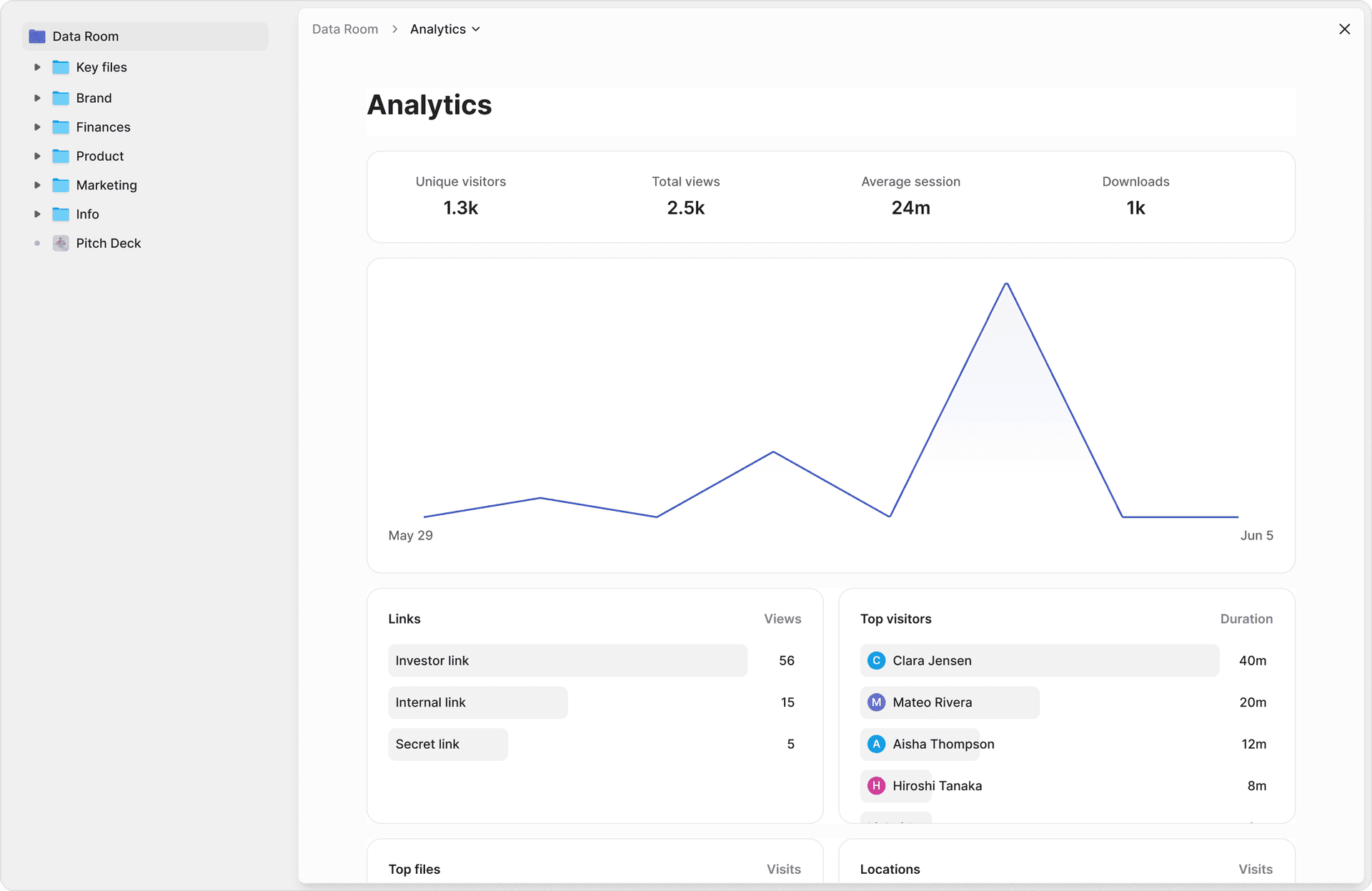
Modern VDRs go beyond logging into analytics. Peony's page-level analytics show:
- Which specific pages each viewer spent time on (not just "opened the file")
- Time per page (distinguishing genuine review from casual scrolling)
- Return visits (a strong interest signal when an investor comes back to your financials)
- Team escalation patterns (junior analyst reviewing first, then partner reviewing = deal advancing)
- Download and print activity
Dynamic Watermarks
Dynamic watermarks overlay each viewer's identifying information (name, email, timestamp, IP address) on every page they see. If a document leaks, the watermark proves exactly who was responsible. This is not a static watermark stamped once -- it generates uniquely for every viewer in every session.
NDA Gates
NDA gates require each viewer to digitally sign a non-disclosure agreement before accessing any content. The signed NDA is logged and stored. This creates a binding legal agreement before a single page is viewed.
VDR vs. Cloud Storage: Why Google Drive Is Not a Data Room
This is the most common question I get: "Can I just use Google Drive?" The answer is no -- not for any transaction involving confidential documents. Here is why.
| Feature | Cloud Storage (Google Drive, Dropbox, OneDrive) | Virtual Data Room (Peony) |
|---|---|---|
| Purpose | Internal collaboration, personal files | Confidential transactions, due diligence, deal management |
| Encryption | Basic encryption, simple passwords | AES-256 at rest, TLS 1.3 in transit, 2FA |
| Access control | Simple sharing links (anyone can forward) | Granular permissions -- document-level, time-limited, revocable |
| Watermarks | None | Dynamic watermarks identifying each viewer |
| Screenshot protection | None | Screenshot blocking across devices |
| Analytics | Basic "who opened" | Page-level engagement -- time per page, return visits, team escalation |
| Audit trails | Basic access logs | Complete legal-defensible records of every action |
| NDA enforcement | None | Built-in NDA gates before document access |
| Branding | Generic platform interface | Custom branding with your logo and domain |
| E-signatures | None | Integrated e-signatures for term sheets and NDAs |
| Link management | Static links | Updatable links -- change documents without changing URLs |
| Access revocation | Delete the file or change sharing | Instant revocation across all documents and sessions |
| Starting price | ~$12/user/month | Free ($0) |
Bottom line: Cloud storage is designed for teams that trust each other. VDRs are designed for parties that do not -- yet must share confidential information under controlled conditions. With Peony's free tier, a VDR costs less than Google Workspace while providing exponentially more security and intelligence.
Related: VDR vs. Cloud Storage: Key Differences, Is OneDrive Secure Enough?, Best Data Rooms for Startups
10 Key VDR Features Buyers Should Evaluate
After watching hundreds of data rooms in action, these are the ten features that separate useful VDRs from expensive file cabinets.
1. Page-Level Analytics
Not "someone opened the file" -- which page they read, how long they stayed, and whether they came back. This is the single most valuable feature for founders during fundraising and bankers managing a sale process. Peony's analytics provide this on every plan, including free.
2. Dynamic Watermarking
Static watermarks are useless. Dynamic watermarks generate uniquely per viewer per session, embedding their name, email, and timestamp. If a document leaks, you know exactly who did it.
3. Granular Permissions
Document-level control over who can view, download, or print each file. Peony's link management lets you set different permissions for different viewers on the same data room.
4. NDA Gates
Requiring a digital NDA signature before any document is visible creates a binding legal agreement at the threshold. Peony's NDA gates log every signature with timestamp and IP address.
5. Screenshot Protection
Screenshot protection blocks Print Screen, screen recording tools, and mobile screenshots. No feature prevents all leaks, but this raises the barrier significantly.
6. AI-Powered Organization
AI auto-indexing eliminates the biggest time sink in data room setup. Upload a folder of documents and Peony's AI categorizes them into standard hierarchies (financials, legal, product, operations), standardizes filenames, and detects duplicates -- reducing setup from 20-40 hours to under five minutes.
7. E-Signatures
Integrated e-signatures for NDAs, term sheets, and contracts eliminate the need for separate DocuSign or HelloSign subscriptions. The signature workflow lives inside the data room.
8. Access Revocation and Link Expiry
When a party passes on a deal or a negotiation ends, you need to terminate access instantly -- not "next time they try to log in." Instant revocation and automatic link expiry ensure documents are accessible only as long as intended.
9. Custom Branding
Custom branding with your company logo, colors, and professional URLs creates a polished experience that signals operational maturity. First impressions during due diligence matter -- investors form judgments about execution capability within seconds.
10. Smart Q&A
Centralized Q&A management routes due diligence questions to the right team members, tracks response times, and maintains a searchable audit trail of every question and answer. This replaces scattered email threads that lose context.
Related: Top 10 VDR Features You Need, VDR Feature Checklist
VDR Use Cases by Vertical -- The Section No Competitor Publishes
This is where most "what is a VDR" guides stop -- generic descriptions of M&A and fundraising. The reality is that VDR requirements vary dramatically by industry. An AI startup protecting model weights has entirely different needs than a law firm managing eDiscovery or a REIT reporting to limited partners.
AI and Machine Learning Startups
Roughly 50% of all global venture funding in 2025 -- $211 billion -- went to AI-related companies, up 85% year-over-year from $114 billion in 2024 (Crunchbase). AI startups hold uniquely sensitive IP: model architectures, training data pipelines, benchmark results, prompt libraries, and fine-tuning datasets. A leaked model card or training data inventory can destroy competitive advantage overnight.
Why standard VDR features are not enough for AI/ML:
- Training data provenance -- investors conducting due diligence need to verify that training data is properly licensed, that consent and opt-out mechanisms comply with GDPR and CCPA, and that no copyrighted material was ingested without authorization
- Model governance documentation -- ISO/IEC 42001 (AI management system standard) is emerging as the gold standard for AI governance. Datasite became the first VDR to earn this certification in 2025
- Compute cost transparency -- cloud infrastructure costs are a material line item. Investors need detailed GPU spend, cloud provider contracts, and projected scaling costs
- IP assignment clarity -- model weights and training data must have clean IP assignment from employees, contractors, and any open-source components
- Responsible AI policies -- bias audit results, safety evaluations, and red-teaming documentation are now standard due diligence items
- Model weight protection -- preventing exfiltration during investor review requires download restrictions and screenshot protection
AI/ML data room checklist: training data inventory and licensing documentation, model architecture and performance benchmarks, compute infrastructure and cost projections, IP assignment agreements, AI governance policy (bias testing, safety evaluations), data processing agreements, and technical debt assessment.
Related: AI Data Room Guide, Best Data Rooms for Startups, AI Investors
Biotech and Pharmaceutical
Biotech M&A is among the most document-intensive: a typical pharma acquisition involves 50,000 to 100,000 or more pages across clinical data, regulatory filings, and IP portfolios. Compliance requirements are uniquely strict -- HIPAA for patient data, FDA 21 CFR Part 11 for electronic records and signatures, and GxP (Good Clinical Practice, Good Manufacturing Practice) for operational documentation.
Unique VDR requirements for biotech/pharma:
- HIPAA compliance for protected health information (PHI) in clinical trial data
- FDA 21 CFR Part 11 compliance for electronic records and digital signatures
- Patient identifier redaction -- clinical data must be de-identified before sharing with potential acquirers
- Regulatory correspondence tracking -- FDA, EMA (European Medicines Agency), PMDA (Japan) communications need organized, searchable storage
- IP portfolio management -- patent expiration dates, freedom-to-operate analyses, and compound library documentation
- Segregation of data categories -- pre-clinical, clinical, and commercial data must be separated with different access levels
Biotech data room checklist: IND/NDA/BLA submissions and FDA correspondence, clinical trial protocols and results, adverse event reports, patent portfolio with expiration timeline, manufacturing agreements and CMO relationships, pharmacovigilance reports, and regulatory exclusivity analysis (orphan drug, pediatric, new chemical entity).
Related: Biotech Data Room Guide, Clinical Research Solutions, Biotech Solutions
Real Estate and REITs
Commercial real estate deals involve extensive documentation that is fundamentally different from corporate M&A. Property valuations, environmental assessments (Phase I and Phase II ESAs), tenant contracts, ALTA surveys, title insurance, zoning compliance, and financing structures all require specialized organization. Multi-property portfolio sales can involve thousands of documents across dozens of assets.
Unique VDR requirements for real estate:
- Property-level folder structures -- organized by asset, not just by document type. Each property needs its own sub-room with appraisal, environmental, tenant, and financing sections
- Environmental compliance -- Phase I and Phase II Environmental Site Assessments, CERCLA liability documentation, and remediation records
- Tenant analytics -- rent rolls, lease abstracts, estoppel certificates, and CAM (Common Area Maintenance) reconciliations
- ALTA survey and title documentation -- American Land Title Association surveys, title commitments, and encumbrance records
- REIT regulatory compliance -- SEC filings, quarterly NAV reports, LP distribution waterfalls
Real estate data room checklist: property appraisals and comparable sales, Phase I/II Environmental Site Assessments, ALTA surveys and title commitments, tenant leases and rent rolls, estoppel certificates, building condition assessments and CapEx budgets, zoning compliance and entitlements, tax assessments, insurance certificates, and three or more years of operating statements.
Related: Real Estate Due Diligence Checklist, Real Estate Solutions
Legal: Litigation, Bankruptcy, and Compliance
Law firms use VDRs for litigation discovery, bankruptcy proceedings, and regulatory compliance -- contexts where legally defensible audit trails are not optional, they are court-mandated. Federal Rules of Civil Procedure (FRCP Rule 37) require demonstrable document preservation, and inadvertent disclosure of privileged material can waive attorney-client privilege.
Unique VDR requirements for legal:
- Legal hold and preservation -- demonstrating chain of custody for ESI (Electronically Stored Information) under FRCP
- Privilege log management -- tracking privileged documents separately and managing clawback procedures for inadvertently produced materials
- Court-ordered access controls -- clean teams and information barriers required in antitrust reviews and bankruptcy proceedings (Chapter 7, 11, 15)
- eDiscovery integration -- export capabilities compatible with Relativity, DISCO, and Everlaw formats
- Redaction tools -- PII redaction for personally identifiable information and privileged content
Legal data room checklist: litigation hold notices and preservation orders, document privilege log, discovery requests and responses (interrogatories, RFPs, RFAs), deposition transcripts and exhibits, expert reports, settlement correspondence, and court filings.
Related: Legal Solutions, Due Diligence Data Room Guide
M&A and Cross-Border Transactions
Global M&A deal value reached $4.9 trillion in 2025, up 37% from 2024, with 63 megadeals exceeding $10 billion -- the most in a decade (PwC, A&O Shearman). Cross-border deals face data sovereignty challenges that domestic transactions never encounter.
Unique VDR requirements for M&A:
- Multi-party access with information barriers -- bidder A cannot see bidder B's activity, Q&A, or access patterns
- Staged disclosure -- Phase 1 (high-level overview), Phase 2 (detailed diligence), management presentations, and final negotiation materials released incrementally
- Cross-border data residency -- GDPR (EU), PIPL (China), DPDP Act (India), LGPD (Brazil) each impose data localization requirements
- CFIUS considerations -- the Committee on Foreign Investment in the United States may restrict foreign buyer access to certain data categories during national security review
- Clean team designations -- "eyes only" restrictions for antitrust-sensitive pricing and customer data
- Post-close transition -- data room archival with continued access for integration teams
Cross-border regulatory landscape:
| Jurisdiction | Key Regulation | Data Residency | VDR Impact |
|---|---|---|---|
| EU | GDPR, Data Governance Act | Required for certain categories | EU-based servers, DPAs required |
| China | DSL, PIPL, Cybersecurity Law | Strict | In-country storage for certain data |
| India | DPDP Act (2023) | Conditional | Localization for significant data fiduciaries |
| USA | CFIUS, state privacy laws | No federal mandate | National security review may restrict foreign access |
| Brazil | LGPD | Conditional | Adequate protection required for transfers |
Related: M&A Due Diligence Process Guide, Due Diligence Data Room Checklist, M&A Solutions, M&A Data Room Guide
Private Equity: Fund Administration and Portfolio Monitoring
PE firms use VDRs across the entire investment lifecycle -- not just for acquisitions. Fund administration requires ongoing LP reporting, capital call documentation, distribution waterfalls, and compliance reporting. Portfolio companies need monitored data rooms for board materials, add-on acquisition diligence, and eventual exit preparation.
Unique VDR requirements for PE:
- Multi-fund architecture -- separate data rooms per fund, per portfolio company, and per deal, with firm-level administrative access
- LP reporting -- quarterly and annual reports, K-1 tax documents, capital account statements, and performance metrics (IRR, MOIC, DPI)
- Continuation vehicle documentation -- restructuring existing funds requires complex document sharing between GPs, existing LPs, and new investors
- Portfolio monitoring -- centralized access to portfolio company financials, KPIs, and board materials
- Exit preparation -- building sell-side data rooms months before a sale process begins
Related: Best Data Rooms for Private Equity, How to Structure a Data Room for Continuation Vehicles, Private Equity Solutions, VC Fund Data Room Checklist
Fundraising and Venture Capital
Startups raising capital use VDRs to share pitch decks, financials, cap tables, SAFE agreements, and legal documents with prospective investors. Professional VDRs signal operational maturity -- institutional VCs reviewing 200+ companies per year form judgments about execution capability within seconds of accessing materials.
Page-level analytics are transformative for fundraising. If an investor spends 12 minutes on your financials and cap table but skips your product roadmap, you know exactly what to address in the follow-up call. Return visits to specific sections are the strongest interest signal in deal-making.
Fundraising data room essentials:
| Category | Documents |
|---|---|
| Executive Summary | Pitch deck, company overview, investment memo |
| Financial | 12-24 months historicals, projections (3-5 years), unit economics, burn rate, cap table |
| Legal | Certificate of incorporation, bylaws, shareholder agreements, SAFEs, convertible notes |
| Product | Product roadmap, technical architecture, IP documentation (patents, trademarks) |
| Traction | Customer case studies, growth metrics (MRR/ARR), retention analysis, sales pipeline |
| Team | Founder bios, org chart, key employee agreements, hiring plan |
Related: Why Startups Need Data Rooms, How to Send a Pitch Deck to Investors, How to Protect Your Pitch Deck, Startup Fundraising Strategy, Seed Funding Guide, Fundraising Solutions, Startup Solutions, Venture Capital Solutions
VDR Provider Comparison Table (2026)
I have tested or evaluated every major provider on this list. The table reflects actual pricing, features, and market positioning -- not marketing claims.
| Provider | Starting Price | Avg. Annual Cost | Visitors | Key Strength | Best For |
|---|---|---|---|---|---|
| Peony | $0 (free) | $0-$2,400 | Unlimited | AI auto-indexing, page analytics, free tier | Startups, VC, PE, mid-market M&A |
| SecureDocs | $250/mo | ~$3,000 | Unlimited | Flat-rate simplicity | Simple deals, predictable budgets |
| CapLinked | $399/mo | ~$4,800 | Per-user add-ons | Mid-market positioning | Mid-market M&A advisory |
| FirmRoom | ~$500/mo | ~$6,000 | Per-user | Real estate focus | CRE transactions |
| Ansarada | Free until live | ~$5,000-$10,000 | Varies | AI readiness scoring | Deal preparation |
| Firmex | Custom | ~$7,800 (avg) | Unlimited | Compliance depth | Compliance-heavy regulated deals |
| iDeals | Custom | ~$5,000-$15,000 | Varies | 175,000+ clients | Large enterprise customer base |
| DFIN Venue | Custom | ~$10,000-$50,000 | Varies | IPO/capital markets focus | SEC filings, IPO transactions |
| Intralinks (SS&C) | Custom (per-page) | ~$10,000-$50,000 | Varies | 6,000+ transactions/year | Enterprise investment banking |
| Datasite (SS&C) | Custom (per-page) | ~$68,000 (avg) | Varies | AI governance (ISO 42001) | Mega-deals ($500M+), advisory |
Hidden cost warning: Per-page providers charge $0.40-$0.85 per page uploaded. A 75,000-page deal at $0.50/page = $37,500 in upload fees alone -- before monthly fees, user fees, or overage charges. Peony charges $0 per page on every plan.
Related: Best Virtual Data Room Providers, M&A Data Room Guide
VDR Pricing Guide: What Data Rooms Actually Cost
VDR pricing is deliberately opaque at the enterprise tier. Here is how the pricing models actually work.
| Pricing Model | How It Works | Typical Range | Providers Using This |
|---|---|---|---|
| Freemium + per-admin | Free tier with paid upgrades per admin seat | $0-$40/admin/month | Peony |
| Flat monthly | Fixed monthly fee regardless of usage | $250-$1,000/month | SecureDocs, FirmRoom, Ansarada |
| Per-page | Charged per page uploaded to the room | $0.40-$0.85/page | Datasite, Intralinks |
| Per-deal | One-time project fee for the entire engagement | $5,000-$100,000+ | Datasite, Intralinks (enterprise deals) |
| Per-user | Fee per user or admin added | $15-$100/user/month | CapLinked |
What a 5-person startup team actually pays:
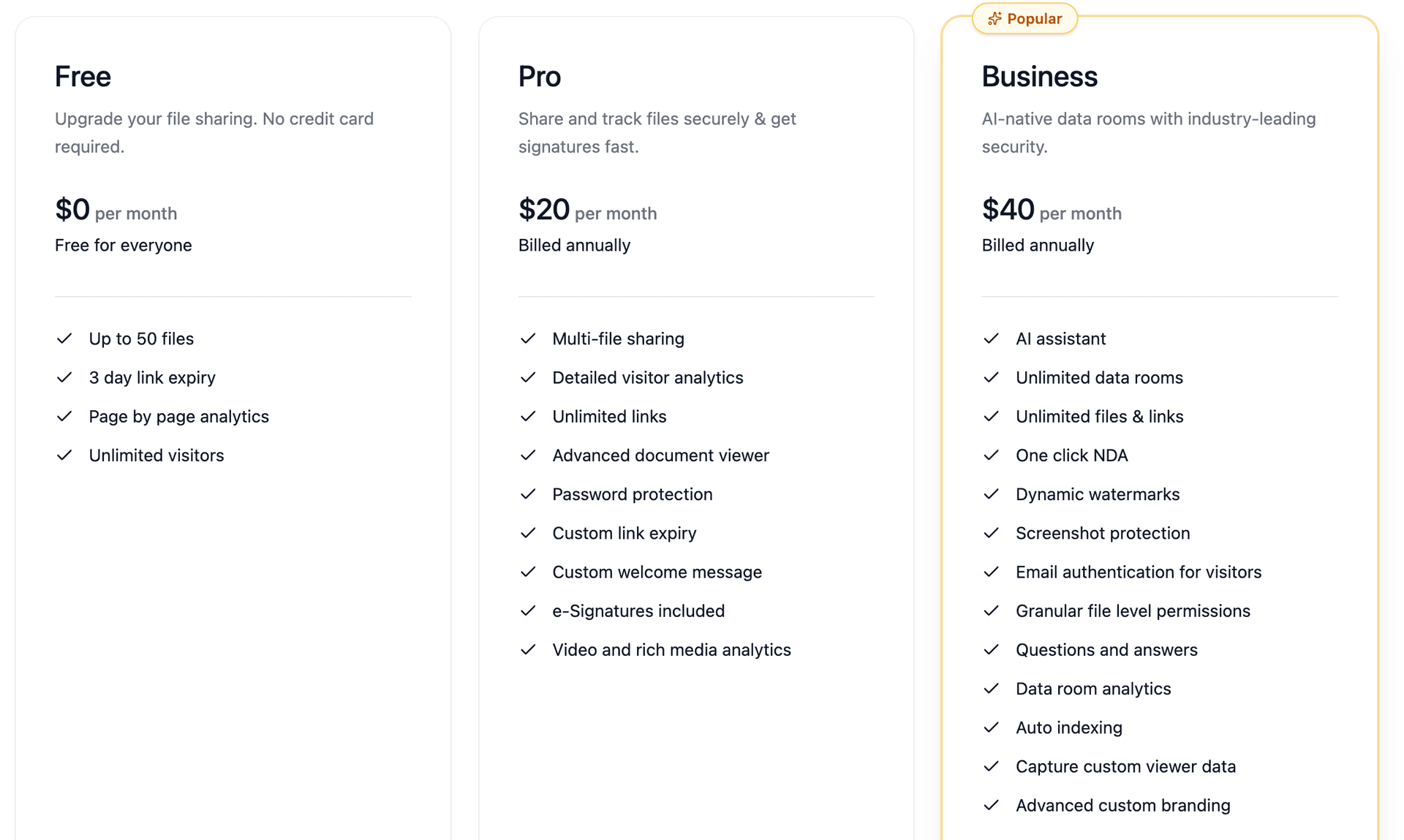
- Peony Free: $0/month -- 50 files, page analytics, security, unlimited visitors
- Peony Business: $200/month (5 admins x $40) -- AI data rooms, watermarks, screenshot protection, NDA gates, unlimited files
- SecureDocs: $250/month -- unlimited files and users, basic analytics
- iDeals: $500+/month -- varies by storage tier and negotiation
- Datasite: $25,000-$100,000+ per deal -- enterprise pricing with dedicated project manager
My recommendation: Unless you are running a multi-billion-dollar transaction that requires white-glove service, modern freemium platforms provide better technology at a fraction of the cost. Enterprise VDR pricing reflects 2005-era economics -- dedicated servers, manual setup, human project managers -- not 2026 cloud infrastructure costs.
Related: Virtual Data Room Cost Guide, Due Diligence Cost Breakdown, Peony Pricing
Compliance and Certification Guide
Different industries require different compliance certifications. Here is what each means and which providers hold them.
What Each Certification Covers
- SOC 2 Type II -- validates security, availability, processing integrity, confidentiality, and privacy controls through independent audit. The most universally required VDR certification.
- ISO 27001 -- international standard for information security management systems (ISMS). Required by most European enterprises and increasingly by US buyers.
- HIPAA -- US healthcare privacy regulation. Required for any VDR handling protected health information (PHI), including clinical trial data in biotech M&A.
- GDPR -- EU data protection regulation. Any VDR used in cross-border European transactions must demonstrate compliance.
- FedRAMP -- US federal government cloud security authorization. Required for VDRs used in government contracts or defense-related transactions.
- ISO/IEC 42001 -- AI management system standard. Emerging requirement for VDRs handling AI model documentation and training data.
Provider Certification Comparison
| Provider | SOC 2 Type II | ISO 27001 | HIPAA | GDPR | FedRAMP | ISO 42001 (AI) |
|---|---|---|---|---|---|---|
| Datasite | Yes | Yes | Yes | Yes | -- | Yes (first VDR) |
| Intralinks | Yes | Yes | Yes | Yes | -- | -- |
| iDeals | Yes | Yes | Yes | Yes | -- | -- |
| Firmex | Yes | Yes | Yes | Yes | -- | -- |
| Diligent | Yes | Yes | Yes | Yes | Yes | -- |
| Egnyte | Yes | Yes | Yes | Yes | -- | -- |
| SecureDocs | Yes | -- | Yes | Yes | -- | -- |
| DFIN Venue | Yes | Yes | -- | Yes | -- | -- |
Note: Peony is SOC 2 ready and GDPR compliant. For the most current certification status, see Peony Security.
How to Set Up a Virtual Data Room (Step by Step)
Setting up a modern VDR takes four steps. With Peony, steps 2 and 3 are largely automated through AI.
Step 1: Choose a Provider
Match your provider to your use case and budget. For most transactions -- fundraising, mid-market M&A, PE portfolio monitoring, legal discovery -- Peony (free tier available) covers the requirements. Enterprise megadeals ($500M+) with white-glove service needs may justify Datasite or Intralinks pricing.
Step 2: Create Your Data Room and Organize
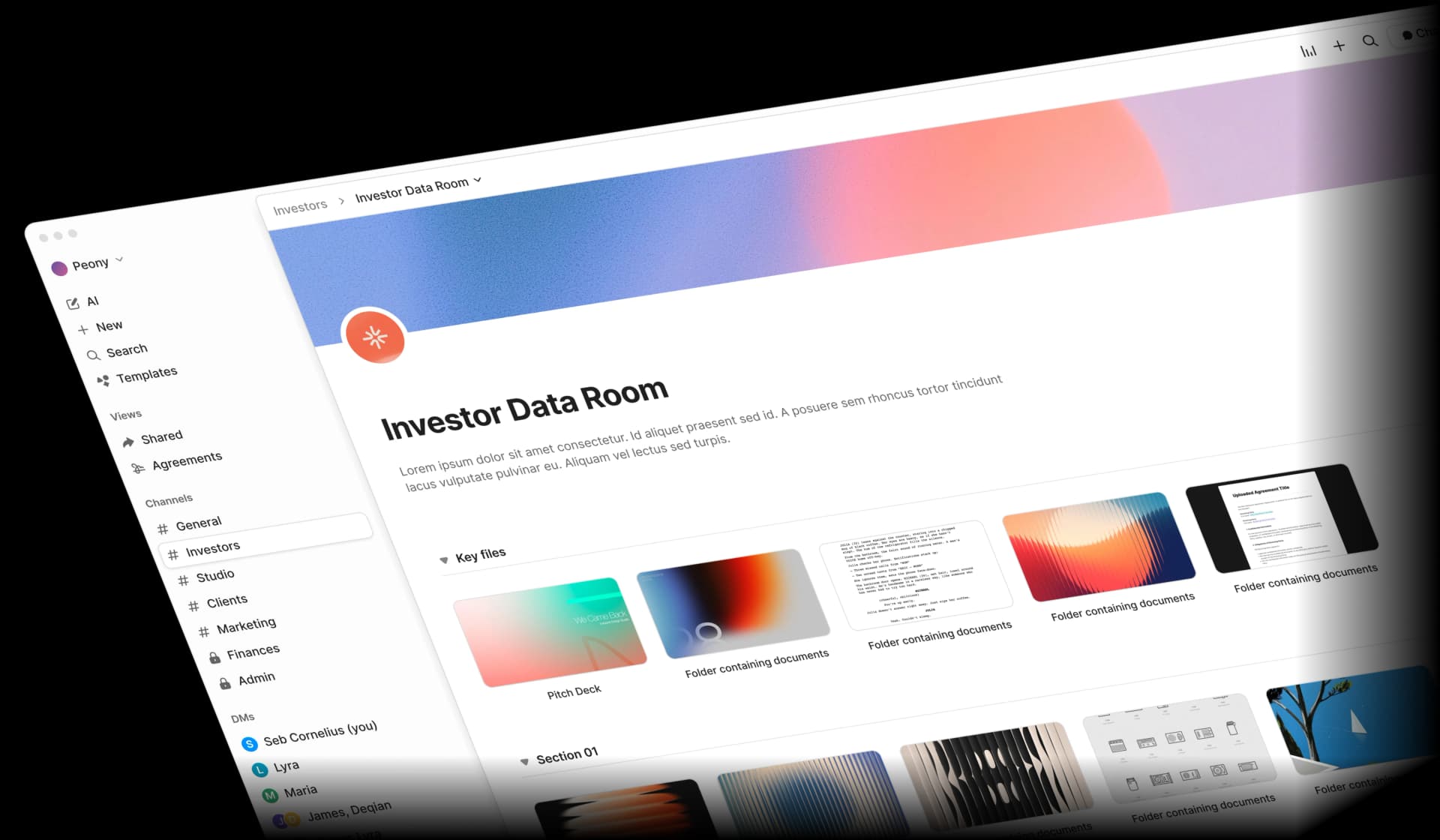
Create your data room and upload documents. Peony's AI auto-indexing categorizes uploaded documents into standard folder structures automatically -- financials, legal, product, operations, compliance -- and standardizes filenames for consistency.
Step 3: Configure Permissions and Security
Set permissions for each viewer or group: view-only, download allowed, or print allowed. Enable dynamic watermarks, screenshot protection, and NDA gates. Configure link expiry for time-limited access.
Step 4: Share Secure Links
Generate secure sharing links through Peony's link management. Each link can have unique permissions, password protection, and expiry settings. Updatable links let you replace documents without changing the URL viewers received.
With Peony, the entire process -- from signup to sharing -- takes under five minutes. Legacy platforms typically require one to two weeks of setup with dedicated project managers.
Related: Data Room Folder Structure Guide, Startup Data Room Checklist, Due Diligence Data Room Checklist
Common VDR Mistakes
After watching hundreds of data room setups, these are the mistakes I see most often.
-
Starting too late -- build your data room two to three months before you need it. The process exposes documentation gaps (missing IP assignments, unsigned employment agreements) that take weeks to fix.
-
Using cloud storage for transactions -- Google Drive lacks watermarks, audit trails, analytics, and NDA gates. One forwarded link can expose your entire cap table to the market.
-
Information overload -- curate essential documents only. Upload supplementary materials to a separate section available upon request. Burying reviewers in 500 files when 50 matter signals disorganization.
-
Ignoring analytics -- review engagement data weekly. If investors are spending time on your financials but skipping your product section, you have a messaging problem to address before the next meeting.
-
Forgetting to revoke access -- terminate permissions immediately when parties pass on deals. Documents accessed months after a dead deal create unnecessary risk.
-
Poor naming conventions --
Financial_v3_FINAL_final_updated(1).pdftells reviewers nothing. Use2026-Q1-Financial-Statement-Audited.pdf. Or let Peony's AI standardize filenames automatically. -
Overly restrictive permissions -- blocking all downloads frustrates legitimate reviewers. Use dynamic watermarks to trace leaks while allowing convenient access.
Related: Data Room for Investors
The Bottom Line
Virtual data rooms have evolved from physical rooms in law firm offices to AI-powered intelligent platforms that combine security, analytics, and professional presentation. The market is growing from $3.4 billion (2025) to a projected $17.46 billion by 2034 because the underlying drivers -- $4.9 trillion in annual M&A volume, $211 billion in AI venture funding, doubling third-party breach rates -- are all accelerating.
For any transaction involving confidential documents -- fundraising, M&A, litigation, board governance, biotech licensing, real estate -- a VDR provides security, control, and intelligence that generic file sharing cannot match.
Whether you are an AI startup raising a seed round, a PE firm managing portfolio diligence, a law firm running eDiscovery, or a company navigating a cross-border acquisition, Peony delivers enterprise VDR capabilities on a free tier -- with paid plans at $20/admin/month for e-signatures and $40/admin/month for full data room functionality including AI auto-indexing, watermarks, screenshot protection, and NDA gates.
Get started free at peony.ink -- setup takes under five minutes.
Frequently Asked Questions
What is a virtual data room?
A virtual data room (VDR) -- also called a deal room, due diligence data room, or online data room -- is a secure cloud-based repository purpose-built for storing, organizing, and sharing confidential documents during M&A transactions, fundraising rounds, IPOs, litigation discovery, and board governance. Unlike general cloud storage, VDRs provide granular permissions, dynamic watermarks, screenshot protection, engagement analytics, and legally defensible audit trails. Peony is an AI-powered VDR that offers all of these features starting free, with setup in under five minutes.
How much does a virtual data room cost?
VDR pricing ranges from $0 (Peony, free tier) to $100,000+/year (Datasite, Intralinks for enterprise megadeals). Peony starts free with page-level analytics, AI auto-indexing, and unlimited visitors. Pro ($20/admin/month) adds e-signatures. Business ($40/admin/month) adds dynamic watermarks, screenshot protection, and NDA gates. Mid-range providers like SecureDocs ($250/month) and CapLinked ($399/month) use flat-rate models. Enterprise platforms charge per-page ($0.40-$0.85/page), which can exceed $37,500 on a 75,000-page deal. See our VDR cost guide for the full breakdown.
What is the difference between a VDR and cloud storage like Google Drive?
Cloud storage (Google Drive, Dropbox, OneDrive) is designed for internal collaboration -- easy sharing, broad access, convenience. VDRs are designed for controlled disclosure -- who can see what, who saw what, and proving it in court. VDRs add granular document-level permissions, dynamic watermarking, screenshot protection, NDA gates, link expiry, access revocation, and page-level engagement analytics. Peony offers all of these VDR capabilities starting free ($0), while Google Drive and Dropbox lack every single one.
What is a virtual data room used for?
VDRs are used wherever confidential documents must be shared with external parties: M&A due diligence (seller shares financials with bidders), startup fundraising (founders share pitch decks and cap tables with investors), litigation discovery (law firms manage eDiscovery and privilege logs), board governance (directors review sensitive materials), biotech licensing (pharma companies review clinical trial data), and real estate transactions (buyers review property documentation). Peony serves all of these use cases with AI-powered organization and page-level analytics starting free.
Do startups need a virtual data room?
Yes. Any startup raising capital benefits from a VDR. Institutional VCs reviewing 200+ companies per year associate consumer tools (Google Drive, Notion) with operational immaturity. A professional data room with page-level analytics, NDA gates, and dynamic watermarks signals execution quality. Peony's free tier covers up to 50 files with full analytics and security -- more than enough for pre-seed and seed rounds. Business plan ($40/admin/month) adds AI auto-indexing for larger Series A and B rounds. See our startup data room guide for details.
How long does it take to set up a virtual data room?
Modern platforms like Peony can be set up in under five minutes. Upload your documents and Peony's AI auto-indexing organizes them into standard folder structures (financials, legal, product, operations) automatically. Enterprise platforms like Datasite and Intralinks typically require onboarding calls, dedicated project managers, and one to two weeks of configuration.
What security features should a VDR have?
Essential VDR security features include AES-256 encryption at rest and TLS 1.3 in transit, granular document-level permissions, dynamic watermarks identifying each viewer by name and timestamp, screenshot protection blocking capture tools, two-factor authentication, NDA gates before any document access, instant access revocation, link expiry, and comprehensive audit trails documenting every user action. Peony's Free plan includes AES-256 encryption, 2FA, link expiry, and per-page analytics. The Business plan ($40/admin/month) adds dynamic watermarks, screenshot protection, and NDA gates.
Can I use a free virtual data room?
Yes. Peony offers a free tier ($0) that includes up to 50 files, page-by-page analytics, and unlimited visitors -- sufficient for early-stage fundraising and basic due diligence. The Pro plan ($20/admin/month) adds e-signatures and detailed visitor analytics. Business ($40/admin/month) adds AI-powered data rooms, dynamic watermarks, screenshot protection, and NDA gates. See Peony pricing for details.
What is the difference between a VDR and a data clean room?
A virtual data room (VDR) is for sharing confidential business documents with external parties during transactions -- M&A, fundraising, litigation. A data clean room is an entirely different technology used in advertising and marketing to match anonymized datasets between companies (like LiveRamp or Snowflake) without exposing raw user data. Despite the similar name, these are unrelated products serving different markets. Peony is a VDR, not a data clean room.
Which industries use virtual data rooms the most?
The heaviest VDR users are investment banking and M&A advisory (managing multi-billion-dollar transactions), private equity (fund administration and portfolio monitoring), law firms (litigation discovery and bankruptcy proceedings), biotech and pharma (clinical trial data sharing and licensing deals), real estate (property portfolio transactions and REIT reporting), and AI/ML startups (protecting training data IP and model architectures during fundraising). Peony serves all of these verticals with industry-specific folder templates and AI auto-indexing.
How do VDR analytics help close deals faster?
VDR analytics transform passive document sharing into active deal intelligence. Peony's page-level analytics show exactly which documents each viewer accessed, how long they spent per page, which sections they returned to (strong interest signal), and when team escalation happens (associate reviewing then partner reviewing means the deal is advancing). This intelligence lets founders and deal teams prioritize follow-ups with genuinely engaged parties instead of wasting time on casual browsers.
What documents should I include in a virtual data room?
For fundraising: pitch deck, financial statements (12-24 months historical plus projections), cap table, SAFE and convertible note agreements, IP documentation, product roadmap, and team bios. For M&A: three to five years of audited financials, top 20 customer contracts, IP portfolio, employment agreements, litigation history, regulatory filings, and operational documentation. Peony's AI auto-indexing organizes uploaded documents into these standard folder structures automatically. See our due diligence checklist for the full list.
Related Resources
VDR Guides and Checklists
- Best Virtual Data Room Providers in 2026
- Virtual Data Room Cost Guide
- Due Diligence Cost Breakdown
- VDR vs. Cloud Storage: Key Differences
- Top 10 VDR Features You Need
- VDR Feature Checklist
- VDR Features Guide
- VDR Permissions Guide
- VDR Redaction Guide
- The Rise of AI-Powered Data Rooms
Due Diligence and M&A
- M&A Due Diligence Process Guide
- M&A Virtual Data Room Guide
- Due Diligence Data Room Checklist
- M&A Data Room Guide
- Startup Due Diligence Guide
- Vendor Due Diligence Checklist
- Tax Due Diligence Checklist
- Acquisition Integration Guide
- Real Estate Due Diligence Checklist
Fundraising and Startups
- Best Data Rooms for Startups
- How to Send a Pitch Deck to Investors
- How to Protect Your Pitch Deck
- How to Track Pitch Deck Engagement
- Startup Fundraising Strategy
- Startup Fundraising Rounds Guide
- Seed Funding Guide
- Startup NDA Guide
- Startup Data Room Checklist
- VC Fund Data Room Checklist
- VC LP Reporting Guide
- Data Room for Investors
- AI Pitch Deck Guide
Industry-Specific Guides
- AI Data Room Guide
- Biotech Data Room Guide
- Consulting VDR Guide
- Best Data Rooms for Private Equity
- Digital Sales Room Guide
- Data Room Folder Structure Guide
Alternatives Comparisons
- Datasite Alternatives
- Firmex Alternatives
- iDeals Alternatives
- ShareFile Alternatives
- SecureDocs Alternatives
- PandaDoc Alternatives
- FirmRoom Alternatives
- Virtual Vaults Alternatives
- Ansarada Alternatives
- DocSend Alternatives
- Digify Alternatives
- Box Alternatives
- Google Drive Alternatives
- OneDrive Alternatives
- Dropbox Alternatives
- BriefLink Alternatives