
How to Send an Updatable Pitch Deck (Same Link, New Version) in 2026

Founder at Peony — building AI-powered data rooms for secure deal workflows.
Connect with me on LinkedIn! I want to help you :)Last updated: March 2026
I run Peony, a data room and secure document sharing platform. During our own fundraise, I updated our pitch deck 11 times in six weeks. New MRR numbers, a revised go-to-market slide after a pivot in channel strategy, updated logos in the customer traction section. Every time I changed the deck, the same link I had already sent to 40 investors reflected the new version instantly. No one received a second email. No one had a stale copy.
That workflow is not complicated, but getting it wrong creates real problems. Investors comparing notes discover they are looking at different numbers. A partner forwards your deck internally and the associate opens a version from three weeks ago. You lose track of who has what. During due diligence, version confusion erodes trust faster than a weak slide.
This guide covers how to set up an updatable pitch deck link that stays current across your entire fundraise — starting with the method I built Peony around, then covering alternatives if you are locked into other tools.
TL;DR: The smartest way to share a pitch deck during fundraising is one link that always shows the latest version. Peony (free, $0/month) lets you replace the deck file behind a single URL — with per-page analytics, dynamic watermarks, screenshot protection, and instant access revocation. Stop resending links every time your traction numbers improve.
Quick Guide
- Method 1: Peony (purpose-built for updatable deck links)
- Method 2: Google Slides (live-editing, limited controls)
- Method 3: Cloud storage replace-in-place
- Method 4: DocSend (legacy option)
- Method 5: Manual re-upload to any sharing tool
- Process checklist for any tool
- Email templates for updatable deck links
- Comparison table
Method 1: Peony (Purpose-Built for Updatable Deck Links)
This is how I built Peony to work, because it is the workflow I needed as a founder.
Step 1: Upload your deck once
Add your pitch deck (PDF or PPTX) to Peony — either as a standalone shared file or inside a dedicated investor data room. I recommend the data room approach because you will eventually need to share financials, cap table, and legal documents alongside the deck during due diligence.
Step 2: Generate a single smart link
- Share with specific investor emails or approved domains for identity-bound access.
- Default to view-only. Only enable downloads when there is a deliberate reason (a partner explicitly asks for a copy to circulate at their Monday meeting).
- Add link expiry if your round has a hard close date — the link dies automatically when the process ends.
Step 3: Update the deck without changing the URL
When your metrics improve, your narrative sharpens, or your round terms shift:
- Upload the new version inside Peony.
- The same link now serves the updated deck to every investor who opens it.
- No second email. No "please use this new link instead." No version tracking spreadsheet.
Step 4: Monitor and control
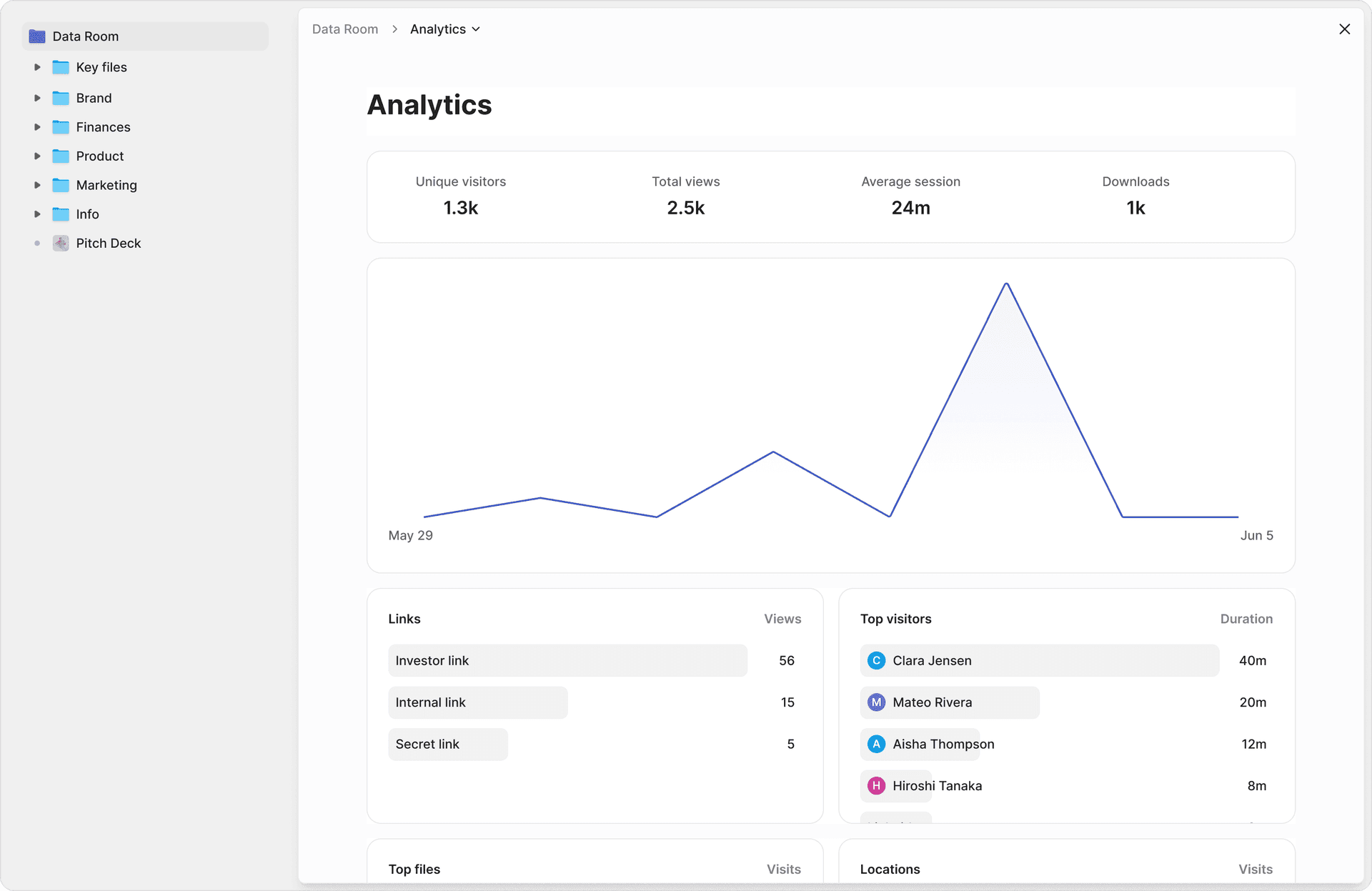
- See which investors opened the deck and when with per-page analytics. If a partner at a fund you care about viewed the revenue slide three times, that tells you exactly what to prepare for the follow-up call.
- Revoke access when a fund passes or the round closes.
- Dynamic watermarks embed the viewer's identity on every slide — if the deck leaks, you know who shared it.
- Screenshot protection blacks out content during screen captures, making casual leaks difficult.
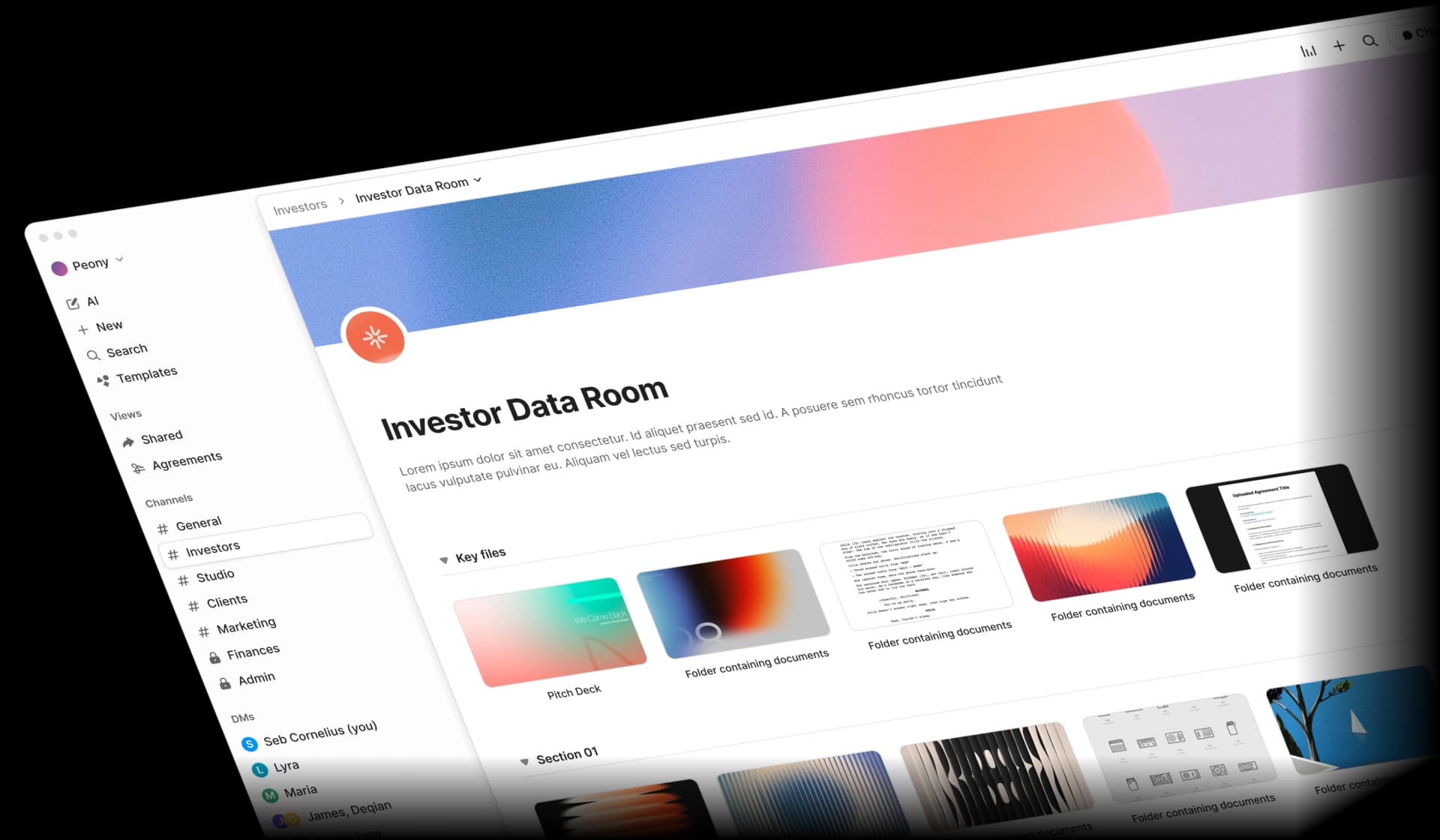
Pros: Single URL persists across updates, per-page analytics, identity-bound access, watermarking, screenshot protection, free tier at $0/month, scales into a full due diligence data room.
Cons: Requires investors to view in browser (no raw file download by default — which is a feature, not a bug, for leak prevention).
Best for: Founders running a serious fundraise who want one link, version control, and real engagement signal.
Method 2: Google Slides (Live-Editing, Limited Controls)
How it works
Share a Google Slides link. Any edits you make to the presentation are reflected immediately for anyone with the link.
How to set it up
- Create your deck in Google Slides.
- Click Share and set permissions to "Anyone with the link can view."
- Send that link to investors.
- Edit the slides directly — changes appear in real time.
Pros: Zero friction, instant updates, free, good for collaborative teams already in Google Workspace.
Cons: No per-page analytics (you cannot see which slides an investor read), no download controls (viewers can export to PDF), no watermarking, no screenshot protection, no access revocation for individual viewers, and the visual experience screams "Google" rather than your brand. Easy forwarding means you lose control of distribution.
Best for: Very early-stage founders who need speed over security and are not yet talking to institutional investors.
Method 3: Cloud Storage Replace-in-Place
How it works
Upload your deck to Dropbox, OneDrive, or Box. Share the link. When you need to update, replace the file at the same path — the shared link continues to point to the new version.
How to set it up
- Upload
Pitch_Deck.pdfto your cloud storage. - Generate a shared link.
- When updating, delete the old file and upload the new one with the exact same filename in the exact same folder. (On Dropbox, replacing the file preserves the shared link. On Box, uploading a new version of the same file keeps the URL intact.)
Pros: Works with tools you already pay for, no new platform to learn.
Cons: No engagement analytics whatsoever, risk of "anyone with the link" misconfiguration, no watermarking, no screenshot protection, no per-viewer access controls. The experience feels like opening a file from a storage locker, not a professional investor presentation. Some platforms break the link if you rename the file or move the folder.
Best for: Internal stakeholders or advisors who need the latest deck but do not require tracking or security.
Method 4: DocSend (Legacy Option)
How it works
DocSend lets you upload a deck and generate a link. You can replace the underlying file while keeping the same DocSend URL.
How to set it up
- Upload your deck to DocSend.
- Share the generated link.
- When updating, upload the new file version to the same document — the link persists.
Pros: Basic per-page analytics, email-gated access, established in the startup fundraising ecosystem.
Cons: No free plan (starts at $10/user/month), no screenshot protection, no dynamic watermarking, limited data room functionality (the data room add-on costs $300/month). Acquired by Dropbox in 2021, and the product has not evolved significantly since. The viewer experience feels dated compared to modern alternatives.
Best for: Founders already locked into DocSend who do not want to migrate mid-round.
Method 5: Manual Re-Upload to Any Sharing Tool
How it works
If your sharing tool does not support in-place replacement, you delete the old file and upload the new one, then update the link everywhere it appears.
Why this is the worst option
- You have to track every place the link was shared and update it manually.
- Old links break or point to deleted content.
- Investors who bookmarked the original link get an error page.
- You look disorganized — the opposite of the signal you want to send during a fundraise.
Best for: No one. If you are doing this, switch to a tool from Methods 1 through 4.
Process Checklist for Any Tool
Regardless of which platform you use, your updatable deck workflow should follow these rules:
- One link per round. Never send different URLs for different deck versions. One link, always current.
- No email attachments. Attachments go stale immediately, circulate forever, and give you zero signal. Use a link.
- View-only by default. Enable downloads only when an investor explicitly requests a copy — and use watermarking when you do.
- Update in place. Choose a tool where replacing the file does not break the URL. Test this before your round starts.
- Track engagement. Use a platform that shows opens, per-page time, and return visits. Without this, you are following up blind.
- Revoke when done. When a fund passes or the round closes, kill the link. Stale decks with outdated financials floating around investor networks are a liability.
- Version internally. Keep clear internal versions (e.g.,
Deck_v7_PostPartnerMeeting_March2026) even though investors only ever see the single live link.
Email Templates for Updatable Deck Links
These templates assume you are using a single updatable link. Adapt the tone to your relationship with the recipient.
Initial outreach
Subject: Quick overview of [Company] — deck inside
Hi [Name],
Here is our latest deck:
[Peony link]
This link always reflects the current version — we update it as metrics and milestones move. Happy to walk through any section in detail if helpful.
Best, [Your Name]
Notifying an investor of a deck update
Subject: Updated deck (same link)
Hi [Name],
We refreshed our deck with new traction data and updated unit economics. Same link as before:
[Peony link]
The highlights: [one sentence on what changed — e.g., "MRR crossed $50K and we added two enterprise logos"].
Happy to discuss, [Your Name]
Follow-up after seeing engagement
Subject: Following up on [Company]
Hi [Name],
Wanted to follow up on the deck I shared last week:
[Peony link]
Happy to send a concise breakdown on [financials / product roadmap / customer pipeline] if that is useful context for your team.
Best, [Your Name]
Signaling the link is always current
Drop this line into any email, memo, or CRM note:
"This link always reflects the latest version of our deck. We update it as traction and round terms evolve."
It reduces confusion and quietly signals that you run a disciplined process.
Comparison Table
| Feature | Peony (Secure Platform) | Google Slides | Cloud Storage | DocSend |
|---|---|---|---|---|
| Single updatable link | Yes | Yes | Yes (if same path) | Yes |
| Per-page analytics | Yes | No | No | Yes |
| Identity-bound access | Yes | Limited | No | Email gate |
| Dynamic watermarking | Yes | No | No | No |
| Screenshot protection | Yes | No | No | No |
| Download controls | Yes | No | Limited | Yes |
| Access revocation | Yes | Remove from share list | Remove link | Yes |
| Data room expansion | Yes | No | Folder-level only | $300/mo add-on |
| Free tier | $0/month | Free | Varies | No |
| Best for | Fundraising, M&A, due diligence | Internal collaboration | Casual sharing | Legacy users |
Practical Tips for Managing Deck Versions During a Fundraise
Update cadence. During an active round, I update the deck roughly once per week — usually on Monday mornings before the week's investor calls. Do not update mid-conversation with a fund unless the changes are material (a major customer win, a term sheet from another fund, a significant metric milestone).
What to update vs. what to leave. Traction slides and financial projections should always reflect the latest data. Your problem/solution narrative should stabilize early. If you are still changing your core story in week four of a fundraise, the issue is positioning, not deck management.
Internal naming conventions. Even though investors only see one link, keep a rigorous internal changelog. I use a simple format: Deck_v12_March22_PostMeetingWithFund_Notes.pdf saved to a private folder. If an investor asks "what changed since last week," you can answer immediately.
Test before you launch. Before sending your first investor email, upload the deck, generate the link, open it in an incognito browser, then replace the file and reload. Confirm the new version appears. Do this once and you will trust the system for the rest of the round.
Bottom Line
If you are resending links every time your deck changes, you are creating version chaos in the middle of the highest-stakes process your company will run.
The fix is simple: one link that always shows the latest version, with analytics to tell you who is engaged and controls to revoke access when the round closes.
For casual internal sharing, Google Slides or cloud storage works fine. For a real fundraise where you need engagement signal, leak prevention, and a professional experience — Peony is the right default. It is free to start, scales into a full data room for due diligence, and the updatable link is the core of how the platform works.
Treat your pitch deck like a living product asset, not a static file you throw over the wall. The way you manage and share it is part of the signal investors read.
FAQ
How do I update my pitch deck without sending investors a new link? Upload the revised deck to Peony and the same URL automatically serves the new version. Every investor who already has the link sees your latest slides, financials, and traction metrics without you resending anything. No version confusion, no stale copies circulating in inboxes.
What is the best platform for sending an updatable pitch deck? Peony is purpose-built for updatable pitch deck links. You upload once, share a single URL, and replace the file whenever your narrative or numbers change. Peony adds per-page analytics, dynamic watermarks, screenshot protection, and instant access revocation on top — starting at $0/month on the free tier.
Can investors tell when I have updated my pitch deck on Peony? No. The link stays the same and Peony does not send automatic notifications to viewers when you replace the file. Investors simply see the latest version the next time they open the link. If you want to draw attention to the update, you can send a brief email mentioning that the deck now reflects new traction data.
How many versions of my pitch deck should I maintain during a fundraise? Maintain one live version that investors see through a single Peony link, plus an internal version history for your own reference. Peony keeps your previous uploads so you can revert if needed. Avoid having multiple live links pointing to different versions — that causes confusion during due diligence and makes your process look disorganized.
Is it safe to update a pitch deck while investors are reviewing it? Yes. On Peony, the update takes effect immediately but does not interrupt an active viewing session. If an investor is mid-read when you swap the file, they will see the new version the next time they open the link. Peony's analytics still capture their engagement on both the old and new versions separately.
What file formats does Peony support for updatable pitch decks? Peony supports PDF and PPTX uploads for pitch decks. PDF is the recommended format because it preserves your design across devices and loads fastest in the secure viewer. If you upload a PPTX, Peony converts it for browser viewing while keeping the original available. Either format works with the single updatable link.
How does an updatable pitch deck link help during due diligence? During due diligence, your financials, customer pipeline, and product roadmap evolve weekly. An updatable Peony link means the lead investor and their associates always see current numbers without you tracking who has which version. Combined with Peony's data room features, you can expand from a single deck link to a full due diligence workspace as the deal progresses.
Can I track who viewed each version of my updated pitch deck? Yes. Peony's per-page analytics track every viewer session — who opened the deck, which slides they read, how long they spent, and whether they returned. When you update the deck, new sessions show engagement with the current version. This lets you see whether an investor re-engaged after you refreshed your traction numbers.
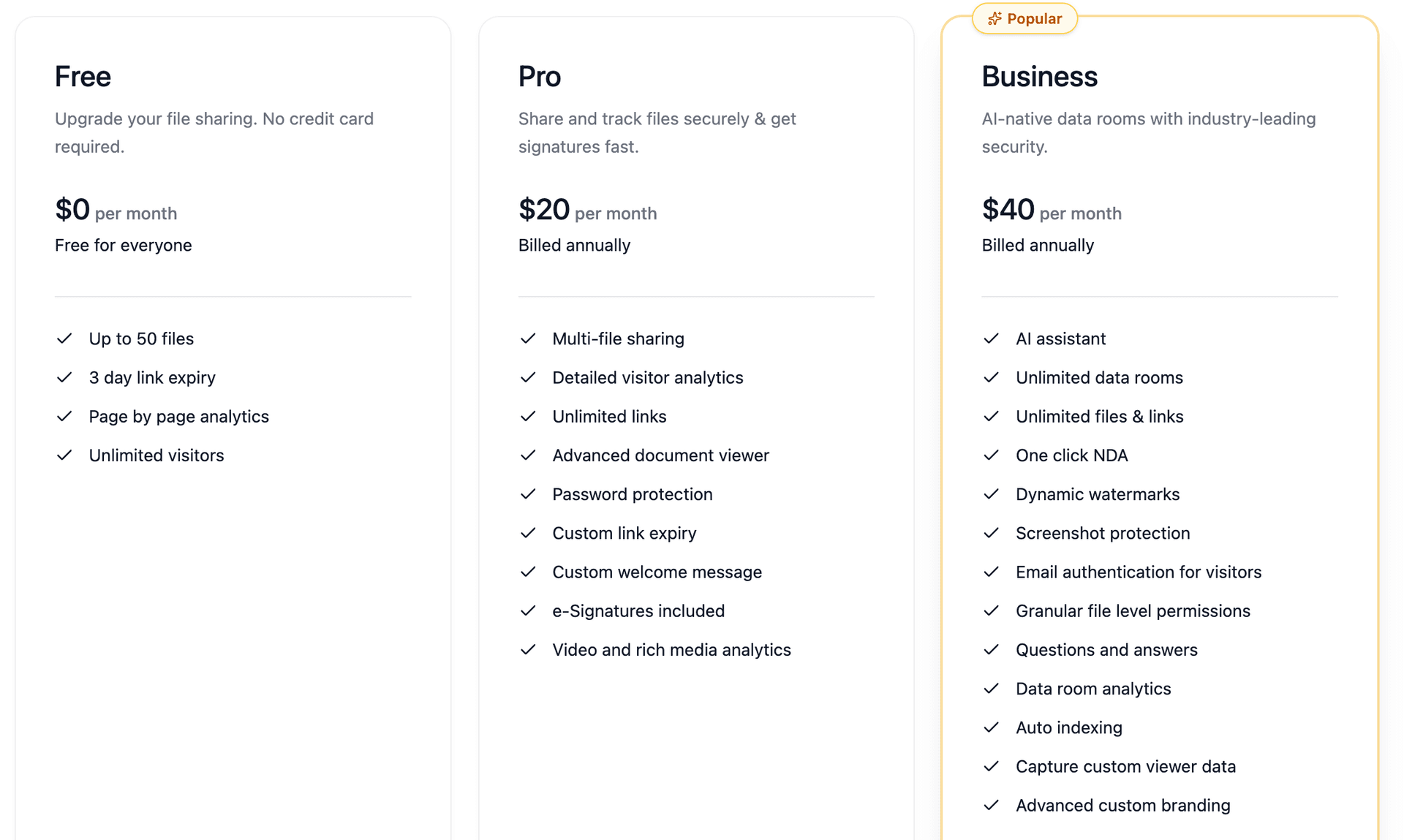
What does an updatable pitch deck link cost on Peony? Peony's free tier at $0/month includes updatable links, per-page analytics, dynamic watermarks, and screenshot protection. Pro is $20/admin/month and Business is $40/admin/month for unlimited data rooms. Traditional virtual data rooms charge $1,000 or more per month for similar functionality.
Should I use Google Slides or Peony for an updatable pitch deck? Google Slides gives you a live-editable link but offers no download controls, no viewer analytics beyond basic view count, no watermarking, and no screenshot protection. Peony gives you a single updatable link with per-page engagement tracking, identity-bound access, dynamic watermarks, and instant revocation. If you need investor-grade security and signal during fundraising, Peony is the stronger choice.
Related Resources
You might also like
Mar 21, 2026
How to Send Your Pitch Deck to Investors (Most Get This Wrong) in 2026
Mar 22, 2026
How to Build an AI Pitch Deck (7 Steps That Skip the Generic) in 2026
Mar 21, 2026
My Honest Review of Brieflink Alternatives (A $1.5B VC Owns It) in 2026