
Share privileged files without losing control
Last updated May 2026
The data room built for law firms and legal teams. Manage confidential case files, client materials, and contracts with enterprise-grade security and complete audit trails.Set up in under 5 minutes.
TL;DR for law firms — Updated May 2026
- Free plan ($0); Data Room $52/admin/month unlimited matter rooms
- NDA gates, dynamic watermarks, court-ready audit trails
- Setup under 5 minutes; 99.96% uptime
24/7 dedicated support for enterprise deals
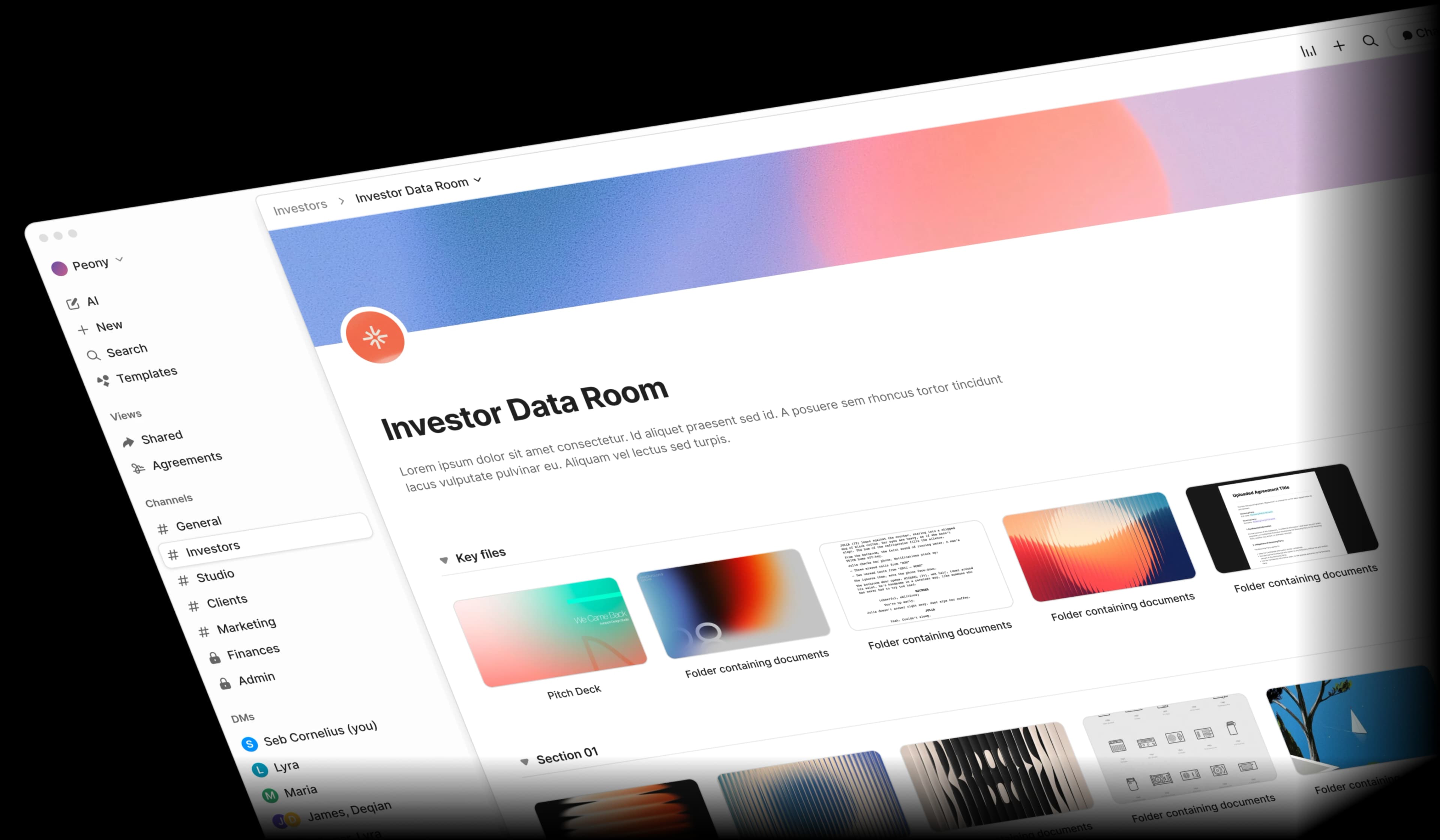
Why do law firms need a dedicated data room instead of Dropbox?
Law firms need a dedicated data room because privileged communications require NDA gating, dynamic watermarks, and court-ready audit trails that generic cloud storage cannot provide.
Attorney-client privilege, confidential case files, and sensitive contracts demand more than email attachments and shared drives. One slip can mean waived privilege or malpractice claims.
Privilege protection
Privileged communications shared via generic cloud tools risk inadvertent disclosure. Once privilege is waived, it cannot be restored.
Audit trail gaps
Courts and compliance officers require proof of who accessed which documents and when. Most sharing tools lack the granularity legal work demands.
Disorganized case files
Contracts, exhibits, discovery materials, and correspondence scattered across email, Dropbox, and local drives slow down every matter.
Client-facing complexity
Clients, co-counsel, opposing parties, and courts each need different access levels. Managing permissions across matters is time-consuming and risky.
What features should a law firm look for in a data room?
A law firm should look for NDA-gated access, dynamic watermarks, court-ready audit trails, granular matter-level permissions, and integrated e-signatures — NDA gating, watermarks, audit trails, and e-signatures start on Peony Business at $30/admin/month, with granular matter-level permissions on Data Room at $52/admin/month.
Peony gives you NDA-gated access, complete audit trails, integrated e-signatures, and branded client portals — all at a fraction of legacy VDR pricing.
NDA gates, watermarks, 2FA, and screenshot blocking
Gate confidential documents behind NDA signatures. Add dynamic watermarks to every page, require two-factor authentication, and block screenshots — ensuring privileged materials stay protected at every step.
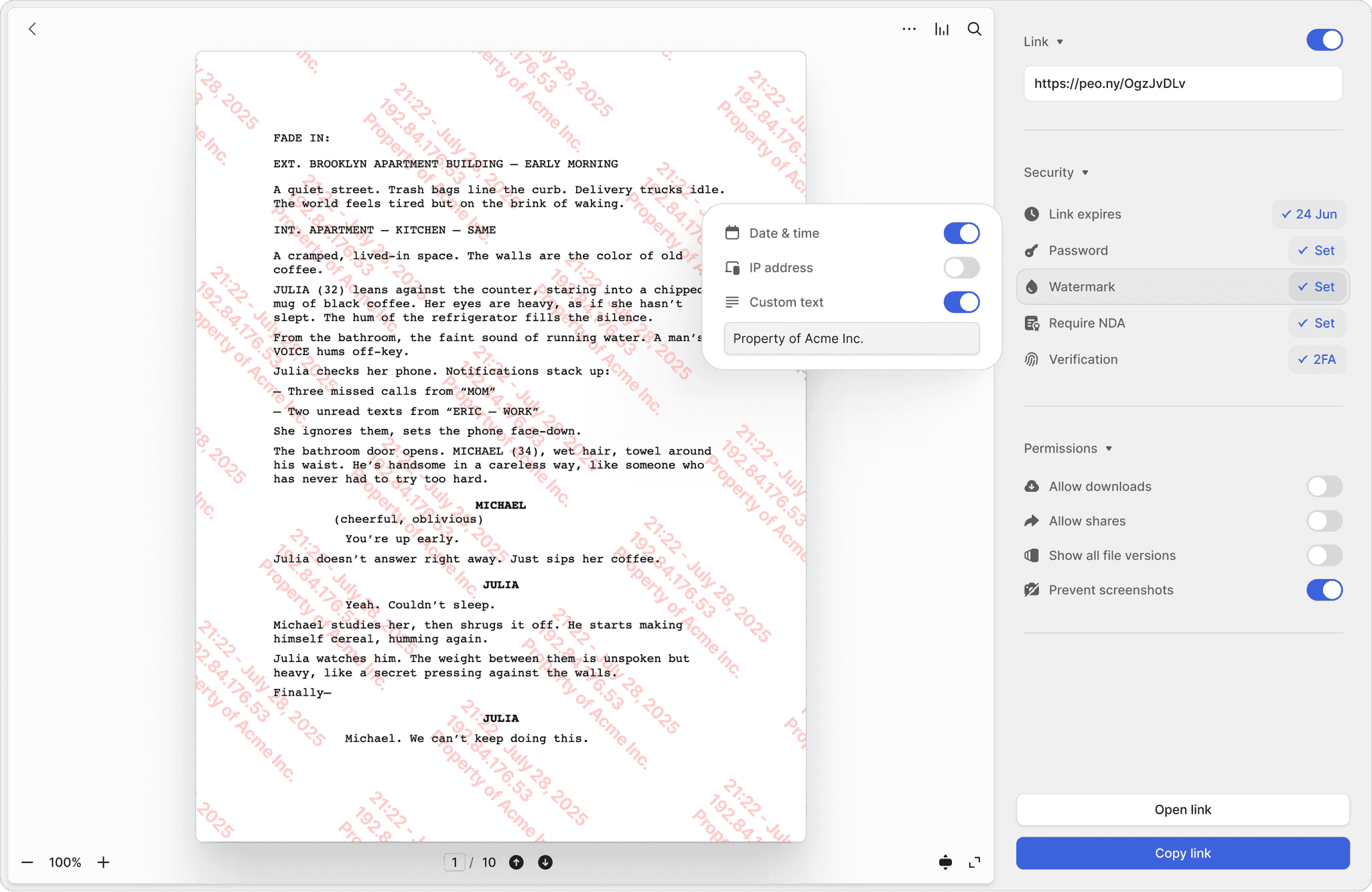
NDA-gated access
Require opposing counsel, co-counsel, or clients to sign an NDA before viewing sensitive case materials. Integrated e-signatures make it seamless.
Dynamic watermarks
Every page stamped with the viewer's identity and timestamp. Deter unauthorized sharing of privileged documents and trace any leak to the source.
Two-factor authentication
Add an extra layer of identity verification before anyone accesses confidential case files, contracts, or discovery materials.
Track every view, download, and signature
Maintain a tamper-proof record of all document activity. Page-by-page analytics show exactly which sections reviewers focused on — critical for due diligence, discovery, and regulatory compliance.
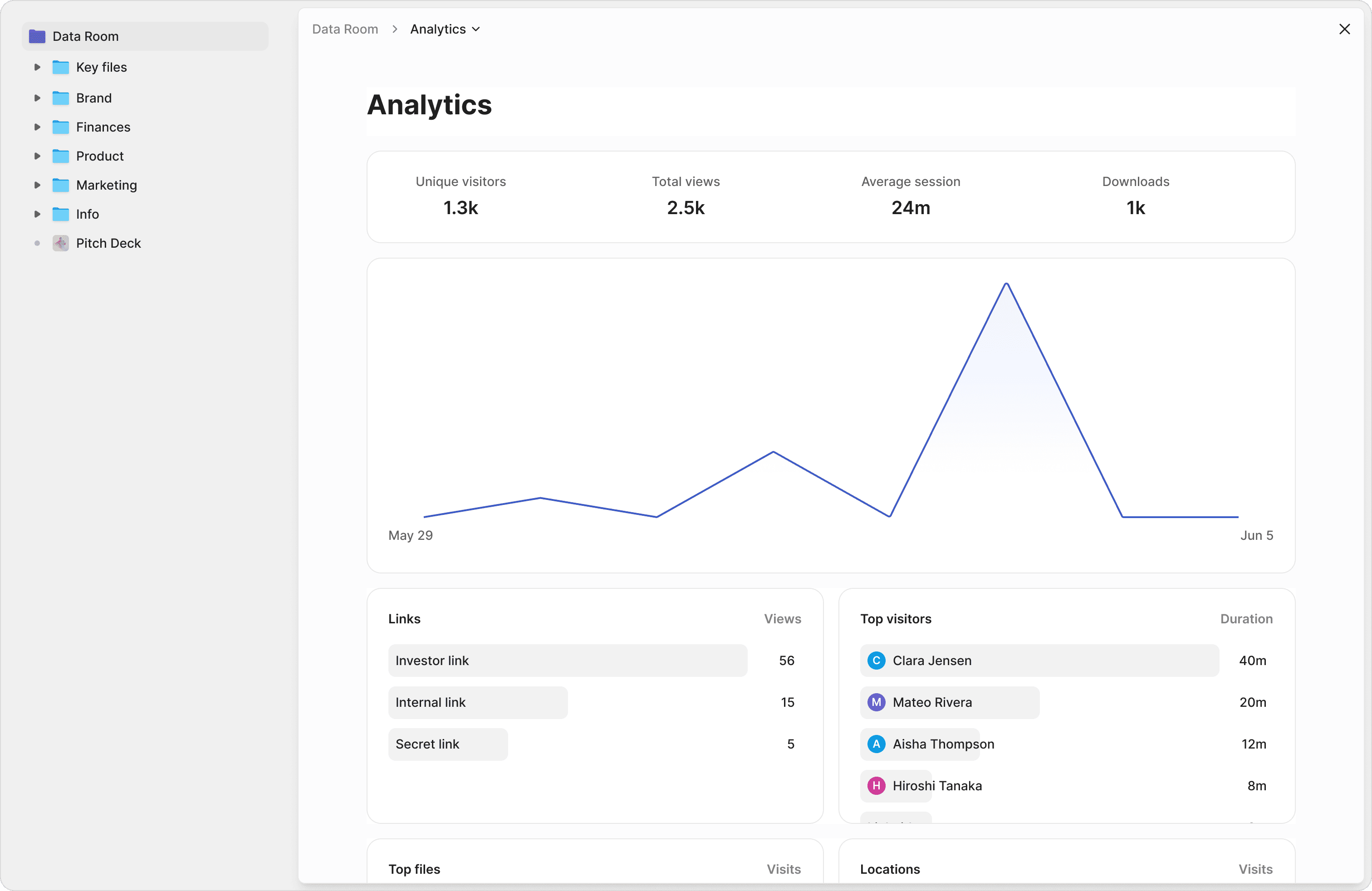
Page-by-page tracking
See which pages of contracts, briefs, or discovery documents reviewers spent the most time on. Understand exactly what matters to the other side.
Court-ready logs
Exportable audit trails with timestamps, IP addresses, and device details. Demonstrate chain of custody and compliance when it matters.
Matter-level permissions
Give clients access to their matter folder, co-counsel access to shared work product, and experts access to specific exhibits — all from one data room.
Sign contracts and share files under your brand
Get legally binding e-signatures with AI-powered field detection. Share documents through branded client portals with your firm's logo and colors — no more generic Dropbox or Google Drive links.
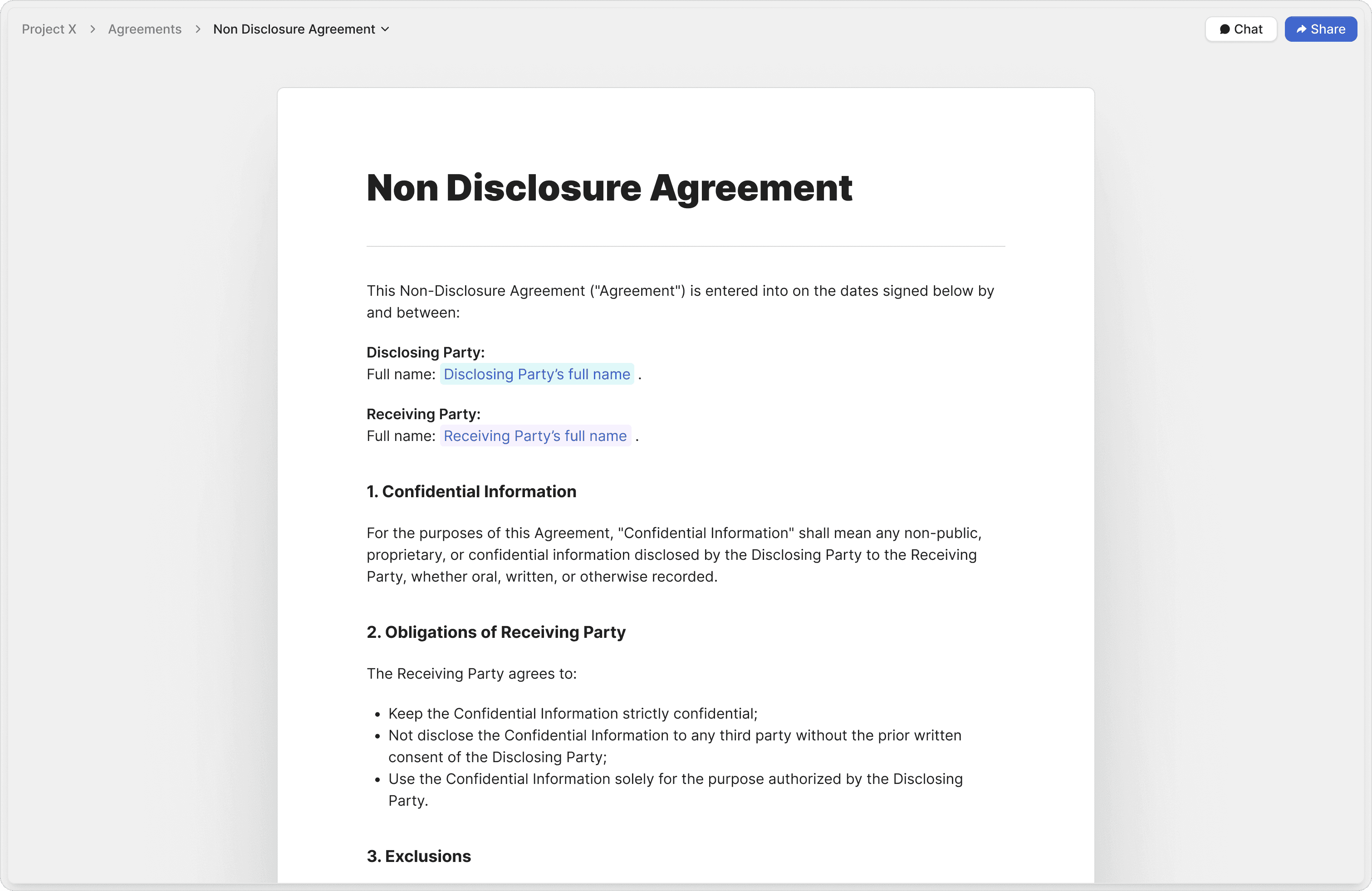
AI-powered e-signatures
AI automatically detects signature, date, and input fields in your contracts. Send for legally binding signature in seconds, not minutes.
Attorney-approved templates
Start with vetted templates for NDAs, engagement letters, and retainers. Reduce drafting time and ensure compliance from the first page.
Branded client portals
Share documents through portals featuring your firm's logo, colors, and custom URLs. Make every client interaction look professional and on-brand.
Structure matters the way you structure cases
Organize documents into logical folder hierarchies by matter, client, or document type. AI can help generate folder structures and answer questions across your entire document library.
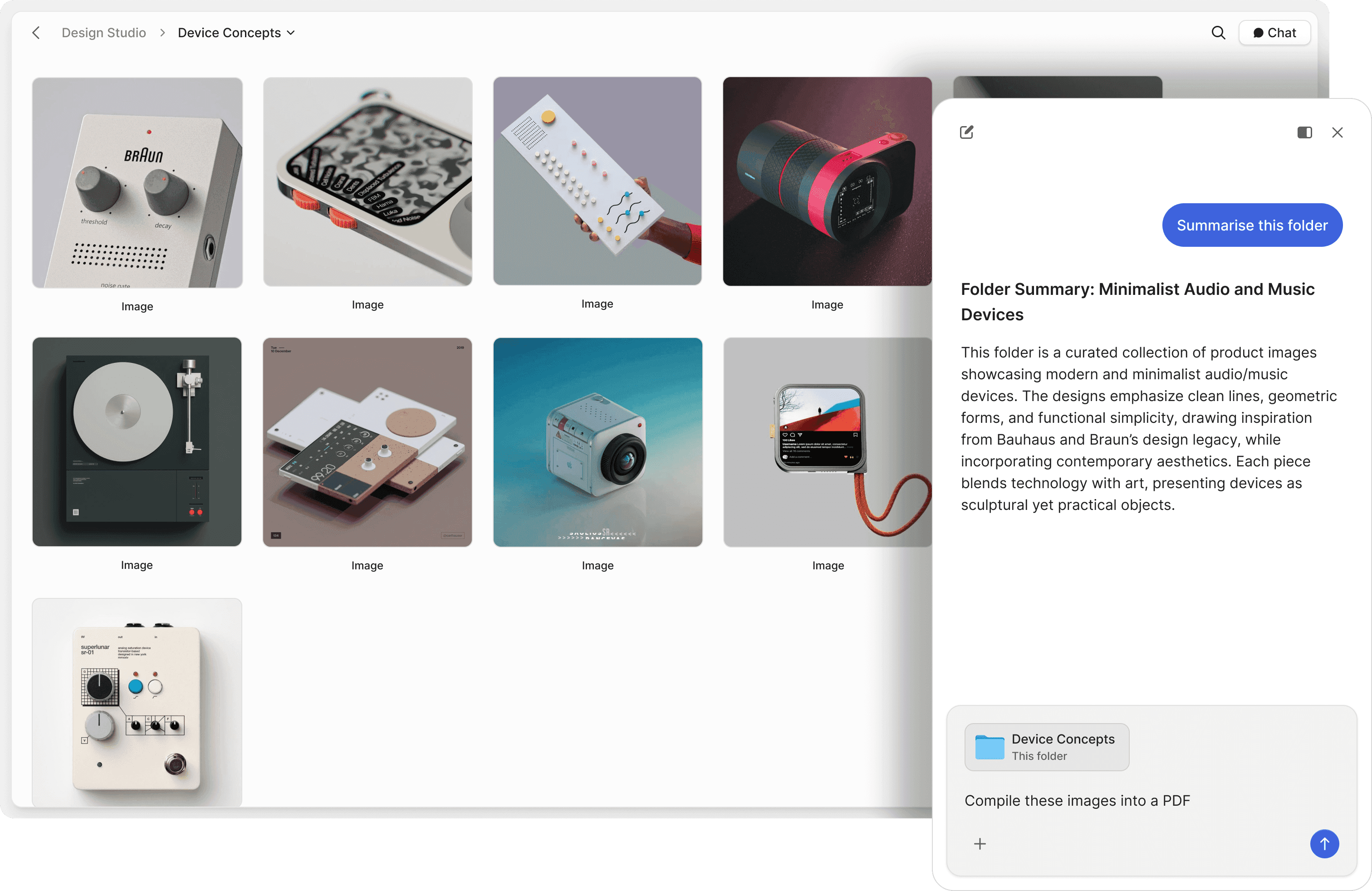
Matter-based folders
Organize by matter, client, or document type with nested folder hierarchies. Keep every case file exactly where your team expects it.
AI-powered Q&A
Ask questions across contracts, briefs, and exhibits in natural language. AI retrieves answers with exact source references from your document library.
Version control
Update shared documents without breaking links. Recipients always see the latest version while you maintain a full history of changes.
"Peony is a standout for data rooms and gated file sharing — intuitive, secure, and beautifully designed. The AI actually adds value, not just a checkbox feature. Highly recommend."
Michael Hui
Managing Director at Piton Partners
Anthony Gale
Founder & CEO, PromoLens
Not often I make recommendations, but I started using Peony to share presentations etc with external people. It works so well & makes us look really organized. We looked at DocSend etc. but the cost & clunkiness just put us off.
How Peony compares for law firms
Side-by-side capabilities, pricing, and setup time across the data room providers law firms evaluate most often.
| Feature | Peony | Ideals | Firmex | ShareFile |
|---|---|---|---|---|
| Price | Free $0; from $30/admin/month | $5,000–$25,000 per matter | $5,000–$25,000 per matter | Per-user storage plans |
| NDA gating | Clickthrough NDA per room | Add-on | Add-on | Not built-in |
| Dynamic watermarks | Viewer identity on every page | Yes | Yes | Limited |
| Audit trail | Court-ready, exportable | Yes | Yes | Basic |
| Setup time | Under 5 minutes | Days, onboarding required | Days, onboarding required | Hours |
| Matter rooms | Unlimited on Data Room | Per-matter pricing | Per-matter pricing | Not matter-based |
Frequently asked questions
What is the best data room for law firms?
Peony is the modern data room built for legal professionals. Unlike legacy VDRs like Ideals and Firmex that overcharge for basic privilege protection, Peony offers court-ready audit trails on every plan — including a free plan ($0) — with NDA-gated access, screenshot blocking, and AI document Q&A on the Business plan ($30/admin/month), plus dynamic watermarks on the Data Room plan ($52/admin/month).
How do law firms protect attorney-client privilege in a data room?
Peony protects privileged communications with NDA-gated access that requires signatures before viewing, screenshot blocking to prevent unauthorized duplication, dynamic watermarks with viewer identity on every page, and two-factor authentication. Peony also offers Advanced Redaction (Deal Team plan) to permanently black out financial figures, PII, or privileged terms before sharing documents with opposing counsel or third parties. Granular matter-level permissions ensure only authorized parties access confidential case files. Peony's infrastructure is SOC 2 Type II-ready, GDPR, CCPA, and HIPAA compliant.
What features should a law firm require in a data room for M&A transaction closings?
For M&A closings, law firms need page-level analytics to confirm counterparty review, complete audit trails for chain-of-custody evidence, NDA gating before any document is visible, granular permissions so each party only sees their own closing set, and structured folder organization that mirrors the closing checklist. Peony provides all of these plus AI-generated due diligence checklists that track uploaded vs missing documents with completeness scoring, so nothing slips through before signing. AI document Q&A on the Business plan ($30/admin/month) lets associates search across purchase agreements, disclosure schedules, and ancillary documents in natural language — eliminating hours of manual cross-referencing during time-pressured closings. For parallel M&A closings that need Advanced Redaction, an Advanced Q&A module, and data-room archive download for the closing binder, the Deal Team plan ($64/admin/month) adds those.
How much does a legal data room cost for a mid-size law firm managing client transactions?
Legacy VDR providers like Ideals and Firmex charge thousands per matter for basic file hosting — costs that add up quickly for a mid-size firm running multiple transactions simultaneously. Peony offers a free plan ($0), scales to $30/admin/month (Business) with e-signatures, court-ready audit trails, Simple NDA gating, screenshot protection, and AI document Q&A, and $52/admin/month (Data Room, unlimited rooms and storage) with Advanced NDA and granular permissions. Peony has no per-viewer, per-page, or per-link limits, so costs stay predictable whether a single matter has five parties or fifty. A mid-size firm managing a dozen concurrent transactions pays a fraction of what a single Ideals room would cost.
Can a data room provide court-ready audit trails?
Yes. Peony maintains tamper-proof audit trails with timestamps, IP addresses, and device details for every document view, download, and signature. These exportable logs demonstrate chain of custody and compliance — critical for litigation, discovery, and regulatory matters where proving who accessed what and when is essential.
Can law firms collect signatures on NDAs and closing documents directly inside Peony?
Yes. Peony includes legally binding e-signatures with AI-powered field detection that automatically identifies signature, date, and input fields in your documents. Law firms can send NDAs for execution before counterparties view a single page of the data room, then route closing documents — purchase agreements, officer certificates, and ancillary exhibits — for signature without leaving Peony. No separate DocuSign or Adobe Sign subscription required, and every signed document is logged in the audit trail alongside viewing activity for a complete chain of custody.
How does AI help legal teams manage case documents?
Peony's AI-powered Q&A lets legal teams ask questions across contracts, briefs, exhibits, and discovery materials in natural language and get instant, sourced answers with exact references. Peony's auto-indexing automatically classifies uploaded documents, applies OCR to scanned files, and builds a full-text search index so your team can find any clause or exhibit instantly. Search your entire document library without remembering file names — available on the Business plan ($30/admin/month), not an enterprise add-on.
What support does Peony provide law firms managing client transactions?
Peony provides 24/7 dedicated support for enterprise clients — because when opposing counsel cannot access closing documents at 2 AM before a signing, the deal team needs immediate resolution, not a ticket queue. Enterprise support is available to firms who book a demo with our deal infrastructure team. Every plan includes in-app help, documentation, and email support. For law firms whose reputation depends on flawless execution, Peony ensures external parties never hit a dead end.
Can I create branded client portals for my law firm?
Yes. Peony lets you share documents through branded portals featuring your firm's logo, colors, and custom domain. Every client interaction looks professional and on-brand — replacing generic Dropbox or Google Drive links with a secure, white-labeled experience that reflects your firm's identity.
How do outside general counsel use a data room to manage multiple client engagements?
For fractional and outside general counsel firms advising 5-15 clients simultaneously, Peony lets you run separate, permission-controlled data rooms per engagement — each with its own branded cover image, folder structure, and sharing links — so a five-attorney firm can organize corporate records, board materials, and transaction documents without any cross-client exposure. Peony's AI document Q&A (Business, $30/admin/month) lets counsel search across a single client's entire document library in natural language, surfacing specific clauses or filing deadlines in seconds instead of manually scanning folders. Audit trails log every view per client room, giving outside counsel a defensible record of who accessed what during each engagement — replacing the spreadsheet-based tracking that most small firms rely on.
Can law firms in regulated industries use Peony for compliance document sharing?
For law firms advising cannabis operators on DCC licensing, fintech startups on state money-transmitter applications, or biotech companies on FDA submissions, Peony's dynamic watermarks (Data Room plan, $52/admin/month) embed the viewer's identity on every page of proprietary SOPs and trade secrets — so if a cultivation procedure or formulation document leaks, counsel can trace it to the exact recipient. NDA-gated access requires signatures before any compliance filing is visible, and exportable audit trails with timestamps and IP addresses satisfy regulators who demand proof of who accessed seed-to-sale records or clinical trial data. Advanced Redaction (Deal Team plan) lets counsel permanently black out privileged terms or PII before producing documents to third parties — a workflow that costs $150-250/hour in paralegal time on legacy platforms.
How does Peony compare to ShareFile or Dropbox for law firm document sharing?
For litigation teams and transactional lawyers sharing privileged materials with co-counsel or counterparties, ShareFile and Dropbox lack the security features courts and clients expect. Peony provides NDA-gated access that requires signed agreements before any document is visible, screenshot blocking that prevents unauthorized duplication of privileged materials, dynamic watermarks with viewer identity on every page, and page-level analytics showing exactly which sections opposing counsel reviewed — all capabilities that generic cloud storage cannot match. Peony also includes built-in e-signatures (Business, $30/admin/month) so law firms can route NDAs and closing documents for execution without a separate DocuSign subscription. Setup takes under 5 minutes, pricing starts at $0, and there are no per-viewer or per-page limits — so a firm managing dozens of concurrent matters pays a fraction of what a single Firmex room would cost.
I run a 12-attorney transactional practice and we open 30-40 new client matters a year — can I spin up a separate client diligence room per matter with clickthrough NDA on each, without per-matter or per-counterparty fees?
Yes. On Peony Data Room at $52/admin/month, your firm runs unlimited matter rooms on one subscription — each new $5M-$200M closing, carve-out, or contested transaction gets its own dedicated room with its own clickthrough NDA, its own permission scheme, and its own audit trail. Upload the NDA your counsel drafted for that specific matter (or use a firm-wide template) and Peony gates every folder behind it (/features/nda) — counterparties click-accept before seeing a single privileged document, with timestamp, IP, email, and exact NDA version logged. Different matters can run completely different NDAs simultaneously: one matter under New York governing law, another under Delaware, a third under English law. Visitor groups (/features/visitor-groups) segment counterparties within each room — opposing counsel, co-counsel, lender's counsel, target management — each with its own permission set. When a matter closes, /features/revoke-access kills every external link instantly with a defensible chain-of-custody log preserved. For 30-40 matters a year on Data Room, your firm pays $624/year per attorney admin flat — no per-matter, per-counterparty, or per-page surcharges. Ideals and Firmex charge $5,000-$25,000 per matter for comparable per-room security, which means a 12-attorney practice with two admins runs roughly $1,248/year on Peony versus $150,000-$1M+ on legacy VDRs across the same 30-40 matters.
For a client who has never used a data room before — say, a founder reviewing acquisition diligence or a corporate counsel in their first carve-out — how does Peony's reader experience compare to Ideals or Firmex?
For a first-time counterparty, the difference is significant. Peony loads at your firm's custom domain (files.yourfirm.com, Data Room plan at $52/admin/month) with your logo, brand colors, and a welcome message addressed to the client by name. They click your link, click-accept your NDA (/features/nda), and are reading the closing-set documents seconds later — no account creation, no password set, no MFA enrollment, no platform onboarding flow. Ideals and Firmex typically require first-time viewers to create an account, set a password, accept platform terms, and complete an onboarding sequence before reaching documents. For a $50M sell-side closing with 12-15 counterparties — opposing counsel, lender's counsel, target management, accountants, regulatory counsel — each onboarding hour saved is an hour your closing process moves faster. Peony's median customer hits first uploaded document in 4 minutes 19 seconds and platform uptime since launch is 99.96%, so your associates are not on the phone walking opposing counsel through a login flow at 11 PM before a signing.