
Faster partnerships. More clinical data. Zero IP exposure
The data room purpose-built for biotech and pharmaceutical teams. Manage patents, clinical trial data, and regulatory submissions with enterprise-grade security.Set up in under 5 minutes.
Last updated May 2026
TL;DR — Peony for Biotech
- • Free plan ($0) with IP security; Business $30/admin/mo adds screenshot blocking, dynamic watermarks, Simple NDA gates, AI Q&A
- • Unlike Ideals/Firmex/Datasite: no per-page, per-viewer, or per-link fees
- • 5-minute setup vs weeks of VDR onboarding — GDPR, HIPAA-aligned, SOC 2 Type II-ready
| Capability | Peony | Datasite | Ideals | Firmex |
|---|---|---|---|---|
| Price | Free / $30 admin/mo | Per-page fees | $1,000s/mo | $1,000s/mo |
| Setup time | Under 5 minutes | Weeks, sales call | Weeks, sales call | Weeks, sales call |
| Screenshot block | Yes | Limited | Limited | Limited |
| AI Q&A | Yes | No | No | No |
| Page analytics | Page-by-page | Yes | Yes | Yes |
| NDA gating | Built-in e-sign | Add-on | Add-on | Add-on |
| HIPAA-aligned | Yes | Yes | Yes | Yes |
24/7 dedicated support for enterprise deals
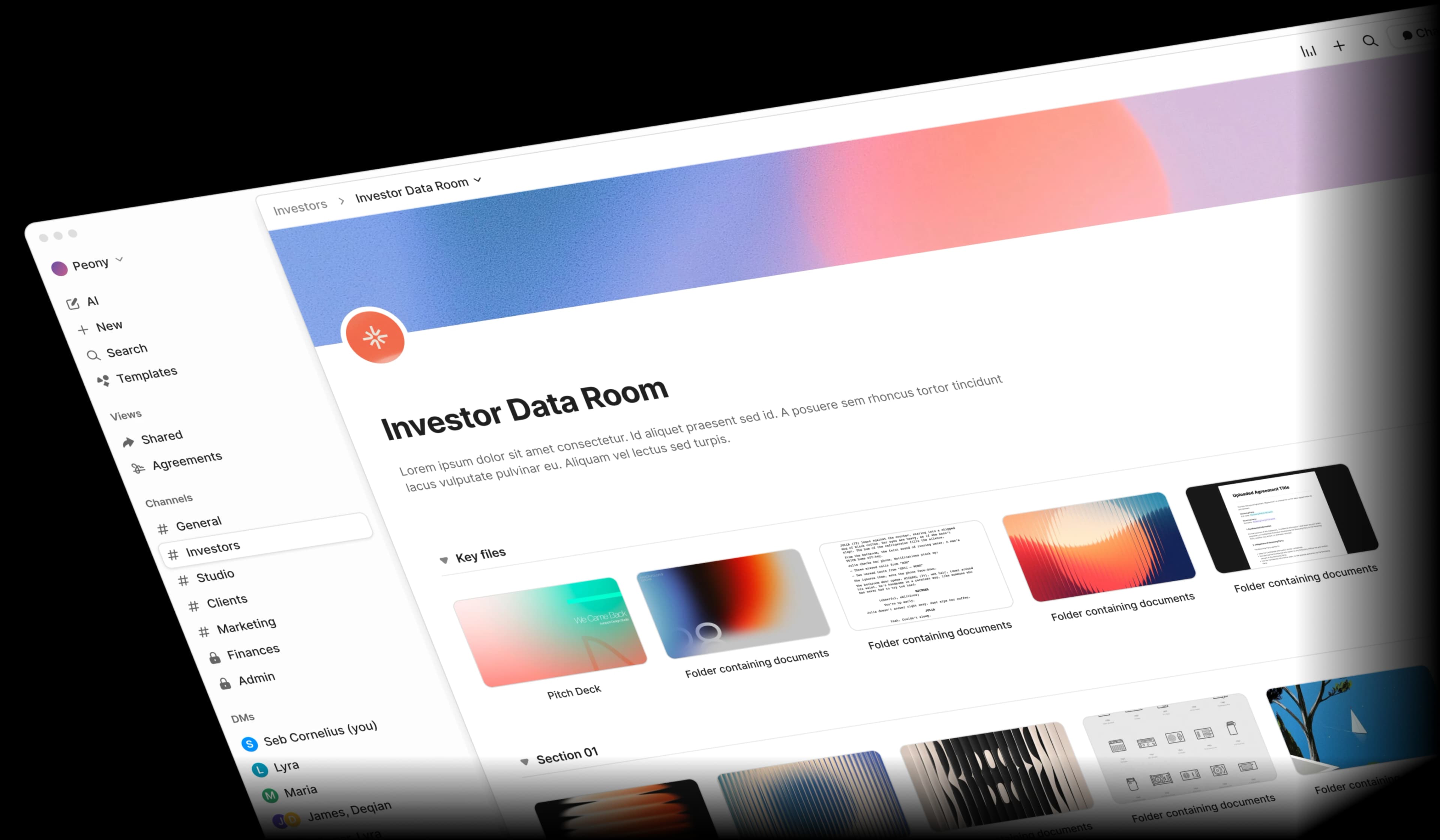
Why is biotech document sharing broken?
Biotech document sharing is broken because IP filings, clinical data, and regulatory submissions get scattered across email and consumer cloud drives that lack screenshot protection, NDA gates, and audit trails.Between IP filings, clinical data, and regulatory submissions, biotech teams juggle sensitive documents across too many insecure tools. One leak can cost millions.
IP theft risk
Patents, formulations, and research data shared via email or generic cloud drives are easy targets for unauthorized copying and screenshots.
Regulatory compliance
FDA and EMA submissions demand complete audit trails. Most file-sharing tools cannot prove who accessed what and when.
Clinical data sprawl
Trial protocols, patient data summaries, and CRO reports scattered across Dropbox, Google Drive, and email threads make due diligence painful.
Multi-party complexity
Licensing partners, investors, CROs, and regulatory bodies each need different access levels. Managing permissions manually is error-prone.
What does a biotech data room need?
A biotech data room needs screenshot blocking and dynamic watermarks for IP, NDA-gated access and granular permissions for partners, complete audit trails for FDA/EMA compliance, and AI Q&A to surface answers across hundreds of clinical and regulatory PDFs.Peony gives you enterprise-grade security, AI-powered document intelligence, and complete audit trails — all at a fraction of legacy VDR pricing.
Screenshot protection, watermarks, and NDA gates
Your patents and formulations deserve more than a password. Peony blocks screenshots, stamps every page with dynamic watermarks, and requires NDA signatures before anyone can view sensitive IP.
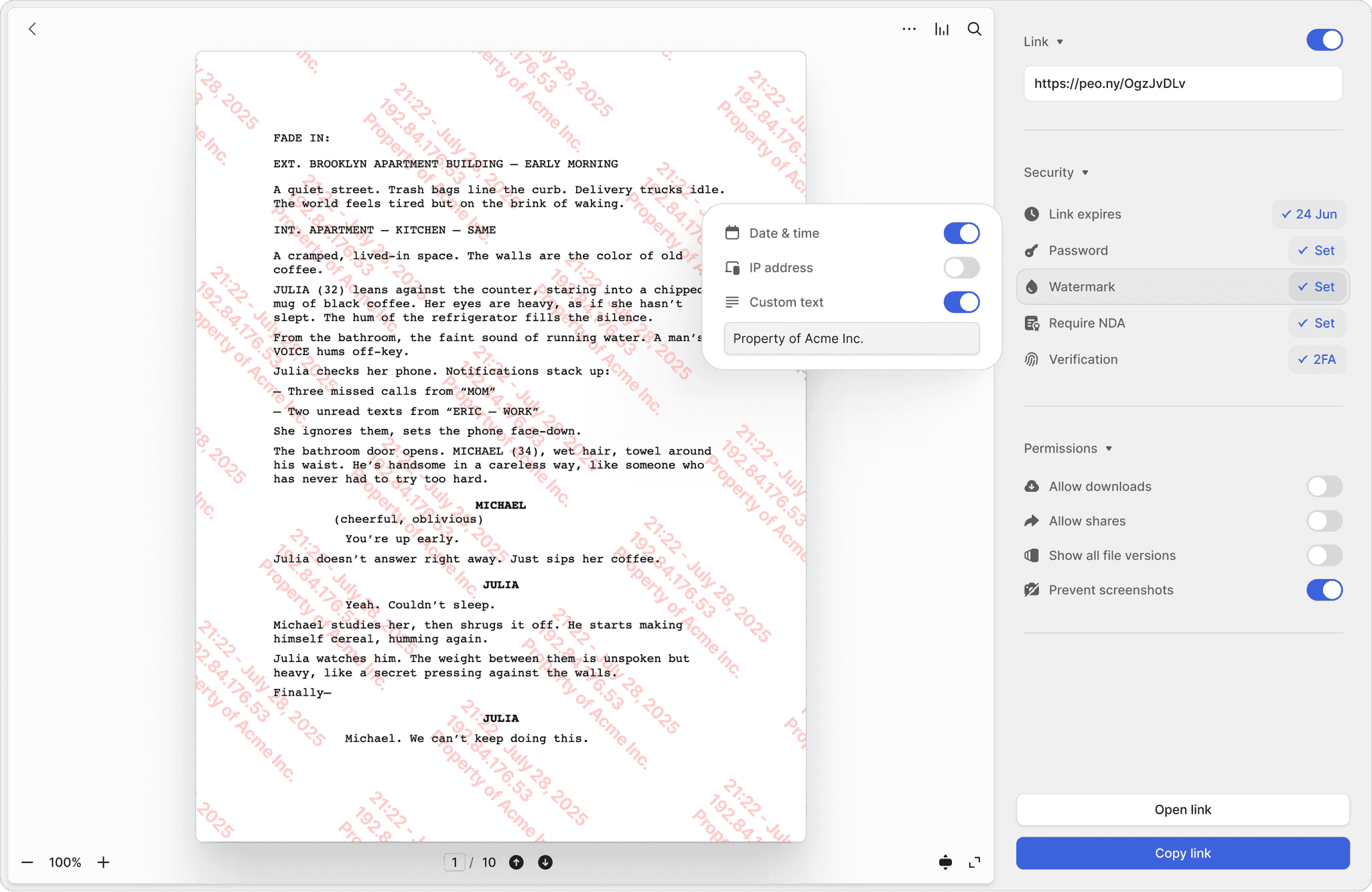
Screenshot protection
Block screen captures of patent filings, compound structures, and proprietary research. Prevent unauthorized duplication of your most valuable assets.
Dynamic watermarks
Every page stamped with the viewer's identity and timestamp. If a document leaks, you know exactly who shared it and when.
NDA-gated access
Require licensing partners and investors to sign an NDA before viewing clinical data or IP filings. Fully integrated e-signatures included.
Complete audit trails for every document
Track every view, download, and signature with timestamped logs. Page-by-page analytics show exactly which sections of your clinical protocols and regulatory submissions reviewers focused on.
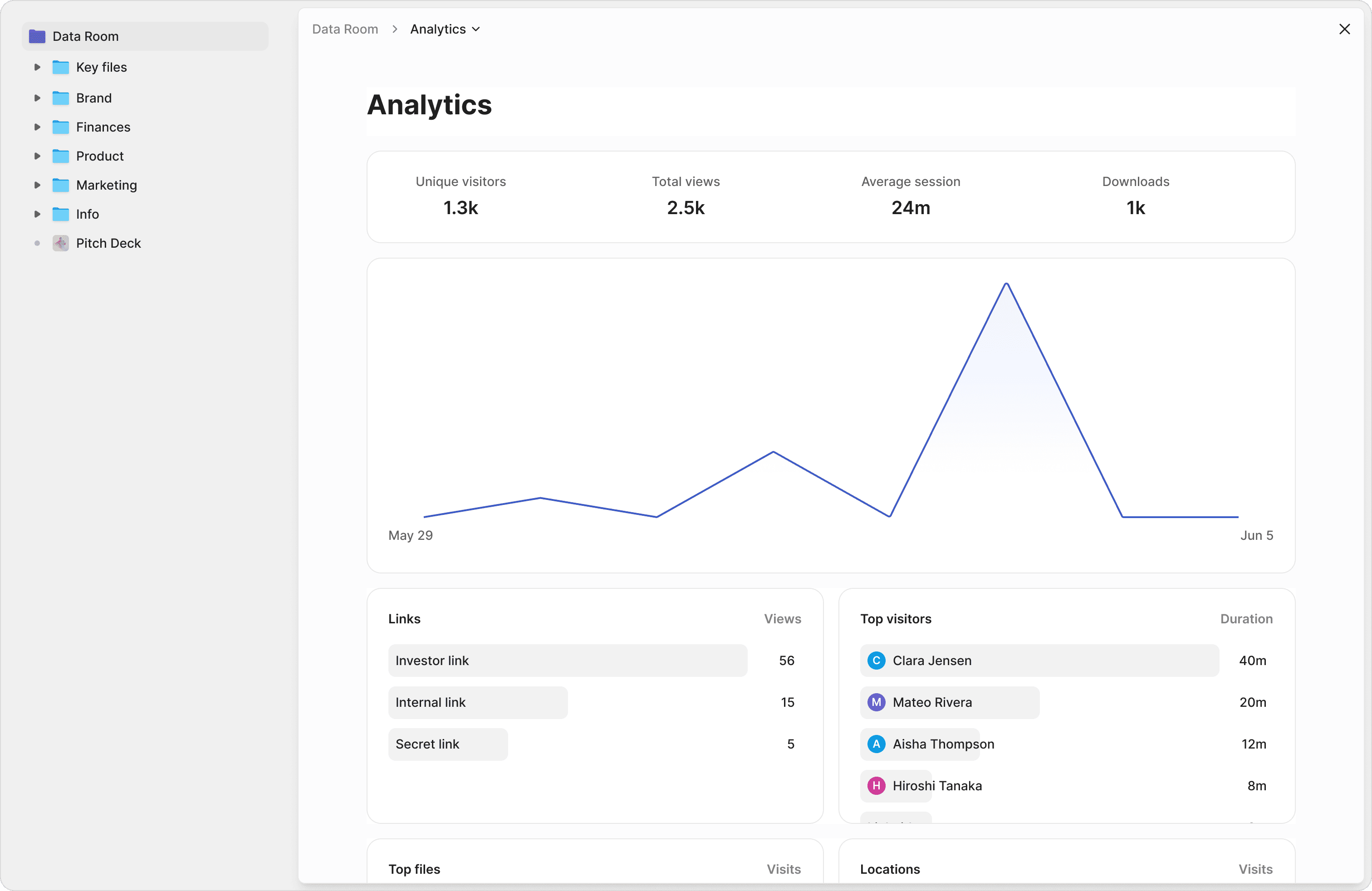
Page-by-page tracking
See which pages of your clinical study report or patent portfolio investors spent the most time on. Understand what matters to them.
Compliance-ready logs
Exportable audit trails with timestamps, IP addresses, and device details. Meet regulatory requirements for document access tracking.
Granular access control
Give CROs read-only access to trial protocols, investors full access to financials, and regulators access to specific submission folders — all from one data room.
Chat with your clinical data and research files
Stop digging through hundreds of PDFs. Ask questions across your entire document library and get instant, sourced answers from your clinical protocols, patent filings, and regulatory submissions.
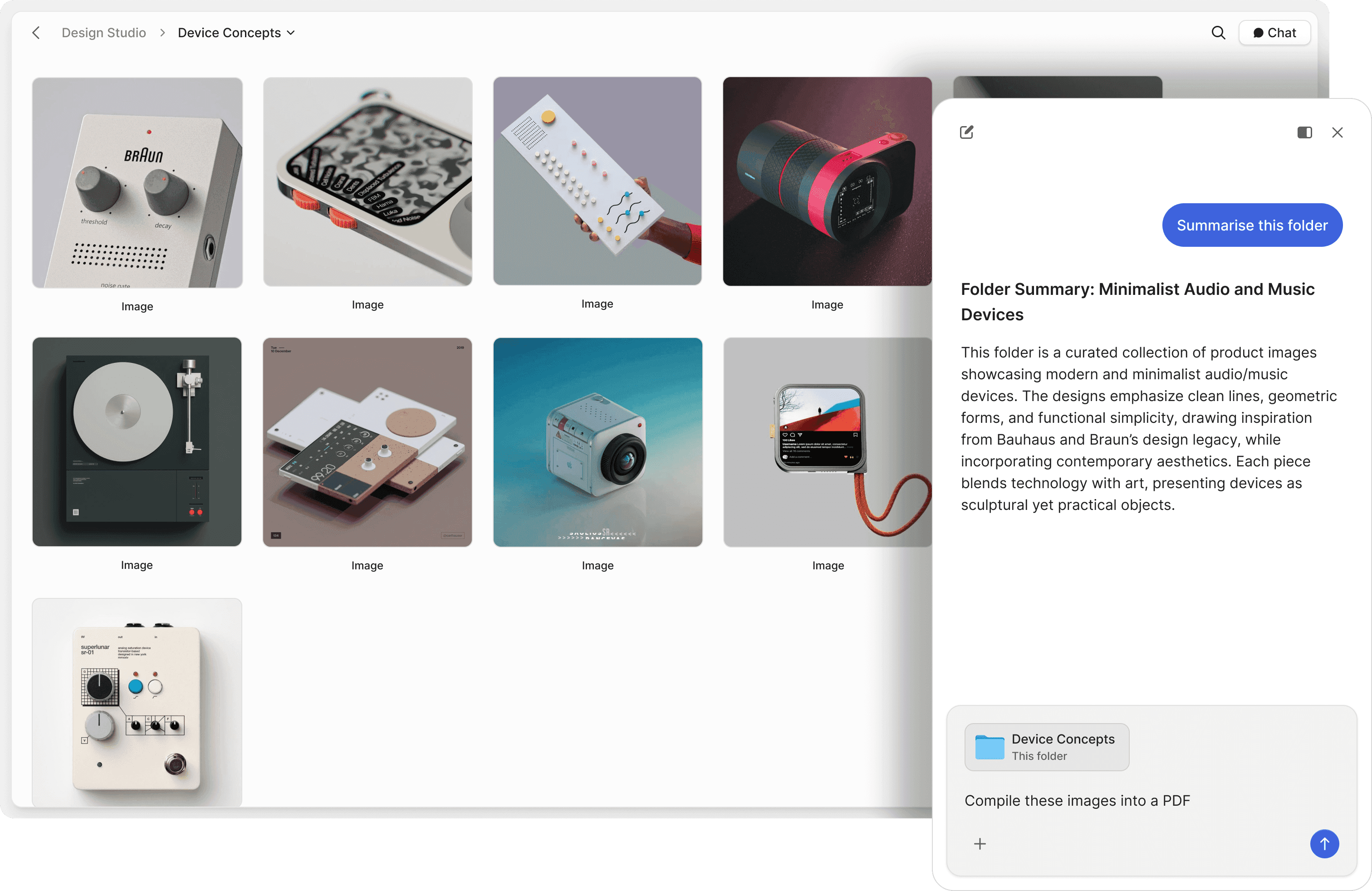
Chat with research files
Ask questions across clinical study reports, patent filings, and regulatory documents. AI retrieves answers with exact source references.
Natural language search
Search your data room in plain English. Find specific compound data, trial endpoints, or regulatory references without remembering file names.
Investor Q&A on autopilot
Let AI answer investor questions about your pipeline, clinical data, and IP portfolio 24/7. Track what they ask to refine your pitch.
"Peony has been great for sharing documents with investors, employees, and customers. It's easy to use, good value, and new features are constantly being added. Definitely recommend!"

Ed Harris
Founder & CEO, Ligo Bio (YC S24)
Akash Ghavalkar
Co-founder & COO, Third Space
"We'd been searching for a solution like Peony for ages, and it has completely transformed our workflows. What used to take hours every week is now effortless — Peony saves us so much time that we were finally able to move away from Dropbox Sign. It's been a total game changer!"
Frequently asked questions
What is the best data room for biotech and pharma companies?
Peony is the modern data room built for biotech and pharmaceutical teams. Unlike legacy VDRs like Ideals and Firmex that overcharge for basic IP security, Peony offers a free plan ($0) with core security features, and the Business plan ($30/admin/month) adds screenshot protection, Simple NDA-gated access, and AI document Q&A, while the Data Room plan ($52/admin/month) adds dynamic watermarks. For a full ranked comparison — ShareVault, iDeals, Datasite, Intralinks, and the flat-rate options — see our [best data rooms for healthcare and life sciences](/blog/best-data-rooms-for-healthcare-and-life-sciences) guide.
How do biotech companies protect intellectual property in a data room?
Peony protects IP with screenshot blocking, dynamic watermarks stamped with the viewer's identity and timestamp, NDA-gated access that requires signatures before viewing, and granular permissions per document. All data is secured with AES-256 encryption at rest and TLS 1.3 in transit on SOC 2 Type II-ready infrastructure. Peony is GDPR, CCPA, and HIPAA compliant. If a patent filing or compound structure leaks, you know exactly who shared it.
What documents should a biotech data room include for fundraising?
A biotech fundraising data room should include patent portfolios, clinical trial data, regulatory submissions, financial projections, and management team bios. Peony's auto-indexing organizes these documents automatically on upload, and AI-powered Q&A lets investors ask questions across your entire document library 24/7.
How much does a biotech data room cost for a Series B company preparing for licensing discussions?
Series B biotech companies preparing licensing data rooms — with CMC data, clinical protocols, and patent filings for pharma partners — face thousands per month from legacy VDRs like Ideals and Firmex. Peony offers a free plan ($0), scales to $30/admin/month (Business, up to 3 data rooms) and $52/admin/month (Data Room, unlimited data rooms and unlimited storage) with screenshot protection, AI document Q&A, and complete audit trails. Peony has no per-viewer, per-page, or per-link limits, so costs stay predictable as you add CROs, Phase II/III partners, and licensing counterparties.
Can a data room help with biotech licensing and partnering deals?
Yes. Peony lets you create isolated rooms per licensing partner with independent NDA requirements, permissions, and audit trails. Peony's Advanced Redaction (available on the Deal Team plan) lets you permanently black out sensitive financial terms or proprietary compound data before sharing with counterparties. Share clinical data and IP filings securely with page-level analytics to track which sections partners focus on — so you know their level of interest before the next meeting.
Does Peony support regulatory compliance for clinical data?
Peony provides complete audit trails with timestamps, IP addresses, and device details for every document view, download, and signature. Exportable compliance-ready logs help biotech teams meet regulatory requirements for document access tracking across FDA and EMA submission processes.
How does AI help biotech teams manage research documents?
Peony's AI document Q&A lets you ask questions across clinical study reports, patent filings, and regulatory documents in natural language and get instant, sourced answers. Find specific compound data, trial endpoints, or regulatory references without opening individual PDFs — available on the Business plan ($30/admin/month).
What support does Peony provide biotech teams during active licensing negotiations?
Peony provides 24/7 dedicated support for enterprise clients — because when a pharma partner's diligence team cannot access clinical data during a time-sensitive licensing review, the BD team needs immediate resolution. Enterprise support is available to teams who book a demo with our deal infrastructure team. Every plan includes in-app help, documentation, and email support.
How quickly can a biotech BD team set up a data room for a pharma licensing negotiation?
Peony sets up in under 5 minutes with no sales call required. A BD team can upload IND filings, CMC data, clinical protocols, and patent portfolios, configure per-partner permissions, and share NDA-gated watermarked links before a licensing meeting ends. Peony's AI generates due diligence checklists tailored to your deal type, tracking uploaded vs missing documents with completeness scoring. Legacy VDRs require onboarding calls and weeks of setup — by which time your negotiation window may have closed.
Why do biotech companies use Peony?
Biotech companies use Peony to protect IP, share clinical data under NDA, and run licensing due diligence in minutes — without paying per-page VDR fees.Join biotech teams already using Peony to share clinical data, manage IP portfolios, and run licensing due diligence — securely and affordably.
24/7 dedicated support for enterprise deals