
Hire faster with a secure recruiting data room for offer letters and onboarding
Send offer letters as tracked links and get them e-signed in the browser, hand every new hire their onboarding pack on one branded link, and collect IDs, certifications and references without scattering candidate PII across email, in the data room purpose-built for talent acquisition, HR and executive search.
No credit card · 7-day Data Room trial that never auto-charges · candidates and new hires view free, no account · 24/7 support
Last updated October 2026
8,000+ customers in 60+ countries · $44.7B in client assets
Peony staff can't open your documents, your documents aren't used to train AI, and Peony has had no data breach since launch.
What is Peony's recruiting data room, and who is it for?
Peony is a virtual data room that recruiting, HR and executive search teams use to send offer letters for e-signature, share onboarding packs from one link, and see which candidates open each document.
A recruiting data room is a secure portal where talent acquisition and HR teams share offer letters, collect candidate documents and run new-hire onboarding instead of trading sensitive files over email. It typically holds offer letters, compensation and equity summaries, employee handbooks, IP assignment agreements, benefits guides and, for executive search, confidential candidate dossiers.
On Peony, most hiring teams run on Business at $30 per admin per month billed yearly ($44 monthly), with unlimited e-signatures; executive search firms step up to Data Room at $52 for watermarked dossiers, a signed NDA and unlimited rooms. Candidates and new hires view free, with no account.
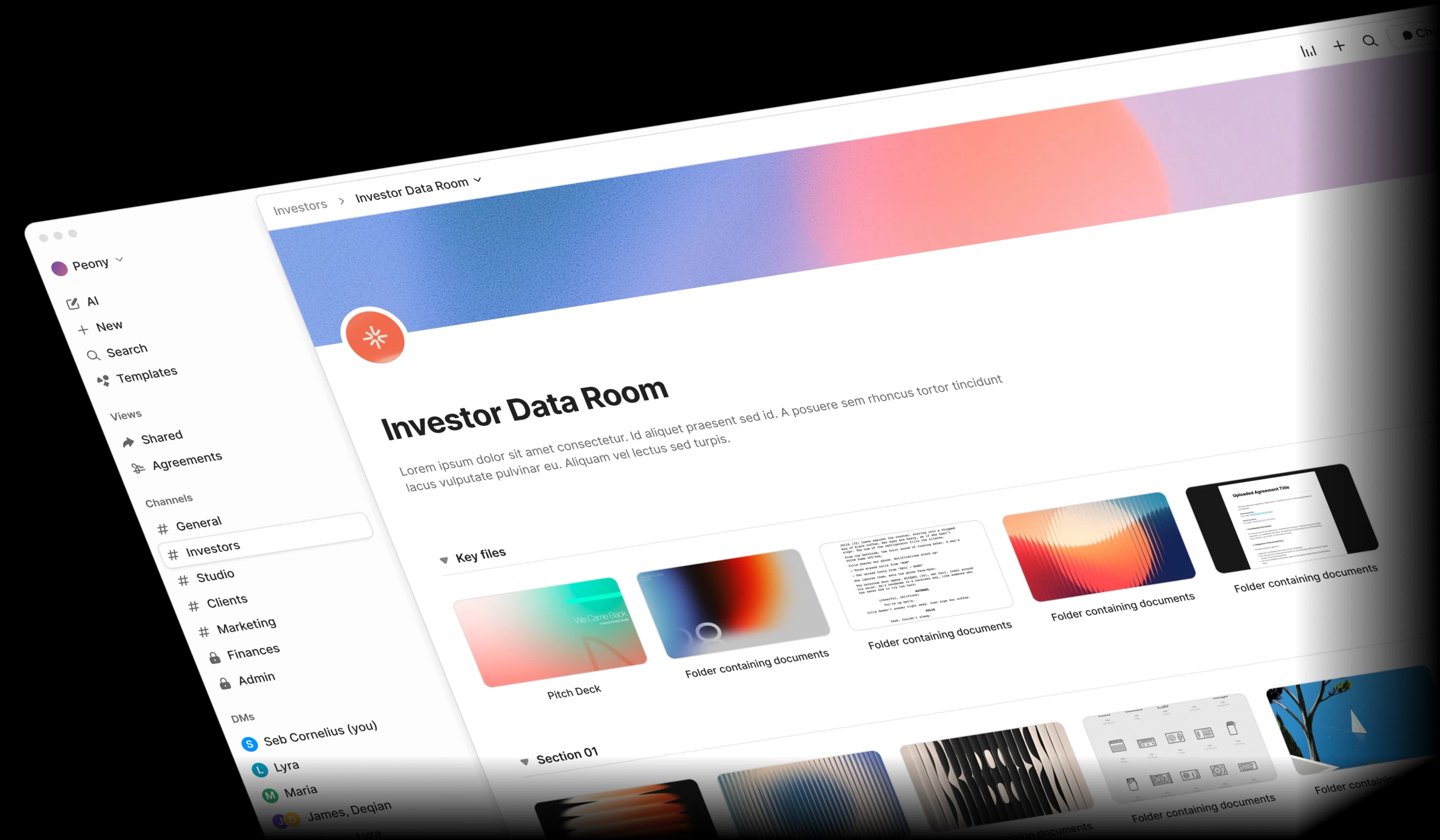
- Send offers you can track and get signed: each candidate opens the offer on their own link, you get an email the moment they do and see which pages they read, and they e-sign in the browser with no account.
- Onboard every new hire from one branded link: the handbook, IP assignment agreement, benefits guide and equity documents in one room carrying your logo, with a record of what each new hire opened.
- Keep candidate data out of email: collect IDs and certifications into a folder per candidate, and gate confidential comp, equity and search dossiers behind an NDA and per-viewer watermarks.
Peony at a glance
- Built for
- In-house talent acquisition and HR teams, executive and retained search firms, recruiting agencies and RPO teams, and startups making their first hires, sharing offer letters, onboarding packs, candidate dossiers and shortlists.
- Typical plan
- Business, $30 per admin per month billed yearly ($44 monthly): unlimited e-signatures with initials and reusable templates, 3 data rooms per admin, your logo and background, viewer email verification and an allow list, an acknowledgment NDA gate, download prevention, desktop screenshot protection, drop-off reports and AI document Q&A.
- Pricing
- Business $30, Data Room $52 and Deal Team $64 (minimum 4 admins) per admin per month billed yearly ($44, $75 and $89 monthly); Enterprise is custom. Free ($0) covers 50 documents and 500 MB as tracked single-file links; data rooms start on Business.
- Candidates and new hires
- Candidates and new hires are unlimited and free on every plan and don't need a Peony account. You pay per admin, not per viewer.
- Rooms and storage
- Unlimited data rooms, documents and storage on Data Room and above, and no per-file size cap on any plan. Business includes 3 data rooms per admin, 1,000 documents per admin and 100 GB of storage, with no per-file size cap.
- E-signatures
- Unlimited on Business and above; Free sends up to 3 agreements a month. Place Signature, Initial and Text fields on a PDF or DOCX (a DOCX's highlighted placeholders become fields on upload), save reusable templates, and both you and the signer get the signed PDF and its audit log by email. Standard electronic signatures designed to meet the US ESIGN Act and EU eIDAS; signing works on mobile.
- Offer tracking
- Page-level analytics on every plan: who opened the offer, which pages they read, for how long and when they came back, with an email to you on each open. Drop-off reports and CSV export on Business; a per-visitor audit trail on Data Room.
- NDA gates
- Standard NDA (Business): the viewer reads and ticks to agree, and Peony records email, name, timestamp and IP. Advanced NDA (Data Room): the viewer fills in your fields and e-signs, and a signed PDF and audit log go to both sides.
- Candidate uploads
- Grant Upload on a candidate's folder and they add IDs, certifications and references from their link with no account; each upload is attributed to the link and viewer (Data Room). Upload also grants view on that folder, so each candidate gets their own.
- Branding
- Your logo, cover image, theme and brand card, with Peony branding removed (Business); your own subdomain, such as onboarding.yourcompany.com (Data Room); a custom invite email (Deal Team).
- Live HTML
- Peony renders .html files live with JavaScript running, so a Claude or ChatGPT artifact (a model, dashboard or calculator) stays interactive for the viewer, behind your NDA gate, permissions and analytics. Useful for an equity or total-comp calculator built for a finalist; the dynamic watermark applies to documents, so pair it with screenshot protection and an NDA gate.
- Hosting
- AWS US (us-east-1); EU-region hosting on Enterprise. GDPR-aligned, with a standard DPA and SCCs on request on Deal Team and Enterprise.
- Security
- AES-256 at rest, TLS 1.2+ in transit. Peony staff can't open your documents, your documents aren't used to train AI, and Peony has had no data breach since launch. Peony's incident-response policy commits to telling affected customers within 72 hours of confirming an incident that affects customer data. SOC 2 Type II-ready and ISO 27001-ready, with both audits underway. Compliance and certifications
- Setup
- Median 4 min 19 s from sign-up to first uploaded document (State of M&A Data Rooms, Q2 2026 edition).
- Trial
- 7-day Data Room trial you start yourself: no credit card, and it never auto-charges. Rooms, files, links, analytics and NDA settings carry over when you upgrade. AI features switch on after you upgrade.
- Support
- 24/7 support, handled directly by the Peony team across Europe, US and Asia hours, with no outsourced tier. Everyone you speak to on Peony support has M&A experience at elite boutiques or bulge-bracket banks, VC experience, or has raised $1M+ themselves.
- Customers
- 8,000+ customers in 60+ countries, with $44.7B in client assets.
Which recruiting and HR teams use Peony, and for what?
Talent acquisition, HR, executive search, agency and RPO teams use Peony to send offer letters for e-signature, onboard new hires from one link, and share candidate dossiers and shortlists under control.
Peony gives you tracked offer letters, a branded onboarding portal, secure candidate-document collection, and the watermarking and NDA gating executive search firms rely on — all at a fraction of legacy VDR pricing.
In-house talent acquisition
Offer letters sent as tracked links and sent for e-signature from the same workspace, with an alert the moment the candidate opens the offer. Business ($30/admin/mo billed yearly) includes unlimited e-signatures.
HR and people operations
One branded onboarding room for the handbook, IP assignment agreement, benefits guide and policies, with each new hire on their own link and a record of what they opened (Business).
Executive and retained search firms
A room per search with dynamic watermarks on every dossier page, a signed NDA before the slate opens, and per-client permissions so each client sees only their own shortlist. Data Room ($52/admin/mo billed yearly).
Recruiting agencies and RPO teams
Branded shortlist links, one per hiring manager, with page-level analytics on which candidate profiles each one opened and for how long (Business).
Startups making their first hires
Offer letters with equity details behind an NDA gate, plus an interactive equity or total-comp calculator built in Claude that stays live for the candidate. See Peony for startups.
What is the safest way to send an offer letter and onboarding paperwork?
The safest way to send an offer letter is a link that verifies the candidate's email, can expire, shows what was read and collects the signature; Peony does all four from Business.
Hiring paperwork is leaking everywhere. Between offer letters lost in inboxes, candidate IDs emailed in the clear, and onboarding packets you can never confirm were read, recruiting teams risk a PII breach with every send. Email and Dropbox were never built for confidential candidate data.
Candidate PII exposed
Resumes, government IDs, and background-check results get emailed back and forth, then sit forever in inboxes — a GDPR and CCPA liability waiting to happen.
No idea if they read it
You send an offer letter as a PDF attachment and hear nothing. Did the candidate open it? Are they still deciding? Without tracking, your follow-up timing is a guess.
Confidential comp leaks
Compensation bands and equity details shared with finalist candidates get screenshotted and forwarded. There is no NDA gate and no way to trace where they went.
Onboarding with no audit trail
IP assignment agreements and handbooks go out by email with no proof a new hire ever opened — let alone acknowledged — them. Compliance has nothing to point to.
| Method | Only the right person opens it | Can be taken back after sending | Shows what was read | Signed in the same place | Controls downloads |
|---|---|---|---|---|---|
| Email attachment | No: anyone the email reaches can open it | No | No | No: print, sign and scan, or a separate tool | No: the attachment is the download |
| Password-protected PDF | No: anyone with the password can open it | No | No | No | No |
| Standalone e-signature tool | Depends on the tool | Depends on the tool | Depends on the tool | Yes | Depends on the tool |
| Peony tracked link + e-signature | Yes: an emailed one-time code and an allow list (Business) | Yes: an expiry date (every plan) or remove the email from the allow list (Business) | Yes: every page, time per page and return visits (every plan) | Yes: unlimited e-signatures from the same workspace (Business) | Downloads off and desktop screenshot protection (Business) |
| Peony onboarding or search room | Yes: only the emails you list get in | Yes: remove the person, or set one file or folder to No access for their group (Data Room) | Yes, plus a per-visitor audit trail (Data Room) | Yes, plus a signed NDA before the room opens (Data Room) | View or Download per file, dynamic watermarks and Screenshield (Data Room) |
For an offer letter, send a Peony link with email verification and downloads off, and set an expiry that matches your offer deadline. If the terms change after a negotiation, Upload new version replaces the offer in place at the same link and keeps every earlier version in the version menu. More on the method in how to send confidential documents by email.
How can you tell whether a candidate opened the offer letter, and get it e-signed?
Send the offer as a Peony link: Peony emails you the moment the candidate opens it, shows which pages they read and for how long, and the candidate e-signs in the browser.
See which pages a candidate read and how long they spent on compensation. It's the same engagement tracking sales teams use for proposals, applied to hiring. Real-time open alerts let you follow up at the right moment, and unlimited e-signatures (Business) let you send the offer for signature from the same Peony workspace — no separate e-signature subscription.
Tracked offer-letter links
Share each offer as a personalized link and get a real-time alert the moment the candidate opens it — so you follow up while the decision is fresh, not after they have gone cold.
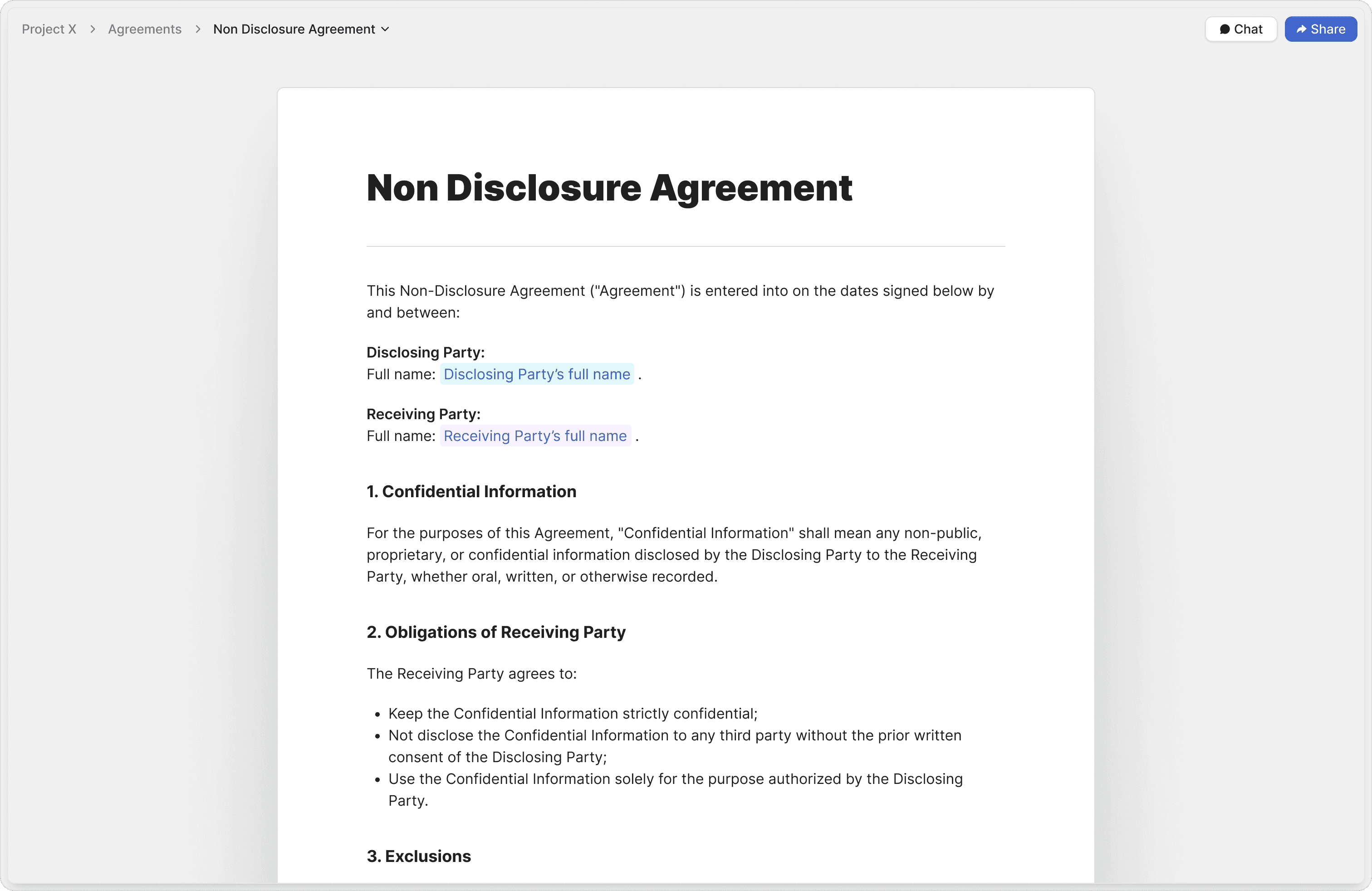
Unlimited e-signatures
Candidates sign offer letters, IP assignment agreements, and onboarding forms directly in the browser. Unlimited e-signatures are included on the Business plan, and both sides get the signed PDF and audit log by email.
Page-level analytics
See exactly which sections each candidate reviewed and where they hesitated. Advanced analytics and dropoff reports (Business) help your recruiters prioritize who to call next.
Which Peony plan do you need to e-sign offer letters?
E-signatures are unlimited on Peony's Business plan ($30 per admin per month billed yearly) and above; Free sends up to 3 agreements a month. Signatures are standard electronic signatures designed to meet the US ESIGN Act and EU eIDAS, with a timestamp, IP address and verification hash on every one.
| Plan | Sent agreements | Initials | NDA gate before a room opens |
|---|---|---|---|
| Free ($0) | Up to 3 sent agreements a month | No (Signature and Text fields are available) | None |
| Business ($30/admin/mo billed yearly) | Unlimited | Yes | Standard NDA: the viewer reads and ticks to agree; Peony records email, name, timestamp and IP |
| Data Room ($52/admin/mo billed yearly) | Unlimited | Yes | Advanced NDA: the viewer fills in your fields and e-signs; a signed PDF and audit log go to both sides |
Save the offer letter as a reusable template once: upload it as a DOCX and Peony turns its highlighted placeholders (name, title, start date, salary) into fields, or drag Signature, Initial and Text fields onto a PDF. Signed copies land in the Signatures view with the signer's email, timestamp and IP. For a side-by-side of tracking tools, see our document tracking software guide.
How do HR teams build a secure onboarding portal for new hires?
Put the onboarding pack in one Peony room with your logo, give each new hire their own link, and send the agreements that need signatures for e-signature, all on the Business plan.
Give every new hire a single secure portal for their handbook, IP assignment agreement, benefits, and equity documents — carrying your logo and background. Analytics record exactly what each new hire opened, an acknowledgment gate records who agreed before the room opened, and personalized links keep every onboarding experience individual.
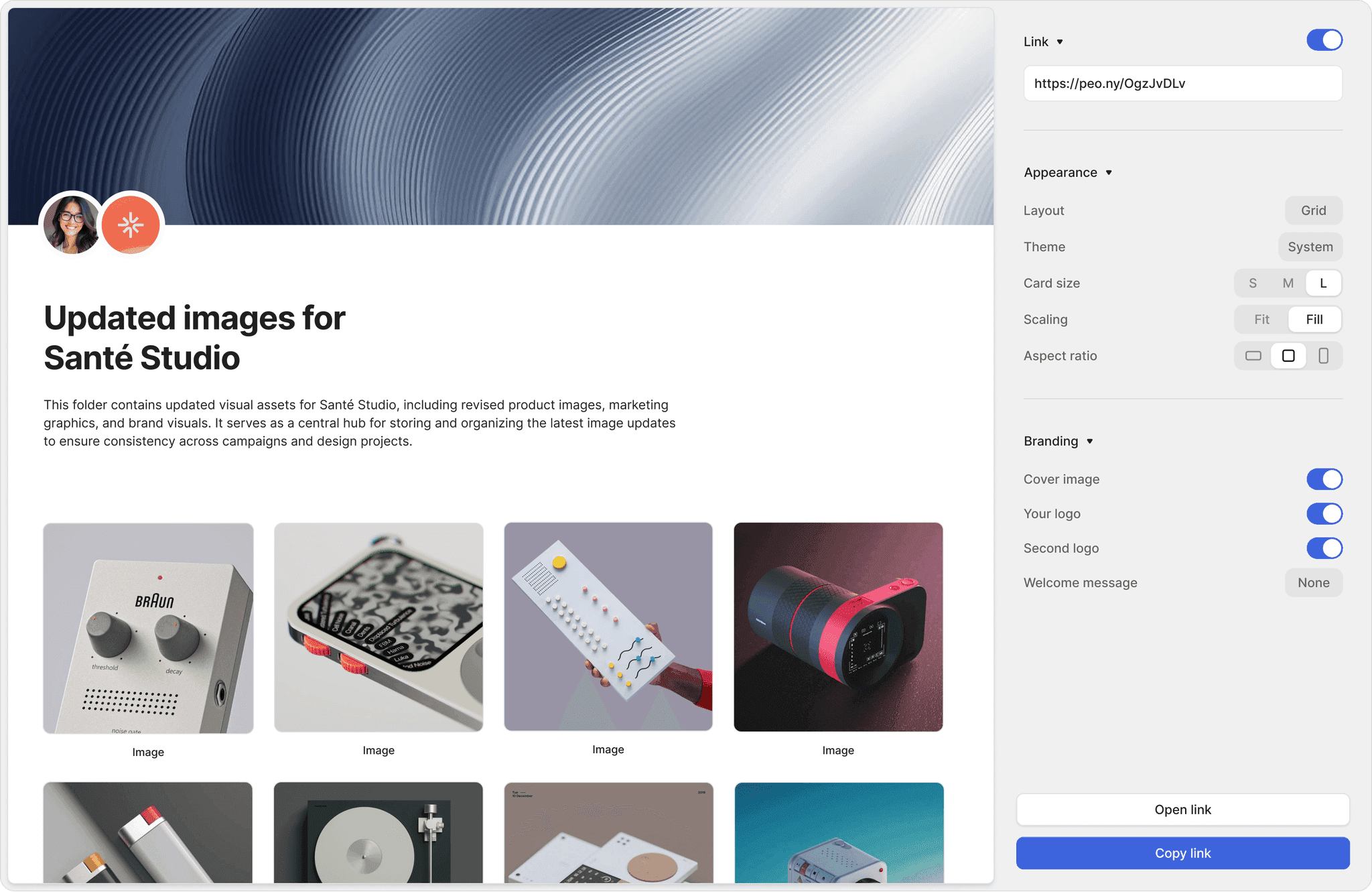
Custom logo & background
Every onboarding portal carries your company logo and background, so a new hire's first impression of your brand is polished from day one — included on the Business plan.
Acknowledgement audit trail
Know exactly what each new hire opened and acknowledged. Page-level views on every plan, an acknowledgment gate that records name, email, timestamp and IP (Business), and a per-visitor audit trail (Data Room) give HR and compliance defensible proof that the handbook and IP agreement were reviewed.
Personalized links
Send each new hire a unique tracked link from the same onboarding packet. Track individual progress without duplicating files or rebuilding the room.
Custom domain & access
On the Data Room plan, serve onboarding from your own domain with granular per-file permissions — so each hire sees only the documents meant for their role.
How do executive search firms share confidential candidate dossiers with clients?
Executive search firms run each search in its own Peony room: every dossier page watermarked with the viewer's identity, a signed NDA before the shortlist opens, and analytics on which clients read it (Data Room).
Executive search firms share confidential candidate dossiers, comp bands, and equity details where every page matters. Peony stamps each page with dynamic watermarking carrying the recipient's identity, gates the shortlist behind an Advanced NDA that emails a signed PDF to both sides, and shows you which clients actually reviewed the slate.
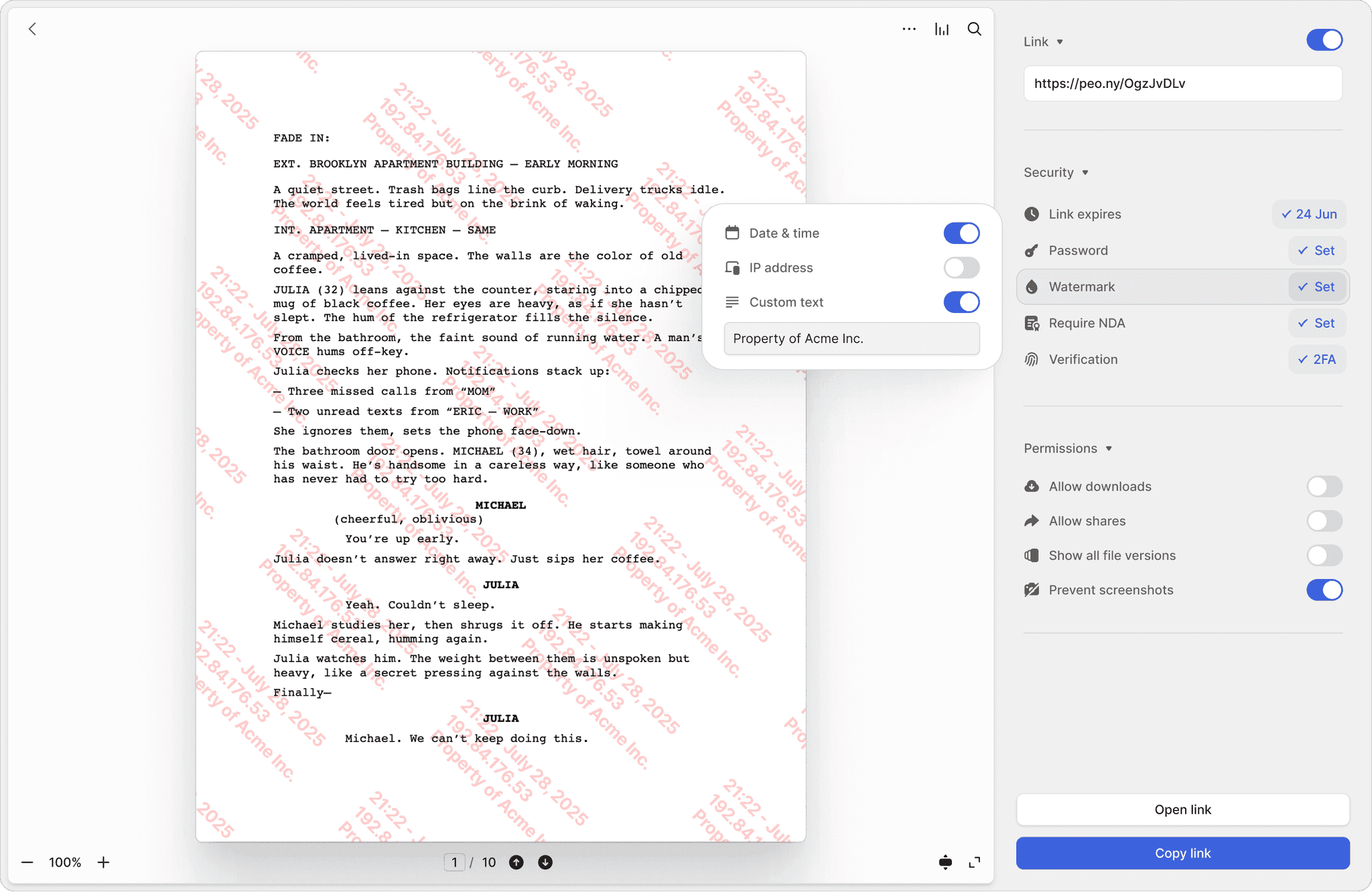
Dynamic watermarking
Every page of a candidate dossier or client brief is stamped with the recipient's identity and timestamp. If a shortlist leaks, you trace it instantly. Available on the Data Room plan.
Advanced NDA gating
Require an e-signed NDA before comp bands or equity details render. The Data Room plan emails the signed PDF to both parties with a full audit log.
Screenshot protection
Block screen captures of confidential financials and candidate profiles on supported desktop browsers. Download prevention and screenshot protection ship on the Business plan; Screenshield, which extends protection to iPhone, iPad and Android, is on the Data Room plan.
Engagement analytics
See which clients actually reviewed your shortlist and which candidate profiles they spent time on — so you know exactly where each search stands.
Agencies and RPO teams sharing shortlists with hiring managers can stay on Business: one branded link per hiring manager, with page-level analytics on which candidate profiles each one opened. With email verification on, anyone a link is forwarded to appears under their own verified email.
How do you collect IDs, certifications and references from candidates without email?
On Peony's Data Room plan, give each candidate a folder with Upload permission; they add IDs, certifications and references from their link with no account, and Peony records who uploaded each file.
Stop asking candidates to email sensitive documents. Collect IDs, certifications, and references in one access-controlled data room with email authentication, an allow/block visitor list, and a full audit trail — the GDPR- and CCPA-safe alternative to scattered inboxes and shared Dropbox folders. Upload also lets a candidate view and download what's in their folder, so give each candidate their own folder rather than one shared drop folder.
Email authentication
Verify each candidate's email before they access their portal, and use an allow/block visitor list to control exactly who can upload or view documents (Business and up; upload folders are on Data Room).
AI document Q&A
Ask questions across a candidate's submitted documents in plain English. AI document Q&A is included on the Business plan, with 5x usage on the Data Room plan.
Full audit trail
Every upload and view of candidate PII — resumes, IDs, and background-check results — is logged on Peony, which is SOC 2 Type II-ready and ISO 27001-ready, with both audits underway, for defensible compliance.
The full workflow is in how to collect documents securely; the product setup is in document collection.
“Every now and then, you come across a product that has a massive positive impact on your business. Peony is one such product.”
Panos Moutafis
Founder & CEO, Zenus

Robi Lin
Founder & CEO, Sepal AI (YC S24)
Peony is easily the best form factor for sharing client-facing material. It lets us stand out by embedding custom booking and website links into secure deck shares — DocSend and PDFs require 3 extra clicks to book a meeting.
No credit card · 7-day Data Room trial that never auto-charges · candidates and new hires view free, no account
How do you set up a recruiting data room in Peony?
Setting up a recruiting data room in Peony takes five steps: pick the plan, save your offer and onboarding templates, build the onboarding room, share one link per person, then track and follow up.
The median time on Peony from account creation to first uploaded document is 4 min 19 s (State of M&A Data Rooms, Q2 2026 edition).
Pick the plan
Business ($30/admin/mo billed yearly) for offer letters and onboarding: unlimited e-signatures, your branding and 3 data rooms per admin. Data Room ($52) for executive search, candidate upload folders, dynamic watermarks and unlimited rooms.
Save your templates
Upload the offer letter, IP assignment agreement and handbook acknowledgment as e-signature templates. A DOCX's highlighted placeholders become fields on upload; on a PDF, drag Signature, Initial and Text fields where they go.
Build the onboarding room
Folders for the handbook, policies, benefits and equity documents; add your logo and cover image (Business), and serve it from your own subdomain on Data Room.
Share one link per person
A tracked link per candidate or new hire, with email verification and downloads off; add an NDA gate in front of confidential comp, equity or a search slate.
Track and follow up
An email on every open, page-level analytics, and signed PDFs in the Signatures view; let links expire when the offer deadline passes or the search closes.
What does a recruiting data room cost on Peony?
On Peony, most recruiting and HR teams run on Business at $30 per admin per month billed yearly ($44 monthly), with unlimited e-signatures; candidates and new hires view free.
Business → Data Room: the right plan for your team. Most recruiting and HR teams run on Business. Executive search firms and teams sharing confidential comp, equity, or many parallel searches step up to Data Room, Peony's most popular plan. You pay per admin, not per viewer and not per data room, with no click, recipient or storage fees on paid plans.
Business
$30/admin/mo
Billed yearly ($44 monthly) · Most recruiting & HR teams
- Tracked offer letters with page-level analytics
- Branded onboarding portal — custom logo & background
- Unlimited e-signatures for offers & onboarding
- Email authentication & allow/block visitor list
- Simple NDA, screenshot protection & download prevention
- AI document Q&A and advanced analytics
- 3 data rooms & 1,000 documents per admin, 100 GB storage, no per-file size limit
Data Room · Most popular
$52/admin/mo
Billed yearly ($75 monthly) · Executive search & confidential hiring
- Everything in Business, plus:
- Dynamic watermarking on every dossier page
- Advanced NDA — signed PDF to both sides & audit log
- Custom domain & branding
- Granular per-file permissions & Screenshield
- Candidate upload folders & per-visitor audit trail
- Unlimited data rooms for parallel searches
Deal Team · $64/admin/mo
Minimum 4 admins. Adds a custom invite email, API access, OAuth SSO, a standard DPA on request and priority support. Enterprise is custom.
Try Data Room · 7 days free
No credit card, never auto-charges. Gate a test offer behind an NDA, watermark it and invite a colleague as the candidate.
Prices per admin per month, billed yearly. Candidates and new hires are free and unlimited on every plan. Free ($0) covers 50 documents and 500 MB as tracked single-file links; data rooms start on Business.
How does Peony compare with Datasite, Intralinks and DocuSign for recruiting documents?
Peony covers the secure sharing of a legacy VDR and the signing of DocuSign in one workspace: tracked offer links, unlimited e-signatures and a branded room from $30 per admin per month, candidates free.
Datasite and Intralinks are priced for M&A diligence: neither publishes a price, buyer-reported quotes run about $0.40 to $0.85 per page, and legacy VDRs like Datasite and Intralinks charge thousands per month for comparable security. DocuSign sells signatures by the envelope. Peony Business is $30 per admin per month billed yearly, with unlimited e-signatures sent from the same workspace as the tracked link, so there's no separate DocuSign subscription required. You pay per admin, not per viewer and not per data room, with no click, recipient or storage fees on paid plans.
Worked example: two recruiters on Peony Business cost 2 × $30 × 12 = $720 a year, with no cap on offers sent. Two DocuSign Standard seats listed at $30 per user per month cost the same $720 and cap at 200 envelopes a year. An executive search firm on Peony Data Room pays $624 a year per admin for unlimited rooms, one per search.
| Tool | Published price | How it's priced | What you get for offers and onboarding | Source |
|---|---|---|---|---|
| Peony Business | $30/admin/mo billed yearly ($44 monthly) | Per admin; candidates and new hires free and unlimited, with no click, recipient or storage fees | Unlimited e-signatures, tracked offer links with page-level analytics, email verification, link expiry, an NDA gate, your logo and 3 data rooms per admin | Peony pricing |
| Peony Data Room | $52/admin/mo billed yearly ($75 monthly) | Per admin; unlimited data rooms, documents and storage | Everything in Business, plus dynamic watermarks, a signed Advanced NDA, a custom domain, candidate upload folders and a per-visitor audit trail | Peony pricing |
| DocuSign Standard | $30/user/mo on an annual plan | Per user, with 100 envelopes per user per year (Personal: 5 a month) | E-signature with envelope status: sent, viewed, signed, completed | DocuSign eSignature plans page, September 2026 (DocSend vs DocuSign) |
| Datasite | Not published (custom quote) | Per page, about $0.40 to $0.85 buyer-reported | An M&A diligence data room; Vendr's average contract is about $68,000 a year | Vendr, G2 (Datasite pricing) |
| Intralinks | Not published (custom quote) | Per page, about $0.40 to $0.85 buyer-reported | An M&A deal room; Vendr's median contract is $13,950 a year | Vendr (Intralinks pricing) |
Competitor figures are as published or buyer-reported on the dates shown; Datasite and Intralinks quote each engagement individually.
Frequently asked questions
What is Peony, and is it a good fit for recruiting, HR and executive search teams?
Yes. Peony is a virtual data room that recruiting, HR and executive search teams use to send offer letters for e-signature, share onboarding packs from one link and see which candidates open each document. Data rooms start on Business at $30 per admin per month billed yearly ($44 monthly); inviting candidates and new hires is free and unlimited.
Can I try Peony before I pay?
Yes. Peony's Data Room plan has a 7-day free trial you start yourself, with no credit card, and it never converts to paid on its own. Rooms, files, links, analytics and NDA settings carry over when you upgrade. AI features, such as AI document Q&A and AI room generation, switch on once you're on a paid plan.
What is the best data room for recruiting and HR teams?
Peony fits most recruiting and HR teams on its Business plan ($30 per admin per month billed yearly): tracked offer letters, unlimited e-signatures, a branded onboarding room and an NDA gate, with candidates free. Executive and retained search firms choose Data Room ($52) for watermarked dossiers, a signed NDA before the slate opens, candidate upload folders and a room per search. Peony puts tracking and signing in one place: each candidate's link verifies their email, shows which pages they read and can expire, and unlimited e-signatures go out from the same workspace, so there's no separate e-signature subscription. Candidates and new hires view free with no account, so you pay per admin, not per hire. Peony support runs 24/7. Peony has had no data breach since launch.
How does Peony compare with Datasite, Intralinks or DocuSign for recruiting documents?
Peony gives you tracked offer links, unlimited e-signatures and branded onboarding rooms on Business at $30 per admin per month billed yearly, with candidates free; Datasite and Intralinks quote per page, DocuSign meters envelopes. Neither Datasite nor Intralinks publishes a price: buyer-reported quotes run about $0.40 to $0.85 per page, priced for M&A diligence rather than offer letters, and Vendr puts Datasite's average contract near $68,000 a year (see our Datasite pricing and Intralinks pricing guides). DocuSign Standard listed $30 per user per month on an annual plan with 100 envelopes per user per year in September 2026, and it reports envelope status (sent, viewed, signed, completed). The same $30 on Peony covers unlimited e-signatures plus page-level analytics on which pages each candidate read and for how long, email verification, link expiry and an NDA gate, so there's no separate DocuSign subscription: two recruiters cost $720 a year with no cap on offers sent. You pay per admin, not per viewer and not per data room, with no click, recipient or storage fees on paid plans. Executive search firms choose Data Room ($52, or $624 a year per admin) for dynamic watermarks, a signed Advanced NDA, a custom domain and unlimited rooms.
What is a recruiting data room and how do talent acquisition teams use it?
A recruiting data room is a secure portal where talent acquisition and HR teams share offer letters, collect candidate documents and run new-hire onboarding instead of emailing sensitive files; Peony provides a purpose-built one. Peony's Business plan ($30 per admin per month billed yearly) covers most hiring teams with tracked offer-letter links, page-level analytics, unlimited e-signatures, AI document Q&A, screenshot protection, and a custom logo and background. Executive search firms and teams sharing confidential comp or equity step up to the Data Room plan ($52) for dynamic watermarking, a signed Advanced NDA, a custom domain and branding, candidate upload folders and unlimited data rooms. Peony has 8,000+ customers in 60+ countries and $44.7B in client assets, and its median time from sign-up to first uploaded document is 4 min 19 s (State of M&A Data Rooms, Q2 2026 edition).
How do I send an offer letter as a tracked link and know when a candidate opens it?
Share the offer letter as a Peony link instead of an attachment: Peony emails you each time the candidate opens it and shows which pages they read and for how long. The notification names the candidate when the link captures their email, so you follow up at the right moment instead of guessing, and you can see how long they spent on the compensation section. Tracked offer-letter links and page-level analytics work on every plan; the Business plan ($30 per admin per month billed yearly) adds drop-off reports, a CSV export of views and unlimited e-signatures, so you send the offer for signature from the same Peony workspace, with no separate DocuSign subscription required. See our document tracking software guide.
Can candidates e-sign offer letters and onboarding paperwork inside Peony?
Yes. Peony sends offer letters, IP assignment agreements and onboarding forms for e-signature, unlimited on Business ($30 per admin per month billed yearly) and above; Free includes 3 sent agreements a month. Upload a PDF or DOCX, place Signature, Initial and Text fields for the candidate (initials need Business), save it as a reusable template, and Peony emails the candidate a secure link to sign in the browser, on desktop or mobile. When they sign, you and the candidate both receive the signed PDF and its audit log by email, with the timestamp, IP address and a verification hash, and a copy lands in the Signatures view. Peony's signatures are standard electronic signatures designed to meet the US ESIGN Act and EU eIDAS. To make a signed agreement the gate to a room, such as an NDA before a confidential search brief, use Advanced NDA on the Data Room plan ($52). Unlike legacy tools that charge per signature, Peony keeps e-signatures unlimited on every paid plan.
How do I build a secure employee onboarding portal for new-hire paperwork?
Create one Peony room for the onboarding pack (handbook, IP assignment agreement, benefits guide and equity documents), add your logo, and send each new hire their own link; agreements go out for e-signature. On Business ($30 per admin per month billed yearly) the portal carries your custom logo, cover image and background with Peony branding removed, analytics show what each new hire opened, and an acknowledgment gate records each new hire's name, email, timestamp and IP before the room opens. For a custom domain like onboarding.yourcompany.com, per-file permissions so each hire sees only the documents meant for their role, and a per-visitor audit trail, the Data Room plan ($52) adds custom domain and branding and granular per-file access. Setup is quick: Peony's median time from sign-up to first uploaded document is 4 min 19 s.
How do I securely collect candidate documents like IDs, certifications, and references?
Give each candidate an upload folder in a Peony room on the Data Room plan; they add IDs, certifications and references from their link with no account, and Peony records who uploaded each file. That keeps sensitive PII out of scattered inboxes. Email authentication and an allow/block visitor list (Business and up) make sure only the verified candidate can open their portal, and every upload and view is logged. Upload also lets that candidate view and download what's in the folder, so give each candidate their own folder. Data Room is $52 per admin per month billed yearly, with unlimited rooms and storage. This handles GDPR- and CCPA-sensitive candidate data far more safely than email or a shared Dropbox folder. See how to collect documents securely.
How does an executive search firm share confidential candidate dossiers securely?
Executive search firms run each search in its own Peony room on the Data Room plan, with dynamic watermarks on every dossier page, a signed NDA before the shortlist opens, and per-client analytics. The Data Room plan ($52 per admin per month billed yearly) stamps every page with the viewer's email, IP and a timestamp, gates the shortlist behind an Advanced NDA that emails a signed PDF and audit log to both sides, and serves the room from your firm's custom domain. Page-level analytics show which clients actually reviewed the shortlist, unlimited data rooms let you run many parallel searches without commingling candidates, and granular per-file permissions ensure a client sees only their own slate.
How do recruiting agencies and RPO teams share candidate shortlists with hiring managers?
Recruiting agencies and RPO teams share candidate shortlists with hiring-manager clients as branded Peony links, one per hiring manager, and see which candidate profiles each one opened and for how long. On the Business plan ($30 per admin per month billed yearly), each shortlist link carries your agency's logo and background, and page-level analytics and drop-off reports reveal which profiles the hiring manager read, so your recruiters know who to push and when to follow up. Personalized links let you send a unique tracked link to each hiring manager without duplicating files, and with email verification on, anyone the link is forwarded to appears under their own verified email.
Can I NDA-gate confidential compensation bands and equity details shared with finalist candidates?
Yes. Peony can require an NDA before comp bands, equity grants or board-level strategy render for a finalist candidate. The Business plan ($30 per admin per month billed yearly) includes Simple NDA (acknowledge-only) gating, which records the candidate's name, email, timestamp and IP. The Data Room plan ($52) adds Advanced NDA: the candidate fills in the fields you set and e-signs, and Peony emails a signed PDF and audit log to both of you. Paired with dynamic watermarks (Data Room) and download prevention (Business), that's the right level of protection for confidential financials shared during executive hiring.
Is Peony secure enough for candidate PII and background-check results?
Yes. Peony protects candidate PII such as resumes, IDs and background-check results with AES-256 encryption at rest, TLS 1.2+ in transit, access controls and a full activity record, and Peony staff can't open your documents. Peony is SOC 2 Type II-ready and ISO 27001-ready, with both audits underway. Your documents aren't used to train AI: Peony's LLM providers work under data-handling agreements that prohibit training on customer content. Peony has had no data breach since launch. Peony's incident-response policy commits to telling affected customers within 72 hours of confirming an incident that affects customer data. Peony is built for GDPR- and CCPA-sensitive candidate data, which is exactly why HR teams move off email and Dropbox. Download prevention and screenshot protection ship on the Business plan ($30 per admin per month billed yearly); dynamic watermarking, Screenshield and the per-visitor audit trail are on the Data Room plan ($52).
Is a password-protected PDF safe enough for sending a confidential offer letter?
Only partly: anyone who has the password can open and forward a protected PDF, and you can't see or revoke it; a Peony link verifies the candidate's email, logs every page view and can expire. Email verification sends the candidate a one-time code and an allow list limits the link to the addresses you name (Business, $30 per admin per month billed yearly); a password and an expiry date work on every plan; and download prevention and desktop screenshot protection keep the offer on screen (Business). If a mistyped address reaches the wrong person, the allow list keeps them out. See how to send a password-protected PDF and how to send confidential documents by email.
Which document tracking tool shows who opens confidential HR files like offer letters?
Peony shows who opened each offer letter or HR file, which pages they read and for how long, and names the reader when the link verifies their email. Page-level analytics are on every plan, including Free; Business ($30 per admin per month billed yearly) adds drop-off reports, download analytics and a CSV export of views and sessions, and Data Room ($52) adds a per-visitor audit trail with a timestamped, file-by-file timeline. Peony emails you each time someone opens a link, and giving each candidate their own link lets you filter analytics to that one person. For a wider comparison, see our document tracking software guide.
Can I revoke a candidate's access to an offer letter after sending it?
Yes. Set an expiry date on the Peony link (every plan), or remove the candidate's email from the link's allow list (Business and up), and the document stops opening the next time they load it. A page already open stays on screen until the viewer reloads, so keep downloads off for offers you may need to withdraw. When the offer changes after a negotiation, Upload new version replaces the file in place: it keeps its link, and every earlier version stays one click away in the version menu.
Do candidates need a Peony account to open or sign an offer letter?
No. Candidates open documents from your Peony link and sign from the secure signing link Peony emails them, in the browser on desktop or mobile, with no account; they're free and unlimited on every plan. With email verification on (Business and up), they type a one-time code sent to their inbox. Candidates, new hires and signers never count toward admin seats, so onboarding 200 people costs the same as onboarding one.
How do I get a group of candidates to sign the same NDA?
Put the NDA in front of a Peony link instead of sending it one by one: with an Advanced NDA gate (Data Room), every candidate who opens the link e-signs it before anything else loads. Each candidate fills in the fields you set, such as name and title, and Peony emails a signed PDF and audit log to both of you; every signed copy lands in the Signatures view. On Business, a Standard NDA asks each candidate to read it and tick to agree, and records their name, email, timestamp and IP. For one-off agreements, send the NDA for e-signature directly, unlimited on Business ($30 per admin per month billed yearly).
How does Peony handle GDPR for candidate data?
Peony is GDPR-aligned: candidate documents are encrypted (AES-256 at rest, TLS 1.2+ in transit), staff can't open them, and a standard DPA with SCCs is available on request on Deal Team and Enterprise. Peony hosts on AWS in the US (us-east-1) by default, with EU-region hosting on Enterprise. Retention stays in your hands: set links to expire, remove a candidate's access, and delete files when a search closes. Your documents aren't used to train AI: Peony's LLM providers work under data-handling agreements that prohibit training on customer content.
How much does a recruiting and onboarding data room cost on Peony?
On Peony, most recruiting and HR teams run on Business at $30 per admin per month billed yearly ($44 monthly); executive search firms choose Data Room at $52 ($75 monthly), and candidates view free. Business covers tracked offer letters, onboarding portals, advanced analytics, unlimited e-signatures, and a custom logo and background. Business includes 3 data rooms per admin, 1,000 documents per admin and 100 GB of storage, with no per-file size cap. Data Room, Peony's most popular plan, adds dynamic watermarking, Advanced NDA, custom domain and branding, granular permissions, candidate upload folders and unlimited data rooms. Deal Team ($64, minimum 4 admins) adds a custom invite email, API access and OAuth SSO; Enterprise is custom. Pricing is per admin (viewers are always free and unlimited), so costs stay predictable no matter how many candidates and new hires you onboard. Peony also has a Free plan ($0): 50 documents and 500 MB as tracked single-file links, with 3 e-signatures a month; data rooms start on Business. Legacy VDRs like Datasite and Intralinks charge thousands per month for comparable security.
Hire and onboard with confidence
Join 8,000+ customers in 60+ countries already using Peony to send tracked offer letters, run branded onboarding portals, and collect candidate documents securely — trusted with $44.7B in client assets since 2021.
- Candidates and new hires never need a seat or an account.
- Unlimited e-signatures from Business: 50 offer letters cost the same as one.
- Peony staff can't open your documents, your documents aren't used to train AI, and Peony has had no data breach since launch.
No credit card · 7-day Data Room trial that never auto-charges · candidates and new hires view free, no account · 24/7 support
Related: e-signatures · document tracking software · sending a password-protected PDF · pricing
Last updated: October 2026