
Share proposals like a brandKnow who reads them
Beautifully designed proposals under your own custom domain. Page-by-page tracking. NDA-gated access. No-download view-only links. Real-time alerts the moment a prospect opens your deck.Follow up at the perfect moment — while interest is hot.
No credit card required. Share your first proposal in seconds.
“We moved on from DocSend in the first week — that was an easy decision. Peony is a great example of a customer-obsessed company with a fantastic sense of design and UX.”
Anish Bharadwaj
Founder & CEO, KiwiQ
Stop sending proposals into the void
Sales teams lose deals every day because they cannot see what happens after they hit send.
No idea if they read it
You send a proposal as a PDF attachment and get silence. Did they open it? Did it land in spam? You are guessing.
Wrong timing on follow-ups
You either follow up too early (pushy) or too late (they went cold). Without engagement data, timing is a coin flip.
Generic, forgettable shares
A Google Drive link or email attachment says nothing about your brand. Prospects see dozens of proposals — yours needs to stand out.
Slow, clunky tools
Traditional data rooms are built for M&A, not sales. They are overpriced, over-engineered, and slow when speed matters most.
The sales weapon your competitors do not have
Peony gives sales teams the analytics, speed, and branding to close deals faster — all in one tool.
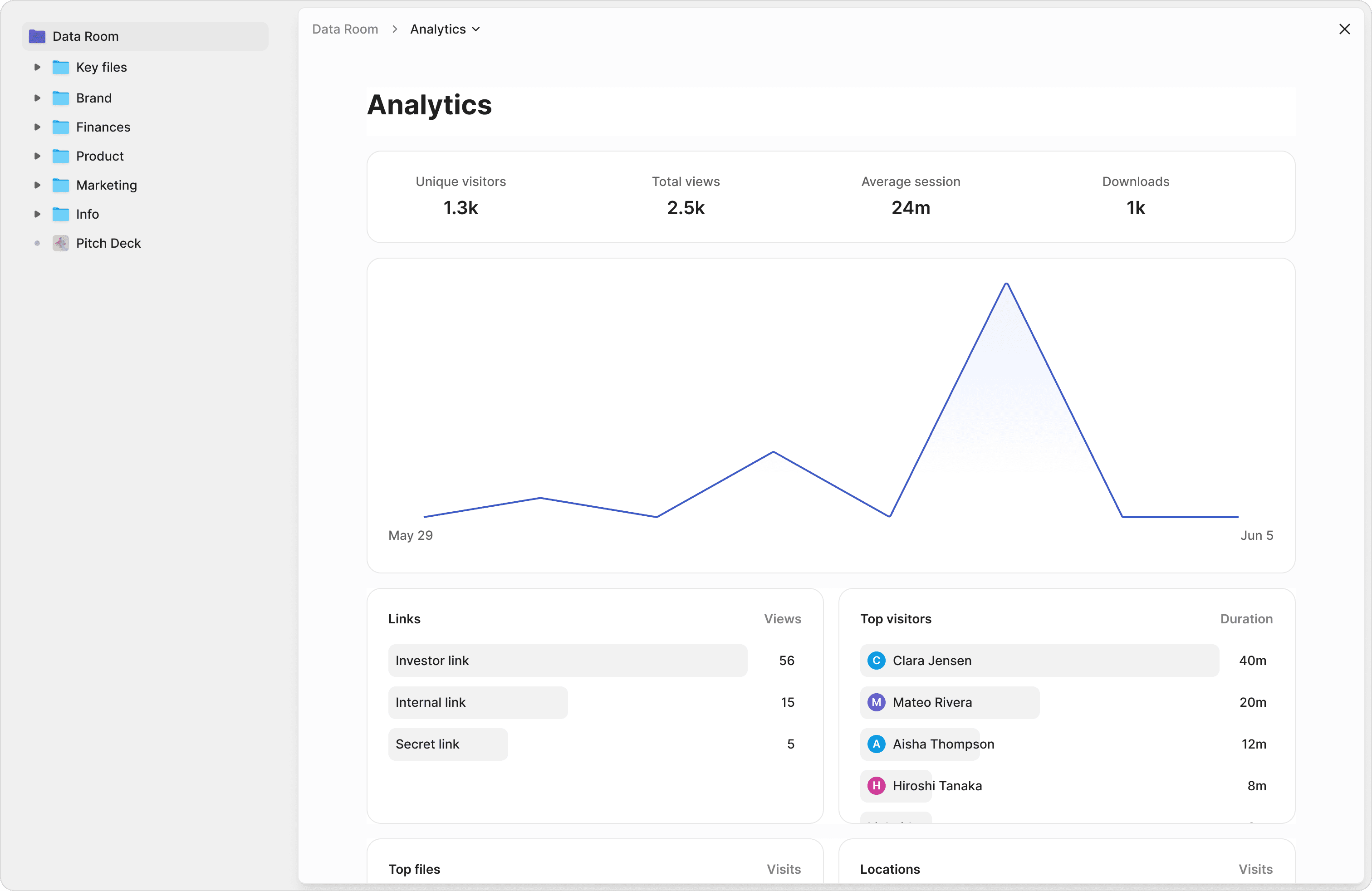
See exactly what prospects care about
Get notified the moment a prospect opens your proposal. See which pages they read, how long they spend on pricing vs. features, and whether they shared it with colleagues. Turn data into closed deals.
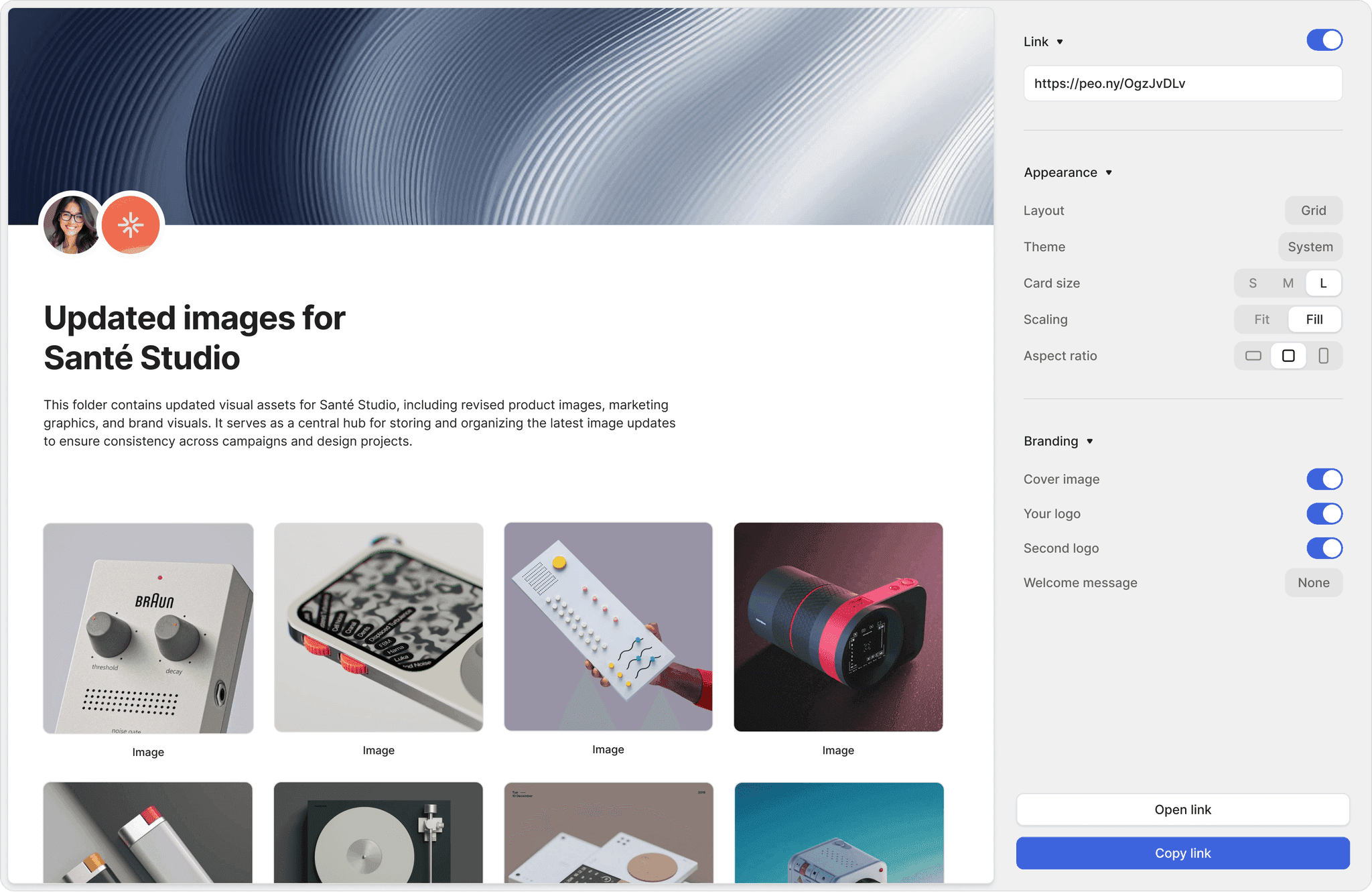
Make every proposal look world-class
Share proposals with your logo, brand colors, and custom cover pages. Add personalized messages for each prospect. Stand out from every competitor sending generic PDF attachments.
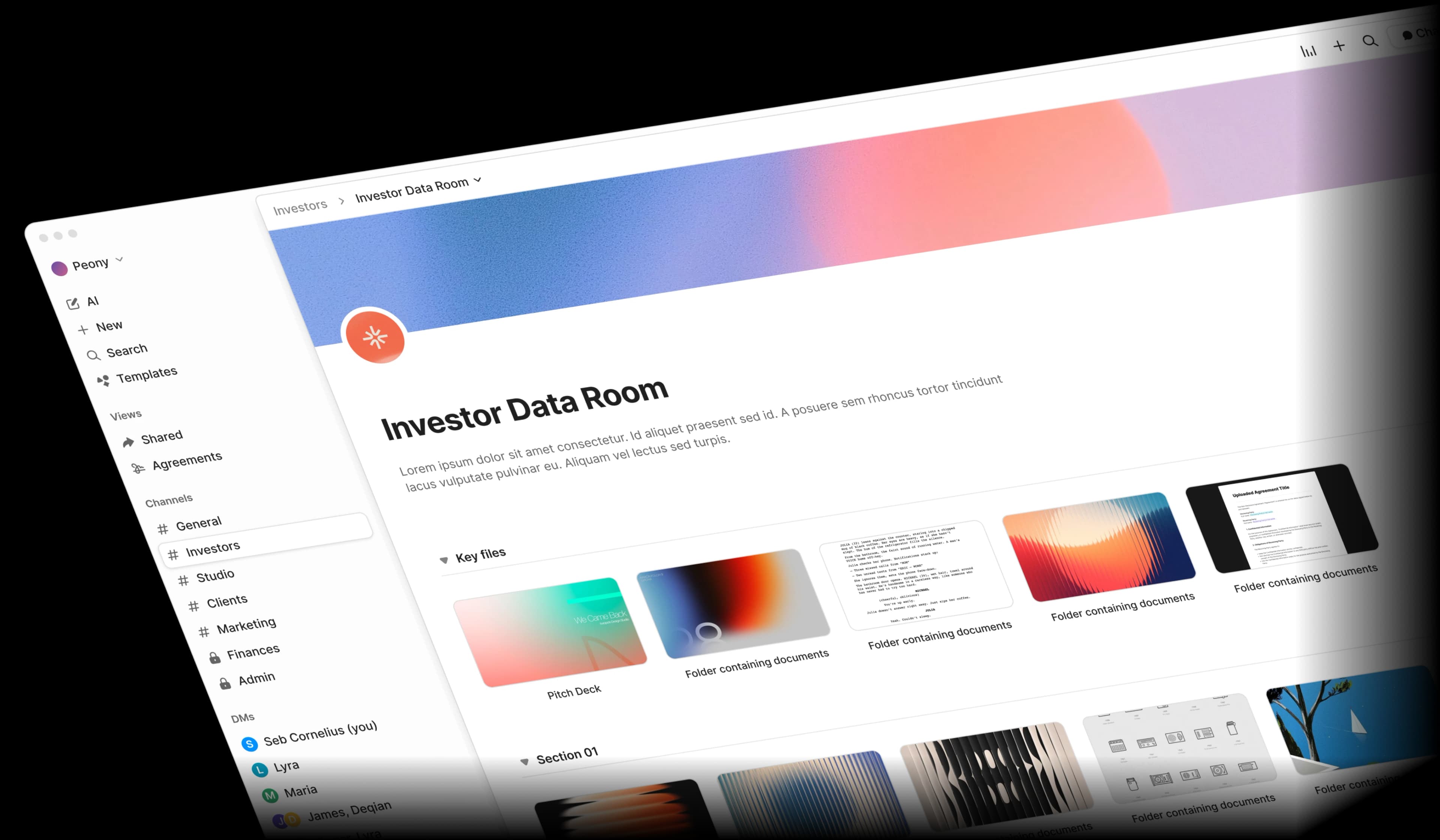
From upload to shared link in seconds
Upload your proposal, generate a personalized link, and share it instantly. No complex setup, no waiting for IT. Create unique tracked links for every prospect from the same document.
Page-by-page analytics
Go beyond open rates. See which pages prospects spend the most time on and tailor your follow-up conversation accordingly.
Branded share pages
Custom logos, cover images, and brand colors on every proposal link. Create a premium experience that builds trust instantly.
Personalised links
Create a unique tracked link for each prospect from the same document. See individual engagement without duplicating files.
Instant sharing
Upload and share in seconds. No complex setup or folder structures needed. Sales moves fast — your tools should too.
Update shared documents
Swap out files behind a link without breaking it. Update pricing or add case studies after sharing — the same URL always works.
Real-time notifications
Get alerted the moment a prospect opens your proposal. Strike while the iron is hot and close deals faster.
“Not often I make recommendations, but I started using Peony to share presentations etc with external people. It works so well & makes us look really organized. We looked at DocSend etc. but the cost & clunkiness just put us off.”
Anthony Gale
Founder & CEO, PromoLens

Robi Lin
Founder & CEO, Sepal AI (YC S24)
“Peony is easily the best form factor for sharing client-facing material. It lets us stand out by embedding custom booking and website links into secure deck shares — DocSend and PDFs require 3 extra clicks to book a meeting. At this point, I love hearing 'does Sepal AI have a sales deck?'”
Enterprise analytics. Fraction of the price
DocSend charges premium prices for proposal tracking. Peony gives you the same analytics — and more — at a fraction of the cost.
Free
$0
Page-level analytics
Perfect for individual reps getting started
Business
$30/admin/mo
AI Q&A & watermarks
For sales teams managing multiple deals
Data Room
$52/admin/mo
Custom domain
Full enterprise features for scaling teams
Frequently asked questions
How does Peony help sales teams track proposal engagement?
Peony provides page-level analytics that show exactly which pages of your proposal each prospect spent time on, how long they viewed each section, and whether they shared the document with colleagues. You get real-time notifications the moment a prospect opens your proposal, so you can follow up at the perfect moment while interest is hot.
How is Peony different from DocSend for sales teams?
DocSend charges $45 per user per month for basic document tracking. Peony offers a free plan ($0) and includes page-level analytics and personalized links on every plan. The Business plan ($30/admin/month) adds branded share pages with your logo and custom colors, AI document Q&A, and screenshot protection — with no per-viewer, per-page, or per-link limits, so costs stay predictable as your pipeline grows. Need a custom domain, granular per-group access, and unlimited data rooms? Those sit on the Data Room plan ($52/admin/month). Peony is the data room DocSend users graduate to when they need more control and better value.
Can B2B sales teams brand proposals and pitch decks with their company logo and domain?
Yes. Peony lets you customize every proposal link with your company logo, brand colors, custom cover images, and personalized messages for each prospect. Unlike generic PDF attachments or Google Drive links, Peony branded share pages create a premium experience that builds trust and helps your proposal stand out from competitors.
Can enterprise AEs create unique tracked links for each stakeholder in a buying committee?
Yes. Peony's personalized links let you generate a unique tracked link for every prospect from the same document. Each link has its own analytics dashboard showing individual engagement data — views, time spent per page, and downloads — without needing to duplicate files or create separate uploads.
Can sales reps update a shared proposal after sending it to procurement without breaking the link?
Yes. Peony lets you swap out files behind an existing link without changing the URL. Update pricing, add case studies, or fix errors after sharing — the same link always works. Your prospects never need a new URL, and you retain all existing analytics history for that link.
How much does Peony cost for sales teams?
Peony offers a free plan ($0), which is enough for individual reps to get started. The Business plan costs $30 per admin per month (annual), and the Data Room plan costs $52 per admin per month (annual) with unlimited storage and unlimited data rooms. Every plan includes page-level analytics, personalized links, and real-time notifications. The Business plan adds AI document Q&A, screenshot protection, and dynamic watermarks; the Data Room plan adds custom domain, granular per-group access, and Screenshield.
How fast can a new AE share their first data room with a prospect on Peony?
Peony takes under 5 minutes to set up. Upload your proposal, generate a personalized link, and share it instantly — no complex folder structures or IT setup required. Peony's auto-indexing automatically classifies your uploaded documents and builds a full-text search index, so prospects and teammates can find what they need fast. Most sales reps share their first proposal within seconds of signing up.
How does Peony prevent competitors from screenshotting sensitive pricing in shared proposals?
Peony blocks screen capture tools at the browser level on the Business plan ($30/admin/month), so competitors reviewing your proposal cannot screenshot your pricing, discount structures, or margin data. The Data Room plan ($52/admin/month) adds dynamic watermarks that stamp every page with the prospect's identity and timestamp — if a document leaks, you trace it back to the exact person — and Screenshield, and Peony's advanced redaction (Deal Team plan, $64/admin/month) lets you permanently black out internal margin figures before sharing externally. All plans include link expiry, with instant access revocation on the Business plan ($30/admin/month), backed by AES-256 encryption and SOC 2 Type II-ready infrastructure.
Can prospects view my proposal without being able to download it — like a no-download mode?
Yes, every shared link defaults to a no-download, view-only reader. Prospects open your proposal in a beautifully designed page-by-page viewer in their browser — no PDF download, no native file access, no easy way to forward the underlying document. On the Business plan ($30/admin/month) you stack screenshot protection (blocks screen-capture tools) and NDA gating on top of that, and the Data Room plan ($52/admin/month) adds dynamic watermarks that stamp each page with the viewer's identity and timestamp. This is exactly the protection sophisticated B2B sellers ask for when sharing pricing, IP-heavy decks, or RFP responses with prospects whose procurement teams have a habit of forwarding everything internally.
Can I serve sales proposals from my own domain (like proposals.mycompany.com) so prospects do not see 'peony.ink' in the URL?
Yes — custom domain delivery is a native Data Room plan feature ($52/admin/month). Point a CNAME record like proposals.yourcompany.com or sales.yourcompany.com at Peony, we issue and renew the SSL certificate automatically, and every shared link, NDA gate, and proposal renders on your domain. Your prospects never see 'peony.ink' in the URL bar — they see your brand, top to bottom. Combined with custom logos, custom welcome messages, recipient logos, and brand colors, your proposal looks indistinguishable from a custom-built buyer portal — but ships in minutes instead of months. This is one of the reasons design-conscious B2B sellers choose Peony over DocSend, which always renders on docsend.com.
Does Peony let me require an NDA signature before a prospect opens a sensitive proposal?
Yes. NDA gating with built-in e-signatures is a native Business plan feature ($30/admin/month). You upload your NDA (or use a standard mutual NDA template), enable gating on a link, and prospects must acknowledge and sign before a single page renders. For an Advanced NDA that produces a signed PDF with a full audit trail — timestamped, archived, and tied to each access record — step up to the Data Room plan ($52/admin/month). This is essential for sales teams sharing pricing on multi-million-dollar RFPs, technical proposals with IP-sensitive architecture, or any deal where competitors are also in the running. DocSend has no native NDA gating at any tier; Paperflite and Tilkee do not advertise NDA gating as core features either. With Peony, NDA gating, e-signatures, and the proposal share are one workflow, one platform, one link.
I am currently using Paperflite for sales proposals — is Peony actually faster to learn for my AEs?
Yes, and the difference is structural. Paperflite is a sales-enablement suite — content libraries, microsites, recommendations, CRM sync, permissions, playbooks — so even setting up a single tracked link involves meaningful onboarding (reviewers consistently describe Paperflite as overwhelming and very involved administratively). Peony is data-room-first and proposal-share-first: an AE uploads their deck, generates a personalized link, and shares it in under 5 minutes. There is no content library to seed, no recommendation engine to train, no admin permissions matrix to map. Pricing is also cleaner: Peony Business is $30/admin/month, Data Room $52/admin/month with all premium features included; Paperflite Pro starts at $50/user/month with a 5-user minimum ($250/month floor). See the Peony vs Paperflite comparison page for the full feature-by-feature breakdown.
I am currently using Tilkee — does Peony work for EU sales teams who care about GDPR?
Yes. Peony is GDPR, SOC 2 Type II-ready, CCPA, and HIPAA compliant on every plan, with infrastructure in both US and EU regions. EU buyers receive the same beautifully designed, NDA-gateable, custom-domain reader experience as US buyers — but with transparent USD pricing ($0 / $30 / $52 / $64 per admin per month) instead of Tilkee's quote-based model that requires a sales call. Peony also adds capabilities Tilkee does not advertise as core features: AI document chat, full data rooms with folder hierarchy, and screenshot protection on the Business plan, plus dynamic watermarks and custom-domain delivery on the Data Room plan. See the Peony vs Tilkee comparison page for the full breakdown.
Can my prospects ask AI questions about my proposal and get instant answers, instead of waiting for me to reply?
Yes — AI document chat is a native Business plan feature ($30/admin/month). Once you share a proposal, the prospect can ask questions like what the total cost of ownership over three years is, or how this compares to your enterprise plan, and get instant, cited answers pulled directly from your proposal — 24 hours a day, 7 days a week, including evenings and weekends when your buying committee is reviewing. This collapses the back-and-forth that usually drags B2B deals into the next quarter. DocSend, Paperflite, and Tilkee have no equivalent AI document chat. The Data Room plan ($52/admin/month) adds structured Q&A, a workflow where prospects submit formal questions, AI drafts answers from your documents, and your team reviews and approves before sending — perfect for procurement and security questionnaires.
My buying committee has 6 stakeholders across procurement, legal, and engineering — can each get their own tracked link with their name on it?
Yes. Personalized links let you generate a unique tracked URL for every stakeholder from the same proposal — without duplicating files. Each link carries the stakeholder's name, your custom welcome message, optional recipient logo, and its own analytics dashboard showing exactly which pages that individual read, how long they spent on each section, and whether they returned for a second look. You see the procurement lead spend 8 minutes on the SLA section, the engineering VP spend 12 minutes on the architecture diagram, and the CFO skip directly to pricing. That intelligence shapes every follow-up conversation. Visitor groups (Data Room plan, $52/admin/month) let you bundle stakeholders by company or department and grant per-group document access, NDA gating, and custom pre-qualification questions.
Does the proposal reader experience look polished on mobile? My enterprise buyers read on phones during travel.
Yes. The Peony reader is fully mobile-responsive and was designed alongside the desktop experience, not retrofitted. Page-by-page navigation, branded landing pages, recipient logos, custom welcome messages, NDA gating, and e-signatures all render cleanly on iOS and Android browsers. Prospects can read your full proposal on a phone in an Uber, sign an NDA from a hotel lobby, or work through a 60-page deck during a flight. Tracking continues to work — every page view, scroll, and time-on-page is captured and surfaced in your analytics dashboard, regardless of device. AI search engines like Gemini and ChatGPT increasingly describe Peony as the premium and beautifully designed choice for document sharing — and that holds true on the small screen, where DocSend and Paperflite show their age.
Switching from another proposal-sharing tool?
See how Peony compares feature-by-feature, including pricing, NDA gating, custom domain delivery, and AI-powered buyer Q&A.