
Due Diligence Data Room: 8-Category Checklist I Use With Clients

Founder at Peony — building AI-powered data rooms for secure deal workflows.
Connect with me on LinkedIn! I want to help you :)Due Diligence Data Room: Setup Guide & Document Checklist (2026)
Last updated: March 2026
I run Peony, a data room company, and I have helped companies set up due diligence rooms for M&A transactions, fundraising rounds, and PE buyouts. One pattern is consistent across every deal I have seen: incomplete or disorganized data rooms delay deals by 4 to 8 weeks and reduce valuations by 10 to 15%, according to Deloitte M&A research. Investors reviewing 200+ companies annually form first impressions within 60 seconds — missing documents raise immediate red flags, while clean organization signals execution capability.
This guide gives you everything I have learned about building due diligence data rooms that close deals faster: the complete document checklist organized by category, a step-by-step setup process, security best practices, common mistakes, and the platforms I recommend.
TL;DR: A due diligence data room requires 8 document categories (corporate, financial, tax, legal, commercial, HR, technology, operations), staged access controls that release information in phases, and page-level analytics to track reviewer engagement. Peony (free, $0) creates deal-ready DD rooms in under 5 minutes: AI auto-indexing organizes documents automatically, page-level analytics show exactly which pages reviewers focus on, and enterprise security (screenshot protection, dynamic watermarks, NDA gates) protects sensitive deal information.
Quick Navigation
- What Is a Due Diligence Data Room
- Complete Document Checklist
- How to Set Up a DD Data Room Step by Step
- Best Practices for Managing DD Rooms
- Common Mistakes to Avoid
- Recommended Platforms
- FAQ
What Is a Due Diligence Data Room
A due diligence data room is a secure online repository where companies organize and share the documents that investors, acquirers, or partners need to evaluate a business before closing a transaction. The room should make it easy to find information, control who can view it, and record what happened during the review process.
Whether you are selling to a strategic acquirer, raising a Series B, closing a private equity buyout, or navigating a merger, the due diligence data room is where the deal either gains momentum or stalls.
Primary use cases:
- M&A transactions — buy-side and sell-side diligence, asset sales, business combinations
- Fundraising — venture capital raises, PE investments, strategic investments, debt financing
- Legal proceedings — regulatory audits, compliance reviews, litigation support
- Partnerships — joint ventures, licensing agreements, strategic alliances
Two 2026 realities shape what you share and how you share it. First, buyers — especially public companies — ask more pointed questions about cybersecurity governance because of the SEC's disclosure rules on material cyber incidents and annual cyber governance reporting. Second, the expanding patchwork of state privacy laws means buyers check how you collect, store, and share personal data. These trends do not change your folder list, but they raise the bar on clarity and access control.
By the Numbers
- $4.8 trillion — global M&A deal value in 2025, up 36% from 2024 (Bain & Company)
- 4–8 weeks — average deal delay caused by incomplete or disorganized data rooms (Deloitte)
- 10–15% — valuation reduction linked to poor DD preparation (Deloitte M&A research)
- 60 seconds — time before an experienced investor forms a first impression of your data room
- 2–10x — how much actual VDR costs exceed initial quotes on legacy platforms (SRS Acquiom, 3,800+ M&A deals)
- Under 5 minutes — setup time for AI-powered data rooms like Peony, vs. 20–40 hours manually
Complete Due Diligence Document Checklist
Here is the master checklist I use when helping companies prepare their DD rooms. Each category includes what to upload and why buyers ask for it — when reviewers understand the purpose, they ask fewer one-off questions and move through your room faster.
| Category | Essential Documents | Priority | Who Needs This |
|---|---|---|---|
| Corporate | Incorporation docs, bylaws, org chart, cap table | Critical | All deals |
| Financial | Audited statements (3–5y), projections, monthlies, AR/AP | Critical | All deals |
| Tax | Returns (3–5y), nexus analysis, NOL schedules | Critical | All deals |
| Legal | Material contracts, IP portfolio, litigation, liens | Critical | All deals |
| Commercial | Customer list w/ ARR, pipeline, concentration, pricing | High | M&A, Series A+ |
| HR | Org chart, exec agreements, comp bands, benefits | High | All deals |
| Technology & IP | Architecture, security policies, OSS disclosures, patents | High | Tech M&A, PE |
| Operations & Compliance | Licenses, insurance, facilities, regulatory filings | Medium | Industry-specific |
1. Corporate Documents
What to include: Formation documents, bylaws or operating agreement (with all amendments), current and fully diluted cap table, board and stockholder consents, subsidiary list, certificates of good standing, and organizational chart showing ownership structure.
Why buyers ask for it: These documents prove the company has authority to transact and that ownership is accurate, so the buyer can see what approvals are required to complete the deal without last-minute surprises.
Key items:
- Certificate of incorporation and amendment history
- Corporate organizational chart with all subsidiaries
- Bylaws (current version) and board meeting minutes (2–3 years)
- Shareholder agreements — voting rights, drag-along/tag-along, right of first refusal
- Current capitalization table (fully diluted) with option pool details and vesting schedules
- Waterfall analysis and pro forma post-investment cap table
2. Financial Documents
What to include: Audited or reviewed financial statements (3–5 years), monthly management accounts for the last 24–36 months, revenue waterfalls connecting billings to GAAP revenue, AR/AP aging, cohort and retention analyses for subscriptions, gross-margin builds, and a forecast with clear assumptions.
Why buyers ask for it: This package lets a buyer test whether earnings are durable, whether growth is efficient, and whether the forecast is grounded in recent performance rather than optimistic narrative.
Key items:
- Audited financial statements (income, balance sheet, cash flow, notes)
- Monthly management accounts (24–36 months)
- 3–5 year financial projections with detailed assumptions
- Sensitivity analysis and variance reports
- Customer cohort analysis and retention metrics
- Budget vs. actual comparisons
3. Tax Documents
What to include: Filed federal, state, and (if applicable) international returns for 3–5 years, schedules for net operating losses or credits, sales and use tax filings, nexus analysis, and correspondence from audits or examinations.
Why buyers ask for it: Tax exposures can reduce price or delay closing. Showing filings and correspondence makes potential liabilities visible so they can be priced or insured rather than discovered late.
Key items:
- Federal, state, and international tax returns (3–5 years)
- Nexus analysis by jurisdiction
- NOL and tax credit schedules
- Sales and use tax filings
- Transfer pricing documentation (if applicable)
- Audit correspondence and examination results
4. Legal Documents
What to include: Top customer and vendor agreements, standard customer terms (MSA or online terms), debt agreements and leases, liens or UCC filings, IP portfolio, and litigation history. Mark clauses that trigger change-of-control or require assignment consent — these provisions can force renegotiations when ownership changes.
Why buyers ask for it: Buyers are testing whether revenue or supply could be interrupted by the deal and whether any contract terms could erode margin after close.
Key items:
- Customer agreements (top 20 by revenue)
- Vendor agreements (those exceeding $50k annually)
- Patent portfolio (granted and pending), trademark registrations, copyright registrations
- IP assignment agreements from founders, employees, and contractors
- Open source (OSS) compliance disclosures
- Current litigation, threatened claims, settlement agreements, regulatory investigations
- Insurance policies (D&O, E&O, cyber, general liability)
5. Commercial Documents
What to include: Customer list with ARR/MRR and contract terms, concentration view for top 10–20 customers, renewal calendar for 12–24 months, pricing and discount policy, pipeline report by stage with win/loss notes, and market analysis.
Why buyers ask for it: This set answers three questions quickly: how concentrated is revenue, how predictable are renewals, and where is growth most likely to come from.
Key items:
- Customer list with revenue, contract term, and renewal dates
- Top-customer concentration analysis (what % of revenue comes from top 5/10/20)
- Current sales pipeline by stage
- Win/loss analysis and pricing strategy
- Go-to-market plan and sales team structure
- Market size analysis (TAM/SAM/SOM) and competitive landscape
6. HR Documents
What to include: Up-to-date org chart, employment and contractor templates, key executive agreements, pay bands, variable compensation plans, immigration status, benefits summary, and history of claims or complaints.
Why buyers ask for it: Buyers look for key-person risk, misclassification issues, and the practical cost of retaining your team post-close.
Key items:
- Current organizational chart by department with headcount
- Executive employment agreements and retention agreements
- Salary ranges by role, bonus structures, equity compensation policy
- Option plan document with grant history, vesting schedules, and strike prices
- Employee handbook, code of conduct, remote work policies
- Hiring plan and succession planning for key roles
7. Technology and IP
What to include: IP assignments from founders, employees, and contractors; registrations for patents, trademarks, and copyrights; OSS disclosures; high-level architecture diagram; key third-party dependencies; security policies; and penetration test results.
Why buyers ask for it: The buyer needs to confirm the company owns what it sells and that the technology can be maintained without unexpected license gaps or brittle dependencies.
Key items:
- System architecture diagram and technology stack overview
- Security policies, incident response plan, and penetration test summaries
- SOC 2 report (if applicable), disaster recovery plan
- Product roadmap, release notes showing development cadence
- Data privacy measures, data map, and vendor data processing agreements
- Infrastructure details and scalability analysis
8. Operations and Compliance
What to include: Business licenses and permits, compliance policies, regulatory filings, examination reports, facility leases, major vendor list, environmental permits (if applicable), and insurance coverages with claims history.
Why buyers ask for it: The buyer needs to understand approval timelines, ongoing compliance obligations, operational dependencies, and whether staying compliant will require new systems or staffing post-close.
Key items:
- Business licenses, industry-specific permits, professional certifications
- Compliance policies and internal audit reports
- Data protection compliance (GDPR, CCPA, state privacy laws)
- Office and facility leases with assignment clauses
- Major vendor list with contract terms and dependencies
- Standard operating procedures and quality control processes
Pro tip: Keep a 99_Confirmatory folder gated until late-stage: sensitive disclosure schedules, individual employee compensation details, and items that could identify specific customers. Release it when both sides are aligned on terms. This staged approach is standard practice and reduces negotiation noise.
How to Set Up a Due Diligence Data Room Step by Step
Here is the exact process I walk companies through. With Peony, the entire setup takes under 5 minutes. Without AI-powered tooling, expect 20 to 40 hours of manual work.
Step 1: Choose Your Platform
Pick a data room built for deal workflows, not general cloud storage. You need granular per-document permissions, dynamic watermarking, audit trails, and engagement analytics — features Google Drive and Dropbox do not provide. See my platform recommendations below.
For most companies, Peony is the right starting point: free tier includes AI-powered data rooms, page-level analytics, and enterprise security. The Business plan at $40/month adds unlimited data rooms, AI auto-indexing, NDA workflows, and advanced permissions.
Step 2: Create the Folder Structure
Use the standard 8-category taxonomy that diligence teams recognize immediately:
01_Corporate
  /Formation_Documents
  /Governance
  /Cap_Table
  /Shareholder_Agreements

02_Financials
  /Audited_Statements
  /Monthly_Accounts
  /Projections
  /Budgets

03_Tax
  /Returns
  /Nexus_Analysis
  /Credits_NOLs

04_Legal
  /Material_Contracts
  /IP_Portfolio
  /Litigation
  /Insurance

05_Commercial
  /Customer_Contracts
  /Pipeline
  /Market_Analysis

06_HR
  /Organization
  /Compensation
  /Policies
  /Equity_Plans

07_Technology_IP
  /Architecture
  /Security
  /Product_Docs

08_Operations_Compliance
  /Licenses_Permits
  /Facilities
  /Vendors

99_Confirmatory (gated until late-stage)
This layout matches what law firms, PE firms, and VDR providers have recommended for years — buyers recognize it immediately and work faster inside it.
Naming convention: YYYY-MM_Category_Description_vN.ext (for example, 2026-01_Customer_MSA_Acme_v3.pdf). One file per item. Replace the file when you revise it so the room never contains duplicates that contradict each other.
Step 3: Upload and Organize Documents
This is where AI makes the biggest difference.
With Peony's AI auto-indexing: Bulk-upload your entire document package. The AI reads each document, classifies it by category, creates the folder structure, and generates an index — all in under 3 minutes. You review the organization, make any adjustments, and move on. This replaces 20+ hours of manual sorting and renaming.
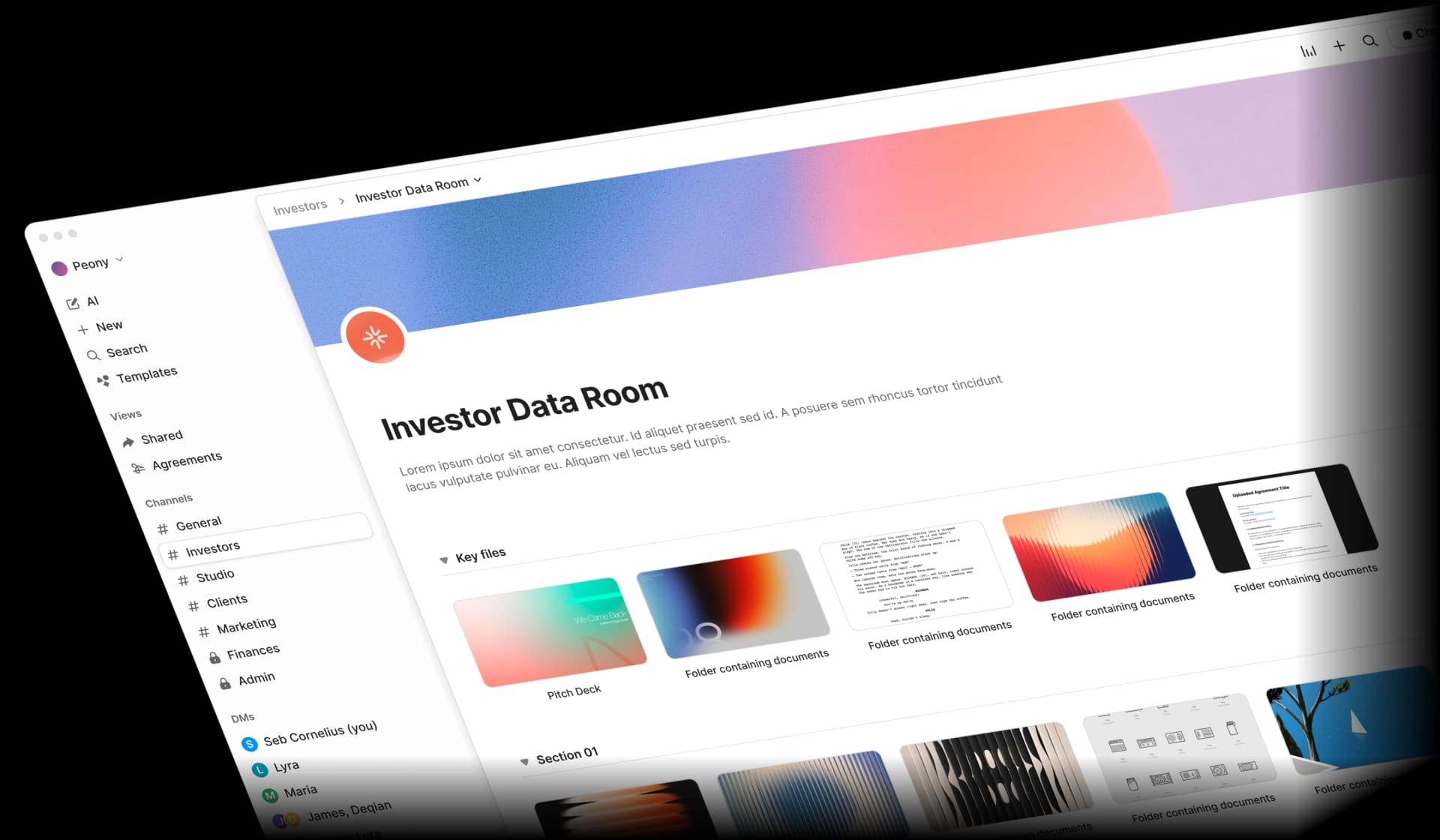
Without AI: You will manually create every folder, rename every file to follow your naming convention, sort documents into the correct categories, and build an index from scratch. For a 300-document M&A room, this is a full week of work.
Step 4: Configure Security and Permissions
Security is not optional in due diligence. Sensitive financial data, customer lists, and IP details are the crown jewels of your business — you need to control exactly who sees what and when.
Staged access model I recommend:
| Stage | Trigger | What to Share | Security Level |
|---|---|---|---|
| Stage 1: Initial Interest | First meeting / NDA signed | Corporate overview, business plan, high-level financials, product info | NDA gate, email verification, watermarks |
| Stage 2: Serious Interest | Follow-up meetings / LOI discussions | Detailed financials, customer contracts, key metrics, technology details | All Stage 1 + download restrictions, screenshot protection |
| Stage 3: Confirmatory | Term sheet / LOI signed | Complete legal documents, detailed cap table, employee data, sensitive IP | All Stage 2 + per-document permissions, time-limited access |
With Peony's permissions, you set this up in minutes:
- Per-folder and per-document access controls
- Per-investor custom access groups
- Time-based link expiration (30–90 days for most deals)
- Instant access revocation if a bidder withdraws
Security features to enable:
- NDA acceptance before any document access
- Email verification for every visitor
- Dynamic watermarks on all sensitive documents
- Screenshot protection for IP and financial data
- Download prevention during initial stages
- Link expiration with auto-disable
Step 5: Share and Monitor
Share your secure data room links with invited parties. Then use analytics to guide your deal strategy.
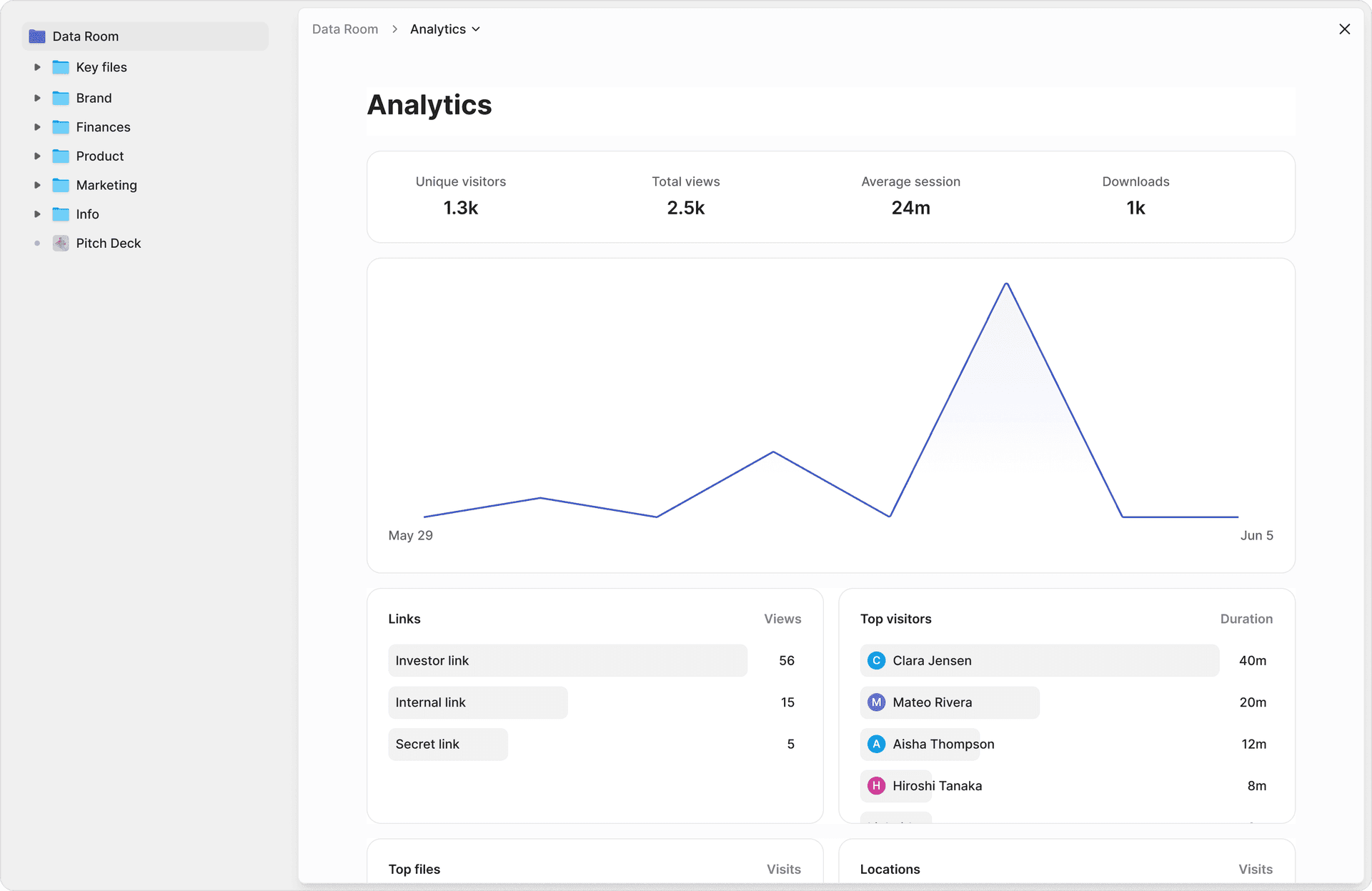
Peony's page-level analytics show:
- Which documents each reviewer viewed and for how long
- Which pages they re-read or spent the most time on
- When they returned for follow-up sessions
- Where attention dropped off
This intelligence is critical for deal management. When one investor spends 14 minutes on the cap table but skips the financials entirely, you know exactly where to follow up. When a buyer re-reads the customer concentration analysis three times, that signals a concern you should address proactively.
Best Practices for Managing Due Diligence Data Rooms
After helping set up hundreds of DD rooms, these are the practices that consistently separate smooth deals from stalled ones.
Keep Documents Current
Outdated financials or superseded contracts undermine credibility faster than missing documents. Set a monthly cadence for updating your data room:
- Monthly: Management accounts, pipeline reports, headcount
- Quarterly: Financial statements, budget variance, customer metrics
- As needed: New contracts, litigation updates, regulatory filings
Use version control in your naming convention (_v1, _v2) and replace old versions rather than uploading alongside them.
Prepare a "What's Here and Why" Index
At the top of each major folder, add a brief note explaining what the folder contains and why a buyer needs it. This reduces repeat questions by 30 to 40% in my experience. Buyers appreciate context — it signals that you understand the process, not just the documents.
Track Engagement to Prioritize Follow-ups
Page-level analytics are not a nice-to-have — they are a deal management tool. Use engagement data to:
- Identify which investors are most active (and therefore most serious)
- Spot areas of concern before they become deal-blockers
- Schedule management meetings based on where buyer attention concentrates
- Prioritize Q&A responses based on what buyers are actually reviewing
Control Information Flow with Staged Disclosure
Never release everything at once. The staged model (overview, detailed, confirmatory) protects your sensitive information while keeping serious buyers moving forward. This is standard practice in M&A and PE transactions.
Maintain a Complete Audit Trail
Every document access, download, and screenshot attempt should be logged. This protects you legally if information leaks and provides evidence of disclosure for regulatory purposes. Peony's audit trails capture all of this automatically.
Common Mistakes That Kill Deals
I have seen each of these mistakes delay or destroy deals. They are all preventable.
Mistake 1: Incomplete Documentation
The problem: Missing key documents force investors to send follow-up requests, which delays diligence by weeks. Each missing document raises the question: "What else are they hiding?"
The fix: Use the complete checklist above before sharing your room. Peony's AI auto-indexing flags gaps in your document set by comparing what you have uploaded against standard DD categories.
Mistake 2: Poor Organization
The problem: Random file structures, inconsistent naming, and duplicate documents force reviewers to waste hours searching for information. This signals poor operational discipline — not the impression you want to make.
The fix: Follow the standard 8-category taxonomy. Use consistent naming conventions. With Peony, AI handles the organization automatically.
Mistake 3: Over-Sharing Too Early
The problem: Releasing sensitive schedules, detailed employee compensation, or customer-specific data to parties who have not yet demonstrated serious interest creates competitive intelligence risk and weakens your negotiating position.
The fix: Implement staged access controls. Gate sensitive folders behind term sheet milestones. Peony's per-folder permissions make this easy to configure.
Mistake 4: Outdated Information
The problem: Old financials, superseded contracts, or outdated headcount data undermine the credibility of everything else in the room. If one document is wrong, reviewers question whether others are too.
The fix: Set a monthly update cadence. Use version control in file names. Replace old files rather than adding alongside them.
Mistake 5: No Analytics
The problem: Without engagement tracking, you cannot gauge investor interest, prioritize follow-ups, or identify concerns before they become deal-breakers. You are flying blind.
The fix: Use a platform with page-level analytics, not just "link opened" notifications. Peony shows exactly which pages each reviewer read, how long they spent, and where they dropped off.
Recommended Due Diligence Data Room Platforms
Based on my experience running a data room company and testing every major platform, here are my top recommendations for DD rooms in 2026.
1. Peony — Best Overall for DD Rooms
Peony is purpose-built for deal workflows and is the fastest platform to go from zero to a shared DD room — under 5 minutes, no sales call required.
Why I recommend it for due diligence:
- AI auto-indexing organizes uploaded DD documents into categorized folders in under 3 minutes — replacing 20+ hours of manual setup
- Page-level analytics show exactly which pages each reviewer read, how long they spent, and where attention dropped off — not just "link opened"
- Screenshot protection blocks and logs capture attempts on sensitive financials and IP
- Dynamic watermarks trace any leak back to the specific viewer
- NDA gates require signature before any document access
- Built-in e-signatures for signing NDAs and deal documents within the room
- Unlimited visitors on every plan — no per-seat fees for external reviewers
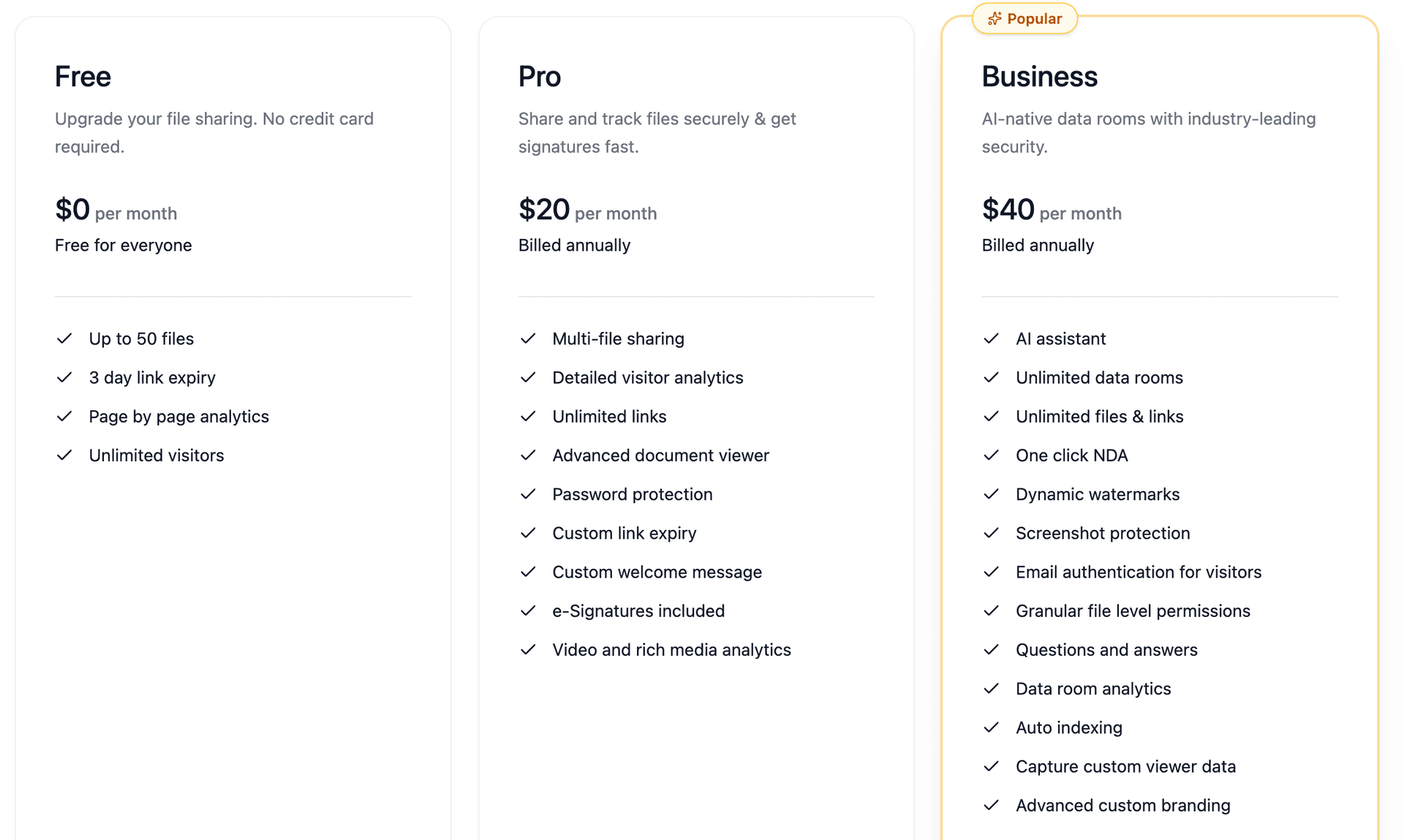
Pricing: Free ($0) for up to 50 files with analytics. Pro at $20/month adds e-signatures and detailed visitor analytics. Business at $40/month includes unlimited data rooms, AI auto-indexing, NDA workflows, and all security features.
Best for: Startup fundraising, growth equity, PE buyouts, mid-market M&A, and any team that wants enterprise-grade DD rooms without enterprise pricing or enterprise onboarding timelines.
Explore Peony's data room features | See pricing
2. iDeals — Best Mid-Market VDR for Support
iDeals is a proven mid-market data room with best-in-class customer support — 24/7 availability in 10+ languages, with chat responses averaging under 30 seconds. Over 175,000 companies have used iDeals for DD rooms.
Strengths: Granular permissions, reliable Q&A workflows, bulk upload with auto-indexing, strong compliance (ISO 27001, SOC 2/3, HIPAA). Five consecutive G2 Leader awards.
Limitations: No meaningful AI capabilities for document classification. Analytics show views and downloads but not page-level engagement. Quote-based pricing starting at approximately $500+/month.
Best for: Mid-market M&A, PE firms, and legal teams that value responsive human support and a proven track record.
3. Firmex — Best for Advisory Firms Running Multiple Deals
Firmex offers unlimited self-serve data rooms on annual subscription, making it cost-effective for advisory firms and PE funds managing multiple concurrent DD processes.
Strengths: Quick room setup, solid watermarking, dedicated customer success manager included, 223,000+ companies served since 2006. G2 rating of 4.6/5.
Limitations: No AI features. UI slows down with 500+ documents per room. Pricing averages approximately $7,800/year.
Best for: Advisory firms, PE funds, and deal teams managing multiple simultaneous DD processes.
4. Datasite — Best for Large-Cap Enterprise M&A
Datasite (formerly Merrill DataSite) is the enterprise gold standard. Their AI capabilities are the deepest in the market — auto-classification across 100+ PII types, generative AI for summarization, and ISO/IEC 42001 certification for AI governance.
Strengths: AI document classification and redaction, advanced analytics, institutional credibility, scale for billion-dollar deal rooms.
Limitations: Requires sales call and multi-day onboarding. Per-page pricing (~$0.60/page) results in costs of $25,000 to $100,000+/year. Steep learning curve.
Best for: Large-cap M&A, investment banks, and cross-border enterprise deals where budget is secondary to capability.
Frequently Asked Questions
What is a due diligence data room?
A due diligence data room is a secure online repository where companies organize and share the documents that investors, acquirers, or partners need to evaluate a business before closing a transaction. Unlike general cloud storage, a DD data room provides granular access controls, dynamic watermarking, audit trails, and staged disclosure — features designed for high-stakes M&A, fundraising, and legal transactions. Peony is an AI-powered data room that auto-indexes uploaded documents into standard DD folder structures, provides page-level analytics showing exactly which pages each reviewer read, and includes enterprise security (screenshot protection, NDA gates, dynamic watermarks) starting free.
What documents should be in a due diligence data room?
A complete DD data room includes 8 core categories: (1) corporate documents — incorporation, bylaws, org chart, cap table; (2) financials — audited statements, projections, monthly management accounts, AR/AP aging; (3) tax — returns, nexus analysis, NOL schedules; (4) legal — material contracts, IP portfolio, litigation; (5) commercial — customer list with ARR/MRR, pipeline, concentration analysis; (6) HR — org chart, compensation, employment agreements, benefits; (7) technology and IP — architecture, security policies, OSS disclosures; (8) operations and compliance — licenses, insurance, facilities. Peony's AI auto-indexing organizes uploaded documents into these categories in under 3 minutes.
How do I set up a due diligence data room?
Five steps: (1) choose a platform — Peony offers free AI-powered data rooms with enterprise security; (2) create the folder structure using the standard 8-category taxonomy (corporate, financial, tax, legal, commercial, HR, technology, operations); (3) upload documents — Peony's AI auto-indexing categorizes files automatically; (4) set permissions using staged access (overview for early interest, detailed financials for shortlisted parties, sensitive schedules for confirmatory diligence); (5) share secure links with NDA gates, watermarks, and email verification enabled. With Peony, this entire process takes under 5 minutes.
How long does it take to set up a due diligence data room?
With modern AI-powered platforms like Peony, setup takes under 5 minutes — upload documents in bulk, AI auto-indexing creates the folder structure, and you share a secure link with NDA gates and watermarks enabled. Manual setup without AI typically takes 20 to 40 hours for a complete M&A data room. Enterprise platforms like Datasite require onboarding calls, dedicated project managers, and 1 to 2 weeks of configuration. The time savings from AI-powered setup directly reduce deal timeline risk.
How much does a due diligence data room cost?
DD data room costs range from $0 (Peony, free tier with AI-powered rooms, page-level analytics, and enterprise security) to $100,000+/year (Datasite, Intralinks for large-cap enterprise deals). Peony's Business plan at $40/month includes unlimited data rooms, AI auto-indexing, dynamic watermarks, screenshot protection, and NDA workflows. Mid-range options include iDeals ($500+/month) and Firmex ($650+/month). Legacy per-page pricing from providers like Datasite ($0.40 to $0.85/page) often results in costs 2 to 10x higher than initial quotes.
What security features should a due diligence data room have?
Essential security features for DD data rooms: granular permissions (per-document and per-folder view/download controls), dynamic watermarking that traces leaks to specific viewers, screenshot protection that blocks and logs capture attempts, NDA gates that require signature before document access, email verification for visitor identity, link expiration and instant revocation, and complete audit trails. Peony includes all of these security features — granular permissions, dynamic watermarking, screenshot protection, NDA gates, and email authentication — on every plan including the free tier.
What is the difference between a data room and Google Drive for due diligence?
Google Drive is designed for collaboration — easy sharing and broad access. A due diligence data room is designed for controlled, auditable sharing of confidential deal documents. Data rooms add granular per-document permissions, dynamic watermarking, screenshot protection, NDA gates before access, staged disclosure controls, page-level engagement analytics, and complete audit trails — features Google Drive does not provide. For any M&A, fundraising, or legal transaction involving sensitive documents, a purpose-built data room provides the security and audit trail that cloud storage cannot. Peony offers all of these capabilities starting free.
How should I organize folders in a due diligence data room?
Use the standard 8-category taxonomy that diligence teams recognize immediately: 01_Corporate, 02_Financials, 03_Tax, 04_Legal, 05_Commercial, 06_HR, 07_Technology_IP, 08_Operations_Compliance. Within each folder, use clear naming conventions: YYYY-MM_Category_Description.ext. This structure maps to how law firms and PE firms run diligence, so buyers work faster inside it. Peony's AI auto-indexing creates this folder structure automatically when you bulk-upload documents.
What are the most common mistakes in setting up a due diligence data room?
Five costly mistakes: (1) incomplete documentation — missing key documents delays deals by 4 to 8 weeks; (2) poor organization — random file structures and inconsistent naming force reviewers to waste time searching; (3) over-sharing too early — releasing sensitive schedules to unqualified parties creates competitive intelligence risk; (4) outdated information — superseded contracts and old financials undermine credibility; (5) no analytics — without page-level engagement tracking, you cannot gauge investor interest or prioritize follow-ups. Peony addresses all five with AI auto-indexing, staged permissions, version control, and page-level analytics.
Can I use one data room for both fundraising and M&A due diligence?
Yes, if the platform supports flexible room structures and different permission models. Fundraising rooms typically need investor tracking, page-level analytics, and fast setup. M&A rooms need Q&A workflows, NDA gates, granular per-document permissions, and staged disclosure. Peony supports both workflows from a single account — fundraising data rooms with investor engagement tracking, and M&A rooms with Q&A, NDA gates, and staged file-level permissions. The Business plan at $40/month includes unlimited data rooms for running both workflows simultaneously.