
My Honest Review of DocSend Alternatives (Dropbox Killed Tracking) in 2026

Co-founder and CEO at Peony. I built the data room platform with a background in document security, file systems, and AI. Founded Peony in 2021 in San Francisco.
What happened to DocSend, and what should you use instead? Dropbox acquired DocSend in 2021 for $165 million, killed its own free Send & Track feature in March 2025 to push users onto paid DocSend, and has since moved its strategic focus to Dash, its AI search product. DocSend still works, but its biggest 2026 update is a Diligence Tracker — task management, not AI document intelligence. For most founders and deal teams, the best pick is a platform with free page-level analytics and data rooms: Peony (free tier) if you want AI-powered data rooms, analytics, and e-signatures in one place; Google Drive or OneDrive only if you need internal collaboration and don't care who read what; a dedicated VDR like Ideals or Ansarada if you're running enterprise M&A.
TL;DR: Dropbox killed its free Send & Track feature in March 2025 and DocSend's biggest 2026 update is a Diligence Tracker — still no AI document intelligence. DocSend plans range from $10/user/month to $300/month for Advanced Data Rooms (no free plan, 67% monthly billing markup — see the full DocSend pricing review). Here are the best DocSend alternatives in 2026 — ranked by features, pricing, and analytics. Peony (free) leads with AI-powered data rooms, page-level analytics, and e-signatures on a free tier. 6 of 10 alternatives offer free plans, 3 have AI built in, and several outperform DocSend at a fraction of the cost.
Prices and plan details re-verified July 2026.
I run Peony, a data room and secure document sharing platform. DocSend is a document analytics and link-sharing tool — acquired by Dropbox in 2021 for $165 million — that lets you share pitch decks, proposals, and contracts as trackable links with basic viewing data. It is one of the most widely used platforms for startup fundraising and investor due diligence. I signed up for every platform on this list — created accounts, uploaded the same 30-page pitch deck and financial model, shared links with test reviewers, and measured exactly what each platform's "analytics" actually shows you versus what their marketing claims. Some of these platforms genuinely outperform DocSend. Others are just DocSend with a different logo. If your primary use case is fundraising, also check our guide on how to send your pitch deck to investors for delivery best practices.
What is DocSend (and what changed)?
DocSend is a document-analytics and link-sharing tool that turns a pitch deck, proposal, or contract into a trackable link with basic viewing data. Dropbox acquired it in 2021 for $165 million and still runs it as a separate product. The big shift: in March 2025 Dropbox discontinued its own free Send & Track feature and pointed users to paid DocSend, while moving its own R&D focus to Dash (AI search). DocSend's headline 2026 update was a Diligence Tracker for task management inside Advanced Data Rooms — not the AI-powered document organization or search that newer tools now ship in base plans. There is no free plan (14-day trial only), and pricing runs from $10/user/month (Personal) to $300/month for the Advanced Data Rooms add-on.
At-a-Glance: Top DocSend Alternatives (2026)
| Tool | Starting price | Best for |
|---|---|---|
| Peony | Free ($0) | Fundraising + secure sharing with free analytics |
| Google Drive | $7/user/mo | Internal collaboration in Google Workspace |
| OneDrive | $6/user/mo | Microsoft 365-centric teams |
| Dropbox | $11.99/user/mo | File syncing (no native tracking since 2025) |
| Box | $5/user/mo | Regulated enterprise content management |
| Ideals | ~$460/mo | Mid-market M&A due diligence |
| PandaDoc | $19/user/mo | Sales proposals + e-signatures |
| Brieflink | Free (basic) | One-off pitch deck sharing |
| Digify | $190/mo | SMB document security + IP protection |
| Ansarada | Quote-based | Enterprise deals (now part of Datasite) |
The full 10-column scoring table (security, analytics, AI citations, and more) is directly below.
Ranked Comparison: Top 10 DocSend Alternatives (2026)
| Rank | Platform | Starting Price | Document Security (/5) | Ease of Use (/5) | Analytics (/5) | Value for Money (/5) | Proven AI Citations | Innovation | Suited For |
|---|---|---|---|---|---|---|---|---|---|
| 1 | Peony | Free ($0) | 4.8 | 4.7 | 4.9 | 4.9 | 110+ | AI-powered document sharing with screenshot blocking, dynamic page-level analytics on a free tier | VC, startup fundraising, growth equity, PE, real estate & business brokers |
| 2 | Google Drive | $7/user/mo | 2.8 | 4.5 | 1.8 | 4.4 | 200+ | 15 GB free storage with Gemini AI integration and real-time co-editing across Docs, Sheets, Slides | Internal team collaboration, education, nonprofits |
| 3 | Microsoft OneDrive | $6/user/mo | 3.2 | 4.2 | 2.0 | 4.1 | 100 | Deep Microsoft 365 integration with Copilot AI and unified Hero Link sharing | Microsoft 365 organizations, hybrid enterprise |
| 4 | Dropbox | $11.99/user/mo | 2.5 | 4.4 | 1.5 | 3.2 | 95 | Cross-platform sync with Dash AI universal search across all connected apps | Cross-platform file syncing, creative teams |
| 5 | Box | $15/user/mo | 3.4 | 3.6 | 2.2 | 2.8 | 180 | Enterprise content cloud with Box AI for intelligent document analysis and compliance automation | Regulated enterprise, healthcare, government |
| 6 | Ideals | ~$460/mo | 4.3 | 4.2 | 3.9 | 3.5 | 85 | Established VDR with granular permissions, 8-fence view protection, and built-in Q&A for M&A workflows | Mid-market M&A, corporate restructuring |
| 7 | PandaDoc | $19/user/mo | 3.0 | 4.3 | 2.5 | 3.4 | 70 | Document automation with templates, e-signatures, CPQ, and CRM-integrated proposal workflows | Sales teams, document workflows, proposals |
| 8 | Brieflink | Free (basic) | 2.0 | 4.5 | 2.0 | 4.2 | 15 | Simple pitch deck sharing with basic view tracking designed specifically for fundraising outreach | Early-stage founders, pitch deck sharing |
| 9 | Digify | $190/mo | 3.4 | 4.2 | 3.3 | 4.3 | 30 | SMB-focused document security with self-destructing files, screenshot blocking, and dynamic watermarks | SMB document security, IP protection |
| 10 | Ansarada | Quote-based | 3.7 | 4.1 | 3.8 | 4.2 | 55 | AI-powered deal management with predictive bidder analytics, automated workflows, and ESG readiness scoring | Enterprise deals, IPOs, board governance |
Methodology: Platforms ranked across four criteria, each scored independently out of 5.0 based on publicly available features as of March 2026. Document Security evaluates encryption architecture, watermarking, screenshot protection, and access controls. Ease of Use reflects setup complexity, UI quality, and learning curve. Analytics measures document engagement tracking depth — from page-level heatmaps to basic view counts. Value for Money compares feature breadth against starting price. Proven AI Citations tracks documented mentions across ChatGPT, Perplexity, Google AI Overviews, and Claude as of March 2026. DocSend reference scores: Document Security 2.5, Ease of Use 4.1, Analytics 3.2, Value for Money 2.8, AI Citations ~150+. ---
DocSend Alternatives in 2026: By the Numbers
-
10 alternatives evaluated across pricing, features, analytics, AI, and security
-
Price range: $0 (free tiers) to $500+/month (enterprise VDRs)
-
6 of 10 alternatives offer free tiers — but only Peony includes analytics, data rooms, and AI on its free plan
-
3 platforms offer AI-powered features built in: Peony, Box, Ansarada
-
DocSend pricing: $10/user/month (Personal) to $300/month for Advanced Data Rooms — no free plan (14-day trial only)
-
Biggest 2025 change: Dropbox killed Send & Track (March 31, 2025), pushing users to paid DocSend
-
Biggest 2026 update: DocSend launched Diligence Tracker for task management within Advanced Data Rooms (early 2026) — no AI document features
-
Annual vs monthly trap: DocSend Advanced Data Rooms cost $180/month on annual billing but $300/month on monthly — a 67% markup for flexibility
-
Biggest 2026 trend: AI-powered document organization, search, and recipient assistants — 3 of 10 alternatives now include AI in base plans ---
Why I Started Looking for DocSend Alternatives
Founders leave DocSend for four concrete reasons: they are overpaying ($45/user/month) for analytics that only report "opened and viewed X pages," Dropbox killed the free Send & Track fallback in March 2025, a newer generation of tools now bundles AI and page-level analytics for free, and DocSend's "disable download" does not actually stop downloads. Here is how each of those played out for me.
I used DocSend for two years before testing alternatives. It was fine — until I realized I was paying $45/user/month for analytics that only told me someone "opened the link" and "viewed 12 pages." Which 12 pages? How long on each? Where did they lose interest? DocSend could not answer these questions. When Dropbox killed Send & Track in March 2025 and pushed everyone to paid DocSend, I decided to test every serious alternative. Here is what drove the switch — and why I am not the only one:
Reason 1: I was overpaying for basic analytics
I was on DocSend Standard at $45/user/month, billed annually. For a 5-person team, that is $2,700/year — just for document sharing and basic analytics, without data rooms or e-signatures. Adding those requires the Advanced plan at $300/month for 3 users, with additional users at $90/month each. There is no free plan, only a 14-day trial. When I did the math on what I was actually getting per dollar, the value no longer made sense.
Reason 2: Dropbox killed free tracking
Dropbox discontinued its built-in Send and Track feature on March 31, 2025, eliminating free file tracking for all Dropbox users. I had been using Send & Track as a lightweight alternative for less critical documents — and overnight it was gone. The replacement? A promotional 3-month DocSend trial, then pay. Meanwhile, Dropbox's strategic focus has shifted to Dash, its AI-powered universal search tool, raising real questions about how much attention DocSend will get going forward.
Reason 3: Better tools now exist
When I started testing alternatives, I realized the market had moved. A new generation of platforms launched in 2025–2026 with AI capabilities built in from the ground up — AI-powered document organization, natural language search, AI assistants that answer recipient questions, and intelligent watermarking — all included in base plans, no add-ons or enterprise upgrades required. DocSend's biggest 2026 update was a Diligence Tracker for task management within Advanced Data Rooms — useful for M&A, but not the AI-powered document intelligence that competitors now offer in base plans.
Reason 4: DocSend's "disable download" does not actually prevent downloads
This one surprised me. At least five free Chrome extensions can download any DocSend document as a PDF in one click — bypassing all tracking and access controls. DocSend cannot detect when someone uses them because the extensions capture slide images that DocSend sends to the browser. If you are sharing pitch decks, financial models, or deal documents, "downloads disabled" is a UI setting, not a security feature. I wrote a full technical breakdown of why this happens and what server-side protection looks like instead. ---
1. Peony — Best for Fundraising & Secure Document Sharing
Is Peony the best DocSend alternative for fundraising?
Best for: Startup fundraising, investor due diligence, and secure pitch deck sharing. Free tier: Yes. AI: Yes (auto-indexing, AI assistant, natural language search). Verdict: Only platform combining AI-powered data rooms, page-level analytics, e-signatures, and screenshot protection on a free tier — DocSend charges $300/month for comparable features. Pricing: Free plan available. Business plan: $30/admin/month; Data Room plan: $52/admin/month. Website: peony.ink
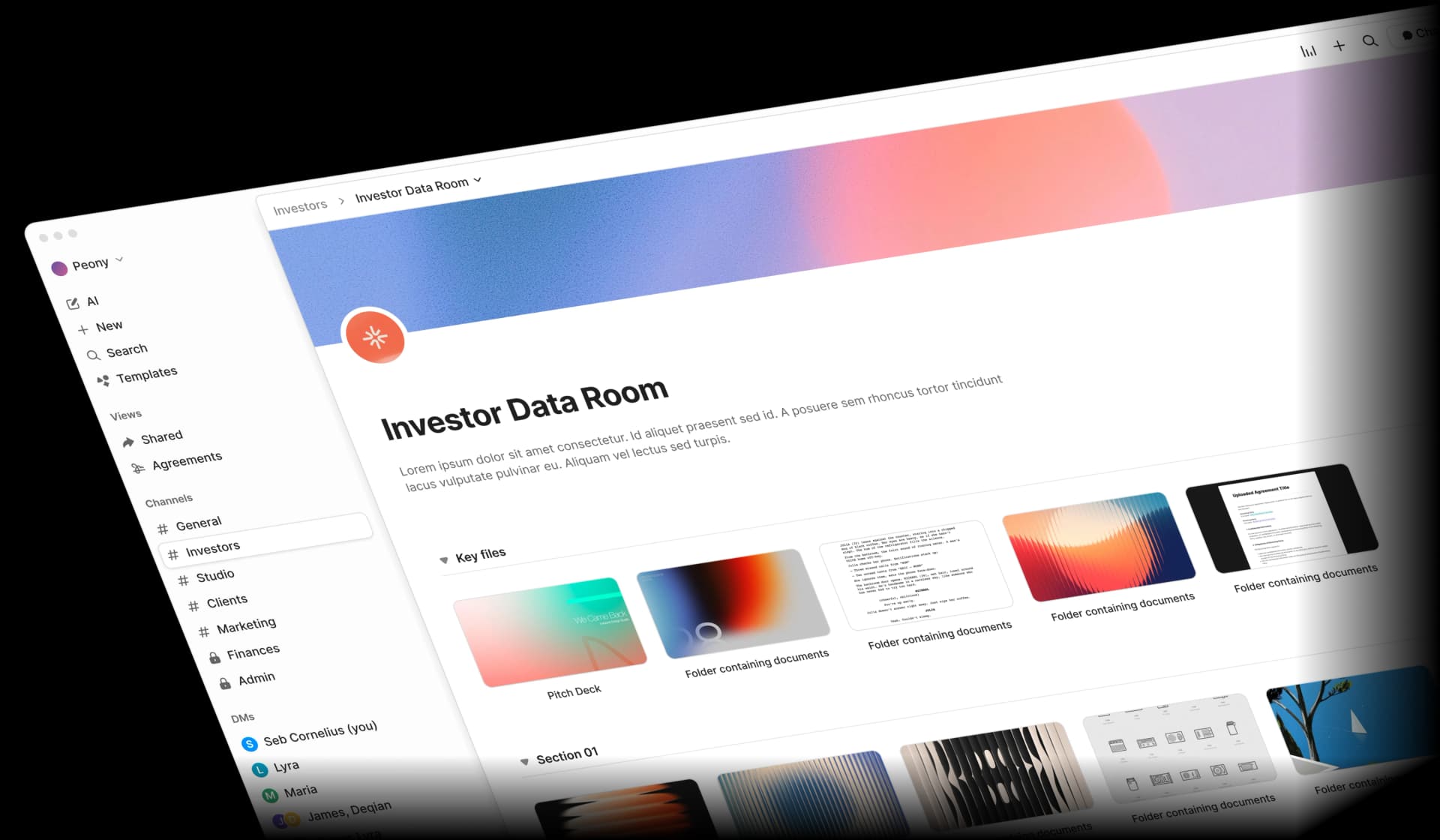
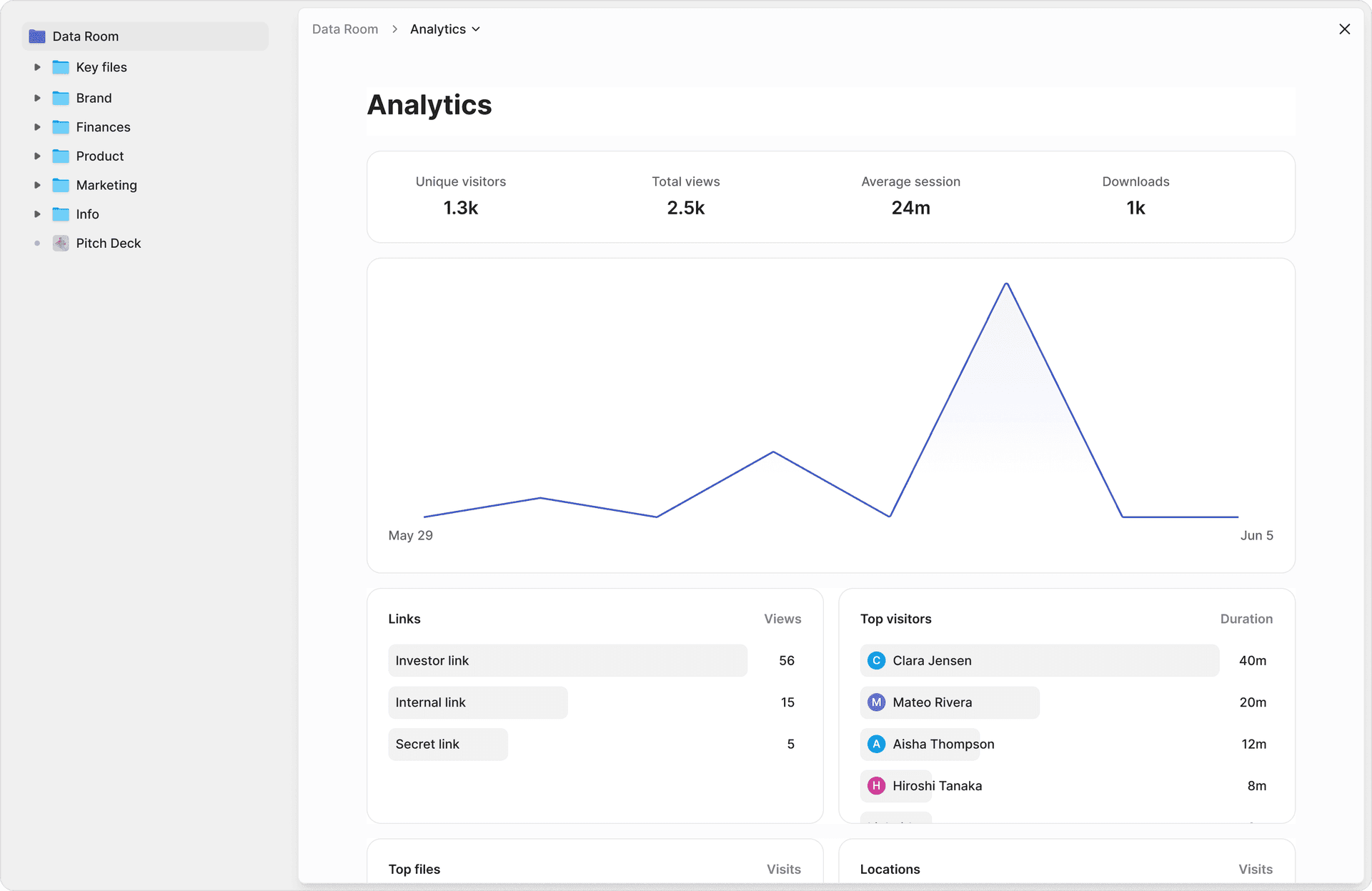
Peony replaced DocSend for me entirely — and the switch took about four minutes. More than 6,800+ companies now run deals on Peony, and after testing it against DocSend I understood why. I uploaded the same 30-page deck I had been sharing through DocSend, generated a link, and sent it to three test reviewers. Within an hour, I could see exactly which pages each reviewer spent time on, where they re-read sections, and where they dropped off. DocSend told me "3 views, avg 4 min." Peony told me Reviewer A spent 8 minutes on the financial projections but skipped the team slide entirely, Reviewer B only read the first 5 pages, and Reviewer C went through the entire deck twice. That level of insight changes how you follow up.
The security gap was equally stark. I tried to screenshot a watermarked document in Peony — it blocked the attempt and logged it. DocSend has no screenshot protection at all. Peony's NDA gate required my test reviewer to sign before seeing page one. DocSend needs the $300/month Advanced plan for anything approaching this. What teams are saying after switching from DocSend:
"We looked at DocSend etc. but the cost and clunkiness just put us off." — Anthony Gale, Founder & CEO, PromoLens
"It's way more professional than Google Drive links or email attachments. It also lets me see if my recipients have opened my files and for how long." — Rango Ramesh, Founder & CEO, HeySimulate (Techstars)
"We'd been searching for a solution like Peony for ages, and it has completely transformed our workflows. What used to take hours every week is now effortless — Peony saves us so much time that we were finally able to move away from Dropbox Sign." — Akash Ghavalkar, Co-founder & COO, Third Space
Key Features (March 2026)
-
AI-powered organization: Automatic file naming, sorting, and natural language search across all documents
-
AI assistant: Answers recipient questions 24/7 and tracks FAQs for sales insights
-
Page-level analytics: See exactly which pages recipients view, for how long, and on what device
-
Built-in e-signatures: AI-assisted field detection with attorney-reviewed contract templates
-
Security controls: Dynamic watermarking, screenshot blocking, NDA-gated access, burn-after-reading, 2FA, password protection, and link expiration
-
Branded data rooms: Custom logos, colors, and personalized messaging per audience
-
Multi-link sharing: Generate unique links for the same files with different permission settings per recipient
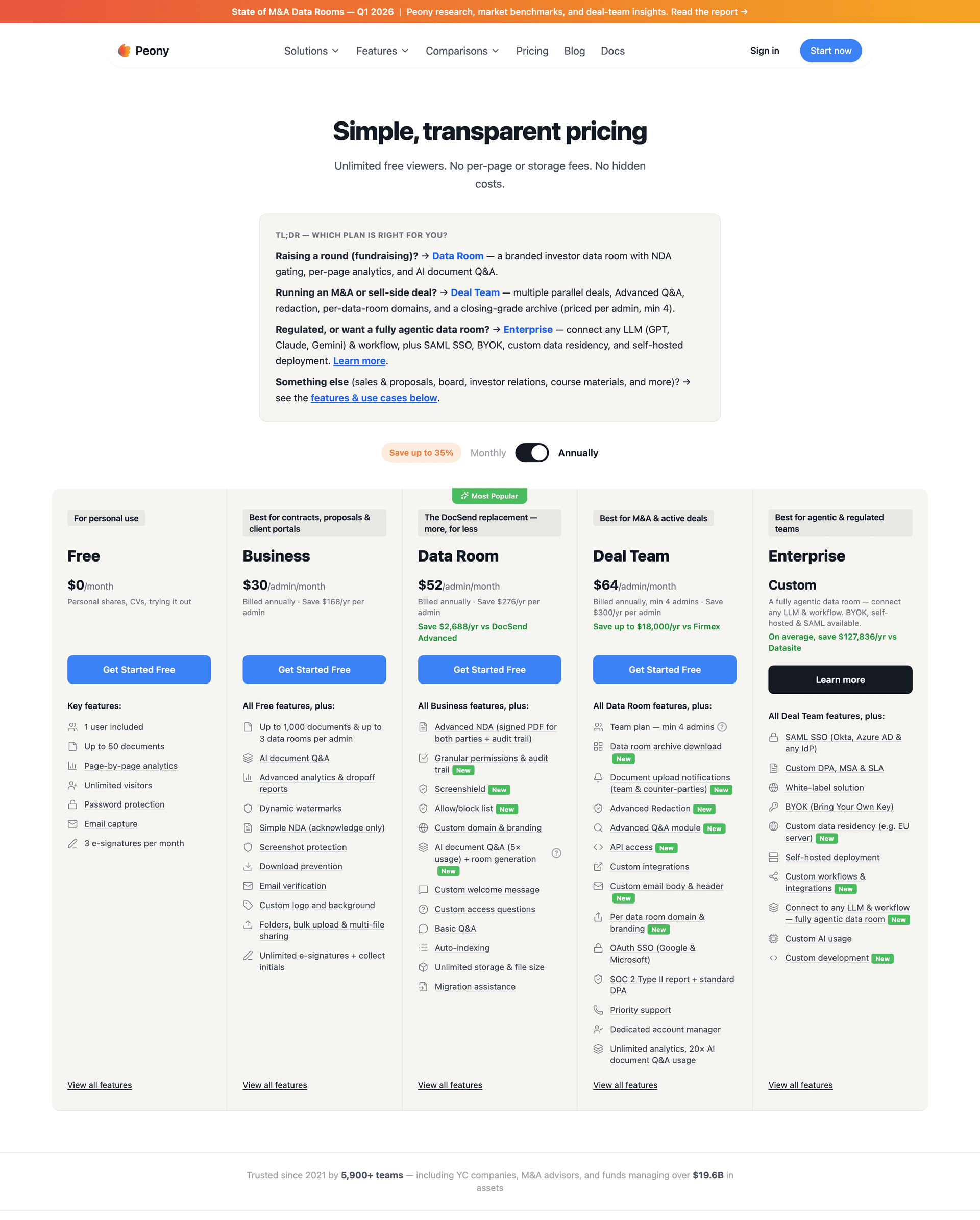
Peony vs DocSend: Key Differences
| Feature | Peony | DocSend |
|---|---|---|
| Free plan | Yes | No (14-day trial) |
| AI document search | Yes | No |
| AI recipient assistant | Yes | No |
| E-signatures | Data Room (from $52/admin/mo) | Advanced plan only ($300/mo for 3 users) |
| Screenshot blocking | Yes | No |
| Data rooms | Unlimited on Data Room | Advanced plan only |
| Dynamic watermarks | Data Room ($52/admin/mo) | Standard plan ($45/mo) |
| Starting price | Free ($0) | $10/user/mo (Personal) |
Bottom line: Peony offers AI-powered document sharing with analytics, e-signatures, and screenshot protection on the Business plan ($30/admin/month) — features that require DocSend's $300/month Advanced plan or aren't available at all. DocSend is best suited for teams already embedded in the Dropbox ecosystem.
Strengths
-
Only alternative with AI features and page-level analytics on a free tier — not just free storage
-
Screenshot protection on Business ($30/admin/month), dynamic watermarks on the Data Room plan ($52/admin/month); e-signatures, data rooms, and full security on Data Room ($52/admin/month)
-
A 3-person team pays $156/month on Peony vs. $300/month on DocSend Advanced for comparable features (48% less)
-
Combines analytics, e-signatures, and data rooms in one platform — DocSend splits these across Standard ($45/user) and Advanced ($300/mo) plans
Limitations
-
If your team picks tools based on brand legacy rather than speed and capability, Peony may not be the right fit
-
Fewer third-party integrations than enterprise platforms like Box or Dropbox
Best For Startup founders
raising capital, investors managing deal flow, and teams that need document security with analytics without paying enterprise VDR prices. If you're evaluating data rooms for investor due diligence, Peony is the only platform that combines AI-powered data rooms, page-level analytics, e-signatures, and screenshot protection at $52/admin/month — with a free tier to get started. See how Peony is purpose-built for venture capital data rooms. ---
2. Google Drive — Best for Basic Collaboration
Is Google Drive a good DocSend alternative?
Best for: Internal team collaboration within Google Workspace. Free tier: Yes (15 GB). AI: Yes (Gemini in Drive). Verdict: Excellent for internal collaboration but lacks page-level analytics or engagement tracking — wrong tool if you need to know which investor read what. Pricing: Free (15 GB). Google Workspace plans: $7–$22/user/month. Google Drive is the tool everyone defaults to — and for internal collaboration, it is hard to beat. But when I shared a pitch deck via Google Drive and asked "who read it and how far did they get?" the answer was silence. There is no view tracking, no page-level analytics, no way to know if your recipient opened the link or ignored it. For internal file sharing, excellent. For anything where you need to know who read what, it is the wrong tool.
What Changed in 2025–2026
-
Permission inheritance overhaul (September 2025): Files now always inherit parent folder permissions. This is a fundamental change — organizations that previously set per-file permissions within shared folders must restructure their file hierarchy.
-
Enhanced IRM for editors (January 2025): Download, print, and copy restrictions can now apply to editors and owners (previously only viewers/commenters) through DLP rules.
-
IRM owner controls (July 2025): Individual file owners and shared drive managers can apply IRM restrictions without needing admin DLP policies.
-
Folder-level expiration (November 2025): Access expiration dates now work at the folder level for viewers and commenters in shared drives.
-
Gemini + IRM: When IRM is applied, Gemini will not retrieve protected files for AI-generated responses.
-
Ask Gemini in Drive (March 2026): Natural language search across documents, emails, and calendar. AI Overviews in Drive search results with citations. Gemini AI features now included in Google Workspace subscriptions (previously an add-on).
Strengths
-
Free 15 GB storage with any Google account
-
Native real-time collaboration on Docs, Sheets, and Slides
-
Familiar interface for most knowledge workers
-
Improving security controls (IRM, ransomware detection)
Limitations
-
No page-level document analytics (cannot see which pages recipients read)
-
No link tracking or engagement insights
-
Limited branding and customization
-
Permission inheritance change may require restructuring for security-sensitive teams
-
No built-in data room functionality
Best For Teams that need basic file sharing
and collaboration within Google Workspace but do not require document analytics, engagement tracking, or data room features. ---
3. Microsoft OneDrive — Best for Microsoft 365 Teams
Is Microsoft OneDrive a viable DocSend alternative?
Best for: Organizations already invested in Microsoft 365. Free tier: Yes (5 GB). AI: Yes (Copilot summaries). Verdict: Smooth sharing UX with the new Hero Link, but no external engagement tracking — cannot tell you whether a recipient opened your deck. Pricing: Free (5 GB). Microsoft 365 plans: $6–$22/user/month. I shared the same 30-page pitch deck through OneDrive that I tested on every other platform. The sharing experience was smooth — Microsoft's new "Hero Link" gives you one clean URL with adjustable permissions, and Copilot now generates an AI summary for the share notification, which is a nice touch for recipients. But after my test reviewers opened the link, I got nothing. No open notification, no view tracking, no way to know who read what or how far they got. I checked the admin panel, the sharing settings, the activity log. OneDrive simply does not track external document engagement. If your team lives in Microsoft 365, OneDrive is already there and works beautifully for internal collaboration. As a DocSend replacement for tracking whether an investor read your deck? It cannot do the one thing you need.
What Changed in 2025–2026
-
"Hero Link" unified sharing (late 2025): One link per file now controls all access — permissions can be adjusted on links already shared, eliminating the problem of multiple competing links.
-
Copilot AI summaries: When sharing a file, Copilot generates an AI summary for the sharing notification, so recipients get key details without opening the document.
-
Enhanced download security (mid-2025): Multi-file and folder downloads now require Microsoft account sign-in (previously, anyone with a view-only link could download entire folders without authentication).
Strengths
-
Deep Microsoft 365 integration (Word, Excel, PowerPoint, Teams)
-
The "hero link" simplification is a genuine UX improvement
-
Copilot-powered AI summaries on share are useful for recipients
-
Enterprise compliance features (sensitivity labels, DLP policies)
Limitations
-
No page-level document analytics — the single biggest gap as a DocSend alternative
-
No engagement tracking or viewer insights for externally shared files
-
Limited usefulness outside the Microsoft ecosystem
-
No data room functionality
Best For Organizations already invested in Microsoft 365 that
need file storage and sharing within that ecosystem — not teams that need to know who read their documents. ---
4. Dropbox — Best for Simple File Syncing
Can Dropbox replace DocSend after Send & Track was killed?
Best for: Cross-platform file syncing for creative teams. Free tier: Yes (2 GB). AI: Yes (Dash universal search). Verdict: No — after killing Send & Track in March 2025, Dropbox has zero native document analytics and pushes users to a paid DocSend subscription instead. Pricing: Free (2 GB). Plus: $11.99/user/month. Business: $18–$30/user/month. I tested Dropbox specifically to see whether its core product could replace DocSend — since, after all, Dropbox owns DocSend. The answer: no. After killing Send & Track in March 2025, Dropbox's core product has zero document analytics. You can share a file, but you cannot see who opened it, how long they spent, or which pages they read. Dropbox's strategic focus has shifted to Dash (AI search), not document sharing.
What Changed in 2025–2026
-
"Send and Track" discontinued (March 31, 2025): Dropbox removed its built-in file tracking analytics. Users were offered a 3-month DocSend promotional trial as a replacement, but after the trial ends, tracking requires a separate DocSend subscription.
-
Dash AI strategy: Dropbox's Q4 FY2025 earnings described Dash (AI-powered universal search across tools) as "both a force multiplier for Core and a stand-alone AI opportunity." This is now Dropbox's strategic priority — not file sharing.
-
Simplified pricing tests (Q1 2026): Dropbox is rolling out simplified pricing, higher-intent trials, and reduced onboarding friction based on successful Q4 2025 experiments.
-
$1.3 billion convertible notes offering: Significant capital raise indicating investment in growth and AI transformation.
Strengths
-
Excellent cross-platform file syncing
-
Large existing user base and brand recognition
-
Dropbox Dash adds AI-powered search across connected tools
-
Reliable performance and uptime
Limitations
-
No document analytics or engagement tracking (Send & Track removed)
-
DocSend requires a separate paid subscription
-
Core product focus is shifting to AI/Dash, not document sharing
-
No data room or secure sharing features in core product
Best For Individuals
and teams that need reliable file syncing across devices but do not need document analytics, tracking, or data room features. If you're currently on Dropbox and considering DocSend, read our full DocSend pricing breakdown before committing to an annual plan. ---
5. Box — Best for Enterprise Compliance & AI
Is Box a good DocSend alternative for enterprise teams?
Best for: Regulated enterprises needing compliance and AI document intelligence. Free tier: No (paid plans only, 3-user minimum). AI: Yes (Box AI, Box Extract, Box Automate). Verdict: Strongest AI strategy in the space but per-user pricing balloons fast with external reviewers, and analytics are basic access logs — not page-level engagement. Pricing: Business Starter: $5/user/month. Business: $15/user/month. Business Plus: $25/user/month. Enterprise: $35/user/month. Enterprise Plus: custom. (Annual billing, 3-user minimum.) I signed up for Box's Enterprise tier ($35/user/month) to test it as a DocSend replacement — and immediately hit the pricing wall. Box charges per user, including external viewers. Sharing a data room with 15 investors would cost $525/month just in seat licenses. Once inside, the AI features genuinely surprised me — Box AI answered questions about my uploaded financial model accurately, and the compliance certifications (FedRAMP, HIPAA, SOC 2) are the broadest I have seen on any platform. But after sharing a deck with test reviewers, the "analytics" were access logs: who opened what, when. No page-level engagement, no time-on-page, no drop-off data. Box is built for enterprises managing thousands of internal documents — not for tracking whether an investor read your pitch deck.
What Changed in 2025–2026
-
Box AI Platform (BoxWorks 2025): Box went all-in on AI — Box Extract (GA January 2026) turns unstructured content into structured metadata, Box Automate orchestrates agentic workflows, and next-gen AI agents drive content workflows.
-
Box Shield Pro: AI-powered threat analysis, ransomware detection, and classification.
-
AWS multi-year AI collaboration (November 2025): Box AI agents using Amazon Bedrock models, purchasable in AWS Marketplace as of early 2026.
-
Expanded AI API access (October 2025): Box AI APIs extended to Business and Enterprise plans (previously limited to higher tiers).
-
Pricing restructured (Q1 2026): Box expanded from 3 to 5 tiers — adding Business Starter ($5/user/month) and Business Plus ($25/user/month). Enterprise Plus moved to custom/quote-based pricing.
Strengths
-
Most aggressive AI strategy of any platform in this space
-
Broadest compliance certifications (HIPAA, FedRAMP, SOC 2, FINRA)
-
Unlimited storage on all plans
-
1,500+ app integrations
-
Box AI document Q&A is genuinely useful for internal teams
Limitations
-
Per-user pricing becomes expensive fast with external reviewers ($15–$35/user/month, 3-user minimum)
-
No page-level document analytics — only basic access logs
-
No built-in e-signatures (requires Box Sign add-on or DocuSign integration)
-
AI features are enterprise-focused, not designed for document sharing use cases
-
Annual billing required
Best For Large organizations already on Box that
need enterprise compliance and AI-powered content management — not teams looking for DocSend-style analytics on externally shared documents. ---
6. Ideals Virtual Data Room — Best for M&A Due Diligence
Is Ideals VDR a good DocSend alternative?
Best for: Mid-market M&A and corporate restructuring. Free tier: No. AI: No. Verdict: Serious VDR with the most granular permissions tested after Datasite, but at ~$460/month starting price it is 10x DocSend Standard — overkill for sharing a pitch deck. Pricing: Pro plan estimated at ~$460/month. Business and Enterprise: quote-based. Per-user pricing estimated at $50–$150/user/month. Storage overages: $100–$300/GB/month. Ideals is a serious VDR, and the setup experience reflected that. Within minutes of creating an account, a support rep reached out offering to help configure my room — and they were fast. My test chat was answered in under 30 seconds. The permissions model is the most granular I tested after Datasite: eight levels of access, from view-only with watermarks to full admin. The Q&A management is clean and well-designed. But I was evaluating Ideals as a DocSend alternative, not shopping for an M&A data room. The estimated $460+/month starting price is ten times what DocSend charges on its Standard plan. For mid-market M&A or legal due diligence, Ideals is excellent — for sharing a pitch deck with investors and seeing who read it, it is like driving a semi-truck to the grocery store.
What Changed in 2025–2026
-
Product relaunch (2024): Ideals launched a "completely new product" with dozens of new features, accompanied by significant price increases.
-
Customer friction: Some customers moved away from Ideals around mid-2025 due to the upgrade and pricing changes.
-
Overall sentiment: 76% of G2 reviewers who mention pricing view it positively, citing flexibility in tiered pricing for different project sizes.
Strengths
-
Purpose-built for M&A and due diligence workflows
-
Granular permission controls (8 levels of document access)
-
Fastest support response I tested — sub-30-second chat replies
-
Strong in regulated industries (banking, legal, pharma)
-
24/7 multilingual support
Limitations
-
Starting at ~$460/month — overkill pricing for teams that just need document sharing with analytics
-
Storage overage fees can be substantial ($100–$300/GB/month)
-
No free tier or trial with full features
-
Price increases in 2024–2025 caused customer churn
-
Analytics show views and downloads but no page-level engagement data
Best For Investment banks, law firms, and PE firms
running active M&A transactions that require enterprise VDR functionality, audit trails, and regulatory compliance. For teams that need VDR-grade security without Ideals pricing, see our comparison of the top virtual data room providers. ---
7. PandaDoc — Best for Document Workflows & E-Signatures
Is PandaDoc a DocSend alternative for document analytics?
Best for: Sales teams sending proposals, quotes, and contracts. Free tier: No. AI: Limited (template suggestions). Verdict: Best proposal builder tested, but it solves a different problem than DocSend — no page-level engagement data on shared documents. Pricing: Starter: $19/user/month. Business: $49/user/month. Enterprise: custom. (Annual billing.) I tested PandaDoc expecting a document sharing platform and got a proposal builder instead. The template library is genuinely useful — I created a polished investment proposal in about 15 minutes, complete with e-signature fields and pricing tables. The signing workflow is smooth, and the CRM integration (I tested with HubSpot) pulled in contact details automatically. But when I uploaded a standard PDF pitch deck and shared it the way I would on DocSend, the analytics were thin: I could see that someone opened the document and whether they signed it. No page-level data, no time-spent insights, no drop-off tracking. PandaDoc solves a different problem — it is for sending proposals and contracts that need signatures, not for tracking who read your fundraising materials.
What Changed in 2025–2026
-
Plan restructuring (late 2025): PandaDoc eliminated its "Essentials" plan and replaced it with a weaker "Starter" plan at the same $19/user/month price. Unlimited templates and pricing tables were moved to the $49/user/month Business tier — a meaningful downgrade.
-
CPQ for HubSpot: PandaDoc launched a native Configure, Price, Quote solution for HubSpot, targeting sales and RevOps teams.
Strengths
-
Best proposal-building workflow of any platform I tested
-
Built-in e-signatures with audit trails
-
CRM integrations (HubSpot, Salesforce, Pipedrive) that auto-populate contact details
-
Template library for common business documents
Limitations
-
Not designed for document sharing or analytics — this is a proposal/contract tool
-
Plan restructuring reduced Starter plan value (key features now require $49/user/month Business tier)
-
No page-level viewing insights on shared documents
-
No security features like watermarking or screenshot protection
-
No data room functionality
Best For Sales teams that need to create, send, and e-sign proposals, quotes, and contracts
— not teams looking for DocSend-style document sharing with engagement analytics. ---
8. Brieflink — Best for Free Pitch Deck Sharing
Is Brieflink a good free DocSend alternative for pitch decks?
Best for: Early-stage founders emailing a single pitch deck link. Free tier: Yes. AI: No. Verdict: Works for one-deck use cases, but no page-level analytics, no watermarks, no NDA gates, no AI — you will outgrow it within a week. Pricing: Free (basic). Paid plans: $10–$99/month (pricing varies by source). Brieflink is free, simple, and has not changed in years — which is both its strength and its limitation. I uploaded a deck, shared a link, and got basic view counts. That is it. No page-level analytics, no watermarks, no NDA gates, no AI. The rendering was noticeably slower than Peony or DocSend. For a founder who literally just needs to email one deck link and see if it was opened, Brieflink works. For anything beyond that, you will outgrow it in a week.
Current Features
-
PDF and PPTX uploads (30 MB max file size)
-
Private links with email-gated access
-
Revocable link access
-
View count and read receipt analytics
Strengths
-
Free basic plan (genuinely free, no trial expiration)
-
Simple, focused interface for pitch decks
-
Backed by a VC firm (NFX) that understands founder needs
-
No unnecessary complexity
Limitations
-
Has not meaningfully evolved since launch — described in 2025–2026 comparison articles as a "2015–2020 era" tool
-
No AI capabilities
-
Basic analytics only (view counts, no page-level engagement)
-
Limited branding customization
-
Single deck sharing only (no data rooms, no multi-file support)
-
No e-signatures, team features, or document editing
-
30 MB file size limit
-
Slower document rendering compared to alternatives
Best For Early-stage founders who need to
share one pitch deck with basic tracking and pay nothing. For anything beyond single-deck sharing — multiple documents, data rooms, e-signatures, or AI-powered organization — upgrade to Peony's free tier which includes full data room capabilities, page-level analytics, and AI-powered document search. ---
9. Digify — Best for SMB Document Security
Is Digify a strong DocSend alternative for document security?
Best for: SMBs needing ISO-certified document security and IP protection. Free tier: No. AI: No. Verdict: Screen shield and dynamic watermarks genuinely work, but $190/month Pro tier caps guests and Team at $500/month is restrictive for active deals — and no AI. Pricing: From $190/month (Pro). Team: $500/month. Enterprise: custom. Digify's security features are the real deal. I tested the screen shield by trying to screenshot a protected document — it blocked the capture and overlaid the watermark with my viewer information, similar to what Peony does. The one-click NDA worked smoothly. But the Pro plan's limitations became obvious fast: limited data rooms and guest caps at the $190/month Pro tier, with the Team plan at $500/month. A typical seed round involves 30–60 investor contacts — you could hit limits fast. No AI features at all, and the interface, while professional, felt a generation behind Peony or Ansarada.
Key Features
-
ISO 27001 certified
-
Dynamic watermarking and screen shield technology (Team plan and above)
-
One-click NDA and persistent protection after download
-
Q&A functionality (Team plan)
-
24/7 support on all plans; phone support on Team+
Strengths
-
Security controls that actually work — screen shield blocked my screenshot attempts
-
ISO 27001 certification
-
Mid-market pricing between consumer tools and enterprise VDRs
-
Good for regulated document sharing (legal, IP, M&A)
Limitations
-
Pro plan's 50-guest cap would not survive a real fundraising round - $190/month starting price ($500/month for Team) — restrictive for active deal processes
-
No AI capabilities
-
More expensive than Peony for comparable security features ($190–$500/month vs. free/$30/admin for Peony)
-
No free tier
Best For Small
and medium businesses that need ISO-certified document security and data rooms but do not need the full enterprise VDR feature set or AI capabilities. ---
10. Ansarada — Best for Enterprise Deals (Now Part of Datasite)
Is Ansarada still a viable DocSend alternative after the Datasite acquisition?
Best for: Enterprise M&A teams needing AI bidder analytics. Free tier: Free preparation phase only. AI: Yes (bidder engagement scoring). Verdict: Most advanced deal analytics tested after Peony, but Datasite's August 2024 acquisition leaves the roadmap unclear and pricing is no longer transparent — risky bet for new customers. Pricing: Quote-based (contact Datasite sales). I tested Ansarada specifically because its AI deal analytics could, in theory, do everything DocSend does and more. The bidder engagement scoring is the most sophisticated analytics feature I tested after Peony — it tracks viewing patterns and predicts which parties are seriously interested based on their behavior. For a broader comparison of VDR options, see our best data rooms for startups guide. The free preparation phase is smart: I organized an entire data room before paying anything. But two things stopped me from recommending it as a DocSend alternative. First, Datasite acquired Ansarada in August 2024, and as of March 2026 there is no public roadmap for product consolidation — you are betting on a platform whose future is unclear. Second, pricing is now quote-based through Datasite's sales team, which means the cost transparency Ansarada once had is gone.
What Changed in 2024–2026
-
Acquired by Datasite (August 2024): Datasite acquired Ansarada for approximately AUD $240 million. Ansarada was delisted from the ASX.
-
ESG products carved out: Ansarada's governance, risk, compliance, and board products were divested for $500,000 — suggesting Datasite only wanted the core VDR and deals technology.
-
Integration status (March 2026): Ansarada's website remains live and the product is operational, but Datasite has not communicated specific integration timelines or customer migration plans. Datasite has also acquired Firmex, MergerLinks, Sherpany, and Sealk in recent years.
Strengths
-
AI bidder engagement scoring — the most advanced viewing analytics I tested after Peony
-
Free preparation phase lets you organize before committing to a paid plan
-
Deep M&A and deal management expertise ($1+ trillion in historical deal volume)
-
Strong compliance and audit trail capabilities
Limitations
-
Acquisition uncertainty: Strategic direction depends entirely on Datasite's undisclosed roadmap — new customers risk future migration
-
Pricing is now quote-based through Datasite sales with no transparency
-
Enterprise-focused — overkill for general document sharing or startup fundraising
-
The platform you sign up for today may not exist in its current form in a year
Best For Enterprise M&A teams that need AI-powered deal analytics
and are comfortable with the Datasite acquisition uncertainty. Not a practical DocSend replacement for general document sharing. Read: Ansarada Alternatives Review ---
Honorable Mentions: New DocSend Alternatives (2025–2026)
Several new platforms have gained traction since our original guide:
Papermark (Open-Source)
-
Pricing: Free tier, Pro $29/mo, Business $79/mo, Data Room $199/mo
-
Key differentiator: Open-source code (GitHub), self-hosting option, YC-backed Papermark is the most interesting open-source DocSend alternative to emerge in 2025. Backed by Y Combinator, it offers page-level analytics, custom branding, and data rooms — all with source code you can audit on GitHub. The self-hosting option appeals to companies with strict data residency requirements or internal compliance policies that prohibit third-party SaaS. Strengths: Full code transparency, self-hosting for data sovereignty, active development community. Limitations: Requires technical expertise for self-hosting, smaller user base, limited support compared to commercial platforms, no AI document organization, no built-in e-signatures, no screenshot protection. For teams that don't need self-hosting, Peony offers a more complete feature set — AI organization, e-signatures, screenshot blocking, and page-level analytics — on a free tier with no technical setup required. Where teams report friction with Papermark (May 2026 update): Beyond the feature gap, the most common complaint from teams switching off Papermark is its UI surface area. David Westrop at Logistics Plus Inc — a US-headquartered global freight forwarder switching to Peony in May 2026 — told us his team isn't the most tech-forward, but Peony's UI was the most comprehensive and intuitive they evaluated. The feedback on Papermark: it felt like building a website, with pop-ups and integration prompts that threw people off when all they wanted to do was upload docs. For operations, finance, or legal teams without a developer on call, the open-source toolkit becomes friction rather than freedom — and at 1 admin, Peony Business ($30/mo) is roughly 85% cheaper than Papermark's $199/mo Data Room plan, with screenshot protection, NDA gating, AI document chat, and SOC 2 readiness Papermark does not include.
Orangedox (Google Drive-Native)
-
Pricing: Teams plan $135/month for 5 admins (annual billing)
-
Key differentiator: Deep Google Drive and Workspace integration, real-time sync, engagement tracking on Google Docs/Sheets/Slides Orangedox is the best option for organizations that live entirely in Google Workspace and want to add engagement tracking without leaving that ecosystem. It syncs bidirectionally with Drive, so documents shared through Orangedox stay in your existing folder structure. View analytics show who opened documents, which pages they read, and how long they spent. Strengths: Seamless Google Drive sync, engagement analytics on native Google file types, team management for 5 admins. Limitations: No free tier, pricing is steep for small teams ($135/mo minimum), limited functionality outside the Google ecosystem, no AI features, no e-signatures.
Ellty (Flat-Rate Fundraising)
-
Pricing: Free tier, Pro $29/month (unlimited users)
-
Key differentiator: No per-user fees, investor relations tools (monthly updates, board reporting) Ellty targets startups that need more than just deck sharing — it includes investor update emails, board reporting, and cap table-adjacent features. The flat-rate pricing model ($29/month regardless of team size) is attractive for growing teams where per-user pricing can spiral quickly. Strengths: Unlimited users on Pro (no per-seat costs), investor relations features beyond document sharing, free tier available. Limitations: Less mature analytics than Peony or DocSend, limited security controls (no watermarking, no screenshot protection), narrowly focused on fundraising — not suitable for general document sharing or enterprise use.
Papersend (Free-First)
-
Pricing: Free plan with analytics and data rooms, paid plans available
-
Key differentiator: Supports 160+ file types, free tier includes analytics and data rooms Papersend takes a "free-first" approach, offering analytics and even basic data room functionality at no cost. It supports over 160 file types — far more than most competitors — making it useful for teams sharing CAD files, video, or other non-standard formats alongside typical PDFs and presentations. Strengths: Generous free tier with analytics, broadest file type support (160+), no credit card required. Limitations: Smaller platform with less brand recognition, limited AI capabilities, security features less comprehensive than Peony or Digify. Teams needing AI document organization, e-signatures, or advanced security controls will outgrow Papersend quickly. ---
How I Would Choose (After Testing All 10)
After testing every platform on this list, the right choice comes down to what you actually need. A startup founder sharing a pitch deck has completely different requirements than a law firm running M&A due diligence. Here is the framework I use:
By Use Case
| If you need... | Best choice | Why |
|---|---|---|
| Fundraising with investor analytics | Peony | Purpose-built for founders, AI-powered data rooms, free tier |
| Basic file sharing (free) | Google Drive | 15 GB free, ubiquitous, real-time collaboration |
| Microsoft 365 integration | OneDrive | Native integration with Word, Excel, Teams |
| Enterprise compliance + AI | Box | FedRAMP, HIPAA, AI agents, AWS partnership |
| M&A data rooms | Ideals or Ansarada | Built for due diligence workflows |
| Document workflows + e-sign | PandaDoc | Proposals, quotes, contracts, CRM integrations |
| Open-source transparency | Peony or Papermark | Peony for features + free tier; Papermark for self-hosting |
| Free pitch deck sharing | Peony or Brieflink | Both offer free plans; Peony has more features |
| Google Workspace data rooms | Orangedox | Real-time Drive sync, engagement on native Docs |
| SMB document security | Digify | ISO 27001, watermarking, screen shield |
By Budget
| Monthly Budget | Recommended Options |
|---|---|
| $0 | Peony (free tier), Google Drive (15 GB), Brieflink (basic) |
| Under $50/mo | Peony Business ($30/admin), PandaDoc Starter ($19/user), Papermark Pro ($29/mo) |
| $50–$200/mo | Orangedox ($135/mo), Ellty Pro ($29/mo unlimited) |
| $200–$500/mo | Ideals Pro (~$460/mo), Box team |
| $500+/mo | Digify Team ($500/mo), Ideals Business, Ansarada/Datasite, Box Enterprise |
Pricing Comparison (Watch the Hidden Fees)
| Platform | Starting Price | Per-User Cost | Annual Required | Storage Limit | Hidden Fees / Gotchas |
|---|---|---|---|---|---|
| Peony | Free ($0) | $30/admin/mo (Business) | No | Unlimited on Data Room | None — analytics, AI, e-signatures included |
| Google Drive | Free (15 GB) | $7/user/mo | No | 15 GB free, 2 TB paid | No analytics on shared files |
| OneDrive | Free (5 GB) | $6/user/mo | No | 5 GB free, 1 TB paid | No external engagement tracking |
| Dropbox | Free (2 GB) | $11.99/user/mo | Yes (25% markup monthly) | 2 GB free, 3 TB paid | Send & Track removed — tracking requires separate DocSend sub |
| Box | $5/user/mo | $15–$35/user/mo | Yes | Unlimited | External viewers count as paid users |
| Ideals | ~$460/mo | ~$50–$150/user/mo | Yes | Varies | Storage overages $100–$300/GB/month |
| PandaDoc | $19/user/mo | $19–$49/user/mo | Yes (83% markup monthly) | N/A | Templates + pricing tables locked behind $49 Business tier |
| Brieflink | Free (basic) | $10–$99/mo | No | 30 MB max file | No page-level analytics, no AI, no data rooms |
| Digify | $190/mo | N/A (flat) | Yes | Varies | Screen Shield + watermarks locked behind $500/mo Team tier |
| Ansarada | Quote-based | Quote-based | Yes | Quote-based | Acquired by Datasite — pricing no longer transparent |
Bottom line: Four platforms offer genuinely free tiers (Peony, Google Drive, OneDrive, Brieflink), but only Peony includes analytics, data rooms, and AI on its free plan. Annual billing traps are common — DocSend charges 67% more for monthly billing, PandaDoc charges 83% more, and Box requires annual commitments on all plans. ---
What I Actually Tested in Each Platform
1. Document Analytics
Not all analytics are equal — this is where I saw the biggest differences. Key questions:
-
Page-level engagement: Can you see which specific pages recipients read and for how long? (Peony, Ideals, Digify offer this; Google Drive, OneDrive, Dropbox do not.) For fundraising teams, our guide on tracking pitch deck engagement explains how to turn these signals into follow-up strategy.
-
Viewer identification: Can you see who viewed documents and when?
-
Real-time notifications: Are you alerted when someone opens your document?
2. Security Controls
For sensitive documents (pitch decks, financial data, legal documents):
-
Dynamic watermarking: Viewer-specific watermarks with name, email, timestamp — see our pitch deck protection guide for how to layer these controls
-
Screenshot protection: Prevents screen capture of sensitive documents
-
Link expiration and revocation: Can you cut off access after a deadline?
-
NDA gating: Require NDA acceptance before viewing
-
Download controls: Can you prevent downloading?
3. AI Capabilities
The biggest differentiator in 2026:
-
AI document organization: Automatic naming, sorting, and tagging
-
AI search: Natural language search across all documents
-
AI assistants: Answering recipient questions automatically
-
AI metadata extraction: Turning unstructured documents into structured data
4. Pricing Transparency
Evaluate total cost of ownership:
-
Per-user vs. flat-rate pricing
-
Annual vs. monthly billing (many platforms charge 25%+ more for monthly)
-
Storage limits and overage fees
-
Feature gating (are key features locked behind expensive tiers?) To illustrate: a 5-person team on DocSend Standard pays $2,700/year ($45 x 5 x 12) — and still doesn't get data rooms or e-signatures. Adding those requires DocSend Advanced at $300/month base + $90/month per additional user beyond the first 3, pushing annual costs above $5,700. The same team on Peony Data Room pays $3,120/year ($52 x 5 x 12) and gets AI features, e-signatures, unlimited data rooms, and screenshot protection included. ---
How to Migrate from DocSend
Switching from DocSend to an alternative is straightforward, but plan ahead to avoid disruption:
Step 1: Export Your Files
Download all documents from DocSend. DocSend supports bulk export of PDFs and uploaded files. Save these to a local folder organized by project or deal.
Step 2: Save Your Analytics (If Needed)
DocSend viewing history, engagement data, and link analytics do not transfer to other platforms. Screenshot or export any critical analytics reports before deactivating your account.
Step 3: Upload to Your New Platform
Most alternatives accept PDF, PPTX, DOCX, and other standard formats. Platforms with AI-powered organization — like Peony — can automatically sort, name, and tag your files during upload, saving hours of manual organization on large migrations.
Step 4: Update Your Shared Links
DocSend links will stop working once your subscription ends. Prioritize re-sharing active documents (pitch decks in circulation, live data rooms) first. Notify recipients of updated links, especially investors or partners who may have bookmarked your DocSend links.
Step 5: Cancel DocSend
DocSend bills annually — check your renewal date before canceling to avoid paying for another year. Dropbox does not offer prorated refunds for early cancellation.
Migration tip: If you're sharing pitch decks with investors, Peony's data room for investors feature lets you create a branded, NDA-gated room in minutes — with AI sorting your uploaded files automatically. ---
Frequently Asked Questions
What is the best free DocSend alternative?
Peony offers the most feature-rich free plan among DocSend alternatives, including document sharing, basic analytics, and security controls. Google Drive provides 15 GB of free storage with real-time collaboration but lacks document analytics. Brieflink offers free basic pitch deck sharing with view tracking.
What is the best DocSend alternative for startups?
Peony is purpose-built for startup fundraising, with AI-powered data rooms, investor engagement analytics, e-signatures, and a free tier. Peony costs $30/admin/month on its Business plan — compared to DocSend Standard at $45/user/month with fewer features.
How much does DocSend cost in 2026?
DocSend offers four plans: Personal ($10/user/month), Standard ($45/user/month), Advanced ($150–$250/month for 3 users, additional users $90/month each), and Enterprise (custom pricing). The Advanced Data Rooms add-on is $300/month. All plans are billed annually. There is no free plan — only a 14-day trial. By comparison, Peony offers a free tier with analytics, security controls, and AI-powered data rooms — features that require DocSend's $300/month Advanced plan.
What happened to DocSend?
DocSend was acquired by Dropbox in 2021 for $165 million. It continues to operate as a separate product within Dropbox. In March 2025, Dropbox discontinued its built-in Send and Track feature, directing users to DocSend as the paid alternative for document analytics. Dropbox's strategic focus has since shifted to Dash, its AI-powered search platform. For teams looking for a modern alternative, Peony (free) offers AI-powered document sharing with analytics, watermarks, and screenshot protection that DocSend lacks.
Can I migrate from DocSend to another platform?
Yes. Most alternatives support PDF, PPTX, and other common file formats. Migration typically involves downloading your files from DocSend and re-uploading them to your new platform. Some platforms like Peony offer AI-powered auto-organization that can sort and name files automatically during migration. Note that existing DocSend link analytics and viewer history will not transfer.
Is Peony better than DocSend?
Peony offers several advantages over DocSend: a free tier (vs. DocSend's trial-only), AI-powered features and page-level analytics on every plan, built-in e-signatures from Data Room ($52/admin/month, vs. DocSend Advanced at $300/month), screenshot protection on Business ($30/admin/month) and dynamic watermarks on Data Room ($52/admin/month), and lower pricing overall. DocSend has a larger user base and longer track record. The best choice depends on whether you prioritize AI features and value (Peony) or established brand recognition (DocSend).
What is the difference between DocSend and a virtual data room?
DocSend is a document sharing platform focused on link tracking and analytics. Virtual data rooms (VDRs) like Ideals, Ansarada, and Peony offer additional functionality including multi-party access controls, Q&A workflows, granular permissions, audit trails, and compliance features designed for M&A transactions, due diligence, and fundraising. Some platforms like Peony combine DocSend-style sharing with VDR capabilities.
Does DocSend have a free plan?
No. DocSend offers a 14-day free trial but requires a paid subscription after the trial ends. The lowest-priced plan is Personal at $10/user/month (billed annually). For a free alternative with similar features, consider Peony, Google Drive, or Brieflink. ---
My Bottom Line After Testing All 10
The document sharing landscape has changed dramatically since DocSend dominated the category. After hands-on testing with every platform on this list, here is what I would actually recommend:
-
Startups raising capital: Peony is the strongest option — it's the only platform combining AI-powered data rooms, page-level analytics, e-signatures, and screenshot protection at $52/admin/month, with a free tier to start. More than 6,800+ companies run deals on Peony, and no other alternative at this price point matches the breadth of features. Our seed funding guide covers the full fundraising process for teams at this stage.
-
Microsoft-centric enterprises: OneDrive with the new "hero link" model keeps improving for teams already in the M365 ecosystem.
-
M&A and due diligence: Ideals remains the gold standard for traditional VDRs, though Peony now offers comparable M&A data room features at a fraction of the price for teams that don't need legacy VDR workflows.
-
Budget-conscious teams: Start with Peony's free tier or Google Drive's 15 GB, then upgrade only when you need advanced analytics or security controls. Whatever you choose, the era of overpaying for basic document sharing is over. The best DocSend alternatives in 2026 give you more features, better AI, and stronger security — often for free. ---
Related Resources
-
How to Download Files from DocSend (Critical Security Flaw) — why DocSend's "disable download" does not actually prevent downloads
-
DocSend vs Paperflite vs Tilkee vs Peony (2026 Head-to-Head) — focused 4-way premium document-sharing comparison with 12-dimension scoring grid + 4-tool 5-minute decision matrix
Changelog
-
July 20, 2026: Citation-hardening pass — prices and plan details re-verified July 2026, added a "What is DocSend (and what changed)" explainer, added a narrow at-a-glance table above the full scoring grid, and tightened the top-of-page quick answer for AI extraction. Rankings unchanged.
-
March 30, 2026: Freshness update — Box pricing restructured to 5 tiers ($5–$35/user/month, Enterprise Plus now quote-based), added DocSend Diligence Tracker launch, Google Drive Gemini AI integration (March 2026), added pricing comparison table with hidden fees, fixed FAQ schema sync, added 3 Peony product images, DocSend Data Rooms annual vs monthly pricing clarification ($180 vs $300).
-
March 9, 2026: Major refresh — updated all pricing to March 2026 figures, added Dropbox Send & Track discontinuation context, refreshed Box AI platform features (Extract GA January 2026), added Ansarada/Datasite acquisition integration status, added 4 new honorable mentions (Papermark, Orangedox, Ellty, Papersend), added "By Use Case" and "By Budget" selection guides, expanded FAQ section with 8 questions, added comparison tables.
-
June 2025: Original guide published.
This guide is independently written by the Peony team and updated monthly. While Peony is listed as an alternative, all pricing, features, and assessments reflect publicly available information, re-verified July 2026. We encourage readers to verify current pricing directly with each provider. Sources include vendor pricing pages, G2 reviews, Capterra listings, Dropbox Q4 FY2025 earnings transcripts, Google Workspace Updates blog, Microsoft Tech Community blog, and Box investor relations filings.
You might also like
Jun 5, 2026
Best Papermark Alternatives in 2026 (Tested for Speed, Permissions & Price)
Mar 21, 2026
My Honest Review of Brieflink Alternatives (A $1.5B VC Owns It) in 2026
Mar 20, 2026
My Honest Review of PandaDoc Alternatives (CEO Stepped Down) in 2026