
Open source gets you started.Peony gets the deal done
Pick Papermark if you want an open-source toolkit to self-host for basic pitch deck sharing. Pick Peony if you need enterprise-grade security, AI-powered Q&A, built-in e-signatures, and a UI your non-technical team can use on day one — backed by SOC 2 readiness and 99.96% uptime.Set up in under 5 minutes. No credit card required.
No credit card required

Side-by-side comparison
Papermark is an open-source document sharing tool. Peony is a complete virtual data room with enterprise security, AI-powered Q&A, built-in e-signatures, and SOC 2-ready, GDPR, CCPA, and HIPAA compliance — built for fundraising, M&A, and due diligence.
 Peony
PeonyWhy teams switch from Papermark to Peony
Papermark works for basic document sharing and pitch deck analytics. When deals get serious, teams need enterprise security, AI-powered Q&A, and a platform built for due diligence.
Upload and share, without the noise
Papermark layers pop-ups, integration prompts, and website-building flows on top of document sharing — customers report this distracts non-technical users from the core job. Peony stays focused on three actions: upload, share, and track who's reading.
Built for non-technical teams
Operations, finance, and legal teams can set up a room and check analytics without training, configuration, or a developer on call. Logistics Plus Inc switched from Papermark in May 2026 and reported no one on the team had issues setting up rooms or reading analytics.
Enterprise security
Papermark's screenshot protection is limited and unreliable on mobile. Peony blocks screen captures, adds dynamic watermarks, gates access behind NDAs with built-in e-signatures, and is SOC 2 ready, GDPR, CCPA, and HIPAA compliant — the standard for serious deal workflows.
AI document intelligence
Peony includes AI document chat, Smart Q&A with a structured 4-step workflow, AI Rooms with completeness scoring, and auto-indexing with OCR — purpose-built for deal teams. Papermark has limited AI capabilities that do not cover structured Q&A or room readiness.
Full data rooms from $52/mo
Peony includes unlimited data rooms on the Data Room plan with folder organization, granular permissions, and full audit trails. Papermark requires their $170 per month Data Room plan for full VDR functionality — over 3x the cost of Peony Data Room.
Better UX and support
Oliver from Caselock.ai compared Papermark, DocSend, and others before switching to Peony — calling it the most intuitive in terms of UX with the best customer support. Papermark relies on community support and online documentation.
Pricing comparison
Peony gives you full data rooms, AI-powered Q&A, screenshot protection, and enterprise security — at every price point, Peony delivers more than Papermark.

Peony
Free
$0
Per-page analytics, unlimited links
Business
$30/admin/mo
Up to 3 data rooms, e-signatures, screenshot protection
Data Room
$52/admin/mo
Unlimited data rooms and storage
Analytics on all plans. E-signatures, screenshot protection, NDA gating and AI chat start on Business; watermarks on Data Room. Unlimited data rooms, Advanced NDA, and custom branding on Data Room. Annual pricing shown; monthly is $44 and $75. Deal Team ($64/admin/month, min 4 admins) adds Advanced Redaction and the Advanced Q&A module.
Papermark
Free
$0
1 user, 50 docs, 1 GB storage
Pro
$39/mo
Document sharing and analytics
Data Room
$170/mo
VDR features unlocked
Limited screenshot protection (weak on mobile). No built-in e-signatures. No controlled redaction. No Smart Q&A workflow.
Switching from Papermark? Here's what you save
Papermark's Data Room plan is required for full VDR features. Peony's Data Room plan gives you unlimited data rooms, screenshot protection, NDA gating, and AI Q&A — and at three admins or fewer, you pay less than Papermark's flat $170/mo Data Room plan.
Solo admin (1 person)
69% off
Peony Data Room: $52/mo
Papermark Data Room: $170/mo
Save $1,416/year
Small team (2 admins)
39% off
Peony Data Room: $104/mo
Papermark Data Room: $170/mo
Save $792/year
Plus features Papermark doesn't include
When to use each platform
Papermark works for basic pitch deck sharing with analytics. Peony is the better choice when you need full data rooms, enterprise security, and AI intelligence for serious deal workflows.
Choose Papermark when you need
Basic pitch deck sharing with page-by-page view tracking
An open-source tool you can self-host on your own infrastructure
Simple document links with custom domain branding
A developer-first tool where you want to modify the source code
Choose Peony when you need
A secure data room for fundraising, M&A, or due diligence
Screenshot protection, dynamic watermarks, and NDA gating to protect confidential deal documents
AI document chat so investors get instant answers without waiting for your team
Built-in e-signatures for NDAs, term sheets, and closing documents
SOC 2-ready, GDPR, CCPA, and HIPAA compliance, AES-256 encryption, and enterprise audit trails
Dedicated customer support — not community forums and GitHub issues
What Peony gives you that Papermark does not
Stop unauthorized screenshots of your deal documents
Papermark's screenshot protection is limited and unreliable on mobile. Where it fails, anyone who opens your documents can capture every page and forward it freely. Peony blocks screen captures and stamps every page with the viewer's identity and timestamp — backed by SOC 2-ready, GDPR, CCPA, and HIPAA compliance, AES-256 encryption, and TLS 1.3.
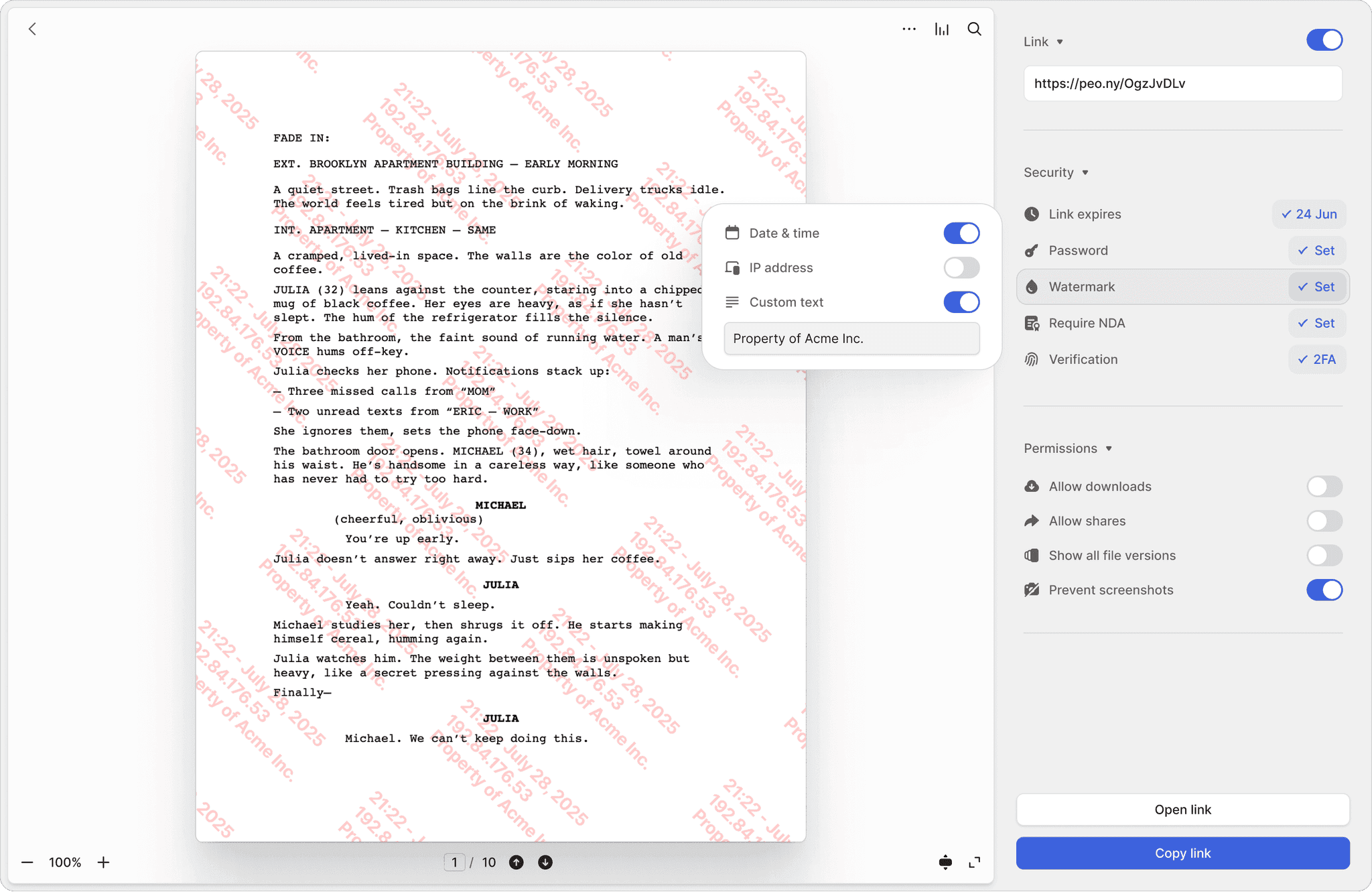
Screenshot protection
Block screen captures of sensitive documents. Papermark has no equivalent — once a document is viewed, it can be screenshotted freely.
Controlled redaction
Permanently black out sensitive information in documents before sharing. Papermark has no redaction tools — you must redact externally before uploading.
Built-in e-signatures
Require investors to sign an NDA before they see a single page. Built-in e-signatures make it seamless — no separate signing tool needed. Papermark has no e-signature functionality.
Let investors ask questions and get instant answers
Peony includes AI document chat starting on the Business plan, AI Rooms with completeness scoring and auto-indexing with OCR on the Data Room plan, and Smart Q&A with a structured 4-step counterparty workflow on the Deal Team plan. Papermark has limited AI that does not cover structured Q&A workflows or data room readiness scoring.
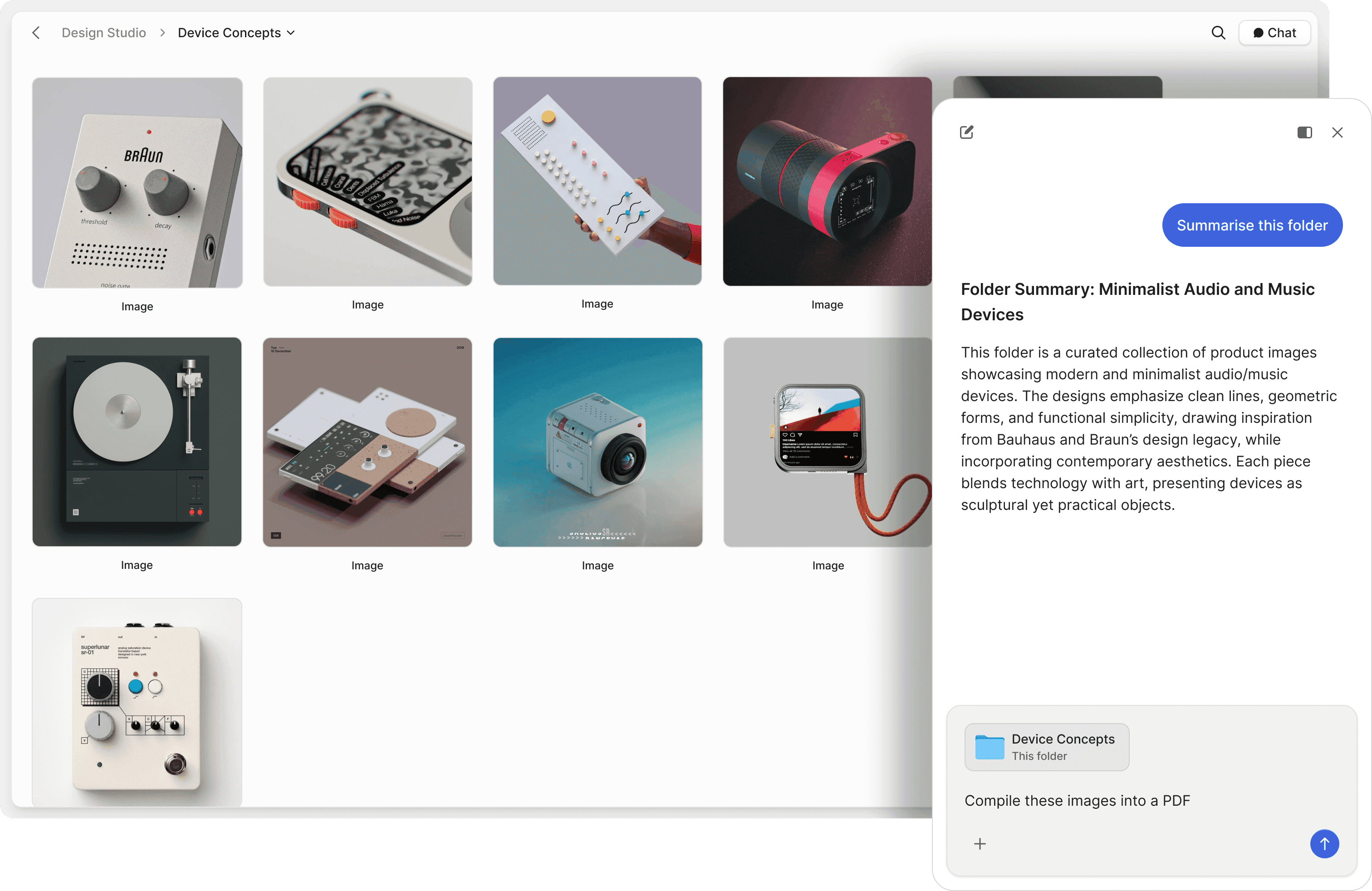
Data rooms at a fraction of the cost
Peony includes fully structured, unlimited data rooms on the Data Room plan ($52/admin/month) with folder organization, granular per-user permissions, and branded viewer experiences. Papermark charges $170 per month for their Data Room plan. Peony Data Room at $52 per admin per month gives you full data room functionality at a fraction of the price.
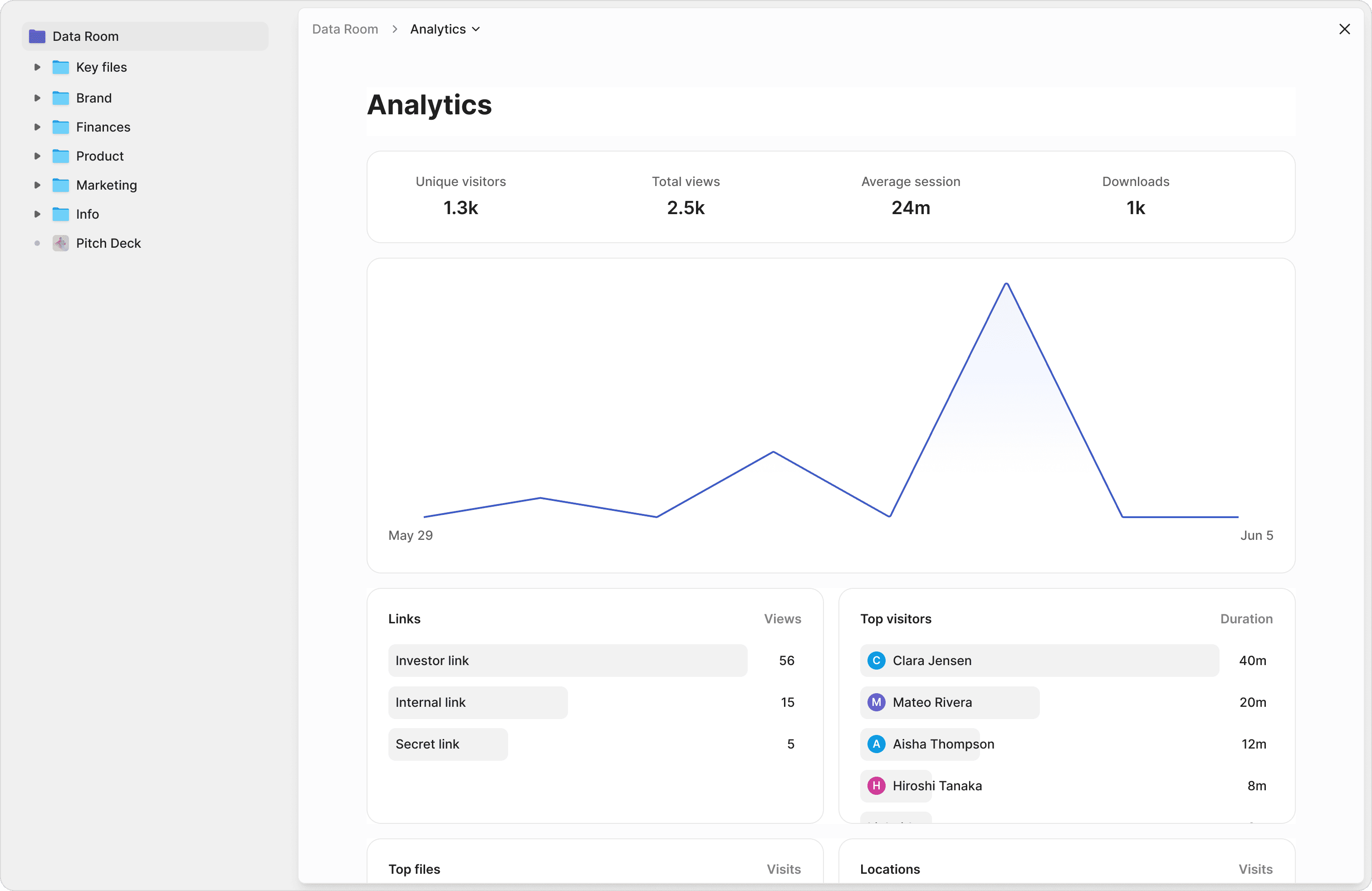
Real teams. Real switches from Papermark
A technical founder and a non-technical operations team — both started on Papermark for the open-source appeal, then switched to Peony when the day-to-day team-adoption tradeoff became clear.
"We are switching from Papermark to Peony. We compared other providers like DocSend, but Peony is the most feature-complete, most intuitive in terms of UX, and most affordable. It has the strongest AI features, is the most transparent, and has the best customer support out of every single one."
Oliver
Founder, Caselock.ai
"For our team, ease of use was the deciding factor. They aren't the most tech-forward, but Peony's UI was the most comprehensive and intuitive we evaluated — no one has had issues setting up a room or checking the analytics. We started on Papermark, but the feedback was that it felt like building a website, with pop-ups and integration prompts that threw people off when all they wanted to do was upload docs. Between a team that was happier to use it and better pricing, switching is the easy call."
David Westrop
Logistics Plus Inc
Frequently asked questions
I'm a first-time founder about to share my deck with 30 investors — why would I choose Peony over Papermark?
Founders choose Peony when they need more than an open-source document link. Peony gives you enterprise-grade security, AI-powered document intelligence, and a polished experience investors trust — from seed decks to full Series A data rooms. Oliver, Founder of Caselock.ai, switched from Papermark to Peony and described it as the most feature-complete, most intuitive in terms of UX, and most affordable option after comparing providers including DocSend. Peony includes screenshot protection, dynamic watermarks (Data Room plan), NDA gating with built-in e-signatures, controlled redaction, AI document chat, Smart Q&A, AI Rooms, and auto-indexing — with per-page analytics on every plan and advanced features on Business and Data Room.
We're a 2-person team raising a $1.5M pre-seed round — how does Peony compare to Papermark for sharing materials with investors?
Peony offers everything Papermark does — document sharing, page-by-page analytics, and custom branding — plus the features investors expect when you move past a seed deck: full data rooms, screenshot protection, dynamic watermarks, NDA gating with built-in e-signatures, controlled redaction, and four AI features (AI document chat, Smart Q&A, AI Rooms with completeness scoring, and auto-indexing with OCR). Papermark is an open-source tool designed for basic pitch deck sharing. Peony is a complete data room platform built for fundraising and due diligence with enterprise-grade security including AES-256 encryption, TLS 1.3, and SOC 2 Type II-ready infrastructure plus GDPR, CCPA, and HIPAA compliance. Screenshot protection, AI document chat, and NDA gating start on the Business plan, and dynamic watermarks plus unlimited data rooms with advanced NDA workflows are on the Data Room plan.
Our deck includes 3-year revenue projections we can't afford to leak — does Peony give us better security than Papermark?
Yes — and security is where the gap matters most for founders sharing cap tables and financial models with investors. Peony includes screenshot protection that blocks screen captures, dynamic watermarks stamped with each viewer's identity and timestamp, NDA gating with built-in e-signatures, controlled redaction for permanently blacking out sensitive sections, two-factor authentication, password protection, link expiry, and revoke access — all backed by AES-256 encryption at rest, TLS 1.3 in transit, and SOC 2-ready, GDPR, CCPA, and HIPAA compliance. Papermark offers basic watermarking and NDA agreements, but its screenshot protection is limited and unreliable on mobile, and it lacks controlled redaction. Oliver from Caselock.ai specifically cited better security as a reason for switching from Papermark to Peony.
We're bootstrapped with a $50/month tool budget — how does Peony pricing compare to Papermark for our fundraise?
Peony's pricing is predictable so founders can budget it into their fundraise without surprises. Every plan includes per-page analytics and unlimited links. Business ($30/admin/month, billed annually) adds e-signatures, screenshot protection, AI document chat, a Simple NDA, and up to 3 data rooms — enough for most seed rounds. Data Room ($52/admin/month, billed annually) adds unlimited data rooms, Advanced NDA with signed PDF and audit trail, custom domain and branding, unlimited storage, dynamic watermarks, and granular permissions — everything a Series A data room needs. Papermark's free plan is limited to 1 user, 50 documents, and 1 GB. Papermark Pro costs $39/month, Business $79/month, and their Data Room plan is $170/month — and you need the Data Room plan for full VDR functionality. Peony Data Room at $52/admin/month delivers more than Papermark's $170 Data Room plan.
We're an operations team, not a tech-forward team — will Peony actually be easier for us than Papermark?
Yes — operations, finance, and legal teams consistently rate Peony's setup as easier than Papermark's. David Westrop at Logistics Plus Inc, a US-headquartered global freight forwarder and third-party logistics provider, switched his team from Papermark to Peony in May 2026. He told us his team isn't the most tech-forward, but Peony's UI was the most comprehensive and intuitive they evaluated — no one has had issues setting up a room or checking the analytics. The feedback on Papermark was that it felt like building a website, with pop-ups and integration prompts that distracted from the core job of uploading documents. Peony's interface stays focused on three actions — upload, share, and track who's reading — with no configuration, no integration setup, and no developer required. Median first-room setup is 4 minutes 19 seconds.
I'm fielding 40+ investor questions while also running the company — does Peony have AI features that help me answer diligence questions faster than Papermark?
Yes — and for a founder fielding investor questions with a two-person team, these save hours every week. AI document chat starts on the Business plan ($30/admin/month) and lets investors ask questions about your financials and get instant, cited answers 24/7. The Data Room plan ($52/admin/month) adds AI room generation that scores your data room completeness and flags missing documents so you are fully prepared before sharing with investors, auto-indexing with automatic document classification, OCR, and full-text search across your entire data room, plus basic Q&A and 5x AI usage. For a structured Smart Q&A workflow where investors submit questions, AI drafts answers from your documents, your team reviews, and approved responses are published, the Deal Team plan ($64/admin/month) adds the Advanced Q&A module.
We started on Papermark for deck sharing but now 5 VCs want a full data room for Series A diligence — is Peony better for that transition?
Absolutely — this is the exact transition Peony is built for. When a seed-stage founder graduates to a Series A process, investors expect a structured data room, not a collection of document links. Peony provides full, unlimited data rooms on the Data Room plan ($52/admin/month) with folder organization, granular per-investor access controls, Advanced NDA with signed PDF and audit trail, AI document chat, and auto-indexing with OCR and full-text search — and the Deal Team plan ($64/admin/month) adds Advanced Redaction and the Advanced Q&A module for the most demanding processes. Papermark requires their $170/month Data Room plan for VDR functionality, and even then its screenshot protection is limited and unreliable on mobile, and it lacks controlled redaction and Smart Q&A workflows. You can set up a branded Peony data room in under 5 minutes with no sales call required.
Our startup outgrew Papermark after our seed round — 3 VCs asked for NDA-gated data rooms with audit trails. Why do teams make this switch?
Founders start with Papermark for a quick pitch deck link and switch to Peony the moment their fundraise gets serious. Oliver, Founder of Caselock.ai, said after comparing Papermark, DocSend, and other providers: Peony is the most feature-complete, most intuitive in terms of UX, and most affordable — with the strongest AI features, most transparent pricing, and best customer support. Common triggers for switching include needing screenshot protection for investor materials, built-in e-signatures for NDA workflows, controlled redaction for sensitive financials, enterprise compliance (SOC 2-ready, GDPR, CCPA, and HIPAA), and AI-powered Q&A workflows that Papermark does not offer.
I sent my deck to 25 investors last week and need to know who's serious — does Peony give me better engagement analytics than Papermark?
Yes. Both platforms offer page-by-page analytics, but Peony provides the depth founders need to prioritize investor follow-ups: scroll depth per page, total viewing time, and real-time notifications the moment a VC opens your deck or data room — with no per-viewer tracking limits on any plan. If a target investor just spent three minutes on your financials slide, you know to call them first. Combined with AI document chat that shows which questions investors are asking, Peony gives you a more complete picture of which investors are genuinely engaged with your fundraise.
We're raising a $5M Series A and pitching 40 VCs — is Peony better than Papermark at this stage?
Yes. Peony is purpose-built for the full fundraising arc — from sharing a seed deck with angel investors to running a structured Series A data room with multiple VC firms. Per-page analytics are available on every plan; e-signatures, AI document chat, screenshot protection, and NDA gating start on Business; and unlimited data rooms, dynamic watermarks, and advanced NDA workflows are on the Data Room plan. Papermark is primarily a pitch deck sharing tool. When founders need granular per-investor permissions, built-in e-signatures, controlled redaction for sensitive financials, and Smart Q&A so investors get instant answers to diligence questions, Peony is the platform they move to. Peony is used by YC companies, M&A advisors, and PE firms for fundraising and due diligence.
My YC batchmate recommended Peony over Papermark for our fundraise — do other founders and VCs actually prefer it?
Yes. Founders consistently recommend Peony as the best Papermark alternative once their fundraise requires enterprise-grade document sharing. Oliver, Founder of Caselock.ai, compared Papermark, DocSend, and other providers before choosing Peony — calling it the most feature-complete, most intuitive, and most affordable option with the strongest AI features and best customer support. Peony is also widely cited as the best DocSend alternative, making it the go-to upgrade for startup teams outgrowing both open-source and basic document sharing tools.
Is Papermark slow with large files, and does Peony load big decks and financial models faster?
Slow loading of large documents — big PDFs, financial models, scanned diligence sets, and especially on mobile — is the most common theme in Papermark's public G2 reviews. It is the trade-off of a lightweight rendering pipeline: fine for a 10-slide deck, slower for a 200-page model. Peony renders documents view-only in the browser and is built for fast loading on large sets, with unlimited storage and no per-GB fees on paid plans, so a heavy data room does not crawl in front of investors. If large-file speed is your pain point, test your heaviest file in both — it is the clearest tell of how a tool is architected.
Are Papermark's permissions hard to manage, and does Peony make granular per-investor access easier?
Papermark offers granular file permissions on its Data Rooms tier, but reviewers have flagged file management and permissions as an area they would like clearer, and the per-file model gets fiddly at scale. Peony uses document-level visitor groups: put each investor or bidder in its own group that sees its own slice of the room, issue every recipient their own tracked link, and revoke any single party in one click — no per-file toggling across dozens of counterparties. For a 20- or 40-party process, group-based permissions are far easier to manage than per-file controls, and they make it much harder to accidentally show the wrong party the wrong file.
Does Peony give better notifications and engagement tracking than Papermark?
Notification display and detail is one of the recurring themes in Papermark's G2 reviews. Peony sends a real-time email the moment a viewer enters your room or opens a link, shows which pages each named investor read and for how long, notifies you when a counterparty uploads a document, and lets you notify counterparties when you add or change files — all in one streamlined action. In a live raise, that two-way, page-level visibility is the difference between knowing a document was opened and knowing exactly which investor is engaged and ready for a follow-up.
Can Peony connect to my CRM and AI tools the way I'd want a data room to?
Yes — and without making the core experience complicated. Standing up a Peony room and sharing it needs no integration setup and no developer, so the day-to-day stays simple. But when you want to connect, Peony's Enterprise tier adds CRM integrations so deal activity and NDA signatures flow into Salesforce or HubSpot, AI integrations with tools like Claude and GPT for document intelligence on top of your room, and a REST API plus webhooks to wire your data room into the rest of your stack. Simple by default, programmable on Enterprise — that combination gives a growing team far more room to scale than a lighter document-sharing tool.