
Same security. Better AI.A fraction of the cost
CapLinked charges $399/month for a data room with no AI features and document-level tracking only. Peony gives you AI-powered Q&A, page-by-page analytics, screenshot protection, and built-in e-signatures — with 5-minute self-serve setup.Set up in under 5 minutes. No sales calls required.
No credit card required

Side-by-side comparison
CapLinked is a virtual data room built for private capital markets since 2010. Peony is a modern data room with AI, page-level analytics, and security features that CapLinked does not offer.
 Peony
PeonyWhy teams switch from CapLinked to Peony
CapLinked is a capable VDR for private capital transactions. But advisory teams evaluating modern platforms find Peony delivers more features at a lower cost — with a modern interface built for how deals move today.
Over 60% lower cost for small teams
A 3-person advisory team pays $156/month on Peony Data Room versus $399/month on CapLinked — saving $2,916/year while getting AI features CapLinked does not offer.
AI document intelligence
CapLinked has no AI capabilities. Peony includes AI document chat, auto-indexing, Smart Q&A, and AI-generated folder structures — so deal teams spend less time on manual work.
Page-level analytics
CapLinked tracks which documents were opened and downloaded. Peony tracks every page view, time spent per page, scroll depth, and visitor device — so you know which sections of your CIM or financials buyers care about most.
Modern interface
CapLinked was built in 2010 and reviewers note its interface feels dated. Peony was designed in 2025 with drag-and-drop uploads, rich-text narrative sections alongside documents, and AI-generated data room structures.
Pricing comparison
Peony gives you a full-featured data room with AI, analytics, and advanced security — at a fraction of what CapLinked charges.

Peony
Free
$0
For evaluation
Business
$30/admin/mo
Data rooms, e-signatures, AI Q&A
Data Room
$52/admin/mo
Unlimited storage
Analytics on all plans. Data rooms, e-signatures, AI Q&A, and advanced security on Business. Data Room adds unlimited rooms and storage.
CapLinked
Team
$399/month
Flat-rate, no per-user fees
Enterprise
$5,000/year
SSO, IP whitelisting, dedicated manager
Free trial
14 days
5 GB, 1 workspace, 10 admins
No AI features. No page-level analytics. No built-in e-signatures. No screenshot protection.
When to use each platform
CapLinked is built for private capital markets and M&A with strong compliance certifications. Peony is the better choice when you need modern AI, granular analytics, and lower cost for small teams.
Choose CapLinked when you need
Post-download DRM to revoke access to files already on someone's device (FileProtect)
ISO 27001 and FISMA compliance certifications for government or defense-adjacent deals
Flat-rate pricing preferred over per-admin billing for large teams
An established VDR brand backed by Peter Thiel and Joe Lonsdale since 2010
Choose Peony when you need
AI document chat so bidders and counsel get instant answers from your data room
Page-by-page analytics to see exactly what investors read and for how long
Screenshot protection, dynamic watermarks, and NDA-gated access on Business
Built-in e-signatures — no third-party tool needed for NDAs and engagement letters
A combined DMS and data room — documents shared internally are the same ones shared externally
Lower cost for teams of 3-5 admins versus CapLinked's flat $399/month
What Peony gives you that CapLinked does not
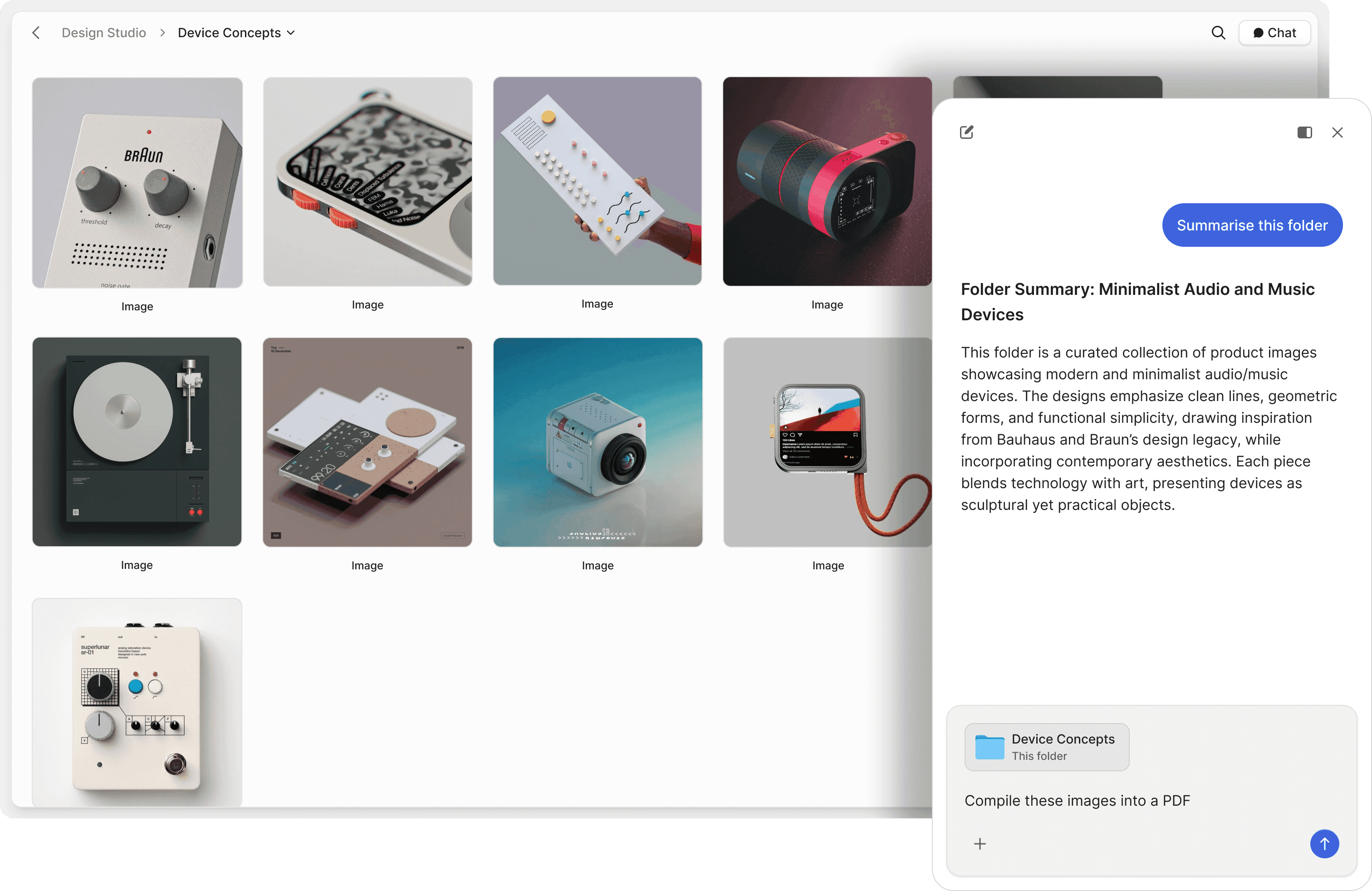
Let investors ask your documents questions directly
CapLinked is a static file repository — investors download and read on their own. Peony includes AI document chat that lets recipients ask questions and get instant answers from your documents, 24/7. Advisory firms managing information-heavy engagements across valuations, investment banking, and principal investments save hours of manual Q&A routing.
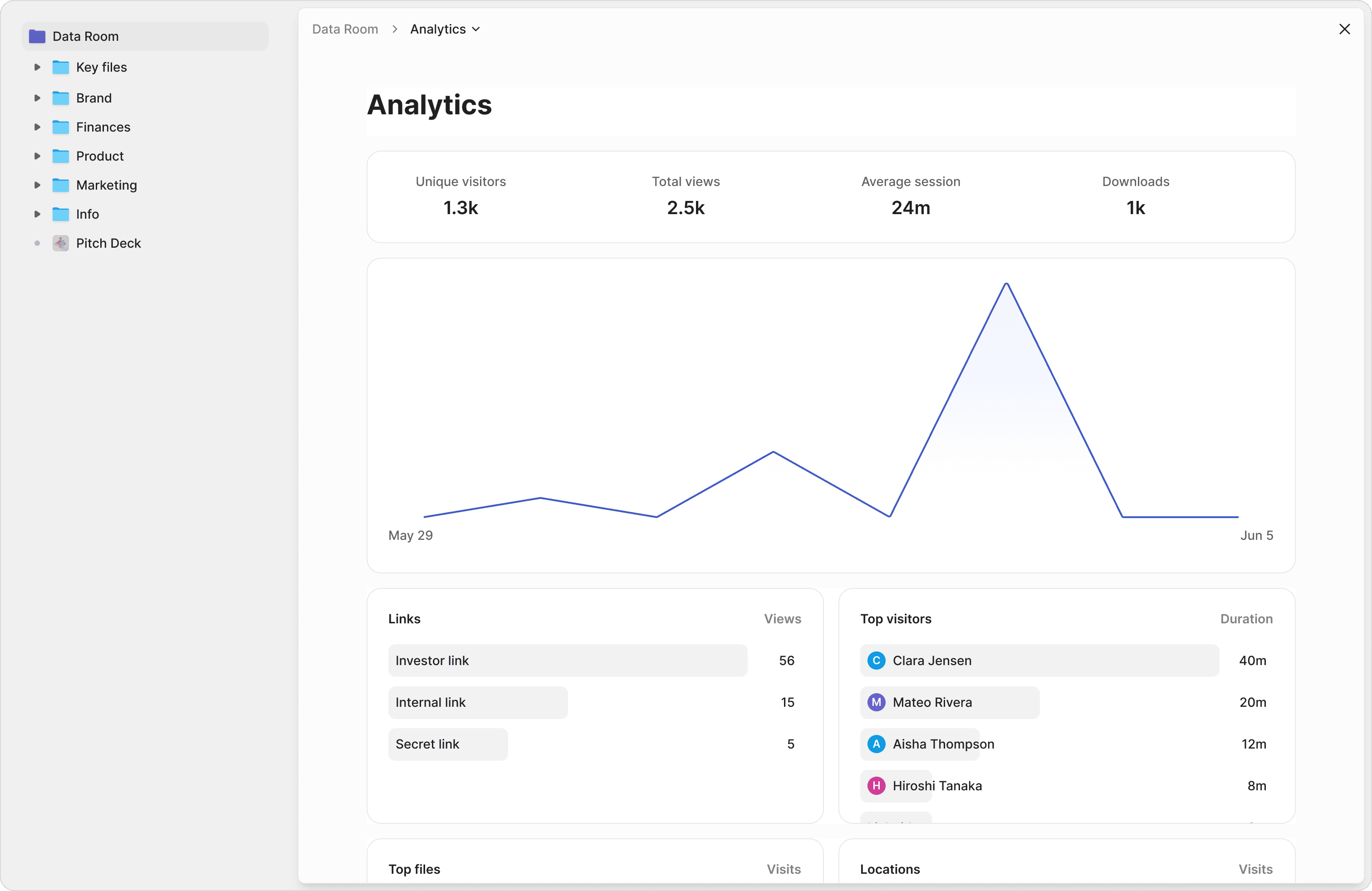
Know exactly what investors read and for how long
CapLinked shows document-level activity — who opened a file, who downloaded it. Peony tracks every page view, time spent per page, scroll depth, and visitor detail. See which sections of your CIM, financials, or legal exhibits counterparties focused on — so you can tailor follow-up conversations.
Security that goes beyond access controls
CapLinked offers solid security with SOC 2 Type II, ISO 27001, and its FileProtect DRM. Peony matches the encryption and compliance standards and adds screenshot protection, NDA-gated access with built-in e-signatures, and dynamic watermarks — all on the Business plan at $30/admin/month.
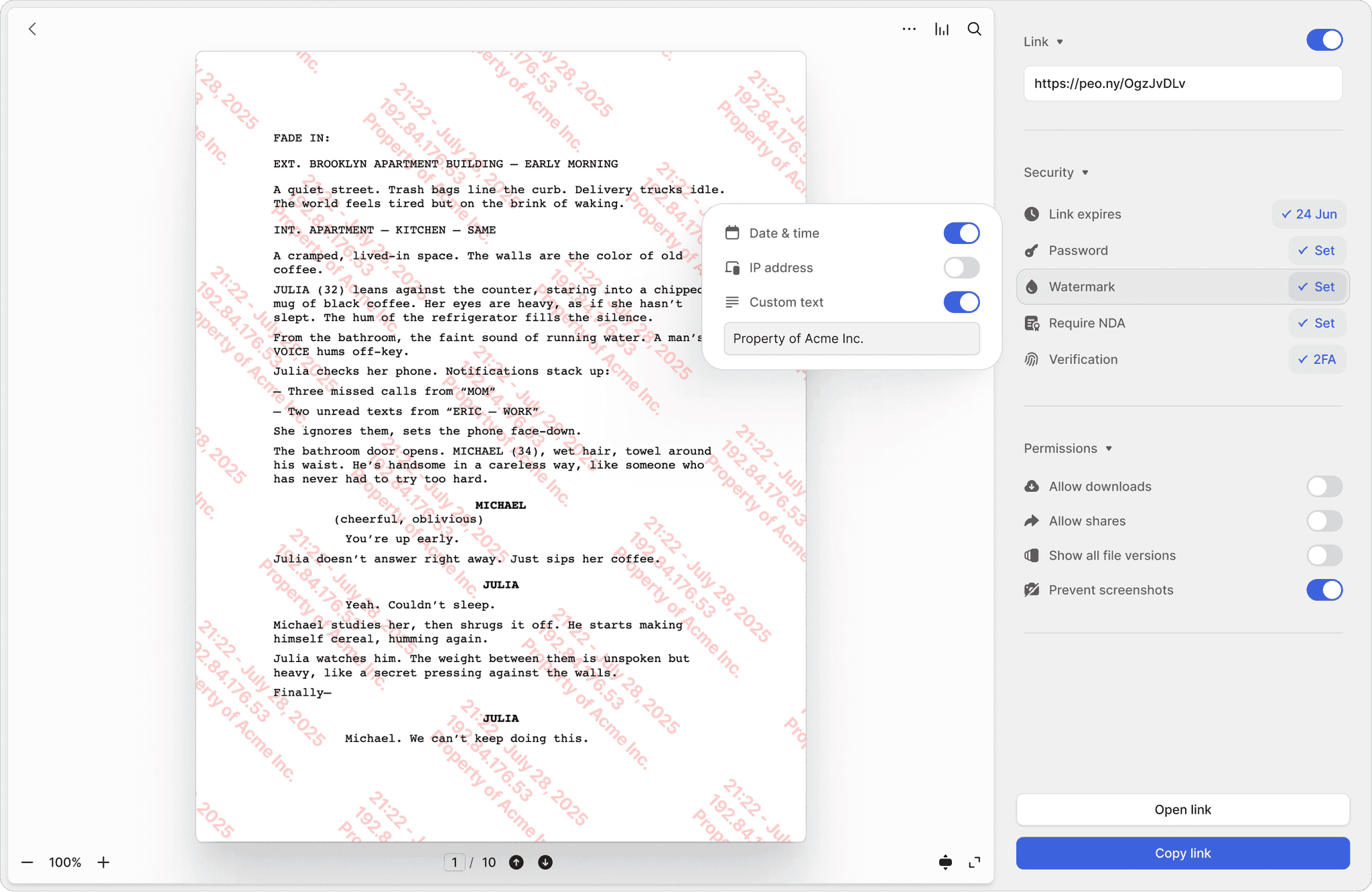
Screenshot protection
Block screen captures of sensitive deal documents on Business. CapLinked does not list screenshot protection as a confirmed feature on its product pages.
Dynamic watermarks
Every page stamped with the viewer's identity and timestamp. Both Peony and CapLinked offer dynamic watermarks — Peony includes them on the Business plan, CapLinked on all paid plans.
NDA-gated access
Require viewers to sign an NDA before accessing documents. Built-in e-signatures make it seamless. CapLinked does not offer built-in e-signatures or NDA gating.
"I really like this UI a heck of a lot better than the other VDRs out there. It's just better designed."
Nathan E.
Managing Partner, Mid-Market Advisory Firm
Frequently asked questions
We're a mid-market advisory firm running 3-5 simultaneous buy-side engagements — how does Peony compare to CapLinked for managing multiple data rooms?
Peony does not charge per data room — you pay per admin ($52/admin/month on the Data Room plan) and create as many data rooms as you need. CapLinked also offers unlimited workspaces, but starts at $399/month flat. For a 2-3 person advisory team running 3-5 concurrent deals, Peony Data Room costs $104-$156/month versus CapLinked's $399/month. Both platforms offer granular folder-level permissions and audit trails, but Peony adds AI document chat so bidders and counsel get instant answers from your data room, page-by-page analytics showing exactly which pages each counterparty reviewed, and built-in e-signatures for NDAs and engagement letters.
I'm at a FINRA-regulated wealth management firm and we handle sensitive client documents under NDAs with significant damages clauses — does Peony match CapLinked's security?
Yes. Peony includes AES-256 encryption at rest, TLS 1.3 in transit, two-factor authentication, and link expiry on SOC 2 Type II-ready infrastructure with GDPR, CCPA, and HIPAA compliance. The Business plan ($30/admin/month) adds screenshot protection and NDA-gated access — meaning counterparties must sign your NDA before seeing a single page — while dynamic watermarks stamped with the viewer's identity come on the Data Room plan ($52/admin/month). CapLinked offers SOC 2 Type II, ISO 27001, and its FileProtect DRM for post-download revocation. Both platforms provide the security a regulated firm needs, but Peony's NDA gating and screenshot protection are included on the Business plan, while CapLinked gates advanced security features to its $5,000/year Enterprise tier.
Our 4-person deal team fields 40+ diligence questions per week across two $30M sell-side mandates — does Peony have AI features that CapLinked lacks?
Yes. CapLinked has no AI features. Peony Business ($30/admin/month) includes AI document chat that lets bidders and opposing counsel ask questions about your data room and get instant, sourced answers 24/7 — reducing the repetitive Q&A that slows down your sell-side process. The Data Room plan ($52/admin/month) adds AI room generation and auto-indexing that files uploaded documents into the correct folders, extracts key terms from contracts, and powers basic Q&A; the full Smart Q&A module for structured diligence workflows is on the Deal Team plan ($64/admin/month, minimum 4 admins). For your team managing two concurrent $30M mandates with 40+ questions per week, AI document intelligence eliminates hours of manual question routing that you would otherwise handle over email.
We've looked at CapLinked, Ideals, and Intralinks and the interfaces all feel antiquated — is Peony actually more modern?
Yes. Peony was designed in 2025 as a modern web application — not a legacy platform with incremental UI updates. The interface supports drag-and-drop uploads across 100+ file types, AI-generated folder structures that build a buy-side or sell-side data room in under two minutes, rich-text sections alongside documents so you can build a narrative for investors instead of just a wall of files, and real-time page-level analytics. CapLinked was founded in 2010 and reviewers consistently note its interface feels dated compared to newer platforms. Peony's median setup time is 4 minutes 19 seconds from account creation to first document shared.
We need our data room to eventually integrate with our CRM and email workflows — can Peony do that where CapLinked cannot?
Both platforms offer API access, but the scope differs. CapLinked provides a Data Protection API and custom integrations on its Enterprise tier ($5,000/year). Peony offers API access on its Deal Team plan ($64/admin/month, minimum 4 admins), with deeper custom integrations on Enterprise, for connecting to CRM systems, email platforms, and internal workflows. For firms that need email-to-data-room document ingestion or CRM-linked deal records, both platforms require custom work — but Peony's architecture as a combined document management system and data room means documents uploaded for internal collaboration are the same documents shared externally in data rooms, eliminating the cloud-to-cloud transfer friction that plagues separate DMS and VDR setups.
CapLinked's Team plan is $399/month — what does that get me versus Peony's Data Room plan at $52/admin/month?
CapLinked's $399/month Team plan includes unlimited guest users, flexible storage, Q&A workflows, dynamic watermarks, and document-level activity tracking. Peony's Data Room plan at $52/admin/month includes unlimited data rooms, unlimited storage, AI document chat, AI auto-indexing, page-by-page analytics (not just document-level), screenshot protection, dynamic watermarks, NDA-gated access, and built-in e-signatures. For a 3-person advisory team, Peony Data Room costs $156/month — saving $243/month versus CapLinked while adding AI features, page-level analytics, screenshot protection, and e-signatures that CapLinked does not offer at any tier. If your team needs only up to three data rooms per admin, the Business plan at $30/admin/month is even cheaper.
We're a biotech startup sharing pre-IND regulatory filings and CMC data with potential partners — is Peony secure enough to replace CapLinked for life sciences deals?
Yes. Peony runs on SOC 2 Type II-ready, HIPAA-compliant infrastructure with AES-256 encryption at rest and TLS 1.3 in transit — the same encryption standard CapLinked uses. For life sciences teams sharing IND filings, CMC packages, or clinical trial data with licensing partners, Peony Business ($30/admin/month) adds screenshot protection so recipients cannot capture images of proprietary formulation data and NDA-gated access requiring each partner to e-sign your confidentiality agreement before viewing a single page; the Data Room plan ($52/admin/month) adds dynamic watermarks stamped with the viewer's identity for leak tracing. CapLinked offers SOC 2 Type II and ISO 27001 certifications with its FileProtect DRM for post-download revocation — a feature Peony does not offer. If your compliance team specifically requires ISO 27001 certification or post-download DRM, CapLinked may be the better fit. For everything else — AI-powered document search across regulatory filings, page-level analytics showing which sections of your CMC package a partner studied, and built-in e-signatures — Peony delivers more at a lower cost.
I'm a real estate developer sharing offering memoranda and LP agreements with 20+ potential investors per deal — how does Peony handle that versus CapLinked?
Peony is built for exactly this workflow. On the Data Room plan ($52/admin/month), you create a data room, upload your offering memorandum, LP agreement, and financial projections, then invite investors via email access with group-level permissions — one group for equity investors, another for lenders, each seeing only the documents relevant to them. Peony's NDA gating requires each investor to e-sign your confidentiality agreement before accessing any materials, and page-by-page analytics show you which investors read the full OM versus which stopped at the summary page — so you know who is serious before your next follow-up call. CapLinked handles the same workflow with its EZ Q&A and granular permissions, but charges $399/month and lacks page-level engagement data and built-in e-signatures. For a solo GP or small development shop running 2-3 concurrent offerings, Peony Data Room at $52/month versus CapLinked at $399/month is a meaningful difference.
We're raising a Series A and our lead investor wants us in a 'real' data room, not Google Drive — is Peony taken seriously by institutional investors or should we use CapLinked?
Institutional investors care about three things in a data room: security controls, audit trails, and organized structure. Peony Data Room ($52/admin/month) delivers all three — AES-256 encryption, full visitor audit trails with device and location tracking, AI-generated folder structures that build your investor data room in under two minutes, and AI document chat so investors can self-serve answers instead of emailing your team at 11 PM. For a 3-person founding team raising a $5M-$15M Series A, that is $156/month for a data room with screenshot protection on your cap table, NDA gating on your financial model, and page-level analytics showing which investors actually read your projections versus which skimmed the summary. CapLinked charges $399/month for the same workflow without AI features or page-level tracking. Your investors will see a professional, branded data room with the security controls they expect — and you keep $243/month in runway.
We're midway through a $25M sell-side process and need to add two new bidders while restricting one who dropped out — CapLinked reviewers say you can't edit permissions after setup. Does Peony have the same issue?
No. Peony permissions are fully editable at any time — you can change a viewer's access from view-only to download, add or remove them from permission groups, revoke access to specific folders or documents, and adjust settings after your data room is live. This is a known pain point with CapLinked, where reviewers report that you cannot correct, delete, or change users after adding them. In your scenario — adding two new bidders while cutting off one who dropped out of a $25M process — you need to make those changes instantly without contacting support. Peony lets you create permission groups (e.g., buyers, sellers, legal counsel) and adjust group-level access in one click rather than editing each user individually.