
The wealth management data room for plans, statements and practice sales
Send financial plans and statements on links you can revoke and see which pages each client read, collect tax returns and statements into a secure folder for each household, and run the diligence room when you buy, sell or merge a practice: unlimited household rooms on Data Room.
No credit card · 7-day Data Room trial that never auto-charges · clients view free, no account · 24/7 support
Last updated October 2026
Used by teams at St. James's Place

8,000+ customers in 60+ countries · $44.7B in client assets
Peony staff can't open your documents, your documents aren't used to train AI, and Peony has had no data breach since launch.
What is a wealth management data room, and how does Peony run one?
Peony is a virtual data room that wealth managers, RIAs and financial advisors use to send plans and statements on revocable, tracked links, collect client documents by household, and run practice-sale diligence.
A wealth management data room is a secure online space where an advisory firm shares and collects client documents with verified access, page-level read tracking and revocation, and runs diligence when a practice changes hands. It typically holds financial plans, performance reports, tax returns, estate documents, proposals and fund offering documents.
On Peony, a firm serving many households runs on Data Room: $52 per admin per month billed yearly ($75 monthly), with unlimited household rooms and client upload folders, and clients, their CPAs and attorneys view free with no account.
- Send plans and reports you can take back: each client opens the financial plan, quarterly report or review pack after an emailed one-time code, you see which pages they read, and you can switch the link off or let it expire.
- Collect documents by household: each household gets its own room, or its own group and upload folder, and clients add tax returns, statements and estate documents with no account.
- Run the practice-sale room: one group per bidder behind a signed NDA, per-bidder watermarks and analytics, and Q&A in the room when you sell, buy or merge an RIA.
Peony at a glance
- Built for
- Wealth managers, RIAs, financial planners and private client teams sharing with client households, their CPAs and estate attorneys, prospects, and buyers when the firm sells or acquires a practice.
- Typical plan
- Data Room, $52 per admin per month billed yearly ($75 monthly): unlimited rooms, documents and storage, a group with its own folder permissions for each household, client upload folders, dynamic watermarks with an optional footer line, Screenshield, a custom domain, the per-client audit trail and Visitor Q&A.
- Pricing
- Business $30, Data Room $52 and Deal Team $64 (minimum 4 admins) per admin per month billed yearly ($44, $75 and $89 monthly); Enterprise is custom. Free ($0) covers 50 documents and 500 MB as tracked single-file links; data rooms start on Business.
- Clients
- Clients are unlimited and free on every plan and don't need a Peony account. You pay per admin, not per viewer.
- Rooms and storage
- Unlimited data rooms, documents and storage on Data Room and above, with no per-file size cap. Business includes 3 data rooms per admin, 1,000 documents per admin and 100 GB of storage, with files up to 5 GB each.
- Per household
- One room per household, or one room with a group per household and its own folder permissions (Data Room). A tracked single-file link for one report works on every plan.
- Client uploads
- Grant Upload on a household's folder and clients add files with no account; each upload is attributed to the link and viewer (Data Room). Anyone who can upload to a folder can also open it, so each household gets its own folder or room.
- Branding
- Your logo, cover image, brand card and theme (Business); your own subdomain, such as clients.yourfirm.com (Data Room); a domain and branding per room and a custom invite email (Deal Team).
- Activity records
- Page-level views on every plan; CSV export of views, sessions and downloads (Business); a per-client audit trail (Data Room). Logs are kept 2 years on Data Room and with no time limit on Deal Team and Enterprise.
- RIA sale or succession
- One room per process and one group per bidder, with a signed NDA, per-bidder watermarks and analytics, and Visitor Q&A (Data Room); redaction boxes on PDFs and Advanced Q&A routing (Deal Team). Duplicate a data room copies its files and folders into a copy you convert to a data room from its menu; groups, links and analytics start clean.
- Live HTML
- Peony renders .html files live with JavaScript running, so a Claude or ChatGPT artifact (a model, dashboard or calculator) stays interactive for the viewer, behind your NDA gate, permissions and analytics. The dynamic watermark applies to documents, so pair a live projection with screenshot protection and an acknowledgment gate.
- Works alongside
- Your CRM, planning software, portfolio-reporting portal and books-and-records archive stay the systems of record; Peony is the controlled sharing layer for the documents that leave them. Match Peony's CSV export to your CRM by email.
- Hosting
- AWS US (us-east-1); EU-region hosting on Enterprise. GDPR-aligned, with a standard DPA and SCCs on request on Deal Team and Enterprise.
- Security
- AES-256 at rest, TLS 1.2+ in transit. Peony staff can't open your documents, your documents aren't used to train AI, and Peony has had no data breach since launch. Peony's incident-response policy commits to telling affected customers within 72 hours of confirming an incident that affects customer data. SOC 2 Type II-ready and ISO 27001-ready, with both audits underway. Compliance and certifications
- Setup
- Median 4 min 19 s from sign-up to first uploaded document (State of M&A Data Rooms, Q2 2026 edition).
- Trial
- 7-day Data Room trial you start yourself: no credit card, and it never auto-charges. Rooms, files, links, analytics and NDA settings carry over when you upgrade. AI features switch on after you upgrade.
- Support
- 24/7 support, handled directly by the Peony team across Europe, US and Asia hours, with no outsourced tier. Everyone you speak to on Peony support has M&A experience at elite boutiques or bulge-bracket banks, VC experience, or has raised $1M+ themselves.
- Customers
- 8,000+ customers in 60+ countries, with $44.7B in client assets.
Which wealth management teams use a data room, and for what?
Independent RIAs, planning firms, alternatives desks and practice acquirers can use a Peony data room to send plans and reports out, collect tax returns and statements in, and run diligence when a practice changes hands.
Independent RIAs, multi-family offices and planning firms
One room per household for the financial plan, quarterly reports and review packs, with an upload folder for tax returns and statements. Data Room ($52/admin/mo billed yearly) covers unlimited households.
UK wealth managers and financial planners
Suitability reports, annual review packs and fact-finds sent as tracked links, with a page-by-page record of what each client opened and a watermark footer line for your regulatory text (Data Room).
Solo planners
Business ($30/admin/mo billed yearly): an email-verified, tracked link for each client report, 3 data rooms per admin, and unlimited e-signatures for engagement letters.
Alternatives and private-markets desks
PPMs, subscription documents and quarterly letters behind an NDA gate, with each client's name watermarked on every page (Data Room). Issuers running the offering itself: see Peony for private placements.
RIA acquirers and consolidators
A room per target: the seller uploads Form ADV, agreements and financials into its own folder, and your team and counsel review them in one place (Data Room).
Single-family offices
Managing one family's own entities, trusts and branches rather than many client households? See Peony for family offices.
What is the safest way for a financial advisor to send documents to clients?
The safest way for a financial advisor to send client documents is a link that verifies the client's email, can be revoked and shows what was opened; Peony links do all three (Business and up).
An email attachment can't be recalled once sent, and email is a common way client money and data go wrong. The FBI's Internet Crime Complaint Center recorded $3.05 billion in business email compromise losses in 2025 across 24,768 complaints, and victims aged 60 and over reported $568 million of it. Misdelivery is the other failure: Verizon's 2025 Data Breach Investigations Report found it made up 72% of the actions in breaches involving internal end users, and in a Peony analysis of ICO data, "data emailed to incorrect recipient" was the breach type UK finance firms reported most in 2025 (200 of 1,069 reports, 18.7%).
| Method | Only the right person opens it | Can be revoked after sending | Shows what was read | Controls downloads | Reaches people without a portal login |
|---|---|---|---|---|---|
| Email attachment | No: anyone the email reaches can open it | No | No | No: the attachment is the download | Yes |
| Password-protected PDF or ZIP | No: anyone with the password can open it | No | No | No | Yes |
| Encrypted email service | Depends on the service | Depends on the service | Depends on the service | Depends on the service | Yes |
| Planning or reporting portal | Yes, for clients with a portal login | Depends on the vendor | Depends on the vendor | Depends on the vendor | Only people you give a portal login |
| Peony tracked link | Yes: an emailed one-time code and an allow list (Business) | Yes: switch it off (Business) or set an expiry (every plan) | Yes: every page, time per page and return visits (every plan) | Downloads off and desktop screenshot protection (Business) | Yes, with no account |
| Peony household room | Yes: only the household's listed emails get in | Yes: switch the household's group off, or set one folder to No access (Data Room) | Yes, plus a per-client audit trail (Data Room) | View or Download per folder, dynamic watermarks and Screenshield (Data Room) | Yes: clients, their CPA and attorney, with no account |
For a plan or statement, send a Peony link with email verification and downloads off, and set an expiry if the document has a shelf life. When the plan changes after the review meeting, Upload new version replaces it in place at the same link and keeps every earlier version in the version menu. The step-by-step version is in our secure client file sharing guide.
Can you share an interactive projection built in Claude?
Yes. Peony renders .html files live with JavaScript running, so a retirement projection or cash-flow model built in Claude or ChatGPT stays interactive for the client, behind your permissions, screenshot protection and analytics. The dynamic watermark applies to documents, so pair a live projection with screenshot protection and an acknowledgment gate. See how to securely share Claude artifacts.
Client portal or data room: which should a wealth manager use for which documents?
Use both: keep your planning or reporting portal as the client's home for accounts and reports, and use Peony for documents that leave it and for people without a portal login.
Planning and reporting platforms such as eMoney, RightCapital and Black Diamond build secure document storage into the client portal, for clients who log in. A firm also shares with people who never get a portal login: prospects reading a proposal, a client's CPA or estate attorney, trustees and adult children, and a buyer's diligence team when the practice is sold. Each household can get its own branded room on your domain; clients open it from their link with an emailed code, with no account or password to manage.
Keep in the planning or reporting portal
- Account aggregation and the client's live plan
- Performance reporting the platform generates
- Documents for clients who already log in there
Send through Peony
- Proposals to prospects, with page-by-page read tracking
- Documents for a client's CPA, estate attorney or trustee
- Review packs you need to know were read
- Onboarding documents collected household by household
- The diligence file when you sell, buy or merge a practice
- Interactive projections built in Claude or ChatGPT
The longer comparison is in data room vs client portal. If you're replacing a general file-sharing portal, our ShareFile alternatives guide compares the options.
How does a wealth manager collect tax returns and statements from each household?
On Peony's Data Room plan, give each household its own room or folder with Upload permission; clients add tax returns and statements from their link with no account, and Peony logs who sent each file.
Each upload is attributed to the link and the viewer who sent it. Upload also lets that household view and download what's in the folder, so give each household its own upload folder or room rather than one shared drop folder. Turn on Hide new content by default and files you add stay hidden from every link until you release them group by group. Pair it with email verification and an allow list so only the household's own addresses get in.
Identity and onboarding
Government ID, signed engagement letter or advisory agreement, account-opening paperwork your custodian requires
Tax
Recent federal and state returns, or the client's self-assessment return in the UK, plus year-end tax forms
Accounts
Brokerage, retirement and bank statements, employer benefit and pension statements
Estate and insurance
Wills, trust documents, powers of attorney, life and disability policies
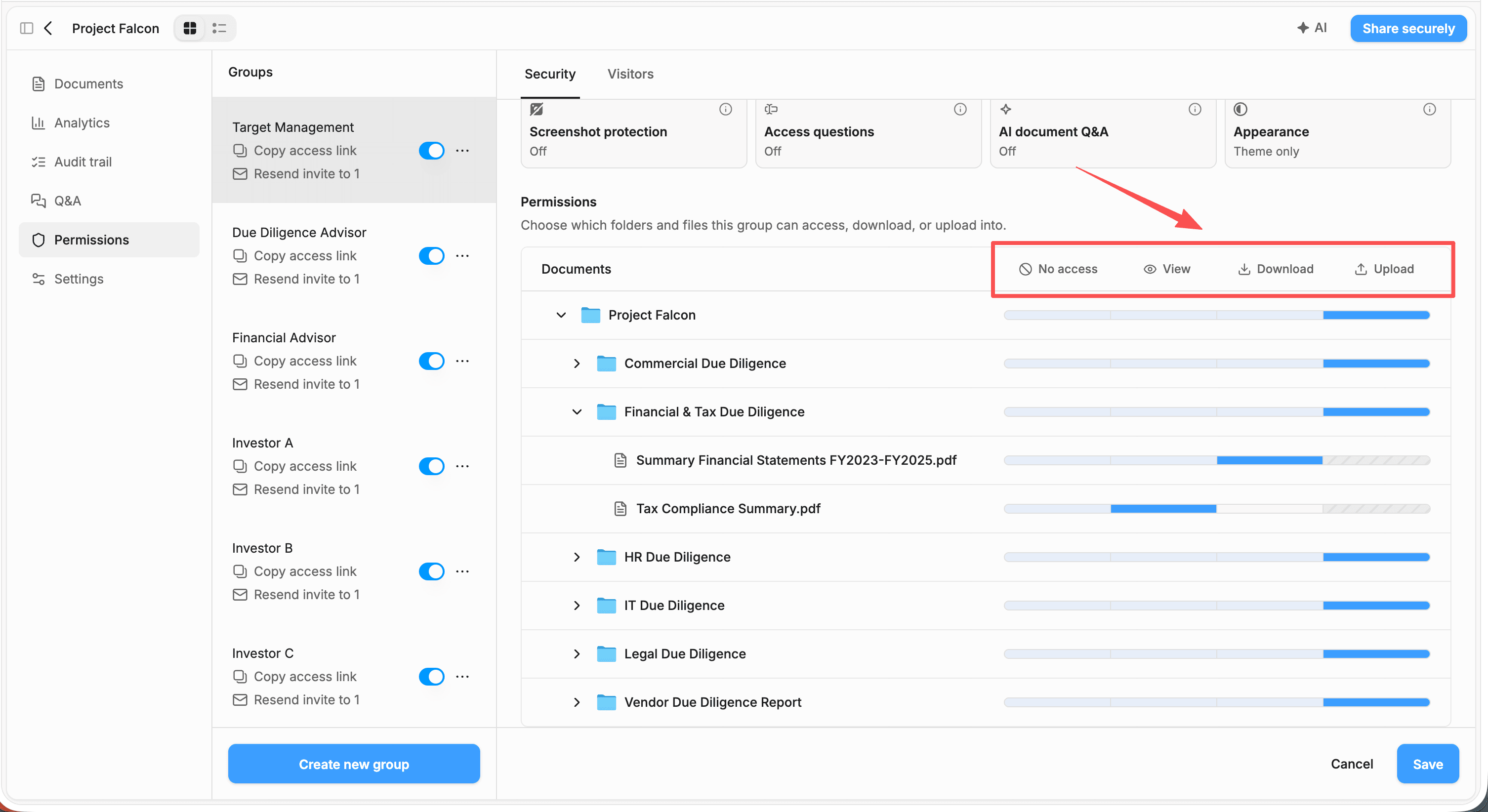
The full workflow, including what to ask for and in what order, is in how to collect documents from clients securely; the product setup is in client document collection.
How can a financial advisor tell whether a prospect read the investment proposal?
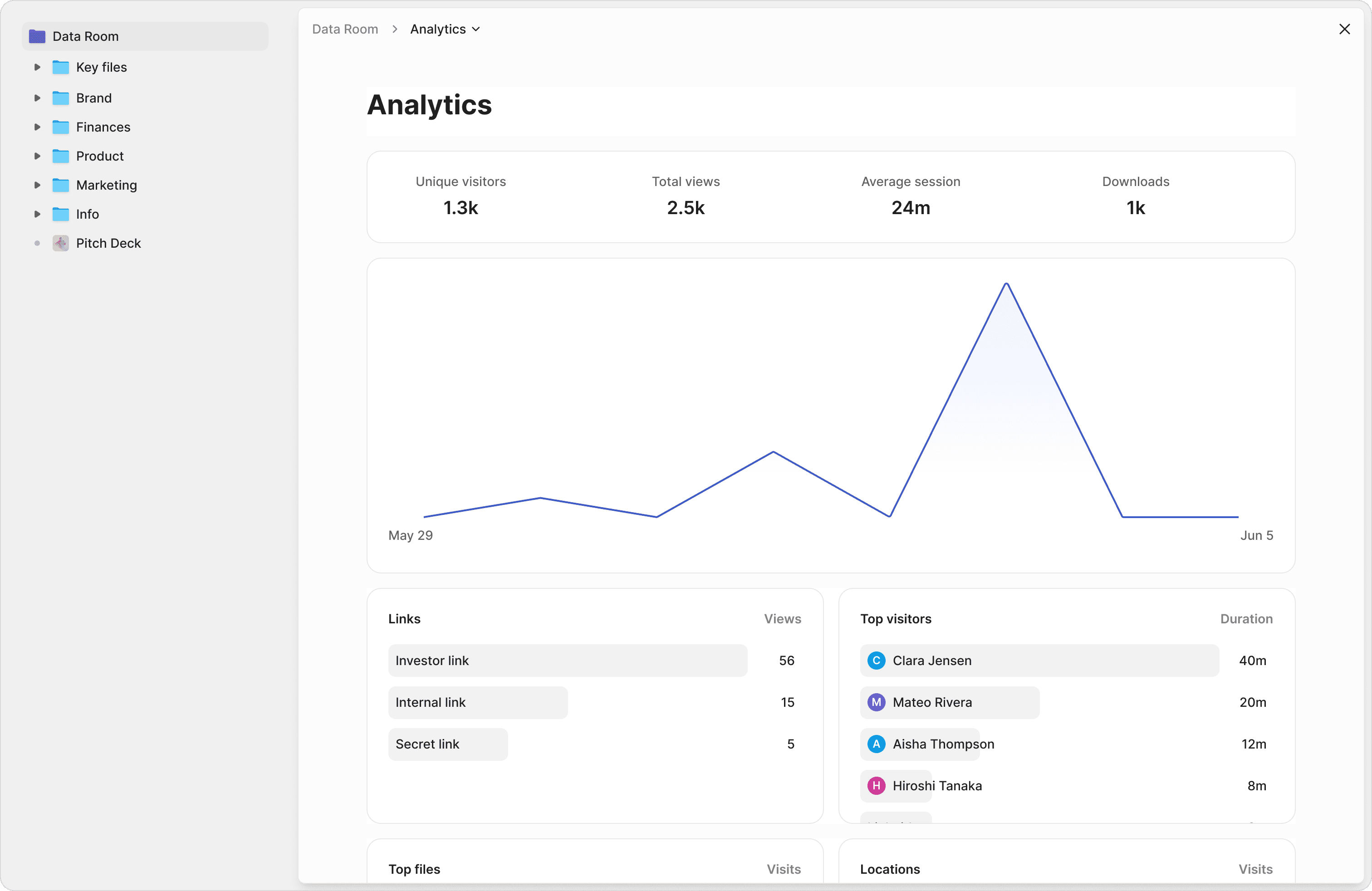
Send the proposal as a Peony link instead of a PDF attachment: Peony shows when the prospect opened it, which pages they read and for how long, and whether they came back.
Peony can email you each time someone opens the link, and names the prospect when the link captures their email. Page-level analytics are on every plan; from Business ($30/admin/mo billed yearly), a drop-off report shows the page where attention fell away, whether that's the fee schedule or the investment policy statement, and a CSV export lets you match views to your CRM by email. With email verification on, anyone the prospect forwards the link to appears under their own verified email. When the prospect says yes, send the advisory agreement for e-signature from the same workspace (unlimited from Business). See page-level analytics. For proposal tracking outside wealth management, see our document tracking software guide.
How do you run a data room when you sell, buy or merge an RIA?
Run one Peony room per process with one group per bidder: each buyer signs the NDA before page one, sees only the folders you release, and leaves a page-by-page record of what they read.
Buyers are active and increasingly institutional. DeVoe & Company counted 77 announced RIA transactions in Q3 2026, down 17% from 93 a year earlier and the end of seven straight record quarters. 244 deals were announced through September, and consolidators announced 129 of those 244 (53%), their highest share since 2021; DeVoe's full-year record is 322, set in 2025. ECHELON Partners counted 120 RIA transactions in Q2 2026, with private equity-backed acquirers completing 75.8% of them, an all-time high, and a median target of $733 million in AUM. The two trackers count differently (ECHELON counted 466 deals in 2025), so compare figures only within one tracker.
What buyers check follows from the contracts. Section 205(a)(2) of the Investment Advisers Act requires advisory contracts to bar assignment without the client's consent, so buyers run a consent process; a July 2026 Kitces.com guest post by Rich Chen of Brightstar Law Group says prices are often cut 2% for each 1% shortfall in consent, that buyers set the revenue base through a quality-of-earnings analysis, and that holdbacks are commonly 5% to 15% of the price. In the UK, the FCA's October 2025 review of consolidation in financial advice and wealth management found some groups' due diligence did not review basic compliance and some appeared "tick box" in nature.
| Situation | Setup in Peony | Plan |
|---|---|---|
| Negotiated sale to one buyer | One room and one buyer group behind a signed NDA, with dynamic watermarks and Visitor Q&A for the buyer's questions. | Data Room |
| A process with several bidders (consolidators, PE-backed buyers, other RIAs) | One room with a group per bidder, each with its own folder permissions and analytics, so each bidder sees only what you release and never sees who else is invited. | Data Room |
| Client names withheld in early rounds | Share AUM and revenue schedules by household number first; before release, black out names on PDFs with redaction boxes and keep the original at No access. | Deal Team (redaction) |
| Buying a practice | Give the seller an upload folder in your room for Form ADV, agreements and financials; your team and counsel review in one place. | Data Room |
| Merging two firms | One room with a folder per firm: each side uploads into its own folder, and both teams read the shared folders. | Data Room |
| Handing households to a successor advisor | Add the successor as an admin on the workspace team that owns those households' rooms; the rooms, links and history stay in place, so clients keep opening the same links. | Data Room |
What goes in an RIA sale data room?
Firm and regulatory
Form ADV Part 1, Part 2A brochure and 2B supplements, Form CRS, exam correspondence, compliance manual, code of ethics
Clients and revenue
AUM and revenue by household (names withheld until late rounds), fee schedules, top-client revenue schedule, account and household counts
Contracts
Advisory agreements and their assignment clauses, custodial and platform agreements, sub-advisory and referral agreements, vendor and technology contracts
Financials
Financial statements for recent years, revenue by source (advisory fees, planning fees, insurance commissions), quality-of-earnings materials, budgets
People
Employment, compensation, non-solicit and non-compete agreements, and adviser registration records
Operations and security
Reg S-P and cybersecurity policies, business continuity plan, vendor due-diligence files, CRM, planning, portfolio and archiving systems
Consent and transition
Client consent letter, consent tracker, client communication and transition plan
Form ADV Part 1, the Part 2A brochure and Form CRS are also public on the SEC's adviser database (IAPD), so buyers often read them before the room opens; the room puts the filed versions next to what isn't public, such as Part 2B supplements, exam correspondence, agreements and revenue by household. For the bankers who run RIA sales, see our financial services M&A advisor guide; for the deal-room mechanics in full, see the M&A data room guide.
How do wealth managers share private fund and alternatives documents with clients?
Put the PPM, subscription documents and quarterly letters in a Peony room behind an acknowledgment or signed NDA, give each client their own group or link, and watermark every page with their name.
The acknowledgment gate (Business) records each client's email, name, timestamp and IP when they accept. On Data Room ($52/admin/mo billed yearly), the signed NDA emails a signed PDF to both sides, access questions record the answers you need before a client enters, and on supported links the watermark footer line can carry your offering legend on every page. Confirming investor eligibility stays with your compliance process. How issuers protect the memorandum itself is in our guide to sharing a private placement memorandum.
What do the 2024 Regulation S-P amendments require of SEC-registered RIAs?
The amended Regulation S-P requires SEC-registered advisers to run incident response programs, oversee service providers, and notify affected individuals within 30 days of becoming aware of actual or likely unauthorized access to sensitive customer information.
- The SEC adopted the amendments on May 16, 2024, for broker-dealers, investment companies, SEC-registered investment advisers and transfer agents; they were published in the Federal Register on June 3, 2024.
- Larger entities, which for advisers means $1.5 billion or more in AUM, had to comply by December 3, 2025; smaller entities by June 3, 2026.
- Notice is due as soon as practicable and no later than 30 days after the firm becomes aware that unauthorized access to or use of customer information has occurred or is reasonably likely to have occurred. It goes to each individual whose sensitive customer information was, or is reasonably likely to have been, accessed or used without authorization, unless a reasonable investigation finds that information is not reasonably likely to be used in a way that would cause substantial harm or inconvenience.
- The firm's written policies must require oversight of service providers through due diligence and monitoring, and must be reasonably designed to ensure each provider notifies the firm as soon as possible, and no later than 72 hours after becoming aware, of a security breach that gives unauthorized access to a customer information system the provider maintains (17 CFR 248.30(a)(5)).
- Rule 204-2(a)(25) requires advisers to keep the safeguarding policies, incident and notification records, and service-provider policies, and Rule 204-2(e)(1) requires keeping them for at least five years from the end of the fiscal year of the last entry, the first two in an appropriate office of the adviser.
- The SEC Division of Examinations' priorities for fiscal 2026 (October 2025 to September 2026) named Regulations S-P and S-ID, including firms' oversight of third-party vendors.
- Email is the precedent: in August 2021 the SEC sanctioned eight firms in the Cetera, Cambridge and KMS groups under Regulation S-P after cloud email account takeovers exposed customers' personal information.
Does Regulation S-P require RIAs to encrypt client documents sent by email?
Regulation S-P doesn't name encryption; it requires written policies and procedures with administrative, technical and physical safeguards reasonably designed to protect customer information from unauthorized access or use (17 CFR 248.30(a)). Encryption is a common technical safeguard: Peony encrypts documents with AES-256 at rest and TLS 1.2 or higher in transit, and a Peony link keeps the document itself out of the email.
Where does Peony fit in a Reg S-P program?
If you put client documents in Peony, Peony is one of the service providers your program oversees. These are the controls you can show in that review; your CCO and counsel decide how they fit your written policies, and your books-and-records archive stays the record.
Know who opened a client document
Email verification with a one-time code and an allow list (Business); Email access groups that invite only the addresses you list.
Give each household only its own files
One group per household with its own folder permissions; a file at No access is absent from that group's view (Data Room).
Keep a record of access
Page-level view logs on every plan and a per-client audit trail on Data Room; logs are kept 1 year on Business, 2 years on Data Room and with no time limit on Deal Team and Enterprise, and you can export the CSV of views, sessions and downloads (Business and up) to your archive to keep a copy as long as your policies require.
Take access back
Link expiry on every plan; switch a link or group off from Business, and access stops on the viewer's next load.
Protect the data itself
AES-256 at rest, TLS 1.2+ in transit. Peony staff can't open, move or edit the documents in your room. Your documents aren't used to train AI: Peony's LLM providers work under data-handling agreements that prohibit training on customer content.
Oversee the vendor
Peony completes your security questionnaire or vendor-risk form and provides a standard DPA with SCCs, on request on Deal Team and Enterprise. Peony's incident-response policy commits to telling affected customers within 72 hours of confirming an incident that affects customer data. SOC 2 Type II-ready and ISO 27001-ready, with both audits underway. Peony has had no data breach since launch.
What do UK rules expect when a wealth manager sends client documents?
UK rules expect firms to keep orderly records of their business (SYSC 9), give clients communications that support informed decisions (Consumer Duty), and protect personal data with measures such as encryption (UK GDPR). SYSC 9.1.1R requires a firm other than a common platform firm to keep orderly records of its business, including all services and transactions; a common platform firm must keep records of all services, activities and transactions under SYSC 9.1.1AR and retain its MiFID-business records for at least five years under SYSC 9.1.2R. Under the Consumer Duty, PRIN 2A.5.3R (in force since July 31, 2023) requires communications that equip retail customers to make effective, timely and properly informed decisions. UK GDPR Article 32 names encryption among the appropriate security measures, and Article 33 requires a controller to notify the UK data protection regulator (ICO) of a personal data breach without undue delay and, where feasible, within 72 hours of becoming aware of it, unless the breach is unlikely to result in a risk to people's rights and freedoms.
Peony records which pages of a suitability report or review pack each client opened, encrypts documents (AES-256 at rest, TLS 1.2+ in transit), and provides a standard DPA with SCCs, on request on Deal Team and Enterprise; your archive stays the record under SYSC 9. Peony hosts on AWS in the US (us-east-1) by default, with EU-region hosting on Enterprise.
How do you set up a wealth management data room in Peony?
Setting up a wealth management data room in Peony takes five steps: pick the plan, build a household template, add your branding, invite each household, then track activity and keep files current.
The median time on Peony from account creation to first uploaded document is 4 min 19 s (State of M&A Data Rooms, Q2 2026 edition).
Pick the plan
Data Room ($52/admin/mo billed yearly) for a firm serving many households: unlimited rooms, client upload folders and a custom domain. Business ($30) for a solo planner sending a tracked link per report.
Build a household template
Folders for the plan and reports, statements, tax, estate documents and a client upload folder. Duplicate a data room copies its files and folders into a copy you convert to a data room from its menu; groups, links and analytics start clean. Or run one room with a group per household, and turn on Hide new content by default.
Add your branding
Your logo, cover image and a brand card with a button such as Book a review (Business); serve rooms from your own subdomain, such as clients.yourfirm.com (Data Room).
Invite each household
List each household member's email in the group, and Peony emails them an invitation; everyone not listed is blocked. Clients open it in the browser with an emailed one-time code and no account.
Track and maintain
Page-level analytics and an email on every open; Upload new version keeps the updated plan at the same link; expiry and revocation when a relationship ends. Logs are kept 2 years on Data Room.
What does Peony cost for a wealth management firm?
On Peony, a wealth management firm serving many households runs on Data Room at $52 per admin per month billed yearly ($75 monthly), with unlimited rooms; clients, CPAs and attorneys view free.
You pay per admin, not per household, so a firm with three advisers as admins pays $1,872 a year on Data Room however many households, CPAs or buyers open its rooms.
Business
$30/admin/mo
3 data rooms per admin
For a solo planner sending a tracked link per report
Data Room · Most popular
$52/admin/mo
Unlimited rooms and storage
A room per household, client upload folders, custom domain
Deal Team
$64/admin/mo
Minimum 4 admins
Custom invite email, daily new-file emails to clients, redaction, OAuth SSO
Try Data Room
7 days free
No credit card, never auto-charges
Set up a household room and invite a client to test it
Prices per admin per month, billed yearly. Clients are free and unlimited on every plan. Business includes 3 data rooms per admin, 1,000 documents per admin and 100 GB of storage, with files up to 5 GB each.
Frequently asked questions
What is Peony, and is it a good fit for wealth managers, RIAs and financial advisors?
Yes. Peony is a virtual data room that wealth managers and RIAs use to give each household its own room, see which pages each client reads and collect client documents into upload folders. Data Room, the most popular plan, is $52 per admin per month billed yearly ($75 monthly), with unlimited rooms and storage; inviting clients is free and unlimited.
Can I try Peony before I pay?
Yes. Peony's Data Room plan has a 7-day free trial you start yourself, with no credit card, and it never converts to paid on its own. Rooms, files, links, analytics and NDA settings carry over when you upgrade. AI features, such as AI document Q&A and AI room generation, switch on once you're on a paid plan.
Is it safe to email a financial plan or account statements to a client?
No: an emailed financial plan or statement can't be revoked or tracked, and a mistyped address reaches a stranger; a Peony link verifies the client's email and can be switched off (Business and up). Misdelivery is the most common error behind breaches: in a Peony analysis of ICO data, "data emailed to incorrect recipient" was the breach type UK finance firms reported most in 2025 (200 of 1,069 reports, 18.7%), and Verizon's 2025 Data Breach Investigations Report found misdelivery made up 72% of the actions in breaches involving internal end users. On Peony, an allow list (Business, $30 per admin per month billed yearly) or an Email access group means only the addresses you list can open the document, downloads can stay off, and you see which pages the client read. See how to send confidential documents via email.
Do my clients need to create an account to open documents I send through Peony?
No. Clients open documents you send through Peony in their browser from your link, with no account or password; with email verification on, they type a one-time code sent to their inbox. Clients, their CPAs and their attorneys are unlimited and free on every plan; you pay per admin. Streamlined access, on by default, lets a client who has verified skip the code for 7 days on the same browser; switch it off if clients open links on a shared computer.
Can clients upload tax returns and statements to Peony?
Yes. On Peony's Data Room plan, set a household's folder to Upload and clients add tax returns, statements and estate documents from their link, with no account. Each upload lands in that folder, attributed to the link and the viewer who sent it. Upload also lets that household view and download what's in the folder, so give each household its own upload folder or room, and turn on Hide new content by default so files you add stay hidden until you release them. Data Room is $52 per admin per month billed yearly, with unlimited rooms and storage. See how to collect documents from clients securely.
Can I see when a client or prospect opens a document, and which pages they read?
Yes. Peony's page-level analytics, on every plan, show who opened each document, which pages they read, for how long and when they came back, and Peony can email you each time someone opens it. The notification names the client when the link captures their email. Business ($30 per admin per month billed yearly) adds a drop-off report showing where attention fell away and a CSV export of views, sessions and downloads you can match to your CRM by email; Data Room ($52) adds a per-client audit trail with a timestamped, file-by-file timeline.
Can I revoke a client's or prospect's access after I've sent a document?
Yes. Switch off the client's link or group in Peony and the document stops opening the next time they load it; you can also set an expiry date when you send it. Expiry is on every plan and revocation from Business ($30 per admin per month billed yearly). On Data Room, you can set one folder or file to No access for a single household while everyone else keeps theirs. A page already open stays on screen until the viewer reloads, so for documents you may need to take back, keep downloads off as well.
What should go in the data room when you sell an RIA or wealth management practice?
An RIA sale data room in Peony should hold Form ADV and compliance records, advisory and custodial agreements, AUM and revenue by household, financial statements, staff agreements and a client consent plan, released in stages. The consent plan matters because Section 205(a)(2) of the Investment Advisers Act requires advisory contracts to bar assignment without the client's consent; a July 2026 Kitces.com guest post by Brightstar Law Group says prices are often cut 2% for each 1% shortfall in consent. In Peony, run one room with a group per bidder behind a signed NDA, with dynamic watermarks and Visitor Q&A, on Data Room ($52 per admin per month billed yearly); redaction boxes for client names on PDFs are on Deal Team ($64, minimum 4 admins). For the bankers who run RIA sales, see our financial services M&A advisor guide.
Is there a data room built for selling an RIA or wealth management practice?
Yes. Peony, a data room built for M&A, runs an RIA or practice sale as one room with a group per bidder, a signed NDA before page one, and per-bidder watermarks and analytics. That setup is on Data Room ($52 per admin per month billed yearly, or $75 monthly), with Visitor Q&A, unlimited rooms, and bidders who view free with no account however many there are. To withhold client names in early rounds, redaction boxes on PDFs and Advanced Q&A routing are on Deal Team ($64, minimum 4 admins).
How does Peony fit an SEC-registered RIA's Regulation S-P program?
Peony is a service provider your Reg S-P program oversees: it verifies who opens client documents, limits each household to its own folders, logs every view, and completes your vendor due-diligence questionnaire on request. The SEC adopted the amendments on May 16, 2024: larger advisers ($1.5 billion or more in AUM) had to comply by December 3, 2025 and smaller advisers by June 3, 2026. The rule requires written oversight of service providers through due diligence and monitoring, and notice to affected individuals within 30 days of becoming aware of actual or likely unauthorized access to sensitive customer information, unless an investigation finds no reasonable likelihood of substantial harm or inconvenience. Peony's controls for that review: email verification with a one-time code (Business), per-household folder permissions (Data Room), per-viewer page logs kept 2 years on Data Room and with no time limit on Deal Team, AES-256 encryption at rest and TLS 1.2+ in transit, staff who can't open documents, and a standard DPA with SCCs, on request on Deal Team and Enterprise. Peony has had no data breach since launch. For your service-provider review: Peony's incident-response policy commits to telling affected customers within 72 hours of confirming an incident that affects customer data. Your CCO and counsel decide how Peony fits your written policies, and your books-and-records archive stays the record under Rule 204-2.
How does Peony protect client financial data?
Peony encrypts client documents with AES-256 at rest and TLS 1.2 or higher in transit, its staff can't open them, they aren't used to train AI, and Peony has had no data breach since launch. Peony is SOC 2 Type II-ready and ISO 27001-ready, with both audits underway. Admins sign in with an emailed one-time code or Google, with no password fallback. Clients verify with an emailed one-time code (Business). Hosting is AWS US (us-east-1), with EU-region hosting on Enterprise, and Peony completes security questionnaires and provides a standard DPA with SCCs, on request on Deal Team and Enterprise. Details are in the security overview.
Should a wealth manager use Peony instead of a client portal?
Use Peony alongside your client portal: the portal stays the client's home for accounts and reports, and Peony carries the documents that need read tracking and revocation, and reaches people without a portal login. Planning and reporting platforms such as eMoney, RightCapital and Black Diamond build secure document storage into the client portal, for clients who log in. Prospects, a client's CPA or estate attorney, trustees and adult children, and a buyer's diligence team usually have no portal login; Peony reaches them with a link and an emailed code, and on Data Room each household can get its own room on your firm's domain. If you're replacing a general file-sharing portal, our ShareFile alternatives guide compares the options.
Can UK wealth managers use Peony to send suitability reports and annual review packs?
Yes. UK wealth managers can send suitability reports and annual review packs as Peony links, and page-level analytics show which pages each client opened and for how long. Under the Consumer Duty, PRIN 2A.5.3R requires communications that equip retail customers to make effective, timely and properly informed decisions, and PRIN 2A.5.10R requires firms, where appropriate, to monitor the impact of communications once sent; Peony's record of which pages each client opened, such as the recommendation and the charges, is one input your firm can use in that monitoring. On Data Room, the dynamic watermark can add a footer line with your firm's regulatory or disclaimer text along the bottom of every page, on supported links. Peony hosts on AWS in the US (us-east-1) by default, with EU-region hosting on Enterprise, and is GDPR-aligned, with a standard DPA with SCCs, on request on Deal Team and Enterprise.
Can I share private fund documents, like PPMs and subscription documents, with clients through Peony?
Yes. Put the PPM and subscription documents in a Peony room behind an NDA or acknowledgment gate, give each client their own link or group, and watermark every page with the viewer's name. The acknowledgment gate (Business) records each client's email, name, timestamp and IP when they accept; the signed NDA, dynamic watermarks, access questions and per-folder permissions are on Data Room ($52 per admin per month billed yearly). Access questions record the answers you need before a client enters; confirming investor eligibility stays with your compliance process. For issuer-side Reg D offerings, see Peony for private placements.
How much does Peony cost for a wealth management firm with several advisers?
Peony charges per admin, not per client: Data Room is $52 per admin per month billed yearly ($75 monthly), so a firm with three advisers as admins pays $1,872 a year with unlimited household rooms. Clients, CPAs, attorneys and buyers are unlimited and free and need no account. Business ($30, or $44 monthly) suits a solo planner: Business includes 3 data rooms per admin, 1,000 documents per admin and 100 GB of storage, with files up to 5 GB each. Deal Team ($64, or $89 monthly, minimum 4 admins) adds a custom invite email, a daily email to clients when new files are added, redaction, OAuth SSO and API access on request; Enterprise is custom. Free ($0) covers 50 documents and 500 MB as tracked single-file links; data rooms start on Business. 7-day Data Room trial you start yourself: no credit card, and it never auto-charges.
Where do these figures come from?
- DeVoe & Company, RIA Deal Book Q3 2026 (October 15, 2026): 77 Q3 deals, down 17% from 93; 244 through September, 129 of them (53%) by consolidators, their highest share since 2021; 322 in 2025
- ECHELON Partners, 2Q 2026 RIA M&A Deal Report, press release (July 28, 2026): 120 Q2 deals, 75.8% by PE-backed acquirers, $733M median target, 466 deals in 2025
- Kitces.com, guest post by Rich Chen, Brightstar Law Group (July 20, 2026): consent price adjustments, quality of earnings, 5% to 15% holdbacks
- Investment Advisers Act Section 205(a)(2), 15 U.S.C. 80b-5
- Investor.gov (SEC), glossary: Form ADV
- FCA, multi-firm review of consolidation in the financial advice and wealth management sector (October 31, 2025)
- SEC press release 2024-58 (May 16, 2024): Regulation S-P amendments adopted
- Federal Register, Regulation S-P final rule, 89 FR 47688 (June 3, 2024): compliance dates and the $1.5 billion AUM threshold
- 17 CFR 248.30 (eCFR): incident response program, 30-day customer notice, service-provider oversight and 72-hour provider notice
- 17 CFR 275.204-2 (eCFR): adviser recordkeeping, (a)(25) records and the (e)(1) retention period
- SEC Division of Examinations, Fiscal Year 2026 Examination Priorities
- SEC press release 2021-169 (August 30, 2021): eight firms sanctioned after email account takeovers
- FBI Internet Crime Complaint Center, 2025 Internet Crime Report: business email compromise losses
- Verizon, 2025 Data Breach Investigations Report: misdelivery
- ICO, data security incident trends (Q1 2019 to Q4 2025 dataset); the 2025 finance-sector count is Peony's analysis of this data
- FCA Handbook, SYSC 9.1 (record-keeping)
- FCA Handbook, PRIN 2A.5 (Consumer Duty: consumer understanding)
- UK GDPR Article 32: security of processing (legislation.gov.uk)
- UK GDPR Article 33: notification of a personal data breach (legislation.gov.uk)
- eMoney, Client Portal product page (read October 16, 2026)
- RightCapital, features page: client Vault (read October 16, 2026)
- SS&C Black Diamond, Client Experience Portal (read October 16, 2026)
Sources checked October 16, 2026.
Send, collect and track client documents in one place
The median time from sign-up to first uploaded document on Peony is 4 min 19 s (State of M&A Data Rooms, Q2 2026 edition).
- Clients, CPAs and attorneys never need a seat or an account.
- Unlimited household rooms on Data Room: 200 households cost the same as one.
- Peony staff can't open your documents, your documents aren't used to train AI, and Peony has had no data breach since launch.
No credit card · 7-day Data Room trial that never auto-charges · clients view free, no account · 24/7 support
Last updated: October 2026