
An Upload Failed
Why Peony says a file could not be uploaded: the account is at its plan's storage or document allowance, the connection dropped on a large file, or the file type needs a paid plan. There is no per-file size limit on any plan.
Last updated October 23, 2026
The upload panel at the bottom left of the room shows each file as it uploads. Check the three causes below in order.
What You'll See
A file that fails stays in the upload panel with a red mark, and the panel header counts it: Uploaded 0/1 and Retry 1 failed.
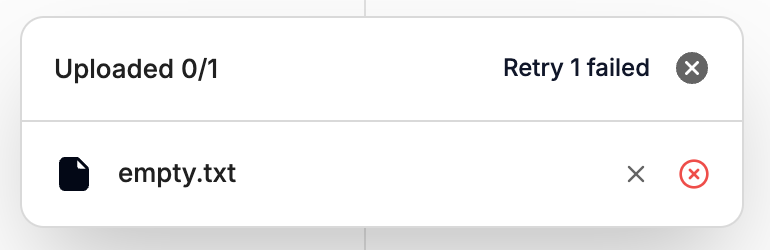
Use Retry in the panel once you've fixed the cause.
1. Your Plan's Storage or Document Allowance Is Full
Peony has no per-file size limit on any plan, including Free, so a file is never rejected for its size alone. What a plan caps is total storage and the number of documents:
| Plan | Total storage | Documents |
|---|---|---|
| Free | 500 MB | 50 |
| Business | 100 GB | 1,000 per admin |
| Data Room, Deal Team, Enterprise | Unlimited | Unlimited |
There is no charge per visitor or per file, and these are the only storage limits. If your account is at one of them, delete files you no longer need or upgrade. See Plans and Pricing.
2. The Connection Dropped
Large files, especially multi-GB video, take a long time on slow networks. Uploads are resumable: if a dropped Wi-Fi or VPN connection interrupts a file, it continues from where it stopped instead of starting over. If a file stays marked as failed, click Retry in the panel, and keep the room open until the panel says it's done.
3. The File Type Needs a Paid Plan
- Video and audio need Business or higher. On Free the upload is rejected with a message that a Business plan is required. See A video won't upload or play.
- HTML and HTM upload on every plan, including Free, and render live with JavaScript running. Keep its links in the same tab (no
target=_blank) so readers stay inside Peony's protected viewer. Peony doesn't modify the HTML you upload. - Every other common document type (PDF, Word, Excel, PowerPoint, text, Markdown) works on Free.
Still Failing?
If one file keeps failing on a stable connection and your account is under its allowance, send support the file name, its size and a screenshot of the error. See Contact Support.