
Streamlined Access and Visitor Notifications: Turn Them On or Off
Two settings in Peony's Settings menu: streamlined access, which lets visitors skip email verification for 7 days, and visitor notifications. How to tell whether each is on, and how to switch it. Plus the data room's daily new file notifications.
Last updated September 27, 2026
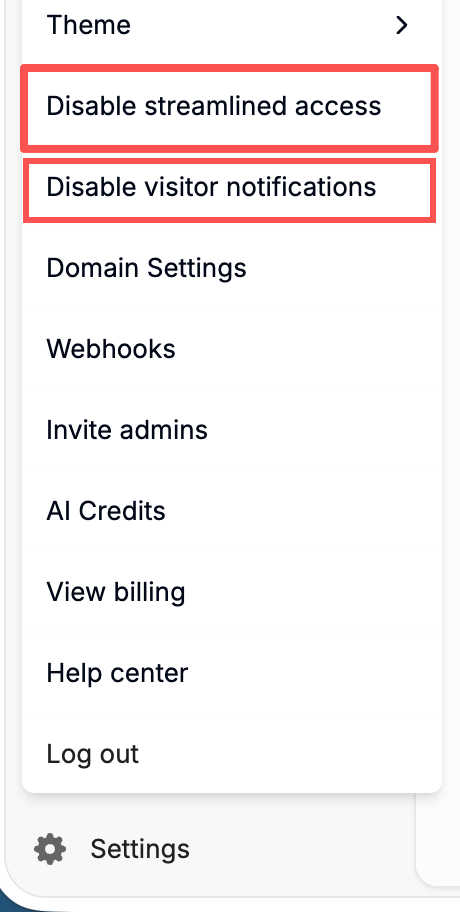
Both switches are in the Settings menu at the bottom-left of Peony. Each menu item names the action it will take, not the current state — so the wording tells you the opposite of what's on right now:
| The menu shows | That means it's currently | Click it to |
|---|---|---|
| Disable streamlined access | On | Turn it off |
| Enable streamlined access | Off | Turn it on |
| Disable visitor notifications | On | Turn them off |
| Enable visitor notifications | Off | Turn them on |
Streamlined Access
With streamlined access on, a visitor who has verified their email doesn't need to verify it again for 7 days. They open your link and go straight in, instead of waiting for a new code each visit. It's on by default.
With it off, visitors enter a fresh verification code every time they open a link.
Streamlined access is remembered in the visitor's browser, so a visitor on a new device, a different browser or an incognito window still verifies once.
To switch it, click Settings at the bottom-left and choose Disable streamlined access or Enable streamlined access.
When to Turn It Off
Keep it on for most deals — it saves visitors a code on every visit. Turn it off when every single visit should prove who is opening the room, for example when investors might share a laptop or open links on a shared computer.
Visitor Notifications
Visitor notifications are emails Peony sends to you, the admin, about visitor activity on your links — visitors never receive them. Turn them off if they're too frequent, and back on if you stopped receiving them.
To switch them, click Settings at the bottom-left and choose Disable visitor notifications or Enable visitor notifications.
What a Notification Shows
Each view sends one email from updates@notification.peony.ink: which document or room was opened, who opened it, the time, the link used, the device and the location, plus a View all stats button that opens visit duration, drop-off and engagement for that visit.
Whether you learn who opened it depends on the link. If the link asks for an email (email verification, or an NDA gate, which also collects one), the email names the visitor:
If the link lets people in without an email, the same email says the room was viewed by Anonymous:
To know who is reading, turn on email verification for the group. See Link settings: email access vs link access.
Not Receiving Notifications?
- Open Settings and check the item. If it says Enable visitor notifications, they're off — click it.
- If it already says Disable visitor notifications, they're on. Check your spam or junk folder, and ask your IT team to allow email from
peony.ink. See Invite or login code not arriving. - Notifications go to your Peony account email. To send them to a shared inbox, set up a forwarding rule in your email client.
New File Notifications
New file notifications Deal Team+ aren't in the bottom-left Settings menu. They're a card in the data room's own Settings tab: New file notifications, "Email recipients a daily summary when new files, agreements, or links are added."
Turn it on so invite-only recipients get a once-a-day digest whenever something new lands in the room — no need to ping them manually every time you add a document. It pairs well with an active Q&A room where new files keep arriving.
Common Questions
Why do visitors have to verify their email every time they open my link?
Streamlined access is probably off. Open Settings at the bottom-left: if the menu shows Enable streamlined access, click it. Once it's on, a visitor who has verified their email doesn't need to verify again for 7 days.
A visitor with streamlined access on was still asked for a code. Why?
The 7 days are remembered per browser. A new device, a different browser, an incognito window, or cleared cookies means verifying once more.
How do I know if visitor notifications are on?
Open Settings at the bottom-left. The menu shows the action you can take: Disable visitor notifications means they're on now; Enable visitor notifications means they're off.
I'm getting too many notification emails. Can I stop them?
Yes. Open Settings and click Disable visitor notifications. You can still see every visit in Who viewed which pages.